

Notes on building smarter websites for actual humans.

Squarespace Plugins an eCommerce Pro Uses
Squarespace does so much right out of the box that you could definitely get by without needing to add a thing. But if you’re looking to take things up a notch, there are so many great plugins out there to turn to. Check out this list of some of my go to options.
Squarespace does so much right out of the box that you could definitely get by without needing to add a thing. But if you’re looking to take things up a notch, there are so many great plugins out there to turn to. The trick is knowing which ones to trust and then using them judiciously. I think of too much code just like having too much clutter lying around the house; it makes it hard to find what you’re looking for and is just downright uncomfy.
Because of this I always take the stance on sites that I’m working on that I want to do as much as possible without adding any extra code and then only come in at the end to pepper in a few choice items that I know will really make the site stand out to customers, make admin way easier, or both. Here are some of my faves!

Squarespace Split Footer
Paid ($30)
You know I love a great website footer and this plugin offers a cool way to incorporate a sign up box or other CTA so that it doesn’t get lost in the crowd. The mockup shows the section sticking out as a way to highlight it but you can also keep it level with the rest of the content for a more streamlined look and use different color backgrounds to differentiate.

Product Color Swatch Variant Plugin
Paid ($59)
This is a great plugin if you want to be able to visually represent the color options for your products versus just having them in a drop-down list. It can be as simple or as advanced as you like; you can use either basic color names or hex codes for simple things but also upload your own images to use as swatches which works great for things like patterns and textures.

Peach’s Affiliate Plugin
This is really more of a whole software/program than just a basic old plugin but if you’re wanting to add affiliate marketing to your Squarespace website, this is the best out there. No other tool integrates as seamlessly with Squarespace and users always give it rave reviews.

Squarespace Mini Cart
Paid ($50)
Hello, cute little cart! This plugin changes the cart into a sleek, minimal pop-up in the corner of your screen but I also really like that you can customize the text that shows up at the top of the mini cart. This is the perfect place to highlight free shipping offers to encourage higher cart values.

Mega Menu for Squarespace 7.1
Paid ($10)
As much as I sometimes favor keeping things simple up top, there are other times when you just need a mega menu. This one is one of my go-to options because it’s easy to use and it works really well. Mega menus are perfect for larger shops that have a lot of categories so that you don’t have to have huge drop-down menus but they also work to just make your navigation more visually appealing.

Notifications Plugin
Paid ($60)
You know those chat bots that automatically popup little messages to you? This is kind of like that except you don’t have to actually chat! 😂 This plugin allows you to publish up to 6 different notification messages and even add images & links to each notification. This could be useful if you want to make sure customers don’t miss new features, services, or products.

Custom Squarespace Cart Icon
Free!
If the traditional shopping cart look doesn’t really match your brand, this plugin is the answer! You can use any custom graphic and even customize the text. So if you want to refer to your shopping cart as a backpack or a tote or a bag - you can just go right on ahead!
Looking for more great eCommerce plugins for Squarespace?
Check out my other list of faves here: My Favorite Squarespace Plugins for eCommerce Sites

How to Price Your eCommerce Shipping Options
Should you offer free shipping or flat rate shipping? Is there a way to get people to spend more on your site, abandon their carts less often and make them happier? How do you calculate the perfect free shipping threshold? Check out this post for answers to all these questions & more!
Your shipping strategy is arguably one of the most integral parts of your whole eCommerce setup. It’s how you can easily lose money if you’re not paying attention to the details… but also how you can gain tons of loyal fans if you dial things in right. Customers expect orders to arrive fast and cheap - even when shopping for higher-end, luxury items. Most eCommerce shoppers expect some sort of deal for free or reduced shipping and want to see packages at their door in no more than a week. Long story short: it’s a lot to ask of the average small business owner to deliver on!
In this post, I’ll walk you through the most common eCommerce shipping options. We’ll uncover which one (or ones!) I recommend most to help you keep your customers happy AND keep some money in your pocket.
FIRST THINGS FIRST
Figure Out What Shipping Actually Costs You
Look, I know this seems obvious but you’d be surprised how many merchants I talk to who haven’t thoroughly worked through how much it actually costs them to ship each and every product in their inventory. 😲 Now, you don’t have to be a spreadsheet person but you are going to have to break out the calculator here. Also, I’ll admit that in a former life I managed shipping & logistics for a large company so things like shipping zones and carrier contract negotiations, and packaging pricing come naturally to me. Don’t worry if they don’t for you - all the details you need to get started are below!
Make note of each product’s specific weight and dimensions. When you’re running sample rates through carriers, you’ll need this info. If products normally ship on their own in one box, the weight should be the total of the item PLUS the packaging itself and the dimensions are of the box. If customers normally order multiple items, you probably have one or two boxes that are most popular. Use those package dimensions as your baseline and then calculate what it costs to ship it at various weights.
Factor in where shipments are going & how they’re getting there. Other factors that play into your actual shipping costs are the destination and the shipping method. For US domestic shipments, shipping is figured based on zip code; international orders will depend on the country + postal code. Since i’s not really reasonable to have five zillion different shipping rates based on all the possible destinations & methods available to you, I recommend just lumping things into buckets. For merchants in the US, you might have groupings such as contiguous US, Alaska & HI, Canada, and everywhere else. You may also decide that you’d like to offer two service options: priority/express delivery and ground/economy delivery. In which case, make note of the costs for both of those for all your buckets.
Don’t forget to include packaging & pack-in costs. You can sometimes score free boxes from carriers like USPS or FedEx depending on your volume but once you start seriously selling, you’re probably going to want to upgrade to branded packaging. It just looks so much better and goes a long way in building your brand. When tallying up your costs, you’ll want to include not only the cost of the boxes themselves but also any fill you use or other materials such as tissue paper, packing peanuts, etc. Lastly, if you include anything special like a postcard, flyer, brochure, or stickers in each box don’t forget to include that in the cost as well! While these are usually just a few cents each, you have to account for it somewhere otherwise it’s just a loss. (p.s. If those pack-ins weigh more than a few ounces be sure to include them in the total weight of each package as well!)
If you want to establish a solid eCommerce brand, it’s best to invest in custom box packaging for your business. Seeing your brand logo in the packaging improves brand recall, which is a great marketing strategy. This helps boost brand awareness and enhance the customer experience. Above all, it gives your customers the impression that your brand is legit and serious about doing business.
Optional: Run a Shipping Audit
If you’re already busy shipping orders, a shipping audit can really help you check in on how things are going. I used to do this quarterly when I was a shipping & logistics manager as a way to keep a pulse on how our expected costs were stacking up against actuals. This doesn’t have to be super complicated but it can definitely expose places where your assumptions based on the factors above need adjusting.
How to run a shipping audit:
Determine a period that you’ll track details that will include a good sampling of your average shipments. This will vary on your order volume and frequency so for some this might be a day or two… others might want to track for a whole week or more.
Keep track of each shipment’s details such as size, weight, destination, etc plus what you charged each customer for the shipment.
At the end of your tracking period, go back to your shipping extension (or your carrier statement) and note what each shipment cost you.
In doing this, you can see if there are destinations or order types that routinely cost more or less than you’re currently charging.
Important tip: don’t worry about one-off outliers! There are always going to be weird shipments that go to crazy destinations that unexpectedly cost a small fortune. Or oddball orders that need to ship in much smaller or much larger boxes than normal. Whatever it is. Don’t worry about them. Shipping is a “sometimes you win" and “sometimes you lose” kind of thing. We’re just looking for if you win more than you lose, you know?
Shipping Strategies to Consider
Now that you have a handle on what it actually costs you to ship your products, it’s time to decide how you’ll cover those costs. Here are the most common options:
Make customers pay for the full price of shipping on top of product prices. This can either be a flat rate average of your costs OR variable, carrier-calculate rates. (Note that I am not a fan of variable rates and customers aren’t either. Check out this post for more on that!) Since this option can be a huge turn-off, I would really only recommend it if you have a very well-established business that sells lightweight items such as jewelry.
Make customers pay part of the shipping cost by increasing product prices & charging a small flat-rate shipping fee. This option works well because it allows you to recoup all of your costs in a more palpable way than the first option. Customers like flat rate shipping fees because they are easy to understand and you’ll like that you’ll see way fewer abandoned carts! If you’re worried about raising your product prices, don’t be! Unless you are selling a highly commoditized product, customers would much rather pay more for something as long as they’re getting a “deal” on shipping than feel nickel-and-dimed at checkout.
Make customers pay for all or part of shipping by increasing product prices accordingly & offering free shipping. Make no mistakes - this is my favorite shipping option by a landslide and the reason why is because customers love it! It’s easy. It feels generous. There are no hurdles or obstacles to overcome once someone is on the checkout page. Whether you account for all or just part of the shipping cost in your product prices is up to you and also depends on how complex you’d like your free shipping offer to be. More on that below but this is the option I would recommend for almost all businesses & startups. Okay, now on to the free shipping fine print!
Free Shipping Fine Print
Because you know that nothing is truly ever “free” here are the ways to make a free shipping strategy work for you:
Free Shipping on all orders - works best if you sell mostly small, lightweight items with high-profit margins or luxury goods.
Free Shipping on only orders over a certain amount - works best if you’re trying to increase your average order value (more on that below). For all orders below the minimum threshold, set up a nominal flat-rate fee.
Free Shipping on only orders for specific products or services - works best if you’re trying to promote new products or clear out seasonal inventory. (For more on how to set up automatic free shipping discounts, check out: Squarespace Discount Rules.)
Free Shipping on only orders to certain locations - works best if a lot of your customers are local/regional and you want to cater to them while not paying too much on the other shipments headed farther away.
Free Shipping on only orders by loyal customers - works best as an incentive to boost repeat purchases and build brand loyalty.
How to Calculate Average Order Value & Determine Your Free Shipping Threshold
Since offering free shipping on only orders over a set amount is my favorite option from the list above, I thought I’d make sure you know how to calculate average order value (sometimes referred to as “average cart value.”) That’s because this option is a tried-and-true method for boosting that amount! The important thing to keep in mind when setting a free shipping threshold is that you want it to be:
Low enough that shoppers feel they can reasonably add an additional product or two without spending a significant amount more than they planned.
High enough that you can cover the additional cost of shipping while still retaining profits.
To calculate your average order value, simply divide your revenue by the # of purchases. Using that number as your base, you’ll then identify a point just above it that you can set as the free shipping cutoff. For example, if your average order value is currently $57 and your average product sells for $18, I would set your free shipping threshold of $75. This would encourage the average shopper to add just one more product to their cart (a reasonable ask) while providing you additional revue to offset any additional shipping costs. Win-win!
Bonus Shipping Strategies Worth Exploring
Local Pickup - I firmly believe that every online shop that has the capacity to do so should be offering some sort of free local pickup. There are just so many good things about this:
Allows you to compete with large retailers & big box sellers
Provides an alternative for your local customers to avoid shipping costs
Offers the opportunity for in-person upsells & engagement
Better for the planet!
Click here for more on how to set up an in-store or local pickup option on Squarespace.
Go Wild & Combine Multiple Options! Okay, okay, okay - I swear to you that I’ll stop saying that options are my favorite but I swear: this one is my actual favorite 💕 Some of the most successful online sellers don’t implement just one of the strategies outlined above, they combine several of them! An example of what this might look like:
Offering low, flat-rate shipping rates for domestic & international shipments. Again, this makes it easy for customers to understand what to expect at checkout and you’ll have accounted for some of the shipping costs by pricing your products appropriately.
Offering free, flat-rate shipping on orders over a certain amount in order to boost average order value. The bonus here is that even though shipping is “free” for your customer that you’ll have already accounted for some of your shipping expenses by pricing your products appropriately.
Offering free in-store pickup for local customers. This will allow them to get orders faster and cheaper and you’ll come out ahead because (you guessed it) you’ll have accounted for some shipping cost in the cost of your products. Bam - straight to the bottom line.
Using the occasional free shipping offer for specific product categories or customer segments as a marketing tool. This allows you to move slow inventory, reward your best customers, build your email list, or promote a new product line without sacrificing the integrity of your main shipping strategy.
Bottom Line
A successful shipping strategy can be as simple or as complex as you’d like it to be but the most important thing is that you start by understanding what it actually costs you and going from there. It’s so important to keep track of this type of info about your business and check back in regularly to make sure things are on track. Shipping doesn’t have to be a headache at all — especially once you realize that it’s one of the most powerful (and easiest) tools available to be able to increase average order values, reduce abandoned cart rates and make customers happy!

3 Mistakes New Online Sellers Make
Tips and strategies to help those new to e-commerce launch quickly and get the most out of a web design project.
If you’re new to the world of e-commerce, it can be... overwhelming. And that’s probably putting it mildly. There are so many things that people will say you need to know and do — and most of it is all written in some sort of techie language that you don’t speak. Honestly, I think it’s probably why there are still so many small businesses that don’t have a website. (Depending on who you ask, estimates are that between 37% to 46% of small businesses in the US still don’t have a website!)
As consumer demand for online shopping options continues to rise, businesses that have even a small web presence will beat out those without one. As I’ve worked with hundreds of clients over the years (and also just browsed a lot of websites), I’ve identified three major mistakes I see a lot of e-commerce newbies make. So, if you’ve been struggling with making the leap from brick-and-mortar or word-of-mouth selling to fledgling e-commerce business, read up. The best part? The solutions aren’t the least bit technical :)
Mistake #1
They make the project bigger than it needs to be.
All too often, I see business owners struggle with e-commerce projects (or put them off altogether) because they are just trying to do too much with their new website at once. They put too much pressure on trying to get everything online and making it all “perfect” when they should be focusing on making smaller, more incremental improvements over time. Some people blame this on being a “perfectionist” but I say it’s a diversion tactic and, unfortunately, it’s costing business.
Possible Solutions:
“The incremental sales boost you’ll get from having just 25% of your top sellers online is still going to be better than no sales at all if you waited to get everything ready to go first.”
If you have a large inventory, don’t worry about getting it all online at once. Pick a handful of your best sellers and start there. The incremental sales boost you’ll get from having just 25% of your top sellers online is still going to be better than no sales at all if you waited to get everything ready to go first. Remember, time = money.
Break the project up into phases. Start by moving just one product or service type online or only providing limited options or variations at first. This will allow you to test things out to see how they go while keeping costs down. Customers would rather have limited options than no options.
Start simple and add fancy features later. Your website doesn’t have to have all the bells and whistles on the day you launch. You can always work on adding cool new things down the road. Keeping your site simple to start will allow you to get launched faster and you can use the analytics (and sales!) from those initial online customers to help you add to your site as you grow. The added benefit here is that it will give people a reason to keep coming back to see what’s new!
Mistake #2
They say too much.
There are typically two reasons why we tend to say too much on our websites: 1) we think it's all about us or 2) we think if we could just tell people more that will encourage them to buy. This results in websites with giant, boring blocks of text or super complicated menus - both of which are a big turn-off when it comes to sales.
Again, the best sites are simple, straightforward, and highly skimmable. Most e-commerce sites need only a few static pages (such as an about page and an FAQ page) but I often see newbies give more real estate to the history of their company than they do to what they’re actually selling. This is a huge mistake and has the unintended side effect of reducing sales, which makes people think e-commerce isn’t worth it. The truth is, we’re often getting in our own way when it comes to sales.
Copywriting Tips:
Keep the focus on your products or services and the benefits they provide to your customer or client. People don’t care about you, they care about what you can do for them. Good news: this means the pressure’s off your need to write the perfect bio or company mission statement. (No one was reading it anyway.)
Avoid technical jargon or long explanations, even if you think they are important to what you’re selling.
Whenever possible, write in bullet points or be open to layouts that push the extraneous details down the page or out of view for most customers. For example, moving super detailed info to a FAQ page or hiding it in a drop-down versus putting it all out there upfront. This way, it's there for the small percentage of people who want to see it but it's not in the way for everyone else.
A good rule of thumb for web copy is to write out what you think you need to say, then cut it in half... and then cut it in half again. Upside: less to write and faster to launch!
Mistake #3
They spend too much time on design.
“E-commerce isn’t a 6 trillion dollar market segment by mistake. There’s a ton of science and strategy to the designs you see online and rookies spend time tinkering with things that don’t need tinkering.”
There’s a reason most websites share a lot of the same layouts and features: it’s because they work. E-commerce isn’t a 6 trillion dollar market segment by mistake. There’s a ton of science and strategy to the designs you see online. And as much as it pains those of us who enjoy aesthetically pleasing websites to admit, function really does matter more than form.
This is another case where rookies have a tell and that’s that they tinker with things that don’t need tinkering. There’s a reason why the button is always where the button always is. Or why menu elements always behave a certain way. It’s because it’s an important part of helping users know how to interact with them.
The upside here is that not worrying about moving things a pixel to the left or right is that you can get to launch day way faster. Also, this isn't to say that design isn't super important to how a website performs, just that for most small businesses, the return on investment just isn't there. It's not worth it to spend months and months stuck in design and development, essentially reinventing the wheel.
Tips to get the most out of the web design process:
Find a web designer you like and whose design style you vibe with and then trust them to do their thing. This doesn’t mean that your input isn’t an important part of the process; just that you hired them for a reason. Your success and happiness are important and they aren't going to steer you wrong.
Don’t be afraid to ask questions if you'd like to know more about the reasons why a design or layout choice was made. In most cases, user experience best practices have guided the decision to put a button here or a link there and we may not recommend moving or changing it if you'd like to maximize sales/conversions but we're always happy to explain why.
In 99.9% of cases, it's best to just pick a theme or template as a great starting point and spend time building out a great user and customer experience around that versus going for a completely custom build. Again, this comes down to ROI and doing everything possible to get you to launch day faster!
If you’re struggling with getting started here’s a post you might find helpful: A Step-by-Step Guide to Starting an eCommerce Business in 2024.

What Are All the Things You Can Sell on Squarespace?
Ever wonder if there’s a way to sell what you’re selling on Squarespace? Chances are the answer is yes! Learn about all the different things you can sell on Squarespace plus the infinite number of ways you can set up and customize everything to perfectly fit your business.
Squarespace’s latest ad campaign is all about how “Squarespace has everything you need to sell anything” and that’s great because the average online seller these days is often selling way more than simple goods. Products are often sold as bundles or subscriptions. Business owners want to be able to provide the option for shoppers to customize or personalize their orders. Entrepreneurial service providers, consultants, coaches, and trainers all need to be able to sell their offerings, fill up workshops, or get paid for their time.
If you ask me, this is where it really matters which eCommerce platform you choose. Squarespace does so many things with absolute ease but when you add any complexity to the mix platforms like Shopify start to fall apart. Shopify can work ok if you sell simple physical products but - let's be honest - that’s just not what modern eCommerce looks like.
The Truth Behind the Shopify App Store
Nothing bothers me more than having to add a bunch of paid apps just to make things work, so it should come as no surprise that I have a very contentious relationship with the Shopify app store. Sure, possibilities seem endless when you start looking around but you soon realize that each app comes with its own limitations, its own varied level of customer service or support, its own technical hang-ups, and its own monthly subscription cost.
All of this is to say that one of the zillion reasons why I love Squarespace for eCommerce is that you really can sell just about anything and everything! And for the very few things that are paid extras, they’re designed as part of the platform so you never have to worry about whether they’re going to integrate with the rest of your website seamlessly or who to contact for support. So, without further ado, a comprehensive list of all the things you can sell on Squarespace:
Included
Physical Products
Physical products are anything that is a tangible good that is shipped. Products can be straightforward and simple or super complex - things are totally customizable! For complex products, you can add up to 6 product options with a max of 250 total variants.
Product options are things like size, color, or style but are completely customizable to whatever you need them to be. Product variants are just the max number of all the possible combinations of the product options.
You can also sell personalized or customizable products by using a combo of product options and custom product or custom checkout forms. (For super extreme cases you can also embed a custom order form into Squarespace.)
Digital Products
Digital products are things like printables, PDFs, eBooks, audio or video files, or any other file you want. The max file size is 300 MB but you can also sell access to multiple files as one product by zipping up the files into one folder. Customers receive a link to download the files in your product and have 24 hours to download before the link expires. Squarespace’s back end management tools allow you to easily do things like resend order download emails and manage customers.
Service Products
eCommerce isn’t just for shipped products! Smart service providers make it easy for their customers and clients to access their offerings by selling them online. Simple services can be added just like regular products. This works great for some things like consultations or flat rate services that don’t require someone to select a specific time for use at checkout. Services can be one-time or recurring and can also have custom product forms just like physical products (above).
Service products can also be things like events, workshops, meetings, group classes, or tours that occur at specific times. You have a couple different options on how to set these up - either as a combo of a service product (with or without the event calendar) or by using the Squarespace Scheduling add-on (detailed below).
Print On Demand & Drop Shipped Products
Squarespace has some great print on demand and dropshipping extensions that allow you to sell physical products in your shop without needing to carry any inventory or manage things like shipping and fulfillment. These include:
Art of Where
Printful
Printique
Spocket
For more details on Squarespace product & inventory extensions, check out this post.
Subscription Products
You can turn any physical or service product into a subscription product on Squarespace! This is a great option if you sell anything from food subscription boxes to recurring consultations. In addition to all the regular eCommerce options, you can set things like the subscription frequency (weekly, monthly, annually) and the billing cycle (anywhere from once to eternity).
Another great reason to choose Squarespace for subscription products is that it is so easy for customers to be able to manage their own accounts. Customer accounts allow you to focus on running your business since customers can do things like reset their account password, edit their next order date or subscription frequency, see their order history or update their billing and shipping information in their account on their own.
Gift Cards
I think every shop should have gift cards! These are super simple to add and each gift card is automatically issued its own unique code that customers can either send to their recipient (or themselves 😊). You can set up gift cards for any value(s) you’d like and the value never expires!
Other Kinda Commerce-y Things
Donations - You can accept donations of any amount you choose on your site using the donation block. Tip: you can also hack the donation block to sell products or services at pay-what-you-want pricing :)
Restaurant Reservations & Online Ordering - Squarespace has great extensions meant just for restaurants. Check out OpenTable and Tock to get started.
Things That Require a Paid Add On
Scheduling
Squarespace Scheduling is an add-on that works well for services and classes that need to be booked at specific times. But this tool is way more than just online booking & appointments! You can also use it to create packages, sell service subscriptions, book group classes and workshops, sell access to recurring events and more.
For a full review of all you can do with Squarespace Scheduling check out this post.
Memberships
Squarespace Member Areas allows you to create gated content that people need to pay for access to. Everything is completely customizable including setting up the billing intervals, membership options, what people see when they log in and all the custom emails that go along with a membership. Another great thing is that customers can also manage their own membership accounts just like with any of the other items you sell on Squarespace.
For a full review of all you can with Squarespace Member Areas check out this post.

5 eCommerce Trends You Can't Afford to Miss Out On
These trends are easy to implement but will have a major impact on your shop experience AND your bottom line! You’ll be pleased to know that this list doesn’t feature any zany design ideas that will look outdated next week but instead will show you how to better connect with today’s online (and in person!) shoppers.
There’s no doubt at all that the world of eCommerce has seen some major booms and changes over the last few years. With more people than ever shopping online - and more small businesses than ever starting to sell online to meet those demands - there are some clear trends that don’t seem to be going away anytime soon.
There are a couple of underlying themes to these trends worth noting. The first is that customers want to feel secure and confident in shopping online above all else. They aren’t necessarily looking for edgy website designs or really outlandish features. The things that motivate people to buy are simple, easy-to-implement ways that just provide reassurance that you’ll be there for them if they need you.
The second theme is that people are looking for mixed online and offline shopping experiences. So if you have a brick-and-mortar store, retail shop, or popup location - use that to your advantage on your website! Your IRL customers see your website as a continuation of the in-store experience, not necessarily a replacement for it and vice versa. You can lean into this overall theme by implementing the ideas below that allow for online customers and real-life shoppers to become one and the same.
Trend 1
Have a generous return & exchange policy.
Having a generous return policy is one of the absolute best things you can do to boost online sales in 2022. Study after study shows us that online stores that offer returns (or better yet, FREE returns) and exchanges perform better than those that don’t. For people who are hesitant to shop online or even just those who are new to your brand, touting your return policy in multiple places on your site is an excellent conversion booster.
How to do it: How to Manage eCommerce Returns on Your Small Business Website
Trend 2
Offer a Buy Now, Pay Later payment option.
I’ll be honest, I thought the whole “buy now, pay later” thing was going to be a short-lived thing that died out by now. But, boy, was I wrong. Shoppers love this option, especially younger shoppers who are leary of amassing credit card debt. It’s also easy enough to add an option like Afterpay to Squarespace that I say just toggle it on so that it’s there for those who want it. A lot of people will still opt to pay traditionally but you may see a small uptick in sales by appealing to those who may have been hesitant to shop without this option.
How to do it: How to Enable AfterPay on Squarespace
Trend 3
Create a Local Pickup option on your website.
This is one of my personal favorite options when I’m shopping online as it helps both me and the place I’m buying from save a little on shipping - and it can be a little greener, too! Local pickup options combine the best of both worlds; people can browse and shop online but then still drop by to pick up their order. Studies also show that this can lead to an uptick in in-person purchases too - win, win! Think of it just like all the candy and goodies in the checkout lane at the grocery store; you’ve technically already finished your shopping but it’s just so tempting to add a little extra something at the last minute!
How to do it: How to Set Up Local Pickup or Curbside Delivery on Squarespace
Trend 4
Display helpful alternatives to any out-of-stock options.
Oh man, it’s frustrating when you think you’ve finally discovered the perfect product for you only to find that it’s out of stock! Shoppers understand that supply chain issues and shortages may mean that you’re running inventory pretty lean and mean but don’t miss out on an opportunity to sell them something else they may love just because their first choice is not available.
I recommend using some of the built-in merchandising features in Squarespace like related products or product waitlists to prevent online customers from reaching a dead end. If you want to get even fancier, you could also add URL redirects for out-of-stock products so that people land directly on your preferred alternative (just make sure to mention that in the copy otherwise people will be confused).
Related: Built-In Features to Help You Sell on Squarespace
Trend 5
Add a chat option to your site.
I swear to you I’m not writing this post with just all of my favorite things as an online shopper myself but I love this one as well! And this is also another one where the stats confirm it works: the majority of people surveyed say they not only expect a live chat option but use it as an indicator of how good a shop’s customer service is overall.
In this post, I dig into what I call the idea of “Conversational Commerce” but the whole point is that you can (and should) be using live chat as a competitive advantage over your competitors. Nowhere else online are you able to have direct 1:1 conversations with your customers and help guide them to exactly what they’re looking for. You can’t have those conversations via social media or even email. Live chat is a way to bring what makes you special in-person to your online space.
How to do it: Best Live Chat Widgets for Squarespace
Bottom Line
These are some trends I can get behind! I love that when it comes to eCommerce people have shown that what they’re looking for are clarity and connection. They want to be reassured and to feel confident in their buying decisions. They want to know that there are real people behind the brand and they want to communicate with YOU! If you’re looking for ways to increase sales or build your audience, I suggest starting with the 5 things on this list. I can guarantee your audience will love them!
Looking for more? Check out: 7 Ways to Build Trust (and Boost Sales) on Your eCommerce Website

How to Manage eCommerce Returns on Your Small Business Website
A robust returns policy is an epic confidence-booster for wary shoppers but what about actually processing those returns when they come in?! Say goodbye to admin headaches and create a seamless (and self-serve!) returns & exchanges portal for your Squarespace eCommerce website.
It’s one of the #1 eCommerce rules: if you’re looking to boost online sales, offer (free) returns & exchanges. Not only is this just great customer service, it’s an excellent way to build trust with new & returning customers while also reducing abandonment rates. I mean, people can get more than a little nervous about buying something if they think they’ll be stuck with it if they decide it’s not for them for whatever reason. I know I’ve personally chosen not to shop with companies that don’t offer returns or exchanges on more than one occasion!
However, for as great as having a generous return/exchange policy is for customers it can admittedly be a bit of an admin headache for you, the business owner. You don’t really have time to be fussing with return authorization requests and managing return shipments. And, to be fair, most customers these days are used to being able to manage their own returns via automated systems offered by big guys like Amazon or other large retailers. Need more proof? 47% off shoppers indicate that an easy-to-print return label as the key element in the best returns experiences. So what’s a small biz to do?
Solution: Aftership Returns
I’ve done a quick review of Aftership Returns in my Minimalist’s Guide to Squarespace Shipping Extensions post here but I think it’s probably one of the most underrated and underutilized apps that every Squarespace eCommerce site absolutely needs so I decided it needed a post all it’s own!


Aftership Returns Overview
Aftership Returns allows customers to automatically process their own return/exchange requests and generate their own shipping labels to send products back to you. It also allows Squarespace business owners to set up automations and rules about returns and exchanges including which products are eligible for return/exchange & which aren’t, how to route return shipments, and a robust analytics panel allowing you to keep track of everything.
It’s a great solution even if you have only the sporadic return request since just having it shows future customers that it will be easy for them to manage returns if they need to. This makes the free plan (which allows for up to 3 returns per month) an option that I think everyone should have if only just for appearances sake! If no one uses it - great! They love your products and you’re out nothing! But, again, this is the case of really just having it being such a trust builder and conversion booster that even if you sprung for the $9/month plan to get some of the more advanced options it would be money well spent!
Here’s a full breakdown of the current Aftership Returns pricing plans:

The Essential plan starts at $9/mo for 20 returns and goes up to $29/mo for 100 returns.
The Pro pan starts at $99/mo for 400 returns and goes up $599 for 3,000 returns.
I think most small businesses and startups will get everything they need out of the Essentials Plan which includes:
An interactive self-service returns page with automated approvals and label generation that makes things fast and seamless for customers.
A returns management portal so you can have oversight of everything happening in one place - plus integration with Aftership tracking (if you use it).
Proactive email notifications to reduce customer service emails and also keep you in the loop.
Discounted USPS labels with no required minimum shipping volume or choose from FedEx, UPS or other preferred carriers.
Customizable everything: set custom return windows, define your own return reasons so you can learn why products aren’t working for customers and define any non-returnable products.
Custom routing rules to ensure items are cost effectively sent back to the right place.
Allow for alternate return methods such as: in-store returns, eco-friendly “green” returns to reduce return shipping costs, or FedEx Easy Returns which allow customers to simply show a QR code to return their order at specified FedEx Office or Walgreens locations without needing to print a label!
How to Set Up An Automated Returns System for Squarespace
Start by signing up for a free Aftership Returns account here!
Then, when logged in to your Squarespace site go to Settings > Extensions and search for the Aftership Returns extension. Click Connect and then follow the prompts on the following screens to connect the new Automizely account you just created.
On your new Aftership Returns account dashboard, you’ll be automatically walked through a few onboarding questions asking you about your return policies so that things are customized to your business - don’t worry, you can always change things later in settings!
Customize your returns page by clicking on Returns Page in the left navigation area. This is where you can set up the url for your returns page, customize the colors & fonts to match your brand, and add any other static content that you’d like to appear on your customer-facing returns page.
You can customize any other settings to suit your business and policies by clicking on the other areas under Customize on the left.
Try a sample return! On your dashboard, you can click on the Demo Return button to walk through the return experience for yourself so that you know how it works as a customer.
When you’re ready, copy the Returns Page url and add it to your site’s navigation. I recommend adding a link in your footer but you may also want to add it to your FAQs and contact page just so people can find it easily from more than one place!
That’s it! Your Squarespace site now has a self-service returns portal! Be sure to include information about your return policy at checkout (Commerce > Checkout > Checkout Page: Store Policies > Return Policy).
Like I’ve said before, I think that every eCommerce shop should take the few minutes to set up a returns portal like this. It is such a confidence builder even if it rarely gets used and when it does it will make life so much easier for customers and shop owners alike!

How To Decide Between Sales & Discounts
Sales and discounts are the same, right? Wrong-o! Discover when to put items on sale, when to discount, and how to match each method up to your business goals in this post all about discounts vs. sales. You’ll learn that not only are these two merchandising features not the same but that there are strategies you can use on your Squarespace site to ensure you’ll always have a successful promotion!
A discounted product and a product on sale are exactly the same, right? After all:
Product A retails for $100 but is on sale for $90 = $90 total
Product B retails for $100 but is discounted 10% = $90 total
But I’m here to tell you that these are, in fact, two very different promotions and there are very clear use cases for when to discount a product versus when to put it on sale.
Long story short: discounts and sales may seem interchangeable but they really aren’t!
Keep reading to learn about how to choose the right promo option to match your goals and how each option works so that you can select the right one for you each time.
First, what are your goals?
There are lots of reasons why you may be thinking about putting something on sale or running a discount promo and it’s important before jumping into the specifics of each to stop and identify what you’re trying to achieve. For example:
Are you trying to clear out some stale inventory? Is it for a specific product or an entire product line or category?
Are you looking for a quick sales boost? Or just encourage higher average cart values in general?
Are you trying to attract new customers or reward existing ones?
Keep the end goal in mind because it will ultimately help you choose the right marketing tool for the job and you’ll see better results in the end. I often hear from clients that are frustrated about sales but it turns out that their sale/discount strategy is actually just working against them and doesn’t match their goals.
Sales
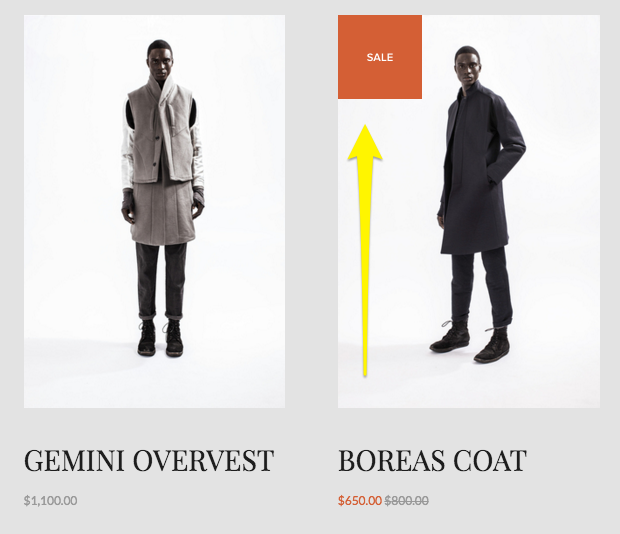
Just like in a brick and mortar shop, sales on Squarespace can be a useful merchandising tool. When you put an item on sale here’s what happens:
A “Sale” badge gets added to the item in summary blocks and on the main shop page.
The original price is shown as crossed out and the sale price is highlighted (usually in a bright/contrasting color but depends on your site styles). This shows up in all places where the price is displayed: summary blocks, product blocks, shop page and product details page.
If your product has variants with different costs, the pricing will display a “starting at” price using the lowest priced variant
Sales Rules
Since sale pricing is set at the site level, it will be available to all customers. There is not a way to have a sale that only a certain subset of your visitors/customers are eligible for. To do that, create a discount instead.
How to Set Up Sale Pricing
You have a few options for setting up sale prices:
Manually - You can set the sale price manually by going into the product editor and toggling sale pricing on/off. The price you enter in the sale box will only show up if the “On Sale” toggle is on; just having a sale price entered does not put the item on sale.
In Bulk via Spreadsheet (recommended) - You can update the prices in bulk via a CSV import. This is my favorite way to set up sales quickly if it needs to be done for more than a handful of products. Using a spreadsheet to manage inventory and edit product info makes it easy to bulk edit prices and toggle sales on/off.
In Bulk via Plugin - If you are spreadsheet adverse but somehow totally into managing a little bit of (pretty easy) code ¯\_(ツ)_/¯ you can use a plugin like this one to apply sales prices to entire shop categories quickly at once.
When to Use Sale Pricing
So when should you put something on sale? Here are the best use cases for sales over discounts:
You want to attract new customers who may want to try your products out but who are leary of buying something full priced
You want to clear out seasonal inventory
You want to boost conversion rates on specific products
You’re not on a tight timeline and just want to run a sale until inventory runs out
Discounts
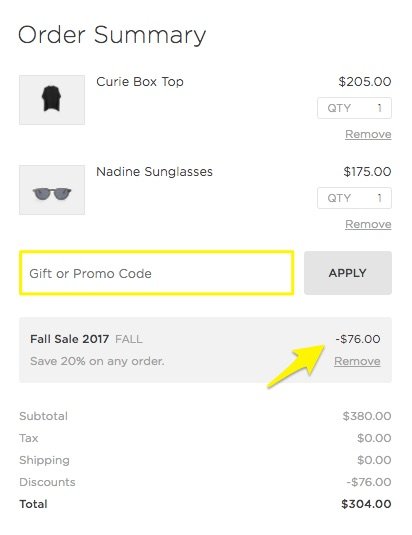
We’re all familiar with discounts and promo codes online! They are different from sales in that they are more targeted and often active only for short time periods in order to spur activity. Here’s what happens what you create a discount:
If you’ve created an automatic discount, the promo details are displayed in the cart at checkout once the criteria you’ve specified has been met.
If you’ve created a discount that requires a promo code, the details are displayed in the cart at checkout only once the code has been entered.
In both cases above, there’s no obvious indication on the product itself that a discount is available so you’ll need to promote it yourself. (This is both a good thing and a bad thing - tips on that below!)
Discount Rules
One of the advantages of discounts over sales is that you can be super specific about the criteria and conditions that must be met. Remember, sales pricing is visible to everyone and the option is either 1) sale pricing on or 2) sale pricing off. That’s it. With discounts you can:
Offer a flat dollar amount or a certain percentage off.
Specify which items or categories are eligible for your promotion.
Apply promotions at the cart level to entire orders and offer free shipping.
Decide whether you want to require a promo code or if the discount will be applied automatically.
Keep track of how often each discount is used/applied.
And more! Squarespace discounts can actually be as simple or as complex as you need them to be. I go into all the nitty gritty details and specifics more in this post.
How to Set Up Discounts
All discounts are created within Squarespace by going to Commerce > Discounts. From this screen you can see all active and scheduled discounts as well as create new ones. (Tip: you can also create and manage discounts on the go using the Squarespace app!)
When to Use Discounts
Now that you know more about how discounts work, here’s when they are the best choice:
You want to offer a promo to a specific subset of customers/visitors. For example, by providing a coupon code to past customers via email or to new customers via social media.
You want to increase average cart values. (Creating a free shipping offer, for example, for orders over a certain amount is one of the easiest ways to get people to spend just a little more than they may have been planning to otherwise.)
You need to spur a quick boost of sales activity. (Setting an expiration date on your promo can create a sense of urgency that can motivate customers to buy.)
You want to highlight or feature new categories of products (or a specific product/service) and encourage people to try it with a discount.
You need to be able to clearly track how often the discount is used/redeemed. While you can definitely track sales using Squarespace commerce analytics, you’ll need to just rely on inferences and assumptions around the exact reasons why people chose to buy. With discounts, you can clearly see exact numbers. You could even get super specific by creating multiple discount codes or promos for each marketing channel so that you can further measure each campaign’s effectiveness.
Miscellaneous Sales & Discount Tips
If you’re using sale pricing, create a “Sale” category and add it to your site’s navigation alongside other categories. There’s not a way to automatically filter all products that are on sale so by creating a special category of your own, you can make it easier for customers to find those products in your shop.
Use built-in features like an announcement bar, pop-ups, related products and limited availability labels to highlight products and sales/discounts. Check out these posts for more sales & marketing tips:
Bottom Line
I hope you can see now how to match your goals up to the right merchandising strategy. Whether you put on an item (or entire shop category!) on sale versus offering a discount will depend on who you’re trying to appeal to and why. If things are still feeling a little vague, I typically boil it down to this:
Use sales to encourage and discounts to reward.
Let’s revisit our example from the very top of this post, imagining now that both products are swimsuits.
Swimsuit A retails for $100 but is on sale for $90 = $90 total
Swimsuit B retails for $100 but is discounted 10% = $90 total
A sale would make sense for Swimsuit A at the end of summer. This would help clear out seasonal inventory and to encourage casual customers to give the brand a try.
A discount would make sense for Swimsuit B to reward loyal customers with exclusive access and VIP pricing.
Both cases result in a $90 order but you can see now that the right method was chosen for each situation.

Email Marketing Platform Showdown (ConvertKit vs. Flodesk vs. Squarespace Email Campaigns)
Email marketing should absolutely be at the top of your marketing strategy but what platform should you go with if you’re selling on Squarespace? In this ultimate showdown software battle, we’ll check out my top 3 faves and help you find the right fit for your business.
Updated December 2023
I’ve talked alot before about the virtues of email marketing. We’ve covered why email beats social media, how to use email marketing to increase customer lifetime value, and lots of other things that all boil down to this: email marketing needs to be a part of your eCommerce strategy.
And not just a small part. Like, actually - a pretty big part. Some quick stats for the uninitiated:
Email generates $42 for every $1 spent. A 4,200% ROI is CRAZY, and also means this is a marketing strategy that you should absolutely be using, and using better.
Roughly half of all consumers want to hear from their favorite brands on a weekly basis.
Marketing and advertising emails influence the buying decision of more than half of customers.
Email is 40% better at converting compared to social media.
TL;DR - email marketing is super effective, customers want to get emails from you and they are willing to make purchases as a result of receiving an email from you.
Now for the big question: what email marketing platform to go with - especially if you’re using Squarespace for eCommerce? I’m comparing my top three faves below but first, a quick note about the emails your site sends automatically.
Non-Marketing Emails
There are some eCommerce emails that your Squarespace site is going to send automatically, no email marketing platform required. These are things like:
Order confirmation emails
Shipping confirmation emails
Abandoned cart emails
Waitlist notification emails
Etc.
You can find out more about these types of emails in this post, which also covers how you can customize them to match your brand and how you can personalize them to improve customer experience.
These emails don’t require you to receive any special consent or approval from your customers since they are sent as a result of an action they’ve already taken on your site: making a purchase (or not), or signing up for an out of stock email reminder, for example.
On the other hand, the emails we’re going to be talking about sending from an email marketing platform below are emails that are above and beyond the basics. These are emails that welcome people who sign up to your list with a special coupon code or offer, marketing promos that shout out a new product drop, or sales emails that invite past customers to revisit your shop.
Getting Approval to Send Emails
Anti-SPAM laws help protect people from getting junk they didn’t sign up for by outlining who you can send to and what needs to be included in each email. Luckily, all the email marketing platforms out there help make this easy by not allowing you to send emails to people that haven’t given their approval and by including an unsubscribe link in the footer of every email, amongst other protections. The important thing to note here is that customers can opt in/out of marketing messages while still receiving things like order confirmation and abandoned cart emails that are sent automatically from Squarespace.
Comparing Platforms
All this being said, all email marketing platforms are not created equal. There are definitely reasons why you may want to choose one over the other and the one that works best for you may be the worst choice for someone else. That’s why we’re going to look at the top 3 choices (ConvertKit, Flodesk and Squarespace Email Campaigns) within the lens of eCommerce and also as a Squarespace user.
Here’s the criteria that I think matters most:
Ease of use
Looks
Automations
Integration
Cost
Let’s jump in!

Squarespace Email Campaigns
I’m kicking off our email marketing platform battle with Squarespace’s built-in option: Squarespace Email Campaigns. There have been a lot of improvements to this feature since it first launched a few years ago making it a great option if you’re needing something relatively simple that has all the features you need and none that you don’t.
Ease of use - You literally cannot get any easier than Squarespace Email Campaigns. You can connect any newsletter block to your list with just one click. It’s super easy to style your emails to match the rest of your site since everything is in the same place. Adding content to emails is also a breeze; things like text, image and button blocks are as simple to use as those on your regular site. The fact that it looks and works just like the rest of your website is one of Squarespace Email Campaigns stronger selling points if you feel like the last thing you need is to learn yet another piece of software!
Looks - Squarespace emails look pretty great! There are lots of pre-styled templates you can use as a jumping off point but it’s also easy to make your own branded templates that you can re-use again and again to keep things consistent. Pulling in assets from your website like your logo, some images and your color palette is as easy as pressing one button but the font choices for emails are purposefully kept to a limited selection to make sure that your emails come through into pretty much every email tool and on any device. You can create nice-looking email layouts that feature your site’s content (or new content that you upload) and the options for controlling how each block displays are pretty intuitive.
Automations - You’ll need to be on the Core plan or above to have access to automations that allow you to create things like welcome emails or other emails based on subscriber or customer activity. You can create series of emails triggered by an event but those emails aren’t as organized or visual as those on ConvertKit or Flodesk. Squarespace Email Campaigns also doesn’t yet have some advanced workflow things like being able to tag people based on activity or route them down different paths based on variable conditions.
Integration - You can add product and blog info right into emails without needing to copy/paste links or other info which is AMAZING. And it should go without saying that because this is a tool that’s built right into Squarespace that there’s no need to fuss with embed codes or trying to figure out how to get different programs to play nice and talk to one another. One of the stronger points is that for simple purchase follow-up emails, you can use product purchases as a trigger for an automation due to the fact that this tool is built right into your eCommerce website. Having everything in one place sure is nice!
Cost - It costs nothing (nada, zip, zero!) to use Squarespace Email Campaigns to build your email list and you can also send your first three email campaigns for free. After that, the pricing tiers start at $5/mo and go up to $48/mo (Starter Plan and Max Plan, respectively - paid annually). Most people will want to skip the Starter plan though because it doesn’t offer email automations which I think are absolutely necessary for any eCommerce business. Beyond that, there is no difference between the other plans aside from how many campaigns and emails you’re allowed to send monthly (you’re allowed unlimited subscribers). If you’re just starting out, I recommend the Core plan which is super reasonable at just $10/mo and allows for up to 5 campaigns and 5,000 emails.
Overall Thoughts
There’s a lot to love about this simple email marketing solution and if you’re just getting started it should definitely be on your radar as a great all-in-one tool.
Flodesk
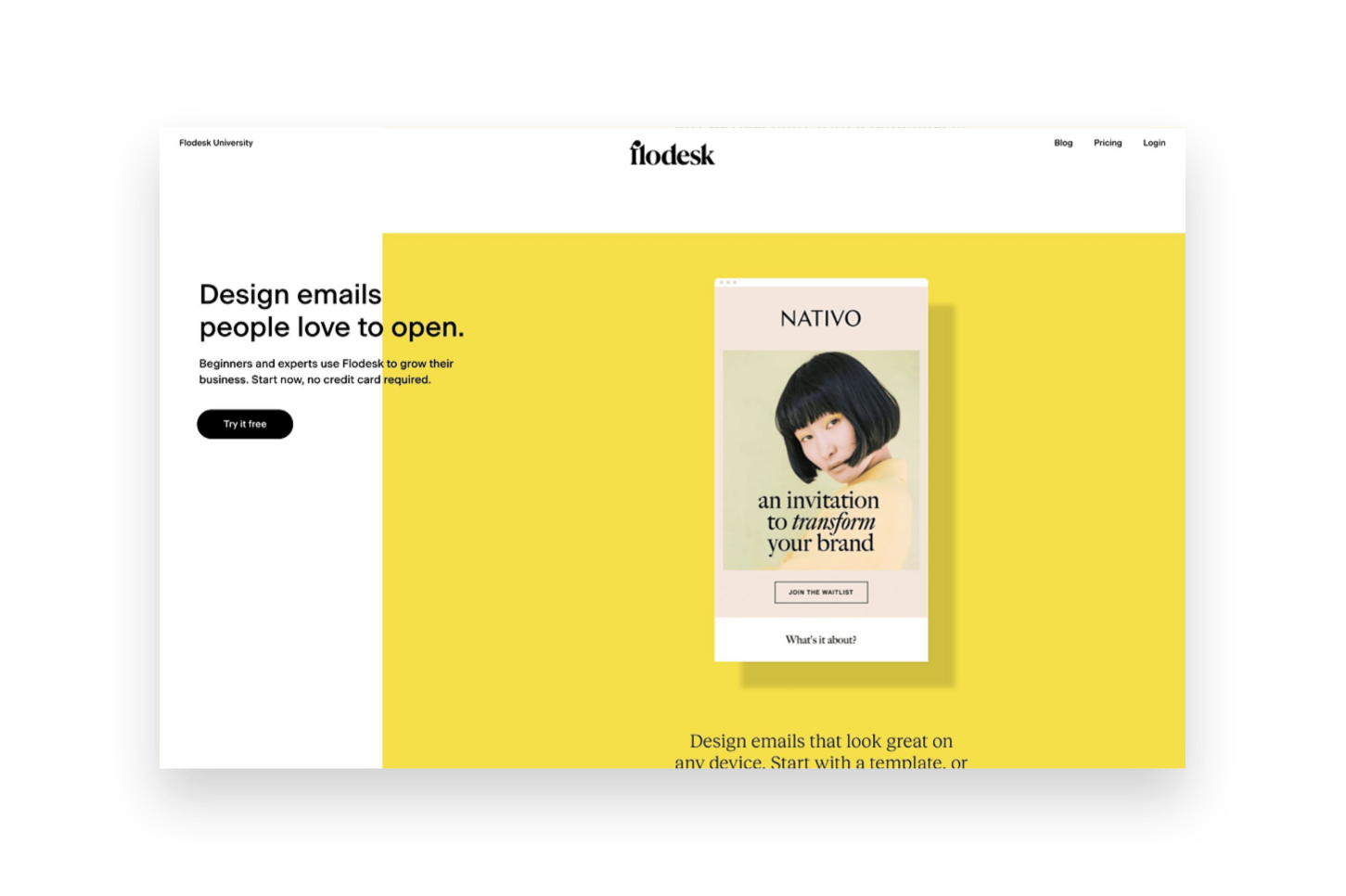
Flodesk is a relative newcomer to the email marketing arena but - hoo boy - did they come in like a wrecking ball! Everyone seemed to fall in love instantaneously with their great-looking templates and the simple pricing setup. Flodesk is a great option for beginners and more advanced marketers alike and it’s easy to incorporate into Squarespace. That said, it’s not without it’s own quirks and issues.
Ease of use - Based just on the simplicity of the interface alone, Flodesk is a dream to work with. It’s clean, modern and minimal which is a breath of fresh air over some other platforms that seem to make things unnecessarily cluttered. So for that alone, Flodesk wins points in my book. The interface is broken down into four parts: Emails, Forms, Workflows & Audience. Emails are where all the one off, newsletter-type emails live. Forms are where you can create either forms or landing pages to embed onto Squarespace for collecting sign ups. Workflows are where you can create visual automations like welcome sequences. And, lastly, Audiences is where you can create mailing list segments.
Looks - All of the pre-made forms, email layouts and layout blocks for within emails are very visually appealing and that’s a lot of what attracts people to Flodesk. You can also save some settings like your logo and custom color palette so that it’s easy to make sure those aspects are on brand every time. The one thing that kind of drives me crazy about Flodesk though is one of the most important: fonts! Every single time you add new blocks or copy in new text (which is likely going to be every single email you send since who sends the same thing each time?) you need to redo the font settings. This can either be really time consuming (if you actually take the effort to do it) or result in sloppy looking emails (if you don’t).
The other thing to note about the super pretty layouts is that a lot of your email will get converted into an image when it shows up in people’s inboxes. There are some studies out there that show that this can negatively impact deliverability rates and/or increase the chances of your email getting filtered into the promos tab or marked as spam. This is just a word of caution that while the layouts look really good that relying too much on them can mean that your emails also don’t have actual “readable” text in them that could be an accessibility issue.
Automations - Flodesk workflows are actually pretty powerful considering the interface is so simple - you may not realize all that you’re really able to do! Workflows are kicked off when someone is added to a segment and can include as many emails as you like set apart by any time delays you specify. Unlike Squarespace Email Campaigns, all the emails for a specific action are kept in one place which makes it easy to organize. You also have lots of advanced thing like conditional actions which are things like if/then rules based on whether someone clicks a link or has opened up the message that was sent prior.
What’s not so easy is setting up automations based on commerce activity, such as those on Squarespace that allow you to send emails after someone buys a certain product, for example. However, they recently launched a new Checkout add-on that allows you to set up sales pages and checkout pages, add upsells, accept payments and follow up instantly. This could be a pretty cool option if you’re not needing a full platform such as Podia to sell digital goods.
Integration - There are two ways to integrate Flodesk & Squarespace. The first is by embedding the code that’s automatically generated by Flodesk into a code block on Squarespace which is as easy as copy-and-paste! The second is by setting up Zapier so that you can use Squarespace forms but then map those submissions to various Flodesk segments. The latter option is great if you want to make sure your forms still always match the rest of your website 100%. An other option if you do use Podia is that Flodesk is now a native integration for that platform making it super easy to connect those two pieces!
Cost - The pricing on Flodesk is crazy simple: it’s a flat rate $38/mo and it includes unlimited everything, forever. You do get a month free if you pay annually and all new sign ups also come with a 30 day free trial of the software. This pricing set up is great because you’ll never pay more as your list grows and all the features are included so long as you’re a subscriber. The Checkout add-on can be purchased separately from email or in a bundle with it and increases the cost accordingly. (Bonus: use my link here to save 50% on your Flodesk subscription!) All this being said, there are more affordable plans with both Squarespace & Convertkit - especially for those with smaller lists.
Overall Thoughts
Flodesk is a good option if you’re looking for something that has a great user interface and if image-based emails are important to you. It integrates well with Squarespace but more so for traditional email marketing & list building than for eCommerce-specific automations.
ConvertKit
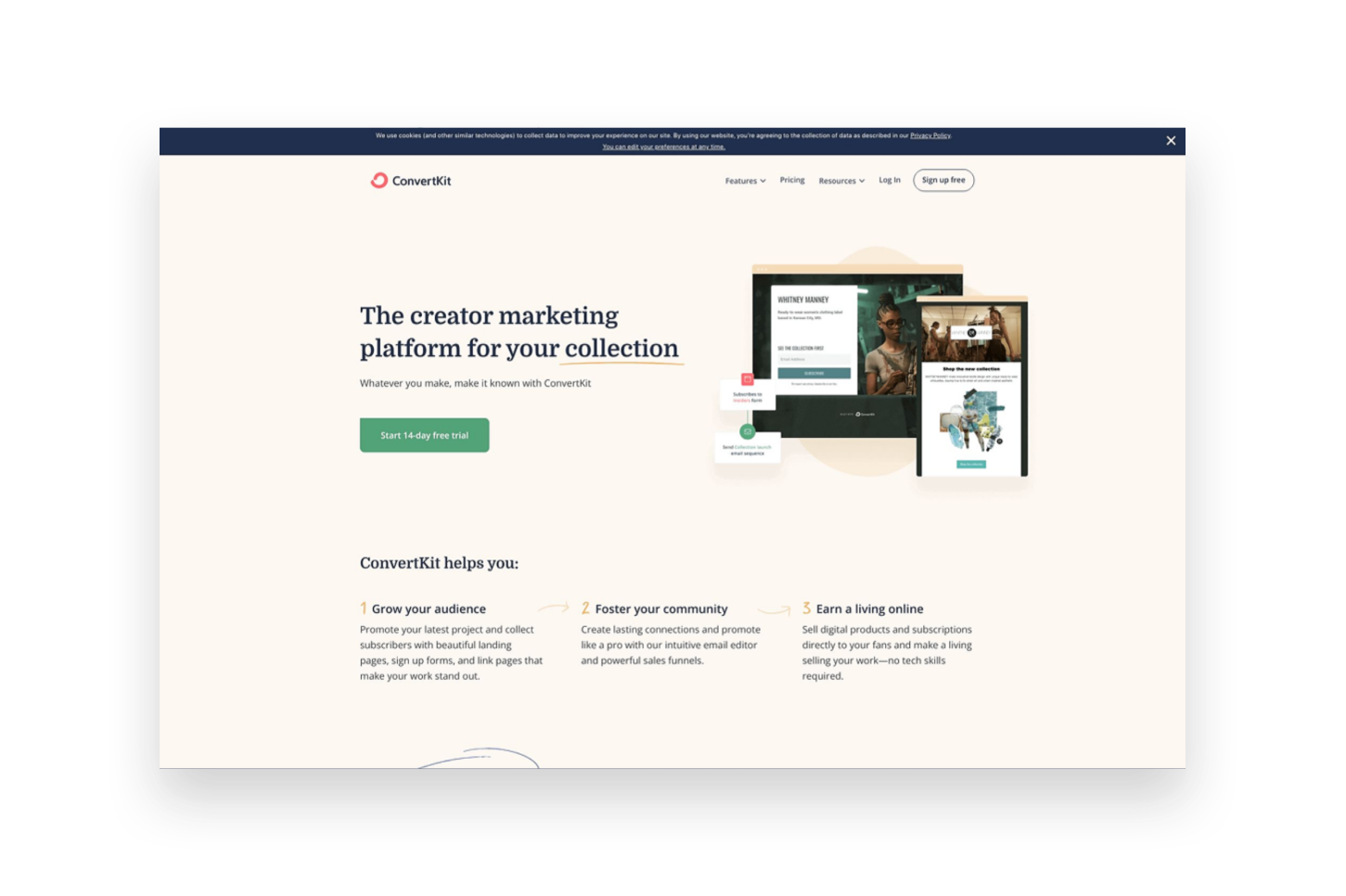
ConvertKit is an OG in the email marketing space and it shows. It has a robust suite of tools available to email marketers of all sizes and super powerful tools to help you automate and sell online. It has a bit of a bad rep for creating “ugly” emails but stay tuned because there may be a little method to the madness!
Ease of use - Even though Convertkit has been around for a long time, they still work on releasing improvements to the product which I really appreciate! For example, when I first tried Convertkit back in the day the interface was a little confusing and overwhelming but today it’s clean, simple and well-organized. It’s easy to see all the tools and understand how they relate to one another and even things like their email templates have received a nice facelift! The main dashboard is broken up into 4 main parts. The first is “Grow”, which houses all your subscriber info, forms and landing page. “Send” is where you can find broadcasts, sequences, email templates and snippets. “Automate” has visual automations, rules, integrations & RSS. And, lastly, “Earn” has products, tip jars, and payouts. Whew! So you can see that there are so.many.tools to choose from!
Something else worth noting is that of all the programs reviewed in this post, I find the dashboard of Convertkit the most helpful. It’s so easy to see stats and analytics at a glance!
Looks - Ok, on to the contentious topic of ConvertKit’s looks. And this is not in regards to the platform itself which is really great-looking but instead about the emails it sends. I mentioned above that ConvertKit tends to have a reputation for creating somewhat “boring” text-based emails. However, ConvertKit’s founder makes a very strong argument for this type of email (you can read more about it here) and I think that so many people have made a turn towards overly visual emails these days that text-based emails may have an even stronger appeal than they did almost a decade ago. All this is not to say that you can’t create nice-looking emails in ConvertKit because you actually can, just know that they will be somewhat less flashy than those created in either Squarespace Email Campaigns or Flodesk. You can still add nice images, brand colors and fonts - all the bare components of those other platforms - they’re just going to be a little more simple overall.
Automations - ConvertKit probably has the most powerful automations of any of the tools we’re looking at in this post! So much so that it actually breaks them down into two parts: Sequences and Visual Automations. Sequences are the simpler of the two and they can be compared to workflows in Flodesk. Sequences are a series of emails set off by an event such as signing up for a freebie or opting in to receive email updates. Visual Automations are Sequences on steroids and have some of the same features as Flodesk workflows but then 1,001 other options as well. You can do things like filter subscribers based on conditions, take actions based on when products/services are purchased, create multiple paths into the automation, add/remove subscriber tags, etc. If any of this all seems overwhelming, ConverKit also has automation templates that you can just duplicate and customize for everything from creating a paid newsletter to promoting and upselling other products.
Integration - ConvertKit integrates with Squarespace in much the same way as Flodesk, with one major notable addition. For basic things, you can either embed ConvertKit forms right into your Squarespace website using a code block or use Zapier to pull info into Flodesk from Squarespace forms and newsletter blocks. Where things get really cool though is the Squarespace Commerce API integration with ConvertKit. IT. IS. AWESOME. Once connected, this means that you can pull purchase activity from Squarespace into Flodesk and use it to tag subscribers, trigger automations - all sorts of things! You can even track revenue data for each subscriber and also see previous purchase history. ConvertKit also has integrations with tools like Teachable, Stripe and Podia so if you use any of those in other parts of your business it would be a great place to pull all your eCommerce data together on the marketing front.
Cost - ConvertKit has a free plan that would be great if you’re just getting started out and have a list of 300 subscribers or fewer. However, most people will want to subscribe to the Creator plan at $9/mo (if paid annually) in order to send automated emails and sequences. Plans go up to $49/mo if you have 3,000 subscribers, or more if you have more. There’s also a Creator Pro plan that includes things like subscriber scoring, advanced reports and a newsletter referral system that starts at $29/mo.
Overall Thoughts
If you’re as serious about email marketing as you are about selling online, ConvertKit should be at the top of your list of tools! It’s powerful where it needs to be and simple where it matters; it’s clear that everything about it is geared to convert.
Bottom Line
The good news is that in our email marketing software epic showdown battle, you really can’t go wrong. But you can definitely do… more right? Here’s how I think things shake out:
Choose Squarespace Email Campaigns … if you’re just getting started with both eCommerce and email marketing.
Choose Flodesk … if you’re focused on building your list but don’t necessarily need it to be based on Commerce activity.
Choose ConvertKit … if email marketing is the corner piece of your marketing strategy and it’s important to you that it’s integrated with all the places you sell online.

All About Squarespace Shipping Labels
You can now print shipping labels from right within Squarespace! But should you? Find out all about the pros and cons of this new feature, whether you should be using it (or something else) and the exact steps to take in order to print your first shipping label.
I love whenever I see Squarespace release commerce updates! It really reconfirms to me the platform’s commitment to supporting online sellers. One of the latest releases has been long awaited but should you dive in? Let’s explore… shipping labels!
But first, a quick reminder of how things work normally without this feature:
If you don’t use a shipping extension: Once someone places an order, you can see the order details in Squarespace. It’s up to you to fulfill and ship that order on your own. This means that you can go to the post office or FedEx Office or the UPS store or whatever you like, pay for the shipment and then log back into Squarespace to enter the tracking information and mark the order as fulfilled in Squarespace.
If you do use a shipping extension: The order details still show up on your Squarespace dashboard but they also automatically get sent over to your shipping extension of choice. The exact process from here varies by extension but the gist is this: the shipping extension will automatically find the shipping option that’s the best fit for the package and destination (based on shipping rules you set up), score you a discounted rate over paying retail, and then create the shipping label for you to print out. It will also automatically send the tracking info back to Squarespace, add it to the order details and mark the order as fulfilled for you.
How to Print Shipping Labels on Squarespace
In short, the new shipping label feature in Squarespace allows you to buy and print shipping labels right from within your orders panel so that you can streamline and simplify your order fulfillment workflow. You’re still going to need to drop packages off at the post office but you won’t have to wait in line to buy a label each time!
Sounds great, right? Yeah! But there are some drawbacks and this may not be a perfect solution (yet!) for everyone. Here are the ins and outs!
Pros
This feature is completely free and included on all users business and commerce plans - no need to pay for a shipping extension!
Keeps everything in one place - no need to log into another program
Discounted rates for Priority Mail Express and First Class versus retail
Saves you from having to manually enter customer addresses and tracking numbers
Cons
Only available for shipments within the US and selling in USD
USPS is currently the only option (no FedEx or UPS, etc.)
You can only print one label at a time
You cannot currently add shipping insurance to an order
You still need to contact USPS to schedule a pickup
So, who do I think should try this and who should skip it for now?
Real talk: I LOVE this new feature but I don’t think it’s for everyone just yet. Here are the people I think should try it and who should look to another option until some more features are released:
Try this if you’re….
A lower volume shipper
Wanting to simplify and streamline your process by not adding yet another piece of software to your lineup
Only shipping in the US, selling in USD, and want to ship via the US Postal Service
Skip this for now if you’re…
Currently using a third party shipping extension and using rules or automations
Needing to print labels in bulk
Currently shipping with enough volume that you have your own discounted carrier rates

Interested in using Squarespace to print shipping labels? Here’s how!
Here are the exact steps you’ll need to take to print your first shipping label on Squarespace:
From the home menu on your Squarespace site > Commerce > Orders > click on a pending order that you’re ready to ship
In the order details window that pops up, click Purchase Label
Add your seller information (you only need to do this the first time, after that just make sure to check the box to save your address and label preferences as the default and it will reuse them every time)
Click on Shipping Label and enter the shipment info including the package dimensions and weight. The customer shipping address should automatically prefill but if you need to change it you can do that in this section as well.
The available USPS shipping options will be displayed as well as a reminder of the shipping option that your customer selected. You can compare options and select the best fit. Then click Review Order > Confirm and Purchase > Print Label.
The last step is to mark your order as fulfilled. The tracking information from the label you printed will automatically be copied in to the order details and be included in the shipment confirmation email that is sent to your customer. Done!

Pricing & Product Lineup Strategies for Sustainable Business Growth
In building your profitable eCommerce business, both pricing and inventory management are crucial to your success. You can price your products perfectly and still confuse buyers by offering too many options. Learn that it’s not just how you price but what you sell that matters!
One of the things that really sets eCommerce web design apart from just regular, old, everyday web design is that there’s a lot of science and strategy that needs to go into almost every decision.
On an informational, brochure website most of the decisions have to do with either aesthetics or making sure your message is being communicated well.
On an eCommerce site, you have to do those things PLUS make sure you’re pricing your products right and choosing the best inventory lineup possible.
And while there’s lots of information out there on these topics I think a lot of it misses an important factor and that is: how to select the right inventory lineup, at the right price points in order to build a sustainable, long-term eCommerce business.
Because it can’t all be about discounts and cost savings and how to low you can set your prices. Those things do nothing but pave the way to insolvency. You simply cannot expect to grow and scale a business that’s based on unsustainable profit margins.
The math simply does not work.
Pricing & inventory are so important to the success of your business now and into the future. How you price your products and what products you choose to sell ultimately impact everything from your cash flow to your profits. Ultimately pricing and inventory impact every single aspect of your business and I’m here to help you get them right.
First, some words of encouragement!
Ok, I definitely made pricing and inventory sound super scary in that last paragraph, didn’t I? Eek! Don’t worry! Because here’s the good news that I hope prevents you from stalling out at this phase in your eCommerce journey:
You can always revise.
That’s right - you can always update your prices. Change your inventory lineup. Modify your messaging. Revamp your sales strategies. All of it.
Nothing is set in stone.
The best thing you can do is launch something and the tips I’m going to give you about pricing and inventory are great places to start.
That’s one of the best things about running your own small business; you can respond swiftly to feedback and changes in the market. You can be nimble and flexible when the big guys are stuck jumping through a bureaucratic series of hoops to make one small change.
I talk a bit more about responding to feedback and analytics a little more down below but I think it’s important enough to mention it in this post twice!
The best thing you can do is launch something and the tips I’m going to give you about pricing and inventory are great places to start.
I want you to have a solid footing for a jumping-off point but where you begin should definitely not be where you end.
There’s a lot of science that goes into pricing and inventory but it’s also a little bit of an art. So the best thing you can do is just begin and then be open to adjusting as you go along!
Ready to jump in? Let’s start first with pricing!
Pricing Factors to Consider
I think by now you definitely get that this post is not going to be about discount strategies you can use to boost sales in the short run. (I’ve got other posts for that!)
Nope, we’re going to talk pricing from a business standpoint - one that takes your long-term viability into consideration. So bust open a spreadsheet (or get a notepad, or whatever - you do you) because it’s time to do some math.
Step 1: What are your costs?
To understand what you need to price something at, you first need to know what it costs you to acquire (or produce) it. This seems simple but I see a lot of startups come and go because they failed to take allllll their costs into consideration.
Variable Costs

For each product that you offer, there’s a cost of goods sold. This is what it costs you to buy what you’re selling wholesale or to purchase the raw materials you need to make your product. This seems like a no-brainer. But there are lots of other variable costs that need to be factored into your prices as well. This includes things like:
Labor
Packaging
Shipping
Promotional Materials, etc.
Add all these costs up for each product.
Fixed Costs
It’s easy to do the math on variable costs because we can see how they directly relate to each product, however, it’s important to factor in the fixed costs of your business as well.
Fixed costs are things like your rent, insurance, the cost of your website - basically things that would stay the same whether you sold 1 unit or 10,000 units.
The best way to make sure you can cover your fixed costs is by doing a break-even analysis. In this process, you’ll add up all your fixed costs and determine how many units of each product you’ll need to sell in order to cover them. Everything above that point is profit.
The SBA offers an easy, free tool to help you with this here: Break-Even Calculator
Step 2: How much do you need to make?
Up until this point, pricing has just been about covering costs and breaking even. But that’s not what we’re here for - we need to make a profit!
You know your lifestyle and industry best so it’s going to be difficult for anyone else to tell you what your profit margins should be. And even though I’m going to tell you in a minute that you don’t really need to pay attention to your competitors, you definitely need to consider how much you can reasonably mark something up while still staying competitive and marketable.
Step 3: Putting It Together
Here are some calculations to help you put all the above together!
Variable Costs = Cost Per Unit / Total Number of Units
Break Even Point = Fixed Costs / (Price Per Unit - Variable Costs)
Target Price = Costs + Profit Margin %
Why what your competitors are charging doesn’t (really) matter
It’s really important that you do all of the above for YOUR business and let the outcome be what the outcome is. Why? Because there’s really no way at all that your competitors have the same costs as you.
This means that arbitrarily setting your price points without taking your own actual numbers into account does you no good. Remember, we want to make sure you’re setting your prices at a point that’s sustainable - and profitable! - for YOU!
Whether you’re able to market and sell the products you want to competitively only matters if you’re also able to do it without seeing red.
Now that we’ve learned all about how to make sure your prices are set so that you can grow your business profitably, let’s see how what you sell matters just as much!

How to Choose the Right Product Lineup
You know how at Costco they typically just sell one brand of something? Like, if you want some mayo, you’re gonna get a great deal on 7 gallons of it but they don’t have a million different varieties. It’s just the mayo. One brand. One size. One variety. The price is what the price is. Take it or leave it.
Costco has an easier time selling one of anything regardless of price.
At the regular grocery store, you can get mayo made with olive oil, mayo made with cage-free eggs, mayo in different flavors, all sorts of different brands and sizes and types. There’s a lot to choose from and maybe you don’t even think you think too much about it because you’re probably thinking that “choice is good” and “people like having options” and yadda yadda yadda.
Wrong.
Here’s the real truth: Costco has an easier time selling one of anything regardless of price than other stores have selling lots of everything, even when products are priced more affordably. Why? Because although we all say we like to have options to choose from, humans are notoriously bad at making decisions or at least get really fatigued and overwhelmed by having to make too many of them.
Using our mayo example, here’s the number of choices a shopper has to make:
At Costco
You want mayo? Y/N
At a regular grocery store
You want mayo? Y/N
What brand?
What size?
What are the ingredients?
Organic or not?
Special flavor?
On sale?
Coupon?
Etc...
I don’t know about you but I know that I can certainly make one decision (and feel better about it) than I can make 8 or more. And it’s not even about the price! Of course, there’s a little bit of selling psychology at play here that we can apply to eCommerce sites so let’s learn a bit about it!
What is Hick’s Law and what does it mean for eCommerce?

I promise this is more about psychology than math but Hick’s law is a principle that basically says that as the number of choices increases that the amount of time it takes to decide amongst those choices increases logarithmically.
Basically, more choices = more decision time.
When we combine with what we know about how long we have to capture people’s attention online (I.e. NOT LONG), what’s the verdict? Well, for me it’s that you should aim to be more like Costco and less like your traditional grocery store. And, no, this doesn’t just involve mayo.
Here’s how:
Tip 1
You’ll see higher conversion rates if you offer fewer choices.
In a famous experiment on decision-making that researchers always point to on this subject, grocers alternated between days where they sold just 6 varieties of jam and days where they offered 24. Four times the product must mean 4x the profit, right? Wrong.

As you can see, the days with fewer varieties had much higher conversion rates than those with more options available. There are a couple of different reasons for this (more tips on this below) but the takeaway for eCommerce is that sites that offer either a highly curated selection of products or who use navigation and menu organization strategically to only show the most profitable categories, while mitigating the others, will outperform those that put it all out there.
It’s also important to point out the obvious here and that’s that the boosting conversion had absolutely nothing to do with lowering prices!
Tip 2
Only offer distinct variations.
One of the lessons from the jam experiment is that people have a really hard time when there are too many options that aren’t clearly distinguishable from one another. It may seem nice to offer lots of options but customers will often feel overwhelmed by trying to suss out what the discrete differences are amongst them and are prone to just give up and go elsewhere.
This means that your products can be priced right and you can still miss out on the sale simply by offering too many choices that are indistinguishable from one another.
What to do instead? Pare down your offering to only distinct variations. Simple variations are easier to talk about, easier to sell, easier to market, and easier to buy!
Tip 3
If you have a complex product or service, bundle options together to minimize decisions.
If what you have to offer is inherently complex (for example: if it’s highly technical or super customizable) you may not be able to remove options or variations. They are what make your offering unique, after all! But you can help ease the decision-making burden by bundling together presets that make the most popular decisions for your customers.
What I’ve found for most shops that offer “customizable” products is that the majority of purchases can actually be boiled down to a few simple combos.
The lesson here is that just because you can offer infinitely customizable products doesn’t mean you should. Taking away decisions isn’t a bad thing! Customers will feel more confident in you telling them that the bundle you’ve put together represents the most popular combination of product features and you can’t put a price on that!
Fast decisions = happy customers!

We all want our customers and clients to be satisfied with what they’ve purchased from us and there are tons of things people do to try to improve customer service. It should be no surprise at this point though that one of the best things that you can do to make happy customers is helping them make fast decisions.
When people are paralyzed by too many options, they get stuck overthinking things, fearing they’ll make the wrong choice or over-analyzing their choices. Studies have shown that the longer it takes someone to make a decision, the less confident they are in the outcome. So, faster decision-making = happier customers, regardless of price!
There are easy ways to help reassure people that they are making a great choice by shopping with you; whether it’s by providing super clear shipping & return policies, simple forms that don’t ask for unnecessary info, or a streamlined checkout that keeps things on one page or auto-fills past info if you have it. The goal is to just make things as easy as possible for people, being empathetic to their situations and helping them feel confident in their purchase.
Launch, Get Feedback & Adjust Accordingly
I told you at the beginning of this post that the goal was going to be to just LAUNCH and that we’d be open to circling back later to revise things as needed. So what does that actually look like? It can mean a few things - here are some ideas:
Use your site’s analytics to see what products sell and which don’t. (Here’s a great article about how to understand the Squarespace Analytics panel to get you started.)
Take seasonality into account. Is what you’re selling more appealing at one time of year over another? Is there a companion product you can launch to round things out the rest of the year?
Are you making enough? After a few months, you’ll know whether your cash flow is feeling good or not. Could you adjust the profit margins in your pricing calculations to better optimize cash flow?
Have you considered not just the prices of your products but the product lineup itself? Is there room to simplify your offerings to help people make buying decisions faster?
If you sell multiple products, can you increase profits without raising prices by eliminating your underperformers? How would making different purchasing decisions affect your fixed or variable costs?
Bottom Line
In building your profitable eCommerce business, both pricing and inventory management are crucial to your success. You can price your products perfectly and still confuse buyers by offering too many options.
The good news is that you now have the tools (and formulas) to make sure that each product you sell doesn’t just get you to break even but makes sure to add a little to your bottom line. And I don’t know about you but just knowing that some of the best performing shops offer the simplest product lineups is such as relief - and not just because it makes all the math a whole lot easier! 😂 Keeping your product lineup simple is easier to manage, easier to market, and easier to sell!

3 Ways to Crush This Holiday Selling Season with Your Squarespace eCommerce Website
Don’t let holiday selling stress you out! Here are 3 simple solutions to make sure you’re not left worried about inventory or shipping - the biggest problems online sellers are facing this season!
eCommerce merchants are facing a double whammy of things to be nervous about this holiday selling season. Chances are you’re worried about 1) ongoing supply chain issues AND 2) the threat of longer than normal shipping times this holiday season (again).
This is resulting in:
Being uneasy about promoting too much too early because you’re not sure you’re even going to have inventory to sell, and…
Sleepless nights spent worrying about an even shorter-than-normal selling season, not sure you’ll be able to fulfill and ship in the teeny tiny window of time you have.
Eek!
Don’t worry - I have three solutions you can try to help ease the nerves so you can sell with confidence this holiday season.
1. Add a Local Pickup Option
Adding a local pickup option will allow for sales right up to the very last minute -- no need to cut things off early to allow for extra shipping and fulfillment time!
Bonus: you can use local pickup as a competitive advantage over non-local online competitors - winning over shoppers who don't want to risk not having gifts arrive in time.
Not sure if this is for you? Let’s explore the idea:
The best of both worlds - offering in-store pickup or curbside delivery are great ways to combine the ease of eCommerce with the familiarity of buying from a favorite local business.
Win back customers who are accustomed to “free” 2-day shipping - It’s about more than just convenience; providing a local pickup option can help you compete with the big guys! Customers are used to shopping online with Amazon or Walmart and getting whatever they want delivered fast. Local pickup is a way to beat them to it!
I think that if more businesses knew how easy it was to set these options up that they would definitely do it - and possibly attract a whole new batch of customers as a result!
I mean, how nice would it be if you could pick up all your holiday shopping curbside on your way home from work?!
Marketing curbside or in-store pickup as a service can really give you a competitive edge! Plus, you can throw in upsells like free gifts with purchase or free gift wrapping to really sweeten the deal.

Tips for Offering a Successful Local Pickup Program
Like I said, setting this up is pretty easy to do from a technical perspective but here are a few quick tips to make sure you’re set up for success before you so:
Document your fulfillment process. This includes making sure that everyone on your team is educated on the in-store pickup or curbside delivery procedures. Write down every step that happens between the time someone submits an order until that order is picked up. Who monitors your inbox for new orders? Who marks them as fulfilled and when? How and when are customers notified? Be specific. Your plan doesn’t have to be complex but it should be organized.
Add info about local pickup to your FAQ page. It’s important to set expectations early about how long it will take to fulfill an order, what needs to be done when the customer arrives at your location, etc. Add information about pick-up hours, where to park, what they need to bring to pick up their order, and your contact information -- especially a phone number! (When in doubt, my rule of thumb is to treat every visitor like a lost tourist 😂)
Provide directions and ALL the information again in your email confirmation. You may have put all the info on your website and FAQ page but just count on the fact that people are busy and assume they didn’t see it. Don’t worry about repeating yourself and provide the directions about what to do again in your email confirmation email. Be explicit. For example, are they to proceed directly to your location right away or will you be emailing again when their order is ready for pickup? Is there a phone number they need to keep handy? Can they stay in their car? Is there a special line to stand in for online orders?
Put up easy-to-read signage at your location regarding curbside pickup procedures. At the risk of repeating myself, I’m telling you to go ahead and repeat yourself :) If you need people to park in a certain spot or area, call or text a certain number or follow some other procedures, let them know. Make it simple and clear. The goal is to reduce frustration and confusion. Great on-site signage also has the benefit of advertising to anyone passing by that you offer local pickup so be sure to mention your website on any and all printed materials!
Two Options for Local Pickup on Squarespace
Use the built-in Local Pickup option. This will create an option at checkout toggle between shipping & pickup and will be available to all customers. (Get there: HOME > COMMERCE > PICKUP)
Set up a free flat-rate option. This will allow you to restrict local pickup options to people in certain areas using zip or postal codes. While it isn’t technically necessary to limit this as an option at checkout, it’s nice to only show it to people who could reasonably choose it. The trick on this is to make sure you give the pickup option a very clear name like “Curbside Pickup - YOUR AREA ONLY” so that it differentiates the local pickup option from any other (potentially free) shipping options you offer. (Get there: HOME > COMMERCE > SHIPPING > ADD SHIPPING OPTION > FLAT RATE)
Tip: for more complete, step-by-step instructions on both of the ways outlined above to set up a local pickup option on Squarespace, check out the bottom of this post where I break down all the details!
2. Simplify Your Shipping Strategy + Add a Shipping Extension
For traditional eCommerce orders, adding a shipping extension can help you fulfill orders FAST and save you some money in the process. Using a shipping extension can help you control costs so that you can offer the #1 thing that online shoppers are looking for: FREE SHIPPING!!!
Plus, I’m pretty sure waiting in line at the post office with other frazzled shippers isn’t exactly you’re idea of a good time! Let’s get you out of there!
Start By Making a Smart Shipping Game Plan:
The best shipping strategies are SIMPLE. Like, stupid simple. And most online sellers make it unnecessarily complicated. Here’s what I recommend for the easiest (and highest converting) shipping strategy you could possibly have:
Set a per order flat rate shipping option. Make the cost cover some nominal amount of whatever it costs you to ship your average order. Don’t worry about making it cover everything, just make it something easy. Like $5. Or $7. Or something relatively easy for online shoppers to stomach and understand.
Set up an automatic free shipping discount for orders above a certain amount. The threshold for free shipping should ideally be somewhere just north of your current average order value. You’ll be surprised at how many people choose to add just a little something to their cart in exchange for free shipping! The key here is that you’re not offering free shipping to just anyone so be sure to set this up in the discount section, not the shipping section!
Why this combo works:
Simply, people hate feeling nickel-and-dimed and love feeling like they got a deal. That’s it.
Offering a flat rate shipping option that will apply to orders under your free shipping threshold feels honest and transparent and ensures that shoppers won’t face any nasty surprises in their cart.
Setting up an automatic free shipping discount encourages people to spend just a little bit more while still making it easy - no coupon code required!
This combo is also super easy to promote!
Imagine how simple it will be to boil your shipping program down to something as easy as: “$5 flat rate shipping. All orders over $45 ship free, no code required!” Swoon. I love it.

On the fence about offering free shipping? Let me convince you it’s worth it!
I go into all the pros and cons of free shipping in this post: eCommerce Strategy 101: Should You Offer Free Shipping? but here are some of the benefits of this for anyone with lingering doubts about how well it works as a strategy.
Free shipping:
Reduces cart abandonment rates
Increases conversion rates
Boosts revenue
Increases order volume
Increases average order value
Helps attract new customers
Encourages repeat visitors
Boosts loyalty, and more!
Combined with a minimum order amount requirement and a low flat rate for any orders below that amount, you’ve got a winning shipping strategy!
Sanity Saver: Shipping Extensions!
Ok, now that you have a winning customer-facing shipping strategy it’s time to focus on what happens behind the scenes when orders come in.
For small- to medium-sized businesses, managing shipping is typically one of the biggest headaches and often eats up tons of resources - time, money, and sanity!
Luckily, Squarespace pairs well with several popular shipping extensions that can help take a load off.
How shipping extensions work:
Shipping extensions are basically apps that use the Commerce API to pull in order data to a third-party platform that takes care of all things shipping for you. Some popular Squarespace shipping extensions are:
ShipStation
GoShippo
ShipBob
Easyship
(Pssst - I give you all details on my fave option below!!)
All of the shipping extensions with native Squarespace shipping integrations work pretty much the same way:
Sign up for an account directly with the app you’d like to use then connect it to your Squarespace site
When orders are placed on your website, the order information will get automatically pulled into your extension of choice and a shipping label will be created for you to print when you are ready to ship.
Once shipped, the tracking information will get sent back to Squarespace and automatically included in a shipping confirmation email to your customer.
Sidenote: A common misconception about shipping extensions is that connecting one to your site somehow “takes over” the shipping options that are displayed to your customers at check out. What you need to remember about shipping extensions is that they only take care of what happens behind the scenes for you, the merchant. You’ll benefit from discounted rates plus a ton of saved time and headaches managing fulfillment manually on your own. The time and cost savings shipping extensions offer still need to be balanced out with a winning customer-facing strategy like above!
My Favorite Shipping Extension: Easyship!
Knowing that all shipping extensions work in essentially the same way, how do you go about choosing one over the other? Well, let me save you the agony of starting a bunch of free trials and testing them for yourself :) My fave is Easyship. Here’s why:
As its name implies… it’s easy. Easyship has a nice, clean interface and offers just enough options to allow you to customize the experience without feeling bloated. Some of the other extensions have complicated user interfaces and offer a bunch of unnecessary options that just bog things down.
The discounts are great! As an online seller, you should never, ever, ever pay retail for shipping. You are not a retail customer. Easyship has great discounted rates that are passed along to you for over 250+ carriers worldwide.
3. Add Fresh (No Cost) Inventory with Print on Demand & Printful
You are not alone if you’re nervous about buying a bunch of inventory that you won't be able to sell - or if you’re one of the zillions of sellers who has a critical shipment you’ve been waiting on stuck in port somewhere. Inventory also costs (wait for it)... money.
Solution:

If you’re running short on both time and resources - you should definitely give a print-on-demand solution like Printful a try!
I think this is an especially good idea if you already have some of your own products in stock but just want to round out your product lineup in a low-risk, high-reward way.
With Printful you can quickly add new products to their shop to make it look like you have tons to offer but you don’t need to worry about:
Buying inventory that will never sell
Production
Warehousing
Fulfillment
Shipping
Returns
… or any of the other headaches that go along with making and selling your own goods!
What is print on demand and how does it work?
Somewhere between manufacturing your own products and dropshipping someone else’s goods from overseas lies the print-on-demand industry. To me, it’s the perfect medium and, in many ways, the best of both worlds.
With print on demand you can offer your own customized products in your own online store... without needing to worry about production, warehousing, shipping, or any of the other headaches that come along with traditional eCommerce.
It’s a win-win!
The Best Print on Demand Solution for Squarespace: Printful!
The secret to making POD work without too much actual work is choosing the right company to partner with and I think you can’t beat the combo of Squarespace + Printful! With your Squarespace site all set up to sell, adding Printful into the mix is easy. And the beauty of it is that it works whether:
Your entire inventory is print-on-demand products or...
You’ll just be adding a few SKUs to your mix to round things out.
It can really be as much or as little a part of your product lineup as you need it to be.
About Printful
If you’re new to POD or Printful, let me share with you how things work and some of the benefits of adding it as an extension of your Squarespace eCommerce business.
Printful itself is FREE! There are NO monthly subscription fees, ZERO set up costs, and NO order minimums. You only pay the wholesale price + shipping for each item that is produced.
Everything is made on demand. Because items are never made in bulk and only go to print when they are actually ordered you can feel free to test drive designs & products without any upfront investment costs, no inventory to store and no worries that you’ll be left holding the bag if something happens to be a flop. (Hey, it happens!)
It’s a completely white-labeled experience. From start to finish, your customers will only know that they saw something they loved on your site and that it arrived in perfect condition to them. Everything from the emails they receive about their order to even the packing slip in the package can be personalized to match your brand. If you want, you can even ship pack-ins like stickers or custom packaging to Printful to use on all your orders!
How Printful Works:
You markup products as much or as little as you want. You’re free to markup the products that Printful will be making as much or as little as you want - you’re in complete control! Remember, it’s not just the product cost itself that matters - it’s your design and style that people are willing to pay for!
Customers pay you directly. When a customer places an order on your site, they’ll pay you directly and in full.
Squarespace sends new order info to Printful for you. The integration between Squarespace and Printful will automatically push the order info from your customer into Printful which means that from here you’re pretty much hands-off completely!
Printful takes care of the rest! Printful will charge you the wholesale cost of the product your customer ordered (plus shipping and taxes) and take care of production, fulfillment, and shipping. They’ll even automatically send the tracking information back to Squarespace so that your customers get a shipping confirmation email from you!
Ready to give print on demand a try? Get started with Printful here!
Have a Stress Free Holiday Selling Season!
One of the reasons I love working with small- to medium-sized businesses like yours is that entrepreneurs are a scrappy bunch! You’re quick to adapt to changing market conditions and don’t let things like inventory delays or tight shipping windows get you down.
Running an eCommerce business can be stress-free, even during the holidays!
By using built-in tools like Local Pickup or a shipping extension like Easyship you can streamline your operations. Incorporating a print-on-demand solution like Printful can get you the inventory you need in a low-risk way.
If you’ve been stressed about how you’re going to make things work, I hope you give these things a try!

Don't Bank on Social Media: Why You Need to Build an Email List
Hot take: social media is not your small biz best friend. Here are four big reasons why building an email list is a much smarter eCommerce marketing strategy in the long run than banking on a social media following for traction.
A website is a must-have when it comes to business but it's not a standalone tool. Even though your website is going to help you look legit, help you sell your products or services, and is totally great for SEO - no website is an island. The cheese does not stand alone!
This means that your site needs to do all the eCommerce things, connect to your active social media accounts, and help you build your email list.
What’s an Email List?
This is the list of people (customers, clients, leads, people who like your blog, probably your mom) who have agreed to give you their email address in exchange for something of value that you have to offer. This could be informational like a newsletter filled with helpful tips or something more actionable like a freebie download or a discount on a future purchase from you.
Why Not Just Social?
Facebook and Instagram are okay enough tools to connect with others and get outside your initial sphere of influence but if this is where all the attention goes, what are you really building? Aside from physical business assets like equipment or inventory or your Macbook - your book of business is what it's all about. It's your contacts, your relationships, your everything.
So if all your interactions with your most valuable business asset are on social media, what happens when new platforms crop up, algorithms change, people leave? What happens when services crash and access to new leads dries up? How do you connect? Would you be starting from zero again?
Instead of waiting until that happens, I want you to start thinking now about how to build your amazing future-proofed online business. The best part is that you can still hang out on social media if you want but you know that you'll just be using those platforms as tools to drive new contacts you meet back to the real heart of your brand - your website and, yes, your email list.
4 Reasons Why You Need an Email List
So you can own your own contacts. Remember this is your #1 business asset! If you interact with your people only on social media, guess what you have? Nothing. Nada. Zip. Zero. This is no bueno, my friend. Take ownership of what's yours!
So you can stop worrying about algorithms. There are lots of competing stats out there on this but it's estimated that only 6-10% of your followers are actually seeing your posts. That is also no bueno. But guaranteed that if you pop up in their inbox with something of value for them that they will pay attention. This keeps your company top of mind for them and also allows you to build more personalized brand experiences. Let your competitors waste their time getting lost in the feed. You'll be right there in your customer’s inbox!
So you can show off your expertise. Notice the bit of emphasis from that last point: so you can provide something of value for them. That's the secret sauce. And it's super simple. In an email, you can get personal and provide tips, advice, tools, and resources that help establish you as an expert in your field. People want to learn and if you can solve a small problem for them for free (instead of just worrying about getting likes) they will turn to you when they're ready to make a bigger purchase.
It’s the best bang for your marketing buck! Email marketing can feel overwhelming at first since it definitely takes a bit of upfront work — but the payoff is so worth it! Email marketing brings in more ROI than SEO, display, advertising, and other forms of digital marketing. Studies have shown that for every $1 you spend on email marketing, you can expect an average return of $42.

The Ultimate Squarespace eCommerce Guide
Stop chasing your tail! I've covered some of my favorite posts on everything from choosing Squarespace for your new eCommerce website to mapping out a winning eCommerce strategy, from launch day to managing the day-to-day. Wherever you are in the process, I’ve got you covered!
There’s so much information out there about Squarespace web design and eCommerce but that’s half the problem! It’s all over the place and not necessarily right where you need it! So I decided to corral some of my favorite posts on everything from choosing Squarespace for your new eCommerce website to mapping out a winning eCommerce strategy, from launch day to managing the day-to-day. Wherever you are in the process, I’ve got you covered!

Choosing Squarespace
As a small business owner, you have a lot of choices that you’re going to need to make. But it’s the first one that’s arguably the most important. To me, choosing Squarespace for eCommerce is a no-brainer but I want to help you get all the facts so you can decide for yourself.

Early Decisions
Some of the early decisions in the eCommerce web design process are things you can set and forget but even simple things can help make sure you’re set up for success moving forward.

Map Out a Winning eCommerce Strategy
I wish I could tell you that eCommerce was as easy as making a website public and watching the money roll in but the reality is you need a solid eCommerce strategy in place to keep things on track. These simple and straightforward resources are here to help!
Go above & Beyond
The difference between ho-hum and fabulous is usually just paying attention to the little details that your competition most definitely missed. Don’t worry - I’m going to make sure that you’re prepped and ready to crush it and stand out from the crowd.

Launch With Confidence
Launch day doesn’t have to be nerve-wracking! You can sell on Squarespace with confidence when you know your site is on point from all angles.

Manage the day-to-day
To me, once your site is up and running is when the fun really begins! You can build new features, add new products and continue to refine the experience - all decisions you can back up with data.

5 Simple Discount Tips
When it comes to discounts, I like to keep things simple! Check out my 5 tips for creating your own simple discount strategy that’s easy to market and manage.
Deciding when and how to discount your products is going to depend as much on your brand as what you’re selling. (In this post all about coupons, offers, discounts & promos, I go more into depth about whether discounting is “on brand” for you or not.)
However, I do think that eCommerce customers, in general, are not only accustomed to seeing offers in their inboxes or discounts promoted on social media but that they expect and enjoy the opportunity to score a deal at checkout. What this means is that even luxury and mid-market brands that never used to offer coupons are starting to incorporate discounts into their marketing strategies to meet the expectations of today’s online shoppers.
The one thing to keep in mind is that while you clearly have a lot of discount options and capabilities at your disposal that just because you can run very specific, highly complex promotions doesn’t mean you should. Keeping your discount strategy simple not only helps you make sure that you’re not setting yourself up to over-discount but is also way easier to market!
With those things in mind, here’s a recommended general discount strategy + some of my best tips for running promotions on your eCommerce site:
Offer Free Shipping - I think every shop needs to have a free shipping option. Restrict it to your cheapest method of shipping and only offer it to orders over a certain amount. Studies have shown that people will pay up for expedited shipping but really hate not having a base option offered for free.
But Throw Some Restrictions On It - Even better, I say restrict that free shipping option so that it only applies to orders over a certain amount. Be strategic here and set the threshold just above your current average order total (before taxes and shipping). People are almost always willing to pay more for products in order to score “free” shipping 🙃
Have One Welcome Discount Code - I tend to not like coupon codes in general but they do work well for “thank you” offers for things like signing up for your email list or placing their first order. If you use Squarespace Campaigns for your email marketing, it’s super easy to set up an automatic email that delivers a coupon code to entice first-time customers to give you a try.
Make Everything Else an Automatic Discount - For other sales or promos you have throughout the year, make it easy and go automated! For example, category discounts or specific product discounts are best when you can just say: “10% off all summer products - no code needed!”
Keep It Simple - Keep your active discounts or offers super targeted and limited. Unless you’re running paid Google ads or something, there’s really no need to ever have a thousand promo codes out there. I'm of the mindset that focusing on value and quality over discounting tends to be the better long-run business strategy.

How to Sell Your Services on Online
Service-based businesses looking to move their businesses online all seem to struggle with how to make the transition. The trick is to think of how you can position your services as products, which are much easier for customers and clients to understand and buy. Here’s how to do it!
Updated September2021
eCommerce doesn’t have to just be for physical products; if services are your business you should definitely think about how to make it easier for your clients to book with you or buy from you online. Luckily, Squarespace makes it easy with lots of built-in features that are made for way more than t-shirts and art prints. If you’ve been thinking about “productizing” your services it’s definitely time to actually jump on this idea because it’s for sure not just a trend.
The concept here is simple: take service-based work that’s difficult to conceptualize and convert it into a defined product with a price tag. There are a few great reasons to consider this approach:
It can help you define a niche. A lot of business owners are afraid of niching down their services. Maybe this is you. You’re afraid of saying no to work and the idea that you might not appeal to everyone is a little scary. I get it! I went through this phase as well and as it turns out, saying yes to anything and everything will do nothing but buy you a one-way ticket to burnout.
It allows you to create systems and processes that are repeatable and scalable. This allows you to work smarter, not harder. Never again feel like you’re reinventing the wheel with each new client you take on. The objection many service-based biz owners have to productization is that they feel that their offering is just “too custom” to define. If this is truly the case, you should probably be charging a lot more for your work! Productization doesn’t mean that your work isn’t personal to each of your clients, it just means that the process you take them through remains (generally) the same. You can document it, define it, rinse and repeat it.
It helps your clients or customers know exactly what they’re getting. People outside your industry or organization are not always in the best position to understand exactly what it is you do. What they know is that they have a problem and (hopefully) your services are the key to solving it. Defining your services as “packages” or products helps define the value that you offer in terms your target demographic can understand and buy into.
Productization in 3 Easy Steps
Define - The first step may require you to open up a Google sheet and making a master list of every.single.thing. you do as part of your core service(s). Account for every hour you put in, all the menial tasks that you do that you normally don’t really get paid for. Document everything.
Refine - Group like with like. Maybe your signature offering could really become two different products? Maybe you realize that what you were billing as three different services is actually one base product with some additional add-ons? Seeing the details of the work you do in this way will also help you discover your niche. Is there a way you could organize the work into a deliverable that your target demographic could identity with best? Again, think about the value you offer and the problem your service solves for your client.
Do the Math - The best part about productization is that you really only have to do the math once! There are a few pricing methodologies you could use but my favorite is tallying up the number of hours a typical project takes you, giving your calendar an honest look, and figuring just how many projects you could reasonably do in a month. I say this because you know what amount of money you need to bring home on the first of the month and you know how much time you want to work each week. The rest is just easy math. The bonus here is that this gives you a hard sales target to shoot for each month - just like tracking inventory!
Tools to Make It Happen
Try…
Service Products
If You Sell…
Consultations
Signature Service Packages
Events
Workshops
Meetings
Group Classes
Service Subscriptions
Try…
Squarespace Scheduling
Try…
Squarespace Member Areas
Try…
Digital Products

More Great Squarespace eCommerce Templates
I searched high and low so you don’t have to! Check out some more of my favorite free and paid Squarespace templates and why they’re great for eCommerce!
My post The Best eCommerce Templates for Squarespace features some great templates but there’s are so many to choose from that I’m back with another roundup of faves! Some of these I may like even more! For the new or uninitiated, Squarespace templates are a great jumping-off point that allow you to get to launch day faster and more affordably than starting from scratch. Templates are also great for eCommerce projects because they take care of a lot of the heavy lifting when it comes to design and layouts so that you can focus your energy and resources on the thing that really matters - your shop!
Another thing to note is that all of the templates I feature are for Squarespace 7.1. This is the newest version of Squarespace and one of the things I love about it (aside from all these awesome eCommerce upgrades) is that all templates have access to all features and functions; you no longer have to worry about picking a template based on what it can or can’t do - they all work great!
p.s. if you’re not sure what to even look for in a template, this is a great place to start: How to Pick the Right Squarespace Template for Your eCommerce site.
Free Built-In Templates
Free is a good price and all these templates are part of Squarespace’s included template gallery so you can just jump right into editing! Remember that it’s important to look at the content areas a template has as much as the style; you can (and should!) always change fonts and colors to suit your brand. Also, don’t get turned off on a template just because the demo content features a specific industry other than yours. Once your products and brand are added, any of these templates would work great for just about any eCommerce shop!

SKYLOOP
What I like:
Skyloop is super fun and vibrant right out of the gate but it’s still super clean and minimal! This template makes the list because it is so explicitly eCommerce-focused that I think it would make it easy for people who are struggling with seeing the selling potential of other templates. This one already features links to featured shop categories and super clean shop navigation which are nice selling tools. Overall this template is a great jumping-off point!
What I would add/change:
This template is really engaging so there’s not a lot I would change although I do think it would be nice to move the subscription box that’s featured on the home page into the footer so that it will be visible on all pages. I also think that every shop needs an FAQ page so I would add that and then possibly incorporate the shop categories into the footer navigation so that visitors can have access to that info again at the bottom of the page.

PASSERO
What I like:
Yum! Doesn’t just looking at this template make you hungry?! I love it for its great “above the fold” image and strong CTA but the home page also has room to highlight features of working with you or shopping from your site. The demo content is set up for a membership site but you could just as easily make those buttons to schedule with you or visit shop categories. The classes page could highlight any number of things like blog posts or help articles - even favorite products! I think this template really shows some of what’s possible on Squarespace in a fun way!
What I would add/change:
I think the footer could be made stronger with a newsletter signup linked to Squarespace campaigns - so that you could automatically send new clients or customers an offer! It may also be cool to embed an Instagram feed to add some dynamic content. I also really like the photos about midway down the demo home page but I don’t love that they don’t link anywhere. It would be really cool if those linked out to corresponding recipes, services, or products to make the site even more interactive!
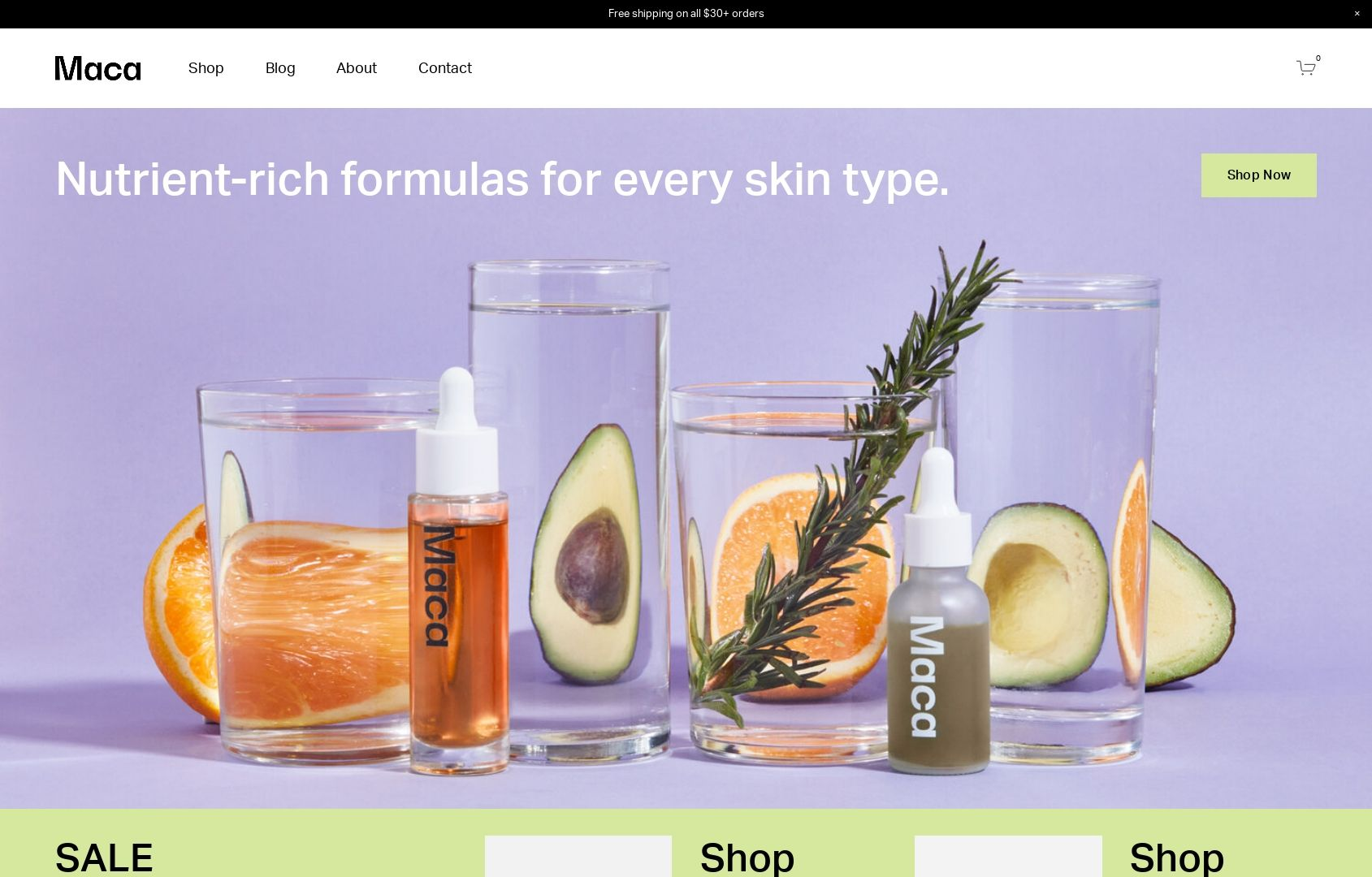
MACA
What I like:
The vibrant colors of Maca just make me happy - and I’m not even a big fan of purple! 😂 The beauty of this template is that I think it would work great even if the colors were toned down a bit. The home page of this template is also super robust with lots of content areas for everything from fave products to shop categories, informational content, and even product features. I also really appreciate the mega footer on this site - everything a customer would need is linked right there while allowing the top navigation to remain simple and tidy.
What I would add/change:
I would definitely turn on the built-in shop category navigation to help people explore the shop better. On Squarespace, you can have up to three levels of nested categories so with lots of products it’s best to put that to use to help people find what they’re looking for quickly. Speaking of categories, I would throw those in the site header just for good measure! Overall, there’s not much not to love with this template!
Paid Templates
Third-party templates like those featured below can be a great way to get a little more style and that little extra “something special” versus starting from a free template. Paid templates are still super economical compared to working with 1:1 with a designer on a complete custom project so they are still a total win in the budget department as well. My two favorite template shops are GoLiveHQ or Ghost Plugins because they are both very reputable and offer excellent customer service.
Paid templates are installed directly into your Squarespace account and you can start editing them right away just like a free template. Some of them also come with some extra CSS code already installed which can really make springing for a paid template worth it. Another bonus is that in general, paid templates tend to have more pages built out with more intricate layouts versus the free templates that may be super generic. This can help you get to “finished” even faster!
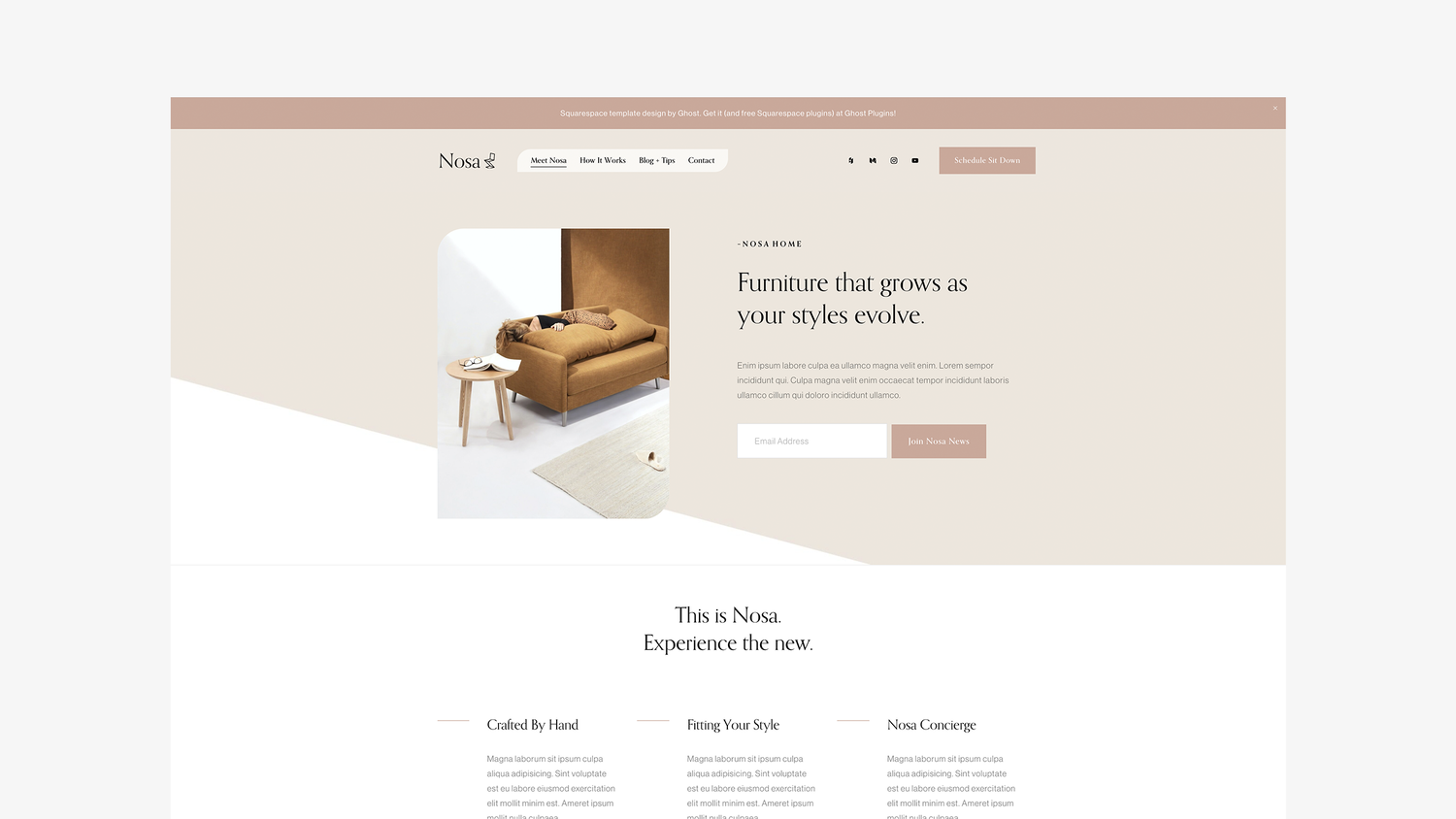
Nosa by Ghost Plugins
What I like:
So much to like! Aside from just having great style that I think could adapt to fit a range of industries and brands, there are tons of great content areas on the home page - and throughout! I love the mega footer, all the signup boxes, and even the super cute contact page! I think this template would be a great fit for a service provider who wants to integrate Squarespace Scheduling or Member Areas but it could work just as well for a subscription-based company or single-product store. Overall, a flexible design with great style!
What I would add/change:
There’s not a lot I would change but depending on the products/services being sold I might swap out the newsletter sign-up boxes in some of the hero image areas for different calls to action such as a button to check out the shop or services page. The unique shape of some of the images and the header menu is definitely a brand choice that isn’t going to work for everyone. Luckily, this can easily be made a bit more traditional by simply removing a couple lines of custom CSS.
Save 10% off any Ghost template with discount code: KRISTINENEIL

Typeset by GoLive
What I like:
This template is billed as great for service providers that have more copy than images but I think it would actually be an awesome choice for a subscription box company or a startup with just a few signature products. The template has lots of room to explain features and benefits alongside a stylish, clean design. Another thing I really love is the blog which you definitely shouldn’t skip just because your primary focus is eCommerce — blogging is a great way to attract new customers, boost SEO and show off your expertise.
What I would add/change:
I would ditch the portfolio - it’s just not needed here. But don’t worry about that leaving gaps in the content areas on the home page or navigation areas, those can be filled in with shop content or links to your subscription products! I would also beef up the footer with more links and a newsletter opt-in. Also, even though I love the fonts that have been selected as part of this template if you feel like adding a pop of color and personality, I would consider changing up the black fonts for a color that’s on-brand. It could make the bold typography really fun!
Lumi by Ghost Plugins
What I like:
This template is just so slick and cool! It is clean but still has a little edge. The floating header navigation can help keep your main links front and center (literally) but you could always disable that and keep it static if it wasn’t for you. I love the icons and features list on the home page and then all the really bold sections down below. Ghost always delivers on an awesome footer and this template is no exception - the newsletter box and links are such valuable real estate!
What I would add/change:
The demo content is set up to take advantage of a Squarespace Scheduling integration (which can be a great eCommerce tool) but if that doesn’t fit with your business, you could easily swap in membership areas, links to subscription products or boxes, or even shop categories! Also, even though I’m a fan of the black and white I wouldn’t be afraid to make this more fun, playful or bold by changing up the color palette in the site styles section. It’s so easy to update everything in just a few clicks!
Save 10% off any Ghost template with discount code: KRISTINENEIL

4 Things You Can Do Today to Boost Website Sales
Sometimes you just need a few quick wins. If you’re feeling like you need to drum up some sales real quick, here are four strategies you can implement today to do just that!
Updated September 2021
Running an eCommerce business isn’t a “build it and they will come” situation. I mean, it would be nice if a live website automatically = sales but that’s just really not the case. This is because getting traffic to your site is one thing but converting those visitors into paying customers is something else entirely.
Disclaimer: If your site’s traffic is pretty solid but you’re just not seeing any sales, I would first take a good, hard look at the site’s branding, positioning, and messaging. A complete lack of sales when you have pretty good traffic is often symptomatic of some deeper issues in one or more of those areas. Customers who are inspired by (and fans of!) your brand will usually find any way possible to buy from you so before you go crazy with the coupon codes, do a little self-reflection and see if you have some work to do to improve your brand positioning. For more help understanding your site’s analytics, check out this post.
Ok, got everything in tip-top shape and ready to boost your sales? Here are four things you can do today to help motivate folks to hit that “add to cart” button!
1. Have a Sale or Create a Discount
Discounts and sales are tricky because you can sometimes train your customers to only buy from you when there’s a discount. However, if you have a new product or service to promote or are looking to entice back people who possibly weren’t otherwise going to buy from you, discounts can be a great tool.
Squarespace allows you to easily create and manage discounts and sales. Here’s when to use each:

What sale items look like on Squarespace.
When to put items on sale - Sales are great if you’re wanting to mark down prices to move excess inventory, book spots that were going to otherwise go unfilled, or draw attention to specific products in your shop. Customers don’t need a discount code to get the discount - it’s just automatically sold at the “sale” price. Putting items on sale also has the added benefit of a special tag being displayed on your shop’s main page to attract attention.
When to use automatic discounts or coupon codes - coupon codes are a great way to offer a discount to a segmented or targeted group of people (i.e. your email list) without giving everything away to just anyone. You can also pair discount codes with some personalized marketing content to help seal the deal or as a way to attract new customers or clients in general. Unlike sale pricing, which is set manually per product, you can use discounts to discount entire shop categories or orders. You can also set up free shipping offers to boost average cart values. For more on discount rules & what you can do with codes and offers on Squarespace, check out this post.
2. Use an Announcement Bar or Pop Up
Don’t expect people to go digging for what you’re offering - show them right up front! Adding an “announcement bar” above your site’s regular navigation area or incorporating a pop-up message to your site can help draw attention to the sales, discounts, or coupon codes you’re running at the moment. An announcement bar is great for highlighting temporary messages without the need to edit any of your main content. A pop-up can do the same things but just has a bit more real estate and styling options to really highlight your message. You can include an image, simple text, and a strong call-to-action button or link to really make them effective. Here are some ideas to help use these features to boost sales:
Let people know about sales or promos that you set up (per above)
Share limited offers or coupon codes available to everyone
Link directly to new products or services
Post deadlines to create a sense of urgency
Highlight awards or press about your products or services
Remember that these selling tools are most effective when you don’t always have them turned on. Website visitors are quick to become blind to them and will often just skip right over them after seeing them more than a few times. I suggest turning one or the other on when you have something genuinely important to promote, then turn off for a while and switch things up so that things feel fresh and current to repeat visitors. To access the settings for these tools on your Squarespace site just go to the Marketing tab!
3. Get Strategic with Paid Ads
Paid ads, when done thoughtfully, are a powerful way to promote your products to targeted shoppers. But to make the most of your ad spend, be sure to:
Identify the 1-2 platforms where your audience is most active and focus your efforts there.
Craft compelling creative and messaging tailored specifically to connect with your customers.
Test different audiences, placements etc. and optimize based on performance data. Start small!
Stay up to date on emerging ad formats and features on your chosen platforms. Capitalize on new opportunities early.
Make the most of any promotional ad credits when available.
Use robust analytics to continuously improve campaign performance over time. Set it and forget it is not effective!
With a strategic, test-and-learn approach, paid ads can be an impactful sales driver. Take the time to understand your customers, craft thoughtful messaging, and keep improving based on data. This will set you up for success as you boost website sales.
4. Hit Your Email List
One of the best reasons to have an email list is that it allows you to have direct access to people who have either bought from you in the past or already expressed interest in you and your products or services! It completely takes away the need to depend on social media! There are so many great email tools available to you, especially if you use Squarespace Email Campaigns in conjunction with your Squarespace eCommerce website! This is a topic I’ve written a lot about so I’ll just drop a link to everything tagged “email marketing” so that you can jump in whether you’re just getting started or are already set up and just in need of a few new email marketing ideas.
Bottom Line
There are lots of great built-in tools in Squarespace to help you boost sales and half the battle is just learning about all the resources available to you! My last piece of advice is that even though this post technically implies that you can do all these things TODAY that my real hope is that you factor all of these elements into a longer-term marketing plan that’s not hurried or rushed. Understand how all these things can fit together to support your business and use the metrics and analytics available to you to make changes and adjust as needed. Soon, you’ll have no problem converting all that great website traffic into a steady stream of sales!

How to Send Delivery Confirmation Messages with Squarespace
Letting your customers know when a package has been delivered with custom delivery confirmation emails can help you increase customer satisfaction and reduce your admin time. There are two options that integrate seamlessly with Squarespace commerce and I’m sharing the pros and cons of each for you!
This is going to sound cheesy but I’ve been waiting for the perfect time to use this sentence: “I’m not just an eCommerce pro - I’m also a customer!” Cringy? Yes. But this means that a lot of the tips I recommend are because I’ve been working in eCommerce since the early 2000s... aaaand a lot of them are because I’ve been shopping online for just about as long.
As a customer, I love love love when I get an email as soon as a package I’ve ordered has been delivered. As a pro, I love that this is something that’s easier than ever for small businesses to be able to do! It’s a really great way to show customers that you care about their experience and be proactive about any issues there may be with the shipment or order. Providing tracking and delivery updates to your Squarespace customers can also really help reduce the number of status update inquiries you or your customer service team have to field so if you ask me this one is a win-win-win.
There are two ways to send custom order tracking and delivery updates to support your Squarespace eCommerce business. I’ve set up both and to me, there’s not necessarily a super clear winner; the best solution will be the one that aligns with your business needs and that may be completely different from someone else’s. I do have a favorite when it comes to simplicity but the alternative is pretty cool too! I’ll detail them both for you so that you can decide!
Easyship
Of course, my favorite shipping extension made it onto this list! And that’s because even if you like the second option below better for post-purchase tracking and delivery updates you’ll still need a shipping extension to be able to get those orders shipped out in the first place. I love Easyship because it has all the great shipping features and capabilities you want (importing orders, creating labels, carrier discounts, shipping rules, etc.) but still manages to have a super simple user interface that makes it a breeze to use.
Easyship is also the only shipping extension that integrates with Squarespace that offers a “shipment delivered” trigger on Zapier which makes it perfect for us to use to set up simple order delivery confirmation emails!
To do this, you’ll just connect both your Easyship account and your business Gmail account to Zapier. From there, it’s as simple as creating your simple stock email that goes out every time the Easyship “shipment delivered” trigger is activated. (For more on using Zapier check out this post: Fun With Zapier for eCommerce.)

Using Zapier to send simple order delivery confirmation messages from Squarespace + Easyship
Pros: Simple, minimal, not much tech setup, low/no cost
Cons: Design and formatting options for the email are limited
Accounts Needed & Costs:
Easyship - Free for up to 100 shipments/month, then $23/mo for an annual Plus plan. The Plus plan also comes with it’s own custom branded tracking page and emails if you’d like to use those instead of the ones generated by Squarespace. Bonus: give Easyship a try by using my code GWZMUM and get a $20 account credit towards shipping costs.
Zapier - Free for up to 100 single-step tasks/month, $19.99 for up to 750 tasks plus the ability to set up multi-step zaps.
Aftership
If you’re looking for the minimalist approach, stop reading and just go with the above! But if you’re looking for a few more features that will really help your small business look pretty badass, Aftership is worth looking into. You’ll still need to use a shipping extension (check out my reviews of all of them here!) to take care of the outgoing shipping situation from your shop but Aftership picks things up from there.
What may surprise you about this option is that it’s actually pretty dang affordable to do things that used to only be available to huge online sellers like sending branded step-by-step delivery updates and a tracking page with upselling marketing opportunities. While it’s definitely more labor-intensive to set up all the features (there are almost too many of them!), if you’re a growing eCommerce business it may be worth it.
Aftership is also a great option if you’ve been wanting to do things like send text updates about shipments or offer automated returns in the future since those are easy add-ons from the base subscription.
To get started with Aftership, from your Squarespace home screen go to Settings > Extensions > Aftership > Connect.
Pros: Fancier-looking emails, more options if you want to add them, low cost
Cons: Complicated set up with lots of (almost too many!) options, more apps to log in to
Accounts Needed & Costs:
Shipping extension of your choice - such as Easyship (above) in order to manage your outgoing shipments
Aftership Tracking - $9/month for up to 1,200 shipments per year, cost goes up based on usage and if you want any of the upgraded features. The Essential plan will get you a branded tracking page and custom email notifications for when order is in transit, out for delivery, there has been a failed delivery attempt, when the shipment is delivered and/or a delivery exception.
(Optional) SMS notifications - $0.04/text, to also notify customers by SMS about shipments
(Optional) Aftership Returns - free for up to 3 returns per month, paid plans start at $9/month to be able to create an interactive returns page that will allow you to manage returns to your Squarespace store
Bottom Line
Keeping your customers in the loop can not only help reduce the number of customer service inquiries you have to field, but it can also be just another way to help your small business look big online. While I definitely like to be cautious when incorporating new apps or software into my tech lineup, using Easyship or Easyship + Aftership are affordable ways to improve customer experience that integrate so seamlessly with Squarespace that they have my minimalist’s stamp of approval!

Legal Checklist for New eCommerce Businesses
From LLCs to EINs and business bank accounts to domain names, here’s your legal eCommerce to do list in one, tidy place! I’m turning to a trusted legal expert for guidance and sharing some eCommerce-specific tips to help you make sure you’re building a strong foundation for your new online business.
Starting a new business, especially an online shop or an eCommerce business, can sometimes feel like heading out for an exotic vacation. You’re excited to get where you’re going and you have a ton of cool ideas of how things are going to go once you get there but you arrive at the airport pretty much convinced that you’ve forgotten to pack something critically important. You just have that anxious feeling that no matter how well prepared you thought you were that you’ve somehow left something behind. And the anxiety over this can sometimes be enough to ruin the whole trip!
Well, consider this your packing checklist for setting off on the right foot for your eCommerce journey! As someone who’s started multiple small businesses myself, I definitely wish I had come across something like this that was complete and <b>trustworthy</b>. I even thought about putting together a list myself but {newsflash} I’m no lawyer. So I was super excited when an email from Paige Hulse of Paige Hulse Law and the Creative Law Shop recently came across my inbox on this exact topic!
In her post, Paige details all the steps on how to legally start an online shop. You should definitely click through to her post to get out all the legal specifics but I’m going to summarize most of them here, along with a few additions and notes that I think will help specifically ensure that you’re set up for eCommerce success!
Run a Name Search - This seems obvious but there’s a reason why it’s repeated over and over - and why it’s number one on the list! Paige rightfully mentions that most people check whether the domain they want or the social media handles that match are available and often do little else but that’s not the only error some new business owners make when it comes to naming. What I’ve experienced is that too many people fall into the trap of thinking too small when it comes to their name. They either don’t make their search wide enough when looking for any potential conflicts or they settle for a super limited local name just because the domain is available. For more domain name tips, check out this post (hint: #4 is all about domains).
Get Any Required Licenses & Permits - The exact list is going to vary widely depending on what you’re selling and where you’re located but it’s worth seeking out someone who is familiar with 1) your industry, 2) your area and 3) eCommerce for guidance. That last one is super important because even though selling online is still a little bit like the wild, wild West there are changes and new laws cropping up all the time. Also, just because you work from home does not mean you are somehow exempt from licensing. The last thing you want is to get shut down or see some major fines in the future because you didn’t have the right credentials in place or pay the proper fees.
Legal Contracts Are Your Friend - Don’t sleep on this step! Not only is it super important to set up the required privacy policies and terms of service for your eCommerce website, but it’s also really become more affordable than ever to make sure you’re protected. Check out this post that includes two of my favorite options. This is really a non-negotiable and not something you can opt-out of and just “take care of later.” If you plan on selling online, you need these legal policies and clauses in place. (If you’d like to learn even more about GDPR compliance, check out this post from Style Factory!)
File Your LLC - Obviously, you may want to check with your own lawyer and maybe even loop in your tax dude on this decision but the point really is that you need to make sure that your business assets and your personal assets are not one and the same. A DBA does not cut it. An LLC is the most popular route to take to make sure that you're protected. In the words of the late, great Notorious B.I.G.: keep your family and business completely separated.
Get Your EIN Number - Surprisingly, this is one of the fastest tasks on the list! Who knew that a solution featuring irs.gov would ever be so easy?!
Open a Business Bank Account - Remember: no mixing things up. Personal money 👉 personal account. Business money 👉 business account. Simple.
Get Insured - This is another situation where it pays to seek out someone familiar with your business/industry and eCommerce in general. Even if it’s just a general liability policy, you want to be protected.
Website Stuff - I do think that you can do a little more in this step beyond just making sure that your legal policies and copyright are linked in your website footer, although both of those are super important! One of the more intricate things that comes up with each and every client I work with is sales tax. And it’s no surprise to me that everyone is confused - it can be super complicated! Everything from the exact rates to how sales tax should be displayed and collected on your site can vary based on what you’re selling, where you’re located, where your customers are located and everything in between! You definitely want to confirm the specifics for your own case with your accountant or tax professional but the thing that I would recommend to everyone is planning on utilizing the automatic tax rates feature on Squarespace to ensure that sales tax is calculated correctly for each and every online transaction.
Register Your Copyright or Trademark - This is super important if your business is anything other than your name but check out Paige’s post for all the details! I think this is especially important if you’re selling your own custom products such as t-shirts with your own designs or prints of your own photography work, etc. We’ve all read those horror stories about independent creators having their ideas stolen by big brands without credit. Again, don’t think small here; you’ll be thankful that you took care of these things early on!
Bottom Line
Getting started with your first online shop doesn’t have to be an overwhelming experience! Use guides like these to help you feel confident in setting off on your eCommerce journey without worrying that you’ve left something behind or forgot to turn off the stove! 🔥 Once you’ve taken care of the things on your legal list, you can confidently turn your attention to the fun stuff, like web design. For those next steps, check out: A Step-by-Step Guide on How to Set Up Your First Online Shop.

3 Squarespace eCommerce Myths - Busted!
Busting myths right and left when it comes to eCommerce on Squarespace. Haters gonna hate but they also gonna still be working on their website while you're busy watching sales roll in on Squarespace 🤷♀️
Updated August 2021
Sometimes for fun - and in the name of "competitor research” I like to Google things like “Is Squarespace good for eCommerce?” and “Should I use Squarespace for my eCommerce website?" just to see what people are saying. It helps me keep in touch with the good, the bad, the ugly, and - sometimes - the just plain wrong. Since this post was originally published Squarespace has become an even stronger eCommerce solution and yet I still regularly see outdated or even just blatantly incorrect information out there. So, in an effort to keep the misinformation to a minimum let’s bust some Squarespace eCommerce myths!
Myth #1
Design options are limited on Squarespace
Truth
Squarespace templates help you save time & money
Not only do all of Squarespace’s templates allow you to build an online store of any size but there are virtually no limits to design or functionality. And just because a template looks one way right out of the box doesn’t mean things have to (or should!) stay that way. The best part of starting from a template (whether free or paid) is that it’s a great way to not have to reinvent the wheel and start a new site from scratch each time. This is the “standing on the shoulders of giants” approach and I, for one, and here for it! By allowing a template to do some of the heavy lifting, you can devote your precious time and resources to really building out the experience of your site and getting all the selling tools in place to support your business.
Dig Deeper:
How to pick the right Squarespace template for your eCommerce site →
Myth #2
There are limits to what you can sell on Squarespace
TRUTH
You can sell more on Squarespace than Shopify
Not only are you allowed more products, more options, and more variations on Squarespace than on Shopify, there’s really no limit to what you can sell without needing to tack on additional paid apps or string multiple systems together into some sort of “hacked” experience. Additionally, because of all the different things you can sell on Squarespace without needing to look elsewhere for solutions, there tends to be a lot of wiggle room in how you can set things up so that you can make sure the experience is tailored perfectly for your brand. This allows a level of both creative & technical freedom that you’ll be hardpressed to find anywhere else.
Dig Deeper:
Myth #3
Analytics & SEO features are lacking
TRUTH
Squarespace has awesome commerce analytics & SEO Features built right in!
I think I finally figured out that the reason why this myth persists is that there are some folks out there that benefit from it being true - namely people trying to scam you with sketchy search ranking guarantees and make you doubt your own ability to read a graph or chart 🙃There’s also the misconception that just because something is easy that it can’t also be effective. Squarespace has all the same SEO powers as any other platform, they just don’t make you work double-time to access them or put them to use. They just. Work. The same thing goes for analytics; all the data you need (and then some) is right there, made plain and simple so that you can have the data you need readily available to make business decisions.
Dig Deeper: