

Notes on building smarter websites for actual humans.

Top 5 Squarespace Shop Mistakes & How to Fix Them
Squarespace makes opening an online store smooth but scaling operations takes strategy. This post reveals the top 5 store management mistakes that may be hurting your growth and actionable ways to get back on track.
Listen, I get it. Setting up an online store via Squarespace offers a ton of out-of-the-box simplicity compared to tackling site design and a pile of code, and the beautiful templates and intuitive CMS make opening up shop online a breeze.
But don’t let that ease fool you - scaling eCommerce operations into a high-performing machine still takes savvy strategy. Without thoughtful setup and smart management choices, what seems straightforward can quickly snowball into an overwhelming headache.
Over my years building websites and consulting for scaling entrepreneurs looking to unlock growth through eCommerce, I’ve seen merchants make some common Squarespace store management mistakes that shoot future success in the foot.
Lucky for you though, these pitfalls are avoidable if you know what to watch out for! In this post, we’ll review five frequent problem areas and - more importantly - how to course correct.
Mistake #1
Improper Inventory Tracking
Without careful record keeping, items get lost in distribution centers and warehouses faster than a banana bread disappears at a farmer’s market.
Problem: Failing to thoughtfully organize inventory into Squarespace’s categories, tags or other filters makes scaling untenable. Plus not actively monitoring stock levels and reordering timeframes means unpleasant sell outs and scrambling to restock hot items.
Outcome: You can’t find product inventory when needed for an order. Items sell out and diehard customers get turned away empty handed. Massive revenue opportunity cost.
Solution: First, logically segment your catalog with categories and nested subcategories so both you and shoppers can navigate quickly at scale. For example, categorize apparel by type (shirts, pants), further broken down by style (casual, dress), gender, brand, etc.
Monitor best selling items and set minimum stock alerts tied to reorder timeframes by leveraging Squarespace’s built-in analytics and integrating an inventory management extension. Data is your friend!
Mistake #2
Complicated Shipping Options
Free shipping or no free shipping? Zones or flat rates? Tiered pricing by item cost or calculated by carrier? Decisions, decisions.
Problem: It’s easy to get excited by Squarespace’s expansive built-in shipping functionality and go overboard configuring a confusing spider web of custom rates, surcharges, and limitations. But this complexity quickly becomes a barrier preventing checkout and you’ll start to see abandoned cart rates skyrocket.
Outcome: Customers bounce from cart when they can’t clearly understand shipping fees or find an option that seems reasonably priced. Plus you sink unnecessary hours fielding customer service inquiries trying to explain variances.
Solution: I cannot stress enough - simple is best! Studies show free shipping dramatically increases conversion. So make that your hero offer as much as possible by baking modest shipping costs into base prices.
For supplementary paid shipping, configure just 2-3 flat rate tiers based on cart value brackets like under $50, $50-$100, and over $100. Publish handling times by common carriers. Be transparent upfront to set expectations. (p.s. This is all great info for an FAQ page.)
Mistake #3
Discounts Devaluing Products
Everyone loves a deal, there’s no doubt about it. But the lure of juicing short-term sales through discounts often backfires over the long haul.
Problem: Rather than special limited-time or targeted offers, you fall into the trap of keeping items perpetually “on sale” through sitewide promo codes plastered on your site.
Outcome: Customers quickly become trained to only purchase when receiving a discount and abandon carts or hold off buying items at full retail value. Your products seem meaningless without deals.
Solution: Shift promotional focus from widespread price cuts to exclusivity. Highlight specialty collaborations driving scarcity. Use segmented emails with special subscriber sales. Offer new customer discounts but fade them over time through customer lifetime value marketing.
Sparingly advertise discounts around seasonal launches or holidays using banners - then quickly revert back to regular prices. You want to seem generous at times without eroding product value. (Check out this post for more pricing psychology tips.)
Mistake #4
Gaps in Inventory & Order Visibility
With countless product details and customer orders to track daily, it's easy for gaps in visibility to emerge if you’re not proactive.
Problem: Relying on manual spreadsheets and notes rather than a centralized system leads to order processing delays, inventory blindspots, lack of customer purchase history, and more.
Outcome: You oversell out-of-stock items, mishandle customer data, respond slowly to fulfill orders without a 360-degree view. And with no analytics insights, you miss sales trends.
Solution: Eliminate blindspots by centralizing critical info and workflows into Squarespace’s stock tracking, order management, and customer profiles. Standardize order processing procedures. Export analytics reports to make smart decisions based on data.
Staying on top of the details can help you know when to cut items from your inventory, understand which customers purchase most often and help you streamline your back office procedures. Start leveraging the platform tools available to you!
Mistake #5
Transactional vs. Personalized Customer Experience
In the early days of your business, my guess is that you were on a first name basis with every shopper. And while growth is good, it’s easy to forget how important personalization was in making it all happen.
Problem: Once you scaled, customers became faceless transactions rather than unique individuals with preferences and a previous purchase history with your brand.
Outcome: Failure to make shoppers feel special can send them elsewhere to shop, which also means you miss out on referrals and community enthusiasm from loyal brand advocates.
Solution: Tap back into the CRM power built right into Squarespace like saved customer profiles and order data. Segment users by lifetime value bands so your VIP shoppers feel appreciated through special treatment and exclusive offers.
Send post-purchase surveys to identify pain points requiring attention across the buying journey. Personally respond to negative reviews. Have loyalty or affiliate programs that foster community among top fans.
Remember - personalized customer experiences drive measurable revenue gains, increased retention, valuable insights, and free word-of-mouth promotion! Don’t leave that money on the table.
Bottom Line
While it's easy to fall into these common eCommerce pitfalls, the good news is that they are all avoidable with a bit of diligent preparation and process focus upfront. Leverage the tools already available in your Squarespace platform and think proactively. Carefully organize behind-the-scenes workflows just as thoughtfully as you design the customer-facing storefront. Monitor key metrics. Continuously gather feedback. And never lose sight of the individual people who make this business possible - your customers!
By taking the time to purposefully streamline operations and experiences, you equip your brand for scalable, sustainable growth. So be confident in your path forward, learn from mistakes, and continue delighting shoppers - that's the recipe for long-term eCommerce success.

What does it cost to start an eCommerce website in 2024?
Are you thinking about starting a website on Squarespace in 2023? In this blog post, I break down the costs of getting started on Squarespace, including domain registration, hosting fees, and premium design templates. Whether you're launching a simple shop or a robust online store, I've got you covered with all the pricing information you need to make an informed decision. Find out what it really costs to start a Squarespace website in 2023 and start building your online presence today.
Starting an eCommerce website can be an exciting way to sell products or services online and reach a wider audience. It’s no secret that my favorite platform for building an eCommerce website is Squarespace, which offers a range of templates and features to create a professional-looking website and super powerful online shop. But what does it cost to start an eCommerce website on Squarespace in 2024? In this post, I’ll break down the various costs associated with building and maintaining an eCommerce website on Squarespace, including template and plan pricing, payment processing fees, and other potential expenses.
Before we jump into the details, I have a few helpful tips to keep in mind about pricing in general:
Tip #1
Choose the right tool (or suite of tools) for the job
There are still a lot of people out there who seem to think that eCommerce is a costly undertaking, completely out of their reach. While this can definitely be the case if you’re using the wrong tools, I think it’s why it’s so important to make sure you know about all the options out there and what exactly each tool does. It’s also important to have a clear idea of exactly how each piece of software or app you plan on using specifically fits into your business ecosystem. I’ve seen too many business owners paying for redundant systems because they didn’t realize that Software A had the same features or capabilities as App B. (For some of my favorite tech combos for small businesses check out this post.)
Tip #2
Don’t be afraid of monthly subscription costs - just be smart about them
Look, I hate being nickel-and-dimed as much as the next person and I know it’s super annoying that everything these days seems to come with a monthly or annual subscription cost. However, paying monthly subscription costs for apps or software is definitely no more expensive than developing something custom. In fact, custom development is often much, more more expensive. I’ve had more than a few potential clients come to me over the years and inquire about building a custom solution for them because they either “can’t afford” or “don’t like” the monthly costs associated with various apps or tools to do the job. TL;DR things didn’t work out.
Think of it like this: if a company like Squarespace spends a lot of money on R&D to build a powerful eCommerce platform they can either charge a small number of big companies a ton for it (because those companies can afford it) -- or they can charge a large number of small businesses a little for it. Monthly subscription costs offer smaller players the opportunity to use the same tools that used to only be available to the big guys and so I say this is a huge win for small businesses! Love it or hate it, that SaaS model is what has helped put the cost of eCommerce website development into the realm of possibility for many small business owners that may not otherwise be able to afford it.
Tip #3
Don’t forget about tangential costs
It would be impossible for me to estimate all of these things because there are so many variables but there can be quite a few “non-website” costs that can impact the overall success of a website. Upfront costs are things like investing in great branding, strong product photography and compelling copywriting. You might also have ongoing expenses for things like paid ads, promoted posts, social media marketing, social media strategy and SEO. All of this is just to say that while the costs I’m going to outline below are a good place to start for the actual website part of things that you should expect to budget for these other upfront and ongoing costs to get the most out of your investment in a website.
What does it cost to start an eCommerce website in 2024?
Upfront Costs
The bulk of the expenses of an eCommerce website project come in the setup / getting started stage. There are three main factors to consider: the cost of a custom website template (if you choose to go that route), the cost of working with a web design professional to design/build/develop your site, and whether you need to add any third party plugins to customize your site.
Squarespace Template
All modern websites are built off a starting theme or template. This is just a framework that’s used as a jumping-off point so that you don’t have to reinvent the wheel with every new website.
One of my favorite things about Squarespace is that even the free templates are all modern and beautiful. Even better, sites built on the Squarespace 7.1 platform don’t even really need to choose between templates like before because all templates have the exact same features. This means that you’ll never be locked into anything by choosing the “wrong” template.
You also have the option on Squarespace from buying a template design from a third-party designer which is kind of like a compromise between using one of the free templates and going all-in with a web designer (like below). Paid templates are a really affordable way to get a “custom” look without the custom price tag and allow you to get started really quickly so IMHO they are well worth their very affordable price tags!
For more on templates, check out these posts:
Total template cost: $0-$399
Web Designer
I mean, not to be too biased or anything but this is where your investment can really make the difference 😉 especially when it comes to making your chosen template stand out from the crowd. An experienced web designer can use custom CSS, HTML, and javascript to tweak templates so they don’t look so generic and will have an excellent understanding of UX/UI best practices so that your finished site looks professional and converts visitors into customers!
The cost of a web designer is going to vary based on their years of experience but also just the going rate for the type of projects they specialize in and the clients they work for. For example, a designer that works mostly for local businesses in a small, rural town is probably going to have a lower hourly rate than someone who works for brand name companies in NY or LA. This doesn’t mean that one’s work is necessarily more valuable than the other, just that they cater to different markets and meet different needs. For an average small-to-medium business looking to either build their first eCommerce site or revamp an existing one, I have seen designers charge as little as $1000 and as much as $7000 or more.
When comparing web designers, it’s important to not just compare the bottom line cost but also the deliverables. What are you getting exactly? How many pages? How many products? Will you be getting help with SEO or copywriting in addition to the web design setup? What’s not included or is going to cost extra? Take a look at all of these things so you know exactly what you’re paying for.
Last note on this subject: if you feel like you’re somewhat technically inclined and interested in learning some of the basics you could always forgo hiring a designer and go the DIY route. As with most things of this nature, you have to understand that what you save in money doing it yourself will probably cost you in time. An expert can work a zillion times faster and knows what pitfalls and roadblocks to look out for. In most cases, I think that optimizing your time to market is a super relevant factor to consider; after all, you can’t start making money until you launch so spending too long in the development phase has a cost all its own.
Total web designer cost: $0-$7000+
Squarespace Plugins
These are code snippets that extend the functionality of your site and unlike other third party apps below, most of these you only have to pay for once when you first set them up. Check out my favorite plugins for Squarespace eCommerce in this post.
Total Squarespace plugin costs: $0-$160
Recurring Costs
Beyond the initial setup, there are some website expenses that you’re going to get billed regularly for, either monthly or annually. Paying annually almost always comes with a discount over paying monthly so save yourself some $$ and always sign up for subscriptions annually!
Squarespace Costs
Here are the main expenses for a Squarespace eCommerce website:
Website Subscription $276 - 588 / year - I break down the difference in all the plans in this post but this cost is for either the Basic or Advanced Commerce plans
Domain $9-12 / year - Unless you’re new to Squarespace and pay for an annual subscription in which case you get your first year FREE!
Email (G Suite)* $6 / user / month - Same as with the domain/hosting, above - Squarespace offers this FREE for one year for new accounts.
Third Party Tools
Alright, this is where things get VARIABLE because the apps you choose to use are going to probably different than the apps someone else uses making this super unique to each business. That being said, here are the rough costs for the things that I recommend for ALL business:
Email Marketing Subscription $60 - $420 / year - Compare my top three picks in this post
LiveChat $492 / year - more on my favorite tool for this and why I think it’s so important here
Legal Policies $99 / year - make sure you protect your business with an ironclad privacy policy and terms of service
Aftership $108 - $1188 / year - a custom order tracking page can make your small business look totally awesome
Automatic Returns Platform $0 - $1188 / year - worth every penny even if no one returns a thing. Find out why in this post.
Bottom Line
Modern eCommerce software has made it so much more affordable for small businesses to enter the market and even those pesky monthly costs should be considered manageable versus the high custom development costs of yesteryear. When it comes to total expenses, there are some ways to make sure you get the best bang for your buck by carefully selecting a platform and template that meets your business needs. Armed with the right tools and people on your team, you can keep monthly expenses in check and focus on growing your business.

9 Ways to Recession-Proof Your eCommerce Business
Worried about the economic times we live in? Well, I can’t do much about a lot of it, but I do have 9 strategies for you to consider implementing to help ease your customer’s spending concerns - and your worried mind. From what to focus on to how to pivot, this post is full of quick wins for hard times.
Times of economic uncertainty can undoubtedly be the cause of sleepless nights. And, c'mon - it would be weird if worries about customers' ability or willingness to spend and other general financial concerns didn't get to us!
But savvy entrepreneurs have a way of always getting creative when times seem the toughest. This is where brands, especially smaller ones, get to show off their flexibility and ability to pivot in ways that giant corporations simply cannot.
For small eCommerce brands specifically, there are some quick changes you can make to your online store to ensure you can weather any financial storm that may lie ahead. In this post, we'll explore practical ways to recession-proof your eCommerce website. We will discuss strategies for rethinking marketing, focusing on customer retention and inventory management. Bonus: these are all relatively easy-to-implement, low or no-cost ideas you can implement immediately to boost average cart values, deal with lower conversion rates and cope with less traffic to your site. Let's dig in!
Add subscriptions to your mix. If you find that customers routinely return to your shop to buy the same products repeatedly, make it easy for them by offering those same products as a subscription. Offer a discount versus paying for the same products or services piecemeal. Not only will your customers enjoy the savings and added convenience, but you'll also be able to add recurring revenue to the books.
Don't give up on your free shipping offer. I cannot preach enough about the importance of a free shipping offer. If you must rethink pricing, preserve and protect your free shipping offer with your life. Price-sensitive customers hate feeling like they were nickel-and-dimed over shipping fees and like thinking they're getting a great deal. Better yet, a free shipping option for orders over a certain amount helps boost your average cart values and reduce abandoned cart rates by people surprised by shipping costs.
Focus on customer loyalty. You know that saying about how acquiring a new customer costs more than keeping an old one? It's true. With the prospect of smaller average cart values or less traffic overall due to tightened budgets, focus on customer loyalty first and foremost. You can do this in many ways, such as setting up a loyalty program that allows customers to pay for purchases with earned points or perks.
Rethink marketing. You can reduce wasteful spending and boost revenue by cutting back on digital paid spend and going straight to the horse's mouth. Rather than continuing to invest in expensive paid advertising, consider shifting your focus to utilizing customer data to guide your marketing decisions. Consider leveraging the power of small influencers (or even your own satisfied customers!) to help spread your message. Another idea is to explore collaborations with relevant brands and creators and consider offering products as gifts to small influencers to help build brand awareness.
Manage inventory better. Does it seem like there's always either too much or too little stock on hand? If you need help with the former problem, try focusing on building industry partnerships or collabs to introduce your products to new markets. If the latter is more of your issue, it might be time to start looking for new suppliers closer to home or sourcing from multiple suppliers. And for all, try adding a custom label to products you can keep consistently in stock and ready to ship so customers know they can get those items right away. I've seen a few brands do this or even create whole "Quick Ship" categories, and I think it's such a great idea!
Focus on your brand. To make the most of limited resources, prioritize establishing a solid brand. This involves ensuring consistency in your message, tone, and visual identity, as confusing branding can hinder customer conversion. Additionally, take time to evaluate and improve your customer service and clearly understand your target audience. Remember that you can't appeal to everyone, so focusing on a segmented marketplace actually allows you to best serve your core customers.
Boost customer confidence on the product page. Optimizing your product details pages can impact your bottom line in two ways. First by increasing customer confidence in their purchase decisions and second by reducing costly returns. Be sure to include detailed and comprehensive product descriptions that accurately convey the features and benefits of the product. Incorporate video - especially 360-degree views that allow customers to thoroughly examine the product from all angles and better understand what they can expect. Also, ensure you're displaying customer reviews, as they can help build trust and provide valuable insights into the product's performance and suitability. (For more tips on optimizing your Squarespace product pages check out this post!)
Incorporate user-generated video. Studies have repeatedly shown that videos (especially short videos that answer the question "Why should I buy?") are great conversion tools - but video production can be overwhelming and expensive. Luckily, videos from past customers are just as helpful as content you might produce on your own - acting as part social proof and part explainer video all in one.
Expand local pickup & delivery options. If you're an online seller that also offers in-person buying opportunities, the Venn diagram of online customers and in-person customers probably has a ton of overlap. Offering local pickup options (and/or delivery if you can swing it) has a few benefits. First, it's generally faster and cheaper than shipping goods, which can appeal to shoppers on a budget. Second, it allows you to build stronger personal relationships with your customers and invite them to explore other offerings they may have yet to consider. Don't have a brick-and-mortar location? Try teaming up with another local business that does and see if they'd be open to allowing your customers to pick up from their location - this could be a win-win for both companies!
Silver Linings
Looking at the list above, I see a few themes that may just be the silver linings. One of the biggest is that, in many ways, while eCommerce opens up the whole world to us, locality still matters. Whether we're sourcing products from suppliers closer to home, building relationships with micro-influencers, or offering ways to bring online convenience to brick-and-mortar shopping - I love to see it!
Also, let's be honest: only some businesses have the strength or fortitude to ride out a downturn. While that's definitely sad, it also opens up opportunities for newcomers to the market to step in and fill in the gaps. Starting a business in a downturn can help you seize market share and build a strong foundation coming out the other side. If you've been sitting on a big idea, this may be just the time to take your shot.

SEO Best Practices for Product Pages
How do you help the right people discover your products? Follow these tips and best practices for your product pages to appeal to customers and search engines alike.
When it comes to Squarespace SEO, I usually defer to the experts and always recommend starting from Squarespace’s own SEO checklist. This is a great resource to start dabbling in improving your site’s search performance and touches on all the site-wide best practices. There are some specific things you can do on your product pages to give things a boost as well though and that’s what we’re going to be talking about here!
First, A Big Fat Disclaimer
SEO is crazy complex and a niche unto itself. When we talk about improving things for SEO purposes, we’re talking about the super long game. Changes you make today will have virtually no impact on how things perform tomorrow but may have measurable ripple effects over time. So, if you’re here thinking that making these changes are going to magically change how your site performs in search overnight, you will be disappointed.
BUT this does not mean that they aren’t worth doing – just want to set some realistic expectations here! Ok, onward!
Squarespace eCommerce SEO
One of the most important things you can do before you jump into your product pages specifically is make sure your site is connected to Google Search Console. (Step-by-step instructions on that in this Squarespace support article.) Doing this will help serve up some pretty helpful info to your Squarespace analytics dashboard. You’ll want to use this info to help you compile a list of relevant keywords that you can incorporate into your product pages.
Related Post: Crash Course: The Squarespace Commerce Analytics Panel
Once you have that done, it’s time to head to your shop and take a look at your products.
How to Optimize Your Product Pages for SEO
Here’s a checklist of 6 specific things each of your product pages should have in place.

Product Names
Remember that keyword list I told you to make using the info from your analytics panel, above? Whenever possible, using one or more of those relevant keywords right in your product names can help connect your product to a customer's search query.
Don’t work too hard to force anything (human readers matter more than robot ones!) – and know that for the most part your product names are naturally going to be relevant without needing to try too hard. (If they aren’t, ask yourself whether they truly have a place in your shop.)
It can also be helpful to use descriptive words that might match up to your shop’s tags or categories right in the product name. Example: instead of “sweatshirt” try “Women’s 100% Cotton Vintage Sweatshirt”

Product Descriptions
For each product, you’ll want to be sure to write descriptions that include more of those keywords from your list. Describe what sets your item apart from the competition, highlight relevant features or explain what makes your product worth buying.
If you’re struggling with what to say, I always think that tapping into one of the 5 senses helps; for example - describing the way a fabric feels in detail or how a candle smells using descriptive words.
The one thing you don’t want to do is drone on for too long in your main product description. Keep things relatively short (roughly 3 sentences at most) is a good guide. Add other information, including technical details, product specs, longer descriptions and more to the Additional Information section. This makes it so people don’t have to scroll too far from the top of your page to get to the “Add to Cart” button!

Product Images
I promise not to tell you that a picture is worth a thousand words. But I can’t lie to you: your product photography can really make or break your entire eCommerce experience. There’s nothing that will make a potential customer click away faster than bad product photos (think: poorly shot, poorly lit, inconsistent in style). So don’t be stingy on product photos! For each product, include shots of the front, back and sides if you can. Depending on what you’re selling you may also want to include close-up shots of details (so people can see things like fabric texture or how a product is assembled) or other angles. Bonus points for 360 videos or gifs!
Related Post: 6 Simple Tips for eCommerce Photography that Converts

Product Prices
I’m kind of hoping that you already did this before deciding to launch your business 😬 but please take the time to research products similar to what you’re selling to make sure your prices are competitive. This is another situation where not only will your actual human shoppers notice when things feel off but so will Google and other search engines.
If there’s a reason why your products are significantly higher (or lower) than the competition, you’ll want to make sure that your copy (including relevant keywords) backs that up. Example: if your line of soda is priced significantly higher than average make sure that you’re describing why using keywords like: organic, hand-crafted, small batch, locally sourced ingredients, etc. This information can help explain that we’re not comparing apples to apples.

Product URLs
I’ve hinted at this a bit above but one of the most important things about SEO is to remember that you need to appeal to both humans and search engines alike. Sellers used to try to “trick” search engines by stuffing keywords into every nook and cranny, including product URLs. But remember that Google is very smart and you cannot get by with any dirty little tricks like this.
So, the secret to a great product URL is to keep things short and sweet. URLs with too many keywords are red flags as are keywords that contain much more than the simple product name.
If you followed the advice above on how to name your products using relevant keywords where appropriate, making your product URLs your simple product name is all you’ll need to do.
(Bonus tip: clean up any odd bits that get added automatically to URLs if you’re duplicating products. For example, change “womens-wool-socks-h3lm23” to just “womens-wool-socks.”

Product SEO Title & Description
For each of your products on Squarespace, you also get a chance to write specific information that you’d like search engines to pick up. In the absence of this info, Google will use the other info on the page to try to fill in the blanks so it’s best to just serve it up exactly how you’d like it.
SEO titles for products should be about 100 characters or between 5 and 10 words to make sure it appears correctly in search results. Longer titles may get cut off. If your product names are about this length, I would say to just make your SEO title = your product name but if you have any extra room you could add the name of your collection or another product attribute.
SEO product descriptions are what displays right below the title above in search results. You want to cap this at about 400 characters and first and foremost make it human-readable. Use product keywords naturally incorporated into a shortened product description and you’ll make it easy for customers to find your products as a result of their search queries!
Bottom Line
SEO can be a little overwhelming but most of the best practices help improve your site as much for your real life customers as they do search engines. Thinking about how your customers experience your site, what information they need and how you can best communicate to them digitally will ultimately also help your site perform better in search. When it comes to your product pages, incorporate the tips in the 7 areas above for each and every item you sell and over time you should find that more of the right people are finding you.

Ecommerce Pricing Strategies That Will Help You Increase Your Bottom Line
Pricing strategies are some of my favorite things to explore because it's just so fascinating how our consumer brains work. These aren't tricks, just proven ways to help you sell more on your eCommerce site.
Updated July 2022
Something everyone in business struggles with is pricing. If things sell quickly, we worry that maybe we could have priced higher and made more money. If things aren’t selling at all we are quick to cut prices, rationalizing that “any sale is better than no sale” and eat away at our profits in the process.
The thing about pricing is that getting it right isn’t just dumb luck. There are strategies (with actual science and psychology to back them up) that can help you figure out how to position your products and services to optimize profit.
1. Cheaper Isn’t Always Better
This is an example of how what you say about your pricing matters almost as much as what the actual price is. (Copywriters worldwide are applauding me right now!) Imagine someone selling fake designer sunglasses on a street corner. Their only sales pitch is that they are cheaper than their competition (either other fakes or the real thing). They don’t tell you why (inferior materials, cheap labor, potentially stolen goods, whatever), they are just telling you that you’re not going to find a cheaper pair of sunglasses anywhere. Do you buy it? Of course, you don’t! Because your mind immediately thought it was a scam or a trick. Why would they be pointing out their competitor’s pricing if there wasn’t something great about their own product that they could promote instead? Leaning on price alone as a differentiator is a race to the bottom.
Takeaway: Don’t mention your competitors or their prices unless you can also provide damn good reasons why you’re a more affordable alternative. Explain that you have better purchasing power or a more refined process or more high-tech manufacturing facilities or whatever it is. Let that be the differentiator and the pricing won’t matter.
2. Give Them a Price Anchor
Price anchoring is a nifty little pricing psychology hack that I often compare to the jewelry case at Costco. Have you ever lingered a while at the Costco jewelry case? It’s a price anchoring master class. Why? Because there is always that one singular engagement ring that is glittering and giant and comes with a price tag of something like $99,193.74. This makes you laugh in horror because who in their right mind would buy this? No one. But you know what suddenly looks super awesome? That very reasonably priced and almost as sparkly stunner right next to it. Why does Costco put this anchor ring in the case? To make the prices of all other rings seem like a bargain. Once your mind has been shocked by the first price, all other prices will seem reasonable by comparison.
Takeaway: When giving people options, make sure there are perceivable differences in cost and value. On the off chance someone goes for your super-premium option you’re in the money but in the everyday scenario, the item you really want to sell will seem like the best deal by comparison.
3. Play With The Digits
There are tons of different articles, strategies, and theories out there about how the way we present the price of what we’re selling affects the bottom line and they can all agree on this: when in doubt, shift the digits up or down.
Down Shift (Charm Pricing)
Charm pricing is so ubiquitous that it’s everywhere and even though we’re all super aware of it, none of us seems to be immune to it. It is wildly effective! It’s basically reducing the price by one cent to a number that ends in 9 (or 5, but 9 is more popular).
So: making something that is $10.00 ➞ $9.99
Why this works: scientists aren’t 100% in agreement on why but one theory is that because the price is specific that we feel like its value is calculated very precisely. Others say that because we calculate the value of a product or service based on the perceived loss that we read $9.99 as cheaper than $10.00 or that we feel like we’ve saved money by buying something for $9 rather than $10.
Up Shift (Prestige Pricing)
On the flip side, shifting prices up by a cent or rounding them to even numbers and removing the decimals can have equally powerful effects.
For example: making something that was $197.82 ➞ $200
Prestige pricing works well in situations where you’re selling based on emotions and feelings and less on rationale. For example, if you’ve positioned your product as the premium option in the market shifting the price up to a round number can help validate the copy and drive up sales. Where $197.82 would be perceived as a “sale” price or markdown, $200 feels like the right type of price for something premium.
Takeaway: Depending on your positioning, shifting your prices up or down a digit can have a big impact. The most important thing is that the pricing layout (how the numbers themselves are actually presented) aligns with the copy and positioning of your product. Buyers are quick to suss out any sort of dissonance between what they’re being told and what they’re being sold so if your copy says premium but your price says discount, they’re going to click away.
4. Use Price Tiers to Your Advantage
This principle seems to almost contradict #1 above but there’s a method to the madness, I promise! This one comes from Priceless: The Myth of Fair Value which is a great book if you’re into this topic like I am. If this book doesn’t exactly sound like your idea of a fun weekend read, no worries, here’s the breakdown of one of the studies which may blow your mind a little at first but will definitely help you structure your price tiers better!
The study looked at beer purchasing patterns (as all good studies should).
Round 1: Two beer options
Out of 100 Beers Sold:
Outcome: People preferred the fancy beer 4 out of 5 times.
Round 2: Two original beer options + with a new option priced lower
Out of 100 Beers Sold:
Outcome: Now the premium beer seems too expensive and since the cheap beer is priced so closely to the mid-range beer, the midrange beer seems like the best option.
Round 3: Two original beer options + with a new option priced higher
Out of 100 Beers Sold:
Outcome: Surprise! People like nice things and some people will always buy the most expensive option but now the mid-range (formally premium) choice seems like the smartest way to go.
Takeaway: If you’re going to bracket your prices into tiers, always anchor up as opposed to down. Cheers!
5. Limit Their Choices
It has been proven time and again that among our many great skills as humans, making decisions amongst too many options is not one of them. Shoppers given too many things to choose from will often opt to do nothing or defer a purchase because 1) we know we suck at making decisions and fear making the wrong one and 2) we tend to over-analyze things that are presented as very complex sending us into “analysis paralysis.”
In the example of using pricing tiers (above), a safe max is three. And if you’re thinking right now that if three options are good then 10 must be better let me tell you NO. Wrong. Stop this.
Takeaway: If there isn’t much difference between similar products or services you offer, consider eliminating or consolidating to present fewer options to your customers or clients. Offering a curated selection of products or services will almost always beat offering an endless array of options shoppers feel bewildered trying to sift through.
The Bottom Line (Pun Intended)
When working on pricing for your online shop or eCommerce store, it’s important to think about all of the different factors that can impact whether that “Add to Cart” button gets clicked. It’s certainly not simple but it doesn’t have to be a guessing game either. Taking some time to familiarize yourself with various eCommerce pricing strategies can help you feel more confident in setting your prices while also improving your bottom line.

eCommerce Lessons from an Online Shopper
I've been waiting my whole eCommerce career to use the line "I'm more than just an eCommerce web designer, I'm also a shopper" and the time has finally arrived.
One of my earliest memories of online shopping in its modern form was when I first discovered sephora.com while cruising the internet at the job I had during my last semester of undergrad. It was 2002 and I worked in reservations at a golf resort. In between booking hotel rooms, coordinating spa treatments and reserving tee times, I spent most of my time in my little half-cubicle online shopping.
I loved that I could see all of the things and take all the time I wanted to compare products. I had a particular fondness for “value sets” of products and often made little spreadsheets calculating what the savings were for buying a bundle vs. buying individual items separately. I was lured by free gifts with purchase. I found great joy in the unboxing of things I bought just days earlier when I probably should have been working. It was a weird transitional time in my life but also one of the first times I had a regular 9-5 job and the splurges on high-end skincare were a salve for much more than my face.
To this day, it stands in great debate as to whether I quit or was fired from that job. What is true is that it definitely set in motion my love for all things e-commerce. And it wasn’t just because I thought it would be easier to have everyone just book their rooms and spa treatments and tee times online themselves so that I could be free to shop online.
It was just that even then, from a business standpoint, I thought it would be much smarter to invest in ways to empower resort guests to make reservations themselves in the same way Sephora allowed me to browse virtually. I knew I spent way more online than I ever would in person at the mall.
There was something way less confrontational about being able to read product details at my leisure, without the pressure to buy. There was room to explore, to discover, to truly take it all in. Whether booking hotel rooms or buying designer perfume, it was novel then to be given the authority to manage things yourself and I liked it.
Around this same time, there were the cries from small businesses everywhere that online shopping was either going to kill brick-and-mortar altogether, or that it was just a fad not worth investing in. The vestiges of these beliefs exist to this day - less so for startups who tend to be more open to seeing the value in technology - but definitely in the small business sector. You either see yourself as a local business that only serves other locals and therefore has no need for a website… or you understand the power of ecommerce but are not sure where you fit into the whole scheme of things.
Interestingly, in a new role sometime after the end of my storied stint at that resort I did go on to work for a company where I was given the opportunity to actually develop an entire eCommerce platform. I didn’t necessarily have any professional experience in the field yet but I had the overconfidence that comes with being fresh out of college and someone willing to give me a chance. If I knew nothing else, I knew that so long as I built interactions that would satisfy me as an online shopper that there was a pretty good chance it would resonate with others. I was right. That platform is still in use to this day and generates multiple millions of dollars for the company every year.
Here are some lessons from my early days as an online shopper that are still just as relevant today and which have now been thoroughly vetted through my involvement in successfully bringing hundreds of businesses to life online, many for the very first time:
1. Constantly give me new things to look at and explore.
If you want me to keep coming back to your site time and time again, you better give me some exciting reasons to do so. Change up that homepage hero banner and link it to some fresh content. Create a “new” category in your shop so that I can see everything that’s dropped since my last visit. Make me feel like I need to check back in often or else run the risk of missing out on something big.
A frequently updated website draws people (and Google) in and creates the ultimate sense of FOMO. Use this to your advantage.
2. Answer all the questions I didn’t know I had.
Your FAQ page matters more than you know. I feel like I can always pick up on how well a company treats their customers based on an FAQ page alone. People like me do, in fact, read every single question and answer – and not just because I want to learn more about your products or services. I do it because I want to see how you answer questions. Is your tone sassy? Sweet? Direct? Blunt? Does it sound like you would truly help me if I had a problem or does it sound like you’re just setting yourself up to cover your own ass with rules and fine print?
A great FAQ page is your secret, hidden way to show your customers a bit of your brand personality. Yes, that should come through in the copy on your other pages but those pages are where you talk about everything going right. An FAQ page is generally the only place where you talk openly about all the things that could go wrong. And it’s in those moments where I want to know you’ve got my back.
3. Show up in my inbox.
If I truly like your brand or your company or your products, I’m signing up for your email list. So, entice me with a coupon code or lure me in with the promise of special offers, whatever it is - I want to be in the loop and I’m willing to give you my email address in exchange for the good stuff.
The crazy thing about email marketing is that I know how the sausage is made and I still want some. I know the messages I get in my inbox aren’t really personalized, written just for me and catered to my personal shopping whims. I know that emails are, for the most part, trying to sell me something. And yet, for brands that I really love - I do not care. I like being invited back. I like feeling like I’m part of the family. I know I’m being marketed to and yet, done right, I don’t mind one bit.
4. Treat me like the VIP I think I am.
Perhaps you haven’t noticed a trend yet but most of what I like about shopping online are the ways it mimics (and sometimes goes beyond) the in-person experience. The best online retailers understand this and follow through with awesome ways for me to feel like I’m their #1 customer. There are so many ways to roll out the red carpet for your online guests and not all of them need to be expensive or complicated:
One of the easiest things you can do is enable customer accounts so that repeat customers like me can easily access my order history.
You can add a live chat widget so I can skip the customer service phone queue and not stress over sending a cold email.
Roll out an affiliate or referral program that recognizes repeat business or encourages customers to share your brand with friends.
Set up a simple, automatic returns process so that if I need to swap out a size or just return something that’s not exactly what I thought it would be I can do so in the easiest way possible.
Customers have a lot of options when browsing around online and all of these things just boil down to making each and every customer feel like they're your best one. Think of ways you can make their lives easier. Be empathetic to their needs. Reward them for their loyalty.
5. Send me packages that show me you love your own brand.
Lastly, the experience with your eCommerce brand lasts longer than you think it does. It goes way beyond the checkout page and extends right to my front door and beyond. Make a lasting impression with packaging that excites me. This means it needs to be 1) on brand, 2) potentially contain a little surprise and 3) anticipate my needs. And, yes, packaging can do all these things.
A branded box and packaging that’s filled with branded tissue or fill, and topped with a branded sticker or card – that’s the holy grail for an online shopper. This is the pay off for not just getting in the car and heading out to the store. The unboxing experience is the whole thing. That’s what we’re here for.
And it just says so much to me when I order something that shows up in a plain old, boring box with not so much as a thank you note. There’s something special about interacting with a company that’s confident enough in their own brand that they want to slap it all over everything and send it all over the world. Whatever it is, packaging matters.
The Bottom Line
20 years on from my short-lived stint as a hotel reservationist and I can tell you to not underestimate the power of eCommerce. It doesn’t matter your business or industry. I could be booking a facial, buying shoes, accessing exclusive digital content, or scheduling a meeting – and all of them are chances for your business to impress me, influence me and convert me into a fan for life. It’s not a coincidence that even after all these years, there’s still a magical delight in receiving one of those black-and-white Sephora packages at my door.

How To Create a Custom Order Form for Squarespace
There’s no need to switch to Shopify and add on a sketchy third party plugin to have a customizable order form on your website. I have a simple solution that means you don’t have to give up on your Squarespace site to be able to have a custom order form. Keep everything you love and add a custom order form right into your current site.
Updated May 2022
This is one of my favorite little Squarespace “hacks” because one of the most common reasons why people think they need to have a Shopify website is to be able to add a plugin to manage custom order forms. But what if you didn’t have to give up on your Squarespace site, the awesome design capabilities, your killer blog, and all that you’ve already built to be able to have a custom order form on Squarespace? Solution: Paperform.
What is Paperform?
At first glance, Paperform is a form builder but it’s really so much more than that. The flexible SaaS Platform allows you to easily create custom forms, build product pages, take payments, automate onboarding, create dedicated landing pages, schedule appointments and put manual processes on autopilot. it’s as simple as writing a document but a lot more fun..
With over 2,000 integrations and 500 templates, there are lots of style and customization options making it a great option for creating things like landing pages, custom quote forms, booking, and reservation forms, and (as you may have guessed) custom order forms. You can collect payments via your forms and either embed them directly on your Squarespace site or link out to them from a text link or button. Perfect for small businesses wanting to build beautiful solutions tailored to their brand.
How to Create a Custom Order Form for Squarespace
You can start your custom order form from one of the 500+ templates they have to offer or choose to create your own from scratch. Personally, I like starting from scratch but there are lots of templates to choose from so if you see one that seems close to what you’re trying to do by all means take the shortcut!
Customize your form to include any questions you need to gather customer and order info. (Remember shorter forms convert best!) Paperform currently has over 26form fields including all the standard stuff like name, email, address but also some really cool fields like file upload, appointments, subscriptions, coupons, price, products, and calculations... Those last few are going to be our secret weapons for your custom order form!
Price - this field is great for simple fixed prices if you set the field to “read-only”. (Hint: If you want people to be able to name their own price or make a donation, just toggle the “read-only” option off.)
Products - adding a product field is like adding a little eCommerce shop right to your form! You can add products, set stock limits of various SKUs, set prices, add images to products, and choose how you’d like your products to be displayed in your form.
Calculations - these fields are cool because not only can you do simple calculations but you can use your customer’s answers in calculations! This means you can add custom or variable values based on the selections people make.
Coupons: Having the option of using coupons not only encourages existing customers to return but also helps to incentivize new ones to engage with your brand. With Paperform, coupons can be disabled or enabled at any time, have an expiration date, and apply to specific payment fields on a form. This feature works really well with the calculations function to automatically work out the price.
Custom Pricing Rules

Custom Pricing Rules are Magic
These are the backbone of any custom order form! Custom pricing rules are like calculation fields on steroids. You can use these to modify the total price of an order based on inputs. You can use logic to map form answers to specific prices. You can even add a processing fee to the total. Combined with the calculations field, you can create a seriously powerful dynamic pricing form for your Squarespace website.
Other Cool features:
Logic Rules - determine when questions, pages, sections of pages, and success pages should be displayed
Custom Emails - use logic to determine which messages are sent after submission
Discountable Products - on a product-by-product basis
Shipping - calculate variable shipping costs based on customer answers
Answer Piping - so that you can display things like customer names and order totals in real-time
Receipts: Now your customers enter their email address for the receipt in the checkout page, one will be auto-sent via Stripe when it has been successfully being charged.
Sales Tax - set up simple or complex rates based on user input automatically added
Analytics: Custom built-in data analytics and powerful data management and automation workflows, including google analytics and Facebook pixel support
Authorize Payments - charge customers later by only authorizing cards at checkout
Product Import - via CSV file
Zapier - connect your form submission info to virtually any other program
Custom Summary Emails - send custom emails or even custom PDFs to either your customer, yourself or both
Custom Confirmation Messages - display custom messages that correspond to answers
Custom Redirects - send customers to another page back on your website based on their answers
Form Sharing - essentially, once you’ve created your beautiful yet intelligent form, custom pdf or custom email, you can send it to the account of your business partner, a colleague or even a client.
Getting Paid
Paperform integrates with multiple payment gateways depending on your individual preference. You can accept the following payment methods for your custom order form:
PayPal
Stripe
Braintree
Square Payments
Embed on Squarespace
Once your form is ready you can either link to it from your site via a button or text link… or embed it right on your site! This means that you can add your custom order form to any page of your Squarespace site. You just copy and paste the code generated by Paperform into a code block where you want your form to appear! Your order form is also automatically mobile-friendly and will work on any device or screen size.
Take It Further
Set up recurring payments or subscription products using the built-in subscription field.
Embed a custom form onto your Squarespace site that allows visitors to upload and submit files along with their forms.
If you’re wanting to create a custom quote request form, you can still use all the calculations fields and custom pricing rules to get a total for you. Just turn off the payment processing.
Add an appointment field to allow customers to book a meeting or schedule their service with you.
Accept donations or set up “pay what you want” pricing by making any price field editable by your customers.
Use the in-app editor to edit anything. From resizing and annotating to adding Insta worthy filters, the Image Editor allows you to control exactly how your images look without needing to open Canva, Figma or PhotoShop.

The Best Upsell You Can Offer Is a Bundle
Product bundling is one of the easiest things you can do to boost sales - it beats other tricky upsell tactics every time! Find out why this strategy is so effective and learn how to implement it on your Squarespace shop today.
A lot of eCommerce talk is all about how to boost sales. And when that happens, invariably people start thinking about how to upsell customers as a way to increase average cart values. By upsell I mean that if customers have added Product A to their cart, thinking of a way to entice them to also add Product B. This is typical thinking and I can see why a lot of sellers try to go about things like this but there’s an easier way:
Product Bundles.
We're all pretty familiar with product bundles. Anyone who’s ever been through a drive-thru and ordered a combo meal has purchased one. Why do they work so well? Well, there are SO many reasons that we’ll get into in a moment but I know I’m not the only one who panic orders a #7 at Taco Bell even though they don’t even drink soda.
Product bundles are the perfect upsell. They allow you to boost sales, grow revenue, and up your AOV (average order value) all at once.
Bundling, Defined
Price bundling is a marketing strategy or a pricing strategy where you combine two or more products and typically sell them at a lower price than if the items were sold individually. There are two types of bundles: pure and mixed.
Pure bundles are things that you can ONLY buy as a bundle (think: a buffet meal - one cost includes all and you can’t buy things ala carte).
Mixed bundles are things that you can buy either separately OR as a bundle. Example: my taco bell value meal. I could buy the tacos and soda on their own or as a combo.
For eCommerce purposes, I think mixed bundling is the way to go so most of what we’re going to talk about from here on out is going to be with that model in mind. Now, on to the good stuff:
Why Bundling Works So Well
Let me count the ways!
“Using an upsell product bundling strategy can be 68% more effective than trying to grab a new customer.”
Simplified buying process - as humans, we’re geared to freeze up if given too many options to pick from, a phenomenon called Hick’s Law that I go into depth on in this post. The bottom line on this is that more choices = more decision time. Providing a smaller number of choices decreases the mental load required to make a purchasing decision which leads to happier, more satisfied customers. Bundling takes advantage of this by not asking customers to try to pair up or select items on their own. The fear of choosing the “wrong” thing is much lower with bundles, especially when they’re positioned as problem-solving and are features/benefits-focused.
Increased perceived value - people love a deal so even if they weren’t necessarily planning on buying everything in the bundle, sometimes the “savings” is just too good to resist. Think of my Taco Bell value meal. I don’t even drink soda and I understand pricing strategy so I KNOW that I could probably save money by just ordering the items I want ala carte. But the ease of ordering by number plus the “savings” is a strong motivator. There’s a sense that you’re getting more but paying less.
Easy to market and promote - it’s easy for customers to see the value in bundles of complementary products which makes your job selling to them just that much easier. From an analytics standpoint, since bundles increase your average order value you can spend a lot less per conversion to sell the same number of products. Not to mention that if you do go the pure bundling route (where your products are available to purchase only as bundles and not individually), you only need to promote the number of bundles SKUs you have, not the total number of product SKUs. This means things like fewer Instagram promoted posts to come up with, less marketing copy to write, and fewer branded photoshoots required! Lastly, studies have shown that it’s 68% more effective to market a product bundle to an existing customer than trying to acquire a new one.
Lower shipping, distribution, and fulfillment costs - as long as you’re packing a box for shipment, you might as well make sure it’s filled to the brim! There’s a fixed cost associated with shipping and fulfillment that may be hard to meet when you’re selling products piecemeal but that’s easy to beat with product bundles. Think about it: how many times have you received a giant, empty Amazon box with one lone item in it? The box, packing inserts, and even the shipping label itself cost pretty much the same whether you’re shipping one item or three. So if you’re struggling with getting ahead on shipping, bundling may be just the ticket.
Reduced friction & increased sales - People are so busy that even if they wanted to check out allllll of your products to find just the right one, they just may not have the time to do so. Bundles are a convenience that are appealing for just how fast and easy they are to order. There’s also a little psychology at play here - one line item in your cart at checkout just “feels” less expensive than a cart with multiple items. At checkout, a cart with multiple items may give some shoppers pause and even compel them to start removing things to “save for later”. A bundle is a one-and-done package deal that you can’t second guess. If you sell services or other complementary products as a bundle, people also won’t feel “nickel and dimed” by multiple line items of associated costs. The bundle price is what it is and that’s it.
Bundling Tips
Ready to incorporate bundling into your eCommerce strategy? Here are some tips!
Combine low-volume, low-priced items with high-volume, premium ones. This not only helps you move slower inventory, but it can also help people discover new favorite products that they otherwise might not have tried. Think of this as the when you buy shampoo and it comes with a little, free travel-size bottle of styling gel by the same brand. You may not have tried the styling gel on its own but as part of a bundle, it was low risk for you and helped the brand move some of its lower volume products. Win-win.
Promote your bundles as great gifts. Position product bundles as a way to solve a specific problem, benefit a certain type of person, or celebrate a holiday or special occasion. Buyers shopping for someone else are always looking to experts like you to ensure their gift is a success. To get the most out of this segment, create a category for bundles in your shop! This way people have the option to skip right to them and won’t have to even worry about sifting through individual products trying to find the right thing.
Try bundling instead of discounts. Discounting decreases a product’s perceived value so I’ve never understood how quick some sellers are to look to discounting strategy instead of bundling strategy. Bonus - not only does bundling boost the perceived value of the products being sold but also of the company itself! You don’t want to be known as a discount seller.
Combine bundles with free shipping offers. Set your free shipping threshold (i.e. “Orders over $100 ship free!”) at the price of your best bundles. As we discussed above, bundling can help you get ahead on shipping costs because you’re shipping more in roughly the same amount of packaging and for the same fulfillment cost. This can help you avoid shipping orders for lowe priced products that cost more to ship than you’re making.
Give your bundles a great name. I always say to focus on the benefits and features of products and product bundles because that makes them harder to compare to others. When you position your product bundle as solving a specific problem, you no longer have to worry about your competition; they’re selling commodities and you’re selling solutions. This has another benefit of people ignoring a higher cost for a bundle than buying just one of the goods. Any sort of price-based comparisons fall away as people focus instead on how the products are going to improve their lives or solve some sort of problem.
Bundling FAQs
-
I mean, higher discounts are always nice but be careful you’re not devaluing your products or brand. There’s no perfect percentage but studies have shown that at only a 20% discount people may prefer to buy items separately while higher discounts steer people towards bundles instead. I would also make sure you’re pricing your individual products appropriately so that there’s room to bundle them effectively. Individual products should be priced at a premium to bundled goods.
-
The answer to this may surprise you! Studies have shown that when the bundle cost is on the high side bundles that include fewer products perform best. Conversely, low-cost bundles do better when they contain more items.
I think the secret to this is that both expensive bundles with lots of products in them and cheap bundles that skimped on inclusions can come across as cheap.
-
Upselling (aka suggesting an alternative product to the one a customer originally intended to buy) really only works when the upsell is less than 25% higher than the original item. Upsells work best for low-risk and low-value items otherwise you run the risk of making people feel like they were bait and switched!
Cross-sells (suggesting companion products that would pair well with the product purchased) can be as simple as showing related products on the page or before checkout and also do well for items that are priced lower than the first item.
Both of the above can be beneficial but shouldn’t really be the heart and soul of your selling strategy. p.s. I go into more on upselling & cross-selling in this post!
For more about selling bundles on Squarespace check out this post!

How To Decide Between Sales & Discounts
Sales and discounts are the same, right? Wrong-o! Discover when to put items on sale, when to discount, and how to match each method up to your business goals in this post all about discounts vs. sales. You’ll learn that not only are these two merchandising features not the same but that there are strategies you can use on your Squarespace site to ensure you’ll always have a successful promotion!
A discounted product and a product on sale are exactly the same, right? After all:
Product A retails for $100 but is on sale for $90 = $90 total
Product B retails for $100 but is discounted 10% = $90 total
But I’m here to tell you that these are, in fact, two very different promotions and there are very clear use cases for when to discount a product versus when to put it on sale.
Long story short: discounts and sales may seem interchangeable but they really aren’t!
Keep reading to learn about how to choose the right promo option to match your goals and how each option works so that you can select the right one for you each time.
First, what are your goals?
There are lots of reasons why you may be thinking about putting something on sale or running a discount promo and it’s important before jumping into the specifics of each to stop and identify what you’re trying to achieve. For example:
Are you trying to clear out some stale inventory? Is it for a specific product or an entire product line or category?
Are you looking for a quick sales boost? Or just encourage higher average cart values in general?
Are you trying to attract new customers or reward existing ones?
Keep the end goal in mind because it will ultimately help you choose the right marketing tool for the job and you’ll see better results in the end. I often hear from clients that are frustrated about sales but it turns out that their sale/discount strategy is actually just working against them and doesn’t match their goals.
Sales
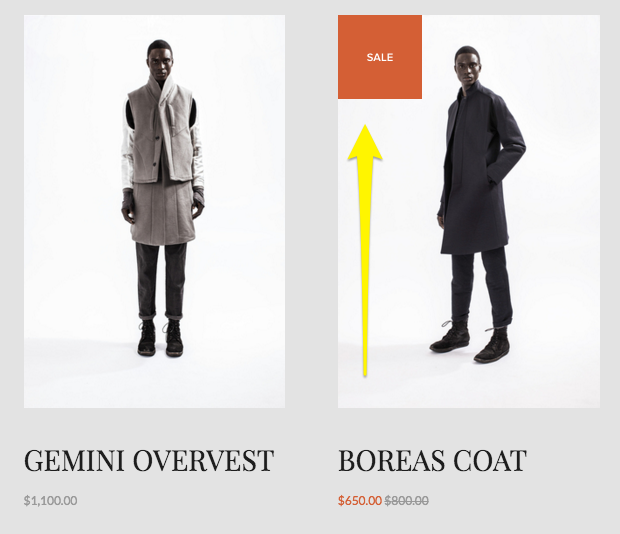
Just like in a brick and mortar shop, sales on Squarespace can be a useful merchandising tool. When you put an item on sale here’s what happens:
A “Sale” badge gets added to the item in summary blocks and on the main shop page.
The original price is shown as crossed out and the sale price is highlighted (usually in a bright/contrasting color but depends on your site styles). This shows up in all places where the price is displayed: summary blocks, product blocks, shop page and product details page.
If your product has variants with different costs, the pricing will display a “starting at” price using the lowest priced variant
Sales Rules
Since sale pricing is set at the site level, it will be available to all customers. There is not a way to have a sale that only a certain subset of your visitors/customers are eligible for. To do that, create a discount instead.
How to Set Up Sale Pricing
You have a few options for setting up sale prices:
Manually - You can set the sale price manually by going into the product editor and toggling sale pricing on/off. The price you enter in the sale box will only show up if the “On Sale” toggle is on; just having a sale price entered does not put the item on sale.
In Bulk via Spreadsheet (recommended) - You can update the prices in bulk via a CSV import. This is my favorite way to set up sales quickly if it needs to be done for more than a handful of products. Using a spreadsheet to manage inventory and edit product info makes it easy to bulk edit prices and toggle sales on/off.
In Bulk via Plugin - If you are spreadsheet adverse but somehow totally into managing a little bit of (pretty easy) code ¯\_(ツ)_/¯ you can use a plugin like this one to apply sales prices to entire shop categories quickly at once.
When to Use Sale Pricing
So when should you put something on sale? Here are the best use cases for sales over discounts:
You want to attract new customers who may want to try your products out but who are leary of buying something full priced
You want to clear out seasonal inventory
You want to boost conversion rates on specific products
You’re not on a tight timeline and just want to run a sale until inventory runs out
Discounts
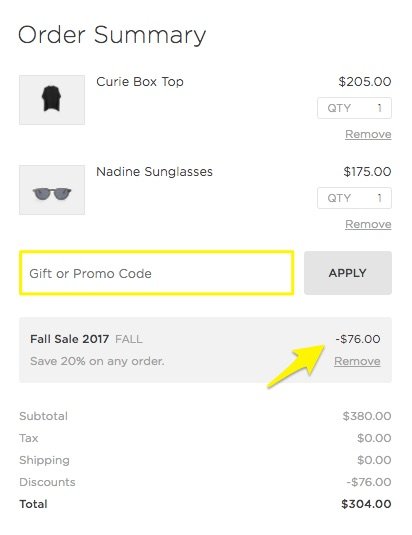
We’re all familiar with discounts and promo codes online! They are different from sales in that they are more targeted and often active only for short time periods in order to spur activity. Here’s what happens what you create a discount:
If you’ve created an automatic discount, the promo details are displayed in the cart at checkout once the criteria you’ve specified has been met.
If you’ve created a discount that requires a promo code, the details are displayed in the cart at checkout only once the code has been entered.
In both cases above, there’s no obvious indication on the product itself that a discount is available so you’ll need to promote it yourself. (This is both a good thing and a bad thing - tips on that below!)
Discount Rules
One of the advantages of discounts over sales is that you can be super specific about the criteria and conditions that must be met. Remember, sales pricing is visible to everyone and the option is either 1) sale pricing on or 2) sale pricing off. That’s it. With discounts you can:
Offer a flat dollar amount or a certain percentage off.
Specify which items or categories are eligible for your promotion.
Apply promotions at the cart level to entire orders and offer free shipping.
Decide whether you want to require a promo code or if the discount will be applied automatically.
Keep track of how often each discount is used/applied.
And more! Squarespace discounts can actually be as simple or as complex as you need them to be. I go into all the nitty gritty details and specifics more in this post.
How to Set Up Discounts
All discounts are created within Squarespace by going to Commerce > Discounts. From this screen you can see all active and scheduled discounts as well as create new ones. (Tip: you can also create and manage discounts on the go using the Squarespace app!)
When to Use Discounts
Now that you know more about how discounts work, here’s when they are the best choice:
You want to offer a promo to a specific subset of customers/visitors. For example, by providing a coupon code to past customers via email or to new customers via social media.
You want to increase average cart values. (Creating a free shipping offer, for example, for orders over a certain amount is one of the easiest ways to get people to spend just a little more than they may have been planning to otherwise.)
You need to spur a quick boost of sales activity. (Setting an expiration date on your promo can create a sense of urgency that can motivate customers to buy.)
You want to highlight or feature new categories of products (or a specific product/service) and encourage people to try it with a discount.
You need to be able to clearly track how often the discount is used/redeemed. While you can definitely track sales using Squarespace commerce analytics, you’ll need to just rely on inferences and assumptions around the exact reasons why people chose to buy. With discounts, you can clearly see exact numbers. You could even get super specific by creating multiple discount codes or promos for each marketing channel so that you can further measure each campaign’s effectiveness.
Miscellaneous Sales & Discount Tips
If you’re using sale pricing, create a “Sale” category and add it to your site’s navigation alongside other categories. There’s not a way to automatically filter all products that are on sale so by creating a special category of your own, you can make it easier for customers to find those products in your shop.
Use built-in features like an announcement bar, pop-ups, related products and limited availability labels to highlight products and sales/discounts. Check out these posts for more sales & marketing tips:
Bottom Line
I hope you can see now how to match your goals up to the right merchandising strategy. Whether you put on an item (or entire shop category!) on sale versus offering a discount will depend on who you’re trying to appeal to and why. If things are still feeling a little vague, I typically boil it down to this:
Use sales to encourage and discounts to reward.
Let’s revisit our example from the very top of this post, imagining now that both products are swimsuits.
Swimsuit A retails for $100 but is on sale for $90 = $90 total
Swimsuit B retails for $100 but is discounted 10% = $90 total
A sale would make sense for Swimsuit A at the end of summer. This would help clear out seasonal inventory and to encourage casual customers to give the brand a try.
A discount would make sense for Swimsuit B to reward loyal customers with exclusive access and VIP pricing.
Both cases result in a $90 order but you can see now that the right method was chosen for each situation.

Pricing & Product Lineup Strategies for Sustainable Business Growth
In building your profitable eCommerce business, both pricing and inventory management are crucial to your success. You can price your products perfectly and still confuse buyers by offering too many options. Learn that it’s not just how you price but what you sell that matters!
One of the things that really sets eCommerce web design apart from just regular, old, everyday web design is that there’s a lot of science and strategy that needs to go into almost every decision.
On an informational, brochure website most of the decisions have to do with either aesthetics or making sure your message is being communicated well.
On an eCommerce site, you have to do those things PLUS make sure you’re pricing your products right and choosing the best inventory lineup possible.
And while there’s lots of information out there on these topics I think a lot of it misses an important factor and that is: how to select the right inventory lineup, at the right price points in order to build a sustainable, long-term eCommerce business.
Because it can’t all be about discounts and cost savings and how to low you can set your prices. Those things do nothing but pave the way to insolvency. You simply cannot expect to grow and scale a business that’s based on unsustainable profit margins.
The math simply does not work.
Pricing & inventory are so important to the success of your business now and into the future. How you price your products and what products you choose to sell ultimately impact everything from your cash flow to your profits. Ultimately pricing and inventory impact every single aspect of your business and I’m here to help you get them right.
First, some words of encouragement!
Ok, I definitely made pricing and inventory sound super scary in that last paragraph, didn’t I? Eek! Don’t worry! Because here’s the good news that I hope prevents you from stalling out at this phase in your eCommerce journey:
You can always revise.
That’s right - you can always update your prices. Change your inventory lineup. Modify your messaging. Revamp your sales strategies. All of it.
Nothing is set in stone.
The best thing you can do is launch something and the tips I’m going to give you about pricing and inventory are great places to start.
That’s one of the best things about running your own small business; you can respond swiftly to feedback and changes in the market. You can be nimble and flexible when the big guys are stuck jumping through a bureaucratic series of hoops to make one small change.
I talk a bit more about responding to feedback and analytics a little more down below but I think it’s important enough to mention it in this post twice!
The best thing you can do is launch something and the tips I’m going to give you about pricing and inventory are great places to start.
I want you to have a solid footing for a jumping-off point but where you begin should definitely not be where you end.
There’s a lot of science that goes into pricing and inventory but it’s also a little bit of an art. So the best thing you can do is just begin and then be open to adjusting as you go along!
Ready to jump in? Let’s start first with pricing!
Pricing Factors to Consider
I think by now you definitely get that this post is not going to be about discount strategies you can use to boost sales in the short run. (I’ve got other posts for that!)
Nope, we’re going to talk pricing from a business standpoint - one that takes your long-term viability into consideration. So bust open a spreadsheet (or get a notepad, or whatever - you do you) because it’s time to do some math.
Step 1: What are your costs?
To understand what you need to price something at, you first need to know what it costs you to acquire (or produce) it. This seems simple but I see a lot of startups come and go because they failed to take allllll their costs into consideration.
Variable Costs

For each product that you offer, there’s a cost of goods sold. This is what it costs you to buy what you’re selling wholesale or to purchase the raw materials you need to make your product. This seems like a no-brainer. But there are lots of other variable costs that need to be factored into your prices as well. This includes things like:
Labor
Packaging
Shipping
Promotional Materials, etc.
Add all these costs up for each product.
Fixed Costs
It’s easy to do the math on variable costs because we can see how they directly relate to each product, however, it’s important to factor in the fixed costs of your business as well.
Fixed costs are things like your rent, insurance, the cost of your website - basically things that would stay the same whether you sold 1 unit or 10,000 units.
The best way to make sure you can cover your fixed costs is by doing a break-even analysis. In this process, you’ll add up all your fixed costs and determine how many units of each product you’ll need to sell in order to cover them. Everything above that point is profit.
The SBA offers an easy, free tool to help you with this here: Break-Even Calculator
Step 2: How much do you need to make?
Up until this point, pricing has just been about covering costs and breaking even. But that’s not what we’re here for - we need to make a profit!
You know your lifestyle and industry best so it’s going to be difficult for anyone else to tell you what your profit margins should be. And even though I’m going to tell you in a minute that you don’t really need to pay attention to your competitors, you definitely need to consider how much you can reasonably mark something up while still staying competitive and marketable.
Step 3: Putting It Together
Here are some calculations to help you put all the above together!
Variable Costs = Cost Per Unit / Total Number of Units
Break Even Point = Fixed Costs / (Price Per Unit - Variable Costs)
Target Price = Costs + Profit Margin %
Why what your competitors are charging doesn’t (really) matter
It’s really important that you do all of the above for YOUR business and let the outcome be what the outcome is. Why? Because there’s really no way at all that your competitors have the same costs as you.
This means that arbitrarily setting your price points without taking your own actual numbers into account does you no good. Remember, we want to make sure you’re setting your prices at a point that’s sustainable - and profitable! - for YOU!
Whether you’re able to market and sell the products you want to competitively only matters if you’re also able to do it without seeing red.
Now that we’ve learned all about how to make sure your prices are set so that you can grow your business profitably, let’s see how what you sell matters just as much!

How to Choose the Right Product Lineup
You know how at Costco they typically just sell one brand of something? Like, if you want some mayo, you’re gonna get a great deal on 7 gallons of it but they don’t have a million different varieties. It’s just the mayo. One brand. One size. One variety. The price is what the price is. Take it or leave it.
Costco has an easier time selling one of anything regardless of price.
At the regular grocery store, you can get mayo made with olive oil, mayo made with cage-free eggs, mayo in different flavors, all sorts of different brands and sizes and types. There’s a lot to choose from and maybe you don’t even think you think too much about it because you’re probably thinking that “choice is good” and “people like having options” and yadda yadda yadda.
Wrong.
Here’s the real truth: Costco has an easier time selling one of anything regardless of price than other stores have selling lots of everything, even when products are priced more affordably. Why? Because although we all say we like to have options to choose from, humans are notoriously bad at making decisions or at least get really fatigued and overwhelmed by having to make too many of them.
Using our mayo example, here’s the number of choices a shopper has to make:
At Costco
You want mayo? Y/N
At a regular grocery store
You want mayo? Y/N
What brand?
What size?
What are the ingredients?
Organic or not?
Special flavor?
On sale?
Coupon?
Etc...
I don’t know about you but I know that I can certainly make one decision (and feel better about it) than I can make 8 or more. And it’s not even about the price! Of course, there’s a little bit of selling psychology at play here that we can apply to eCommerce sites so let’s learn a bit about it!
What is Hick’s Law and what does it mean for eCommerce?

I promise this is more about psychology than math but Hick’s law is a principle that basically says that as the number of choices increases that the amount of time it takes to decide amongst those choices increases logarithmically.
Basically, more choices = more decision time.
When we combine with what we know about how long we have to capture people’s attention online (I.e. NOT LONG), what’s the verdict? Well, for me it’s that you should aim to be more like Costco and less like your traditional grocery store. And, no, this doesn’t just involve mayo.
Here’s how:
Tip 1
You’ll see higher conversion rates if you offer fewer choices.
In a famous experiment on decision-making that researchers always point to on this subject, grocers alternated between days where they sold just 6 varieties of jam and days where they offered 24. Four times the product must mean 4x the profit, right? Wrong.

As you can see, the days with fewer varieties had much higher conversion rates than those with more options available. There are a couple of different reasons for this (more tips on this below) but the takeaway for eCommerce is that sites that offer either a highly curated selection of products or who use navigation and menu organization strategically to only show the most profitable categories, while mitigating the others, will outperform those that put it all out there.
It’s also important to point out the obvious here and that’s that the boosting conversion had absolutely nothing to do with lowering prices!
Tip 2
Only offer distinct variations.
One of the lessons from the jam experiment is that people have a really hard time when there are too many options that aren’t clearly distinguishable from one another. It may seem nice to offer lots of options but customers will often feel overwhelmed by trying to suss out what the discrete differences are amongst them and are prone to just give up and go elsewhere.
This means that your products can be priced right and you can still miss out on the sale simply by offering too many choices that are indistinguishable from one another.
What to do instead? Pare down your offering to only distinct variations. Simple variations are easier to talk about, easier to sell, easier to market, and easier to buy!
Tip 3
If you have a complex product or service, bundle options together to minimize decisions.
If what you have to offer is inherently complex (for example: if it’s highly technical or super customizable) you may not be able to remove options or variations. They are what make your offering unique, after all! But you can help ease the decision-making burden by bundling together presets that make the most popular decisions for your customers.
What I’ve found for most shops that offer “customizable” products is that the majority of purchases can actually be boiled down to a few simple combos.
The lesson here is that just because you can offer infinitely customizable products doesn’t mean you should. Taking away decisions isn’t a bad thing! Customers will feel more confident in you telling them that the bundle you’ve put together represents the most popular combination of product features and you can’t put a price on that!
Fast decisions = happy customers!

We all want our customers and clients to be satisfied with what they’ve purchased from us and there are tons of things people do to try to improve customer service. It should be no surprise at this point though that one of the best things that you can do to make happy customers is helping them make fast decisions.
When people are paralyzed by too many options, they get stuck overthinking things, fearing they’ll make the wrong choice or over-analyzing their choices. Studies have shown that the longer it takes someone to make a decision, the less confident they are in the outcome. So, faster decision-making = happier customers, regardless of price!
There are easy ways to help reassure people that they are making a great choice by shopping with you; whether it’s by providing super clear shipping & return policies, simple forms that don’t ask for unnecessary info, or a streamlined checkout that keeps things on one page or auto-fills past info if you have it. The goal is to just make things as easy as possible for people, being empathetic to their situations and helping them feel confident in their purchase.
Launch, Get Feedback & Adjust Accordingly
I told you at the beginning of this post that the goal was going to be to just LAUNCH and that we’d be open to circling back later to revise things as needed. So what does that actually look like? It can mean a few things - here are some ideas:
Use your site’s analytics to see what products sell and which don’t. (Here’s a great article about how to understand the Squarespace Analytics panel to get you started.)
Take seasonality into account. Is what you’re selling more appealing at one time of year over another? Is there a companion product you can launch to round things out the rest of the year?
Are you making enough? After a few months, you’ll know whether your cash flow is feeling good or not. Could you adjust the profit margins in your pricing calculations to better optimize cash flow?
Have you considered not just the prices of your products but the product lineup itself? Is there room to simplify your offerings to help people make buying decisions faster?
If you sell multiple products, can you increase profits without raising prices by eliminating your underperformers? How would making different purchasing decisions affect your fixed or variable costs?
Bottom Line
In building your profitable eCommerce business, both pricing and inventory management are crucial to your success. You can price your products perfectly and still confuse buyers by offering too many options.
The good news is that you now have the tools (and formulas) to make sure that each product you sell doesn’t just get you to break even but makes sure to add a little to your bottom line. And I don’t know about you but just knowing that some of the best performing shops offer the simplest product lineups is such as relief - and not just because it makes all the math a whole lot easier! 😂 Keeping your product lineup simple is easier to manage, easier to market, and easier to sell!

The Ultimate Squarespace eCommerce Guide
Stop chasing your tail! I've covered some of my favorite posts on everything from choosing Squarespace for your new eCommerce website to mapping out a winning eCommerce strategy, from launch day to managing the day-to-day. Wherever you are in the process, I’ve got you covered!
There’s so much information out there about Squarespace web design and eCommerce but that’s half the problem! It’s all over the place and not necessarily right where you need it! So I decided to corral some of my favorite posts on everything from choosing Squarespace for your new eCommerce website to mapping out a winning eCommerce strategy, from launch day to managing the day-to-day. Wherever you are in the process, I’ve got you covered!

Choosing Squarespace
As a small business owner, you have a lot of choices that you’re going to need to make. But it’s the first one that’s arguably the most important. To me, choosing Squarespace for eCommerce is a no-brainer but I want to help you get all the facts so you can decide for yourself.

Early Decisions
Some of the early decisions in the eCommerce web design process are things you can set and forget but even simple things can help make sure you’re set up for success moving forward.

Map Out a Winning eCommerce Strategy
I wish I could tell you that eCommerce was as easy as making a website public and watching the money roll in but the reality is you need a solid eCommerce strategy in place to keep things on track. These simple and straightforward resources are here to help!
Go above & Beyond
The difference between ho-hum and fabulous is usually just paying attention to the little details that your competition most definitely missed. Don’t worry - I’m going to make sure that you’re prepped and ready to crush it and stand out from the crowd.

Launch With Confidence
Launch day doesn’t have to be nerve-wracking! You can sell on Squarespace with confidence when you know your site is on point from all angles.

Manage the day-to-day
To me, once your site is up and running is when the fun really begins! You can build new features, add new products and continue to refine the experience - all decisions you can back up with data.

5 Simple Discount Tips
When it comes to discounts, I like to keep things simple! Check out my 5 tips for creating your own simple discount strategy that’s easy to market and manage.
Deciding when and how to discount your products is going to depend as much on your brand as what you’re selling. (In this post all about coupons, offers, discounts & promos, I go more into depth about whether discounting is “on brand” for you or not.)
However, I do think that eCommerce customers, in general, are not only accustomed to seeing offers in their inboxes or discounts promoted on social media but that they expect and enjoy the opportunity to score a deal at checkout. What this means is that even luxury and mid-market brands that never used to offer coupons are starting to incorporate discounts into their marketing strategies to meet the expectations of today’s online shoppers.
The one thing to keep in mind is that while you clearly have a lot of discount options and capabilities at your disposal that just because you can run very specific, highly complex promotions doesn’t mean you should. Keeping your discount strategy simple not only helps you make sure that you’re not setting yourself up to over-discount but is also way easier to market!
With those things in mind, here’s a recommended general discount strategy + some of my best tips for running promotions on your eCommerce site:
Offer Free Shipping - I think every shop needs to have a free shipping option. Restrict it to your cheapest method of shipping and only offer it to orders over a certain amount. Studies have shown that people will pay up for expedited shipping but really hate not having a base option offered for free.
But Throw Some Restrictions On It - Even better, I say restrict that free shipping option so that it only applies to orders over a certain amount. Be strategic here and set the threshold just above your current average order total (before taxes and shipping). People are almost always willing to pay more for products in order to score “free” shipping 🙃
Have One Welcome Discount Code - I tend to not like coupon codes in general but they do work well for “thank you” offers for things like signing up for your email list or placing their first order. If you use Squarespace Campaigns for your email marketing, it’s super easy to set up an automatic email that delivers a coupon code to entice first-time customers to give you a try.
Make Everything Else an Automatic Discount - For other sales or promos you have throughout the year, make it easy and go automated! For example, category discounts or specific product discounts are best when you can just say: “10% off all summer products - no code needed!”
Keep It Simple - Keep your active discounts or offers super targeted and limited. Unless you’re running paid Google ads or something, there’s really no need to ever have a thousand promo codes out there. I'm of the mindset that focusing on value and quality over discounting tends to be the better long-run business strategy.

Squarespace Discount Rules
Learn all about creating coupon codes and setting up automatic discounts on Squarespace plus what offers you can combine and which you can’t! Understanding the discount rules will help you prevent over-discounting and plan better marketing offers.
Half the battle when it comes to managing your Squarespace eCommerce website is just taking the time to learn everything that’s possible! Which is a lot! Luckily, I’ve read all the Squarespace documentation so you don’t have to :)
In this post, I’m going to walk you through the 5 steps of setting up a discount so that you know and understand all the options and what they mean. Then, I have a concise primer of all the Squarespace discount rules and exclusions. These are important to understand so that you know that 1) Squarespace has your back with controls that automatically prevent customers from stacking discounts and 2) you can plan smart promotions that you’re actually able to pull off!
Step 1
Choose Your Method
On Squarespace, there are basically two different types of discounts you can set up:
Coupon Code - offers that can be claimed with a coupon code
Automatic Discounts - don’t require a code and magically apply based on what’s in a shopper’s cart
There are good reasons to use both types but FWIW I tend to prefer automatic discounts over those that require codes because it requires less work on the customer’s part. This isn’t to say that there aren’t some times when manual discounts that require a code make a lot of sense! For example, if you’re running a targeted ad or wanting to offer something to only a select group of people using a coupon code over an automatic discount may be the way to go.
So the bottom line here is that I would use automatic discounts for things that you can market to the public on your site such as “Free shipping over $50!” Use coupon codes for situations you may want to make things seem a little more exclusive such as “$10 off for our VIP subscribers using code SD87SDFT!”
Step 2
Choose Your Promo Type
Amount Off - a flat dollar amount discount (ex: $10 off)
Percentage Off - a percentage discount (ex: 10% off)
Free Shipping - can be for any or all of the shipping methods you offer (ex: free express shipping)
Step 3
Select What Orders Your Offer Applies To
Any order - it doesn’t matter what’s in the cart or how much! Go crazy!
Orders over a certain amount - discounts only apply if the minimum order amount is met before any taxes or shipping costs are added.
Single products - apply to just one product that you specify. If you want it to apply to more than one product, use a category discount instead. Discounts for single products can come in handy if you have a new product you want to entice people to try OR if you have an old product that you’re trying to liquidate.
Product categories - apply to all products within a certain category or within multiple categories. Category discounts make it easy to apply offers to whole sections of your shop at once. If someone adds multiple items from the category that you’ve targeted, each item will receive the same discount.
Pro Tip: While shop categories are usually descriptive of the “departments” of your store, they don’t have to be! You can make a “Featured Products” category, a “Best Sellers” category, or even a “Clearance” category to make it easy to target specific items for an offer. For more on product categories check out this post.
Step 4
Set Limits
You can limit both the number of times a discount can be used in total and how many times it can be used per customer. This means that if you don’t want your discounts to have unlimited usage that you can limit usage to either one or the other of those, or both.
Unlimited - You get a discount! And you get a discount! And you get a discount! EVERYONE GETS A DISCOUNT!!!
Limit Total Uses - this counts every time the discount is used at all by anyone. Setting it to unlimited means that there’s no cap on how many times it can be used in general. For example, if you wanted to only allow the first 100 customers access to a VIP offer you could set this to 100 to create a sense of urgency and exclusivity.
Limit Per Customer - allows the discount to only be redeemed once per customer based on the email address that a customer uses at check out. This is especially handy for “Welcome” offers such as “10% off your first order of $50 more!”
Step 5
Set Expiration Date (Optional)
All discount types allow you to set an expiration date. I tend to recommend that even if your promo isn’t really time-based (i.e. 10% off all orders placed in September) that you set an expiration date of the end of the year or some other arbitrary date in the future. This just gives you a reason to go back into the discounts panel every so often to make sure you’re keeping things fresh and up to date.
Discount Limits & Rules
Now that you know all about what elements you can control when creating a discount on Squarespace, it’s important to understand what you can’t do. There are exceptions and rules to what discounts you can stack and combine to help you prevent over-discounting or creating a situation where customers can combine multiple discounts. Understanding these rules will save you the headache of dreaming up a marketing plan that you can’t actually easily pull off!
General Rules
Customers can only enter one coupon code per order
You can’t repeat coupon codes - make a new one each time even if the details are the same or similar.
Discounts apply to the subtotal amount before taxes or shipping
Discounts cannot be greater than the order total
If an order has only one product, a customer cannot combine multiple offers
If a customer tries to redeem multiple offers that aren’t compatible or an offer that is expired, they will receive an error message
Customers paying with a gift card can redeem any discounts like normal
Single Product Discount Rules
What You CAN Do:
Combine with an amount off any order offer (flat rate or percentage)
Combine with an order over offer (flat rate or percentage)
What You CAN’T Do:
Combine with a category discount
Combine multiple single product discounts
Category Discount Rules
What You CAN Do:
Combine with an amount off any order offer (flat rate or percentage)
Combine with an order over offer (flat rate or percentage)
What You CAN’T Do:
Combine multiple category discounts (for products that may be in both categories)
Flat Rate & Percentage Off Rules
If you offer both an automatic flat rate discount and an automatic percentage off discount, only the flat rate one will apply - even if it’s the smaller amount. This means that if you have multiple automatic discounts set up that could theoretically apply to the same order only the flat rate discount will be applied.
You can’t combine offers for any orders or orders over a certain amount if one of the discounts is a percentage discount.
If you do happen to have multiple automatic percentage discounts that would apply to an order, the larger of the two will be applied.
Percentage discounts can only be combined with free shipping offers.
Free Shipping Discounts
You can combine a free shipping offer with any other offer and any free shipping offers you have set up will always apply
You can limit the shipping option(s) that the discount applies to. For example, you may want to only offer free shipping for your cheapest option (like USPS Priority Mail) but still charge the full amount if someone chooses your expedited option (such as FedEx Next Day Air).
Special Notes on Discounting Memberships or Subscription Products
If you have a member area or sell subscription products on your Squarespace site, the following options are available for recurring payments:
You can choose to exclude a subscription product from a discount entirely.
You can choose to apply the discount to the first payment only (all future payments or renewals would be charged full price).
You can choose to apply the discount to all recurring payments, including the first one and all future payments/renewals.

More Pricing Psychology Tips to Increase Sales
Improve your eCommerce pricing by implementing one of these 7 pricing psychology tips. Learn how to put things on sale the right way and how different scenarios call for different strategies in order to increase sales.
It’s been a while since I’ve done a post on pricing but it’s actually one of my favorite topics because I love looking at both the psychology and economics behind what motivates consumers to make a purchase. This post is another great example of this as is this one all about strategic sales. I also think that looking at pricing like this reminds us that we can (and should!) be constantly evaluating and tweaking our offering to maximize profits. It’s rare that you’ll nail things right out of the gate but once you have some sales data and analytics to help you gain more insight into how people are responding to your prices you can refine, refine, refine. Here are some common pricing strategies for you to try!
Discount Pricing
My first tip is just a formatting trick for when you decide to offer a discount. Studies have shown that for high dollar value items it’s best to display discounts in terms of dollars off (ex: Save $200!) but for lower dollar value items to display discounts as percentages (ex: Save 25%!). This is because a percentage of a small amount seems like a better deal than that same amount when displayed as a dollar value. For more on discount strategy, check out this post.
Instead of This

Was $9.99
Now $ 7.50
SAVE $2.49
DO This

25% OFF
Was $9.99
Now $ 7.50
Price Anchoring
Customers often make decisions based on the relative prices between items, especially if they may not have a firm grasp on what a “good price” for something is. By setting a “price anchor” you give shoppers a relative baseline to compare all other prices to. This works well if you sell a wide range of similar items. For example, if you sell denim and have low, mid and high end brands, setting the price of the mid-tier brand closer to the high-end cost may help you sell more of both. This is because people will see the mid-tier brand as a better value to the low-end option and may also then be willing to spend a few extra bucks for the premium brand.
It’s easier to justify a costlier option when there is a low price anchor

$9.99

$17.99

$19.99
Charm Pricing
We all see charm pricing every single day and even though it seems like we should be wise to how it works, we still all fall for it! Charm pricing is simply where you drop the price by one cent so instead of $10, it’s $9.99. This works because studies have shown that people are more likely to round prices down in their heads versus up. You’d also think this would only work on small dollar value items but there’s a reason why cars and real estate use the same strategies - it works!
Instead of This

$10.00
DO This

$9.99
Prestige Pricing
A common mistake some rookie entrepreneurs make is thinking that in order to be competitive they have to be cheaper. Prestige pricing works especially well if you have a product that you can position as higher quality or more luxurious than others on the market. A good example of prestige pricing would be looking at Sephora. They sell skincare and makeup at much higher prices than drugstore brands but have no problem doing so because of the real or perceived higher quality of the products. This pricing model works well if your branding is positioned as luxurious, high end or premium. I go way more into depth on this one plus some other strategies in this post!
People will pay for quality and luxury

$9.99

$18.99
Comparative Pricing
Implementing a comparative pricing strategy is very similar to price anchoring, above. The difference is that in this scenario instead of using a mid-tier product to anchor the price up, you set a decoy product at a comparative price just below your target. For example, if you’re selling pillows consider offering an upgrade to a premium pillow fill. People will compare the prices and you can sell them on the benefits of the premium option. They’ll be much more likely to buy the upgraded premium option when compared to the alternative than if it was sold on it’s own. (Hint: you can also use this tactic when setting up the shipping options for your website!)
Position an expensive option as an upgrade

$9.99

UPGRADE FOR $7
Price Differentiation
Shoppers don’t do well when having to compare between two items that are priced exactly the same. When this is the case, they often spend too much time trying to analyze the differences between the products in an attempt to find the one that is the better value. If you’re selling similar products, giving them slightly different prices will help people make a decision more quickly, which is proven to result in higher sales overall. The differences don’t have to be big to be effective; the important aspect of this strategy is to just not price them exactly the same.
It’s easy to compare products that have different prices

$9.97

$9.89
Price Bundling
This one is last because it’s my favorite! I love this not only as an eCommerce pro but also as a shopper! Bundling products is effective especially well if you offer things that work together as a set or when bundles contain one or two of your most popular products paired with complementary products. The reason why this works is that people are more concerned by the amount they are going to save from buying the bundle than the fact that they originally meant to spend less. When bundling, you’ll want to make sure that the total price is less than the sum of the individual products sold separately. Bundles have two other positive side effects; first, it makes it more difficult for shoppers to determine what the fair value of a product is because it’s technically “cheaper” when bought as part of the bundle. Second, it encourages repeat purchases of more items than the customer may have intended to originally purchase.
IF ALREADY SELL THESE

$9.99

$7.99

$6.99
Total Purchased Separately $24.97
OFFER THIS

Product Bundle
$21.99
Bottom Line
One of the most important things to remember isn’t that the strategies on this list shouldn’t be seen as ways to “trick” your customers. You don’t want to come across as smarmy or sleazy at all! But, if you sell products that fit into one of the scenarios above, these methods can help you increase sales. The ultimate goal to make sure that your pricing isn’t confusing so that people can compare quickly and add to the cart without second-guessing themselves or feeling frustrated. Done right, these pricing psychology tips can definitely help you boost your bottom line.

eCommerce Crash Course: Coupons, Offers, Discounts & Promos
Before you go creating coupon codes all over the place, check out this crash course in eCommerce discount strategies. Assess whether they are right for you, and find out how to implement a discount strategy successfully. If you’re also feeling a little stuck in a discount rut, I also provide some new ideas you can try to mix things up!
I’ve talked before about pricing strategy here and whether you should offer free shipping here. These are both key components of your overall eCommerce strategy that you can - and should - tweak from time to time to make sure you have things juuuust right. But there’s another leg of the stool that needs to also be considered: coupons, offers, discounts, and promotions. All of these things are part pricing strategy and part marketing strategy, and they can have a big impact on online sales.
There are a few schools of thought when it comes to online coupons and such. For me, it’s easiest to think of them this way:
Luxury - Never has sales, ever. Period. Think: Gucci
Mid-Market - Has well-publicized annual and semi-annual sales only. Outside of those times, no sales. No coupons. Think: Nordstrom
Budget - Everything is always on sale. Coupons or other marketing promotions are easy to come by. Somehow never pay full “retail” price. Think: Kohl’s
Questions to Ask Before Getting Started
There are merits to each of these so if you’re still trying to decide which bucket you fall into, ask yourself these questions:
Is it on brand? Shoppers are actually super adept at picking up any discrepancies between what you are saying about your brand and what your pricing strategy is saying about your brand, including whether and how you discount. If your branding says “luxury” but your discount strategy says “budget”, that’s a mismatch.
Are you training people to only buy from you when there’s a discount? This is an important thing to point out in a post all about coupons, offers, discounts & promotions. Before you read any further and decide how to implement any of these, ask yourself if these things need to be part of your strategy. This is a prime example of just because you can do something doesn’t mean you should. One of the biggest eCommerce mistakes I see merchants make is training their customers to only shop when there’s a discount. This devalues what you’re selling and is often only a successful strategy for the highest volume sellers.
Is the timing right? If you’ve decided that offering discounts or promos is on brand and right for your business, there should still be a method to your madness. Discounting willy nilly makes no sense. The best offers are strategized well in advance and are supported by external marketing activities like newsletters, social media posts, etc. Consider the season, popular trends, or other promotions you can leverage off of.
Do you have enough margin to discount? I mean, this should go without saying but if your regular prices don’t leave enough room for you to discount when needed and have you not lose your shirt, you should start by adjusting your retail prices across the board before venturing into the wide world of coupon codes. (More on this below!)
How To Do It Right
Now that you know where you fall on the Gucci-Nordstrom-Kohl’s spectrum™ and you’ve considered all the factors above, let’s explore some of the reasons why you may want to adopt a discount/coupon strategy:
It can quickly drive sales. Everyone loves a bargain so putting something on sale should definitely boost conversions. What this means is that what you lose on tighter margins, you can make up with volume.
It's a good way to move excess or outdated inventory. Think of this in the same way you can buy super cheap Halloween candy on November 1. Most products (and not just the edible kind) have a “shelf life” - even if that means the time period when they’ll be most attractive and potentially sell for the highest price. You may also be at a place where you’re willing to sell products for a near loss just to get them off the books and make room for new goods.
It can attract new customers. We’ve all seen the popups offering X% off our first purchase if we sign up with our email. I would argue that this is getting to be a bit overused and I tend to dislike it because it encourages only buying with a discount but it can be a way to sweeten the deal if you have built that discount into your normal prices. Running a promotion before you officially launch a new product or service can also help build hype!
Strategies To Try
Exit Popup - We’d always prefer people to pay full price so triggering an offer only once someone goes to exit your site can be a way to only offer a discount to people who were going to leave without buying something.
Separate Sales from Non-Sales Items - One of the worst things you can do is put two items that are relatively similar side-by-side and expect people to buy the higher-cost item. For example, if you’re selling this season’s shirt at full price and right next to it I can see that I can score last season’s tee for half off… well, maybe I’m not the most stylish but I’m going to go for the half-off version. To try to prevent this, move all sale items to a separate sales category or page on your site. This means that most shoppers (who are looking for the latest and newest) will shop in your regular section without price distraction and bargain-hunters will head to the sales section first. Everyone wins!
Offer Free Shipping - Shipping discounts are my favorite for a few reasons. First, everyone loves free shipping. Second, shipping discounts don’t devalue what you’re selling. Third, people often assume shipping is going to be super expensive so they may actually think the discount is worth more than it really is. I always say it’s better to mark up your prices across the board and offer free shipping no matter what but I realize that’s not always feasible. If you're in an industry where product-to-product comparisons are easily made, it may be important that you keep your individual prices low. If that’s the case, I would recommend offering free shipping with a minimum cart value (i.e. free shipping on all orders over $X)
Abandoned Cart savings - I mention this briefly above but if I think if you’re going to discount, you might as well only offer that to people who weren’t otherwise going to pay full price. Utilizing your abandoned cart email to deliver a coupon or incentive to return to your site to make a purchase is a way to only show discounts to certain people. Word of warning: there are a lot of people who have become savvy to this tactic and will purposely leave an item in their cart and wait for a coupon to show up in their inbox the next day. I think this kind of is what it is, but just know that these people are out there.
Make Discounts Automatic - Think beyond the coupon code and make things as easy as possible for people by just automatically applying whatever offer you’ve set up to their cart once the criteria are met. I think that this helps make happier customers because it reduces mental load (no need to remember a coupon code!) and makes people feel like they achieved a goal.
Set an Expiration Date - Not only do expiration dates create a sense of urgency, making sure all your discounts and coupons have an expiration date ensures that you can make changes down the road without people feeling like they got the old bait-n-switch.
Limit Usage - This is a good hype-building way to discount. Limiting your offer to only a certain number of people, only a specific group of customers, or by how many times it can be redeemed is a great way to encourage people to buy quickly or even boost brand loyalty by encouraging people to attain a certain “tier” status in order to qualify for a discount.
Other Misc Ideas (That Don’t Really Need Any Commentary)
Discount entire categories or brands versus the whole store
Offer BOGO or B2G1 offers
Offer a tiered discount so people get more off based on buying more of an item
Discount orders over a certain amount
Offer a free gift with a purchase total over a certain amount
Offer a discount on the most or least valued item in their cart with a total purchase over a specific amount
Provide discounts based on customer loyalty to encourage repeat purchases
Hopefully, you now feel like you have a better handle on coupons, offers, discounts, and promos and know how to incorporate one of these strategies successfully. My last piece of advice is to implement and then monitor often. Don’t be afraid to give something a try and adjust as needed once you see how your audience responds. This is another great reason to put an expiration on offers - so that you can tinker with things as needed to find the perfect sweet spot for your brand.

Kristine Neil
Fractional Web Partner
I'm Kristine Neil - a communications strategist who has spent 20+ years designing websites, first running a full-scale design and marketing agency, and now leading my own studio. I've been the creative director managing the work, the coder quietly fixing what others couldn't, and the strategist in the room asking why before how. Somewhere between the MBA and the other degrees, I decided web design was just one tool in a much bigger toolbox - the real work is figuring out what you're trying to say, who needs to hear it, and what's getting in the way. A website is just where all of that comes to life.
I build on Squarespace, and after years deep in the platform I know how far it can go and when to push past its limits. These days, I'm especially drawn to working as a fractional partner - getting to know an organization over time and helping with whatever moves them forward, whether that's a full redesign, an ongoing hand with content and strategy, or just being the person who knows their site best. I write here about eCommerce, web strategy, and making the complex feel a little more human.