

Notes on building smarter websites for actual humans.
A 410-acre park, 3.5 million visitors, and a marketing team of 1.5.
A grant-funded rebuild on Squarespace with live transit and parking data, WCAG 2.1 AA certification, and a site a team of 1.5 can run - for 51% less than what it replaced.
Summary
A grant-funded rebuild of explorewashingtonpark.org: WordPress to Squarespace 7.1, accessibility-first, with real-time transit and parking data - built so a small team can run it for years.
Timeline: Oct 2025 – Aug 2026 launch, three phases
Platform: Squarespace 7.1
Standard met: WCAG 2.1 Level AA
Funding: Travel Oregon grant, with additional investment from EWP
Integrations: Swiftly, Parking Logix, TriMet, Eventually, live weather
Scale: 3.5M annual visitors, 410 acres, 16 attraction and amenity pages
Cost to the organization: 51% less than the previous site and maintenance process, per EWP
The Short Version
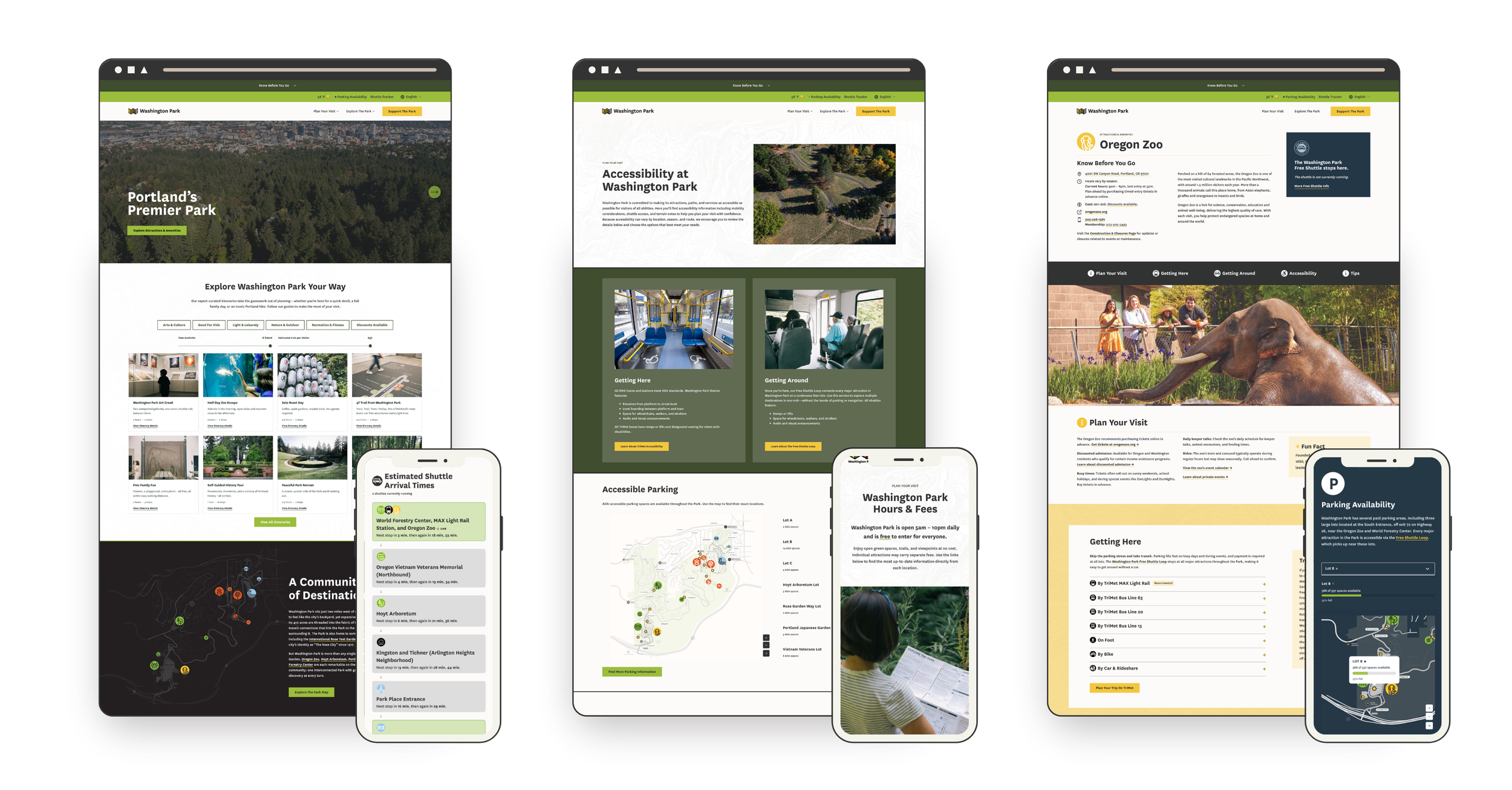
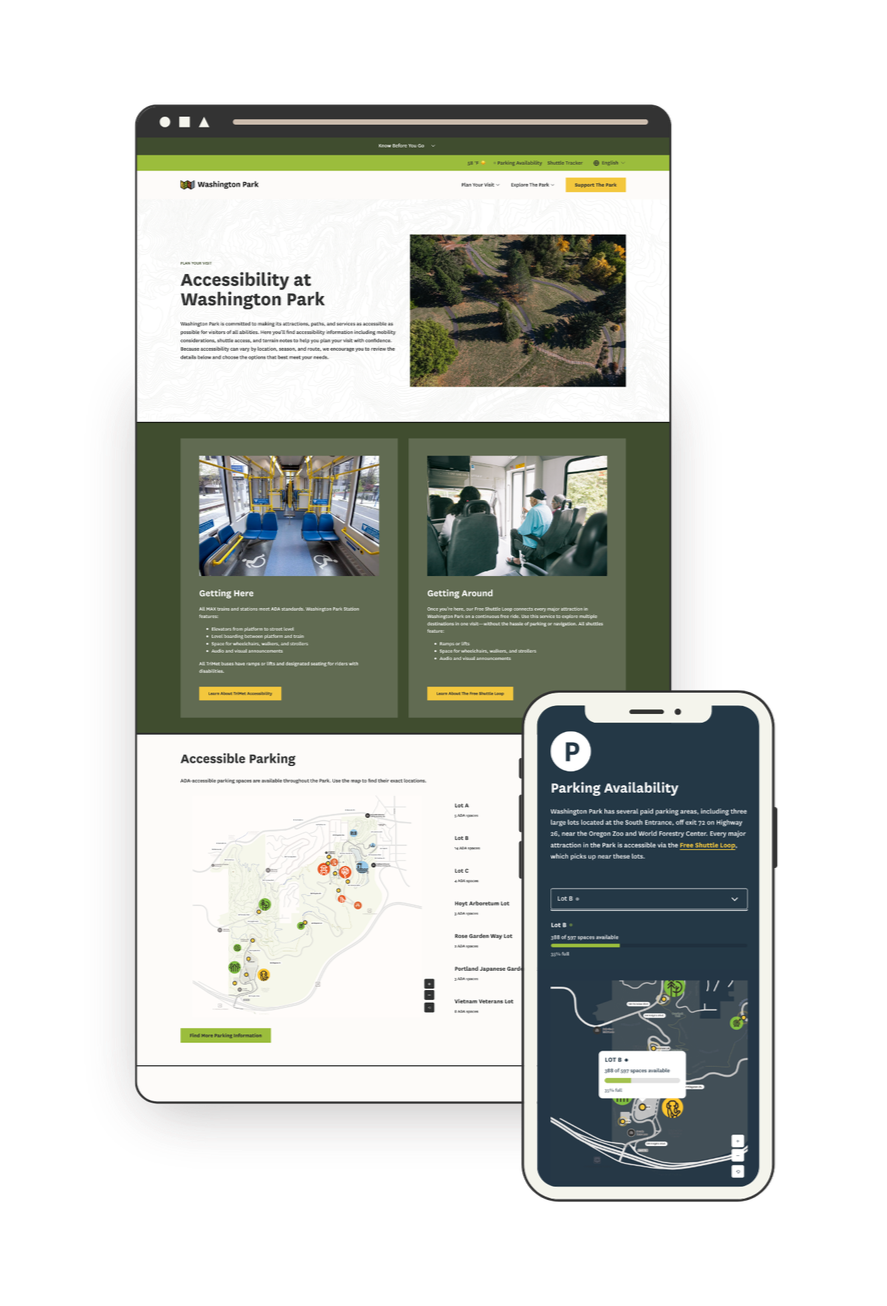
Explore Washington Park manages transportation and visitor services for Portland's most-visited park - home to the Oregon Zoo, Portland Japanese Garden, Hoyt Arboretum, the International Rose Test Garden, and the World Forestry Center Discovery Museum. A Travel Oregon grant helped fund a new site with one job: make it easier to get to the Park without a car and easier to plan your day once you're there. The constraint was that a marketing team of 1.5 people has to own it after handoff. So I built it on Squarespace, with custom development reserved for the handful of things that needed it - live shuttle tracking, live parking availability monitoring, interactive maps, and a feed of expert-curated itineraries with something for everyone - and launched it on schedule at WCAG 2.1 Level AA.
“The final product is better than we could have dreamed: a real-time resource for visitors of all backgrounds and abilities that’s easily managed by Explore Washington Park’s in-house marketing team and costs the organization 51% less than our previous website and maintenance process.”
This was never just a website project
It was Phase One of EWP's ten-year Transportation Access Plan, with a target of moving more of the Park's visitors onto transit and the Park's shuttle loop, a free service that runs daily and stops at every major attraction in the park. Nearly six in ten peak-season visitors travel more than 50 miles to Washington Park, and most of them decide how they're getting to the Park before they leave home. The old site gave them almost nothing to decide with - so they drove, and found out about parking when they were already in it. The goal was to put transit, the shuttle, and live parking data in front of people at the moment that decision gets made, and move the Park's transit share toward the plan's 20% target.
The starting point was an aging WordPress site the internal team couldn't confidently update, which meant every small change was a ticket... and an invoice. The accountability was public grant money, a board, and required reporting intervals with success measures we needed to hit. And the constraint that shaped every technical decision: after handoff, the team has exactly 1.5 people to devote to managing the site on a day-to-day basis.
Doesn't this need a custom build?
A site built against four separate APIs - Swiftly for the shuttle, Parking Logix for parking, TriMet for transit, and a live weather feed - plus custom interactive tools and a WCAG 2.1 Level AA accessibility requirement looks like it needs a custom CMS or a headless build. For a nonprofit, that assumption is expensive both up front and in the long run: a custom build that eats most of the grant before anything launches, a developer on retainer, a stack nobody on staff understands, maintenance debt that outlives the grant.
The actual tradeoff was simpler. Squarespace handles the roughly 80% that staff touch every day - pages, events, content, imagery. Custom development was reserved for the other 20% that needed it, built as isolated, documented components that don't break when someone edits a page. The custom pieces sit on top of native Squarespace features - list sections, portfolios - so staff edit the content underneath the same way they'd edit any other page. This means staff can make updates now and in the future without a developer.
The work nobody sees
The other half of the answer came before the platform mattered at all. Because as tempting as it is to start designing right away, projects like this succeed because the content and structure are solid and strategic. Meghan and I spent the first phase of the project on copy before anything was really designed. Doing this hard content work up front, in a series of Google docs and sheets, may sound like a lot but it's also the reason why the site works. We thought about whether calling a trail "easy" is a judgment or a fact (maybe my easy trail is your hard one). Whether the tone should draw conclusions or give people the information to draw their own. How someone without the budget for a Zoo ticket finds out about free and reduced-cost options clearly and without judgment. What a parent needs to see when they're at the playground with tired kids and it's starting to rain.
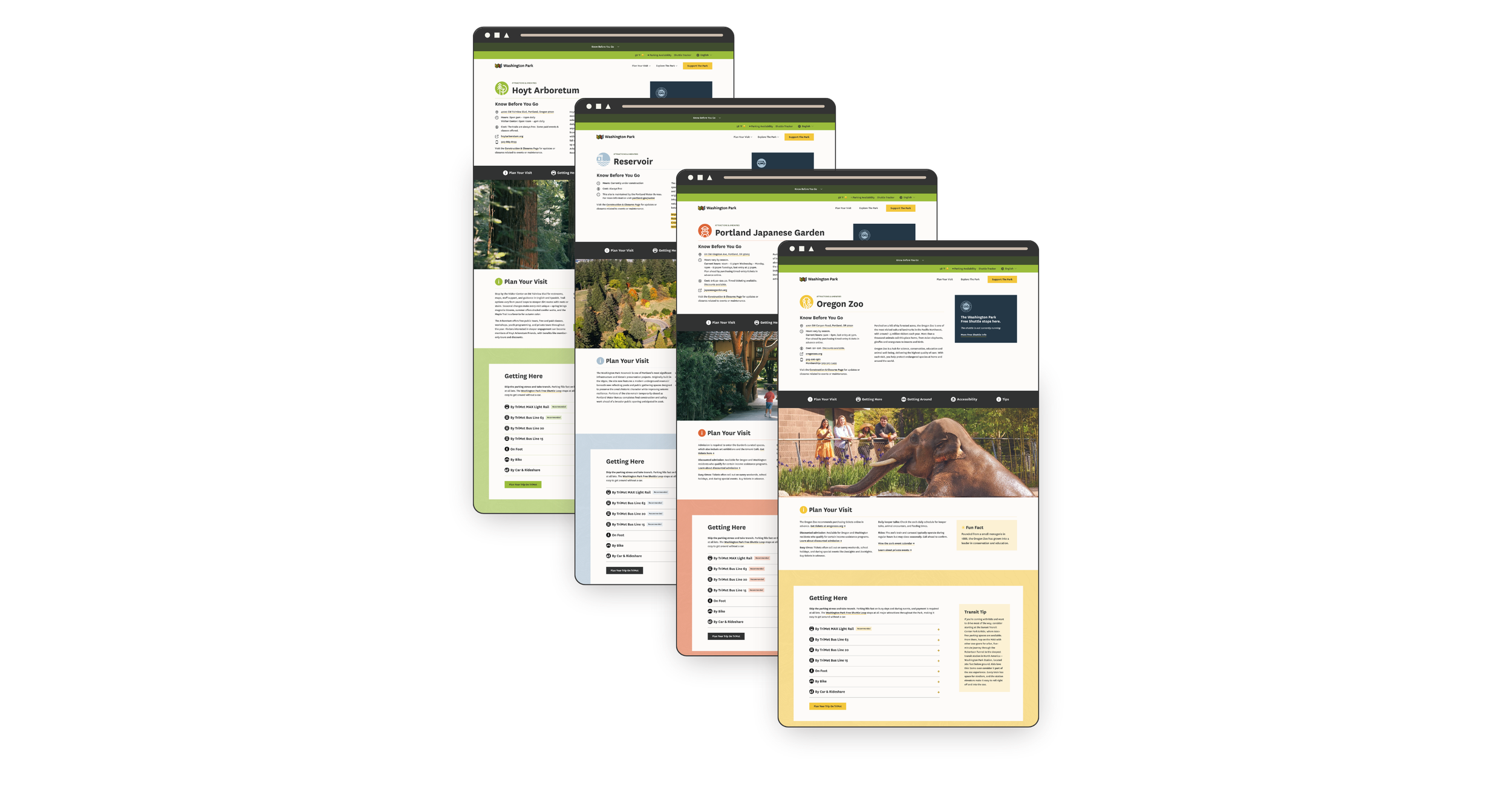
On top of the words themselves, there were 16 attraction and amenity pages, each with its own hours, fees, routes, shuttle stops, and tips - and all of it needed to be mapped and standardized so the site talks about these things the same way on every page, and every page follows the same structure.
A website is wayfinding, so the site borrows from the Park's real signage: a palette that matches the printed maps and iconography that tells people what to expect before they've read a word. On a site like this, that means the answer to whatever someone is nervous about sits in the same place on every page, so nobody has to hunt for it. Once a visitor learns how one page works, they don't have to start over on the next one. (Hint: this predictability is also what makes such a large website maintainable by a small team.)
What we built
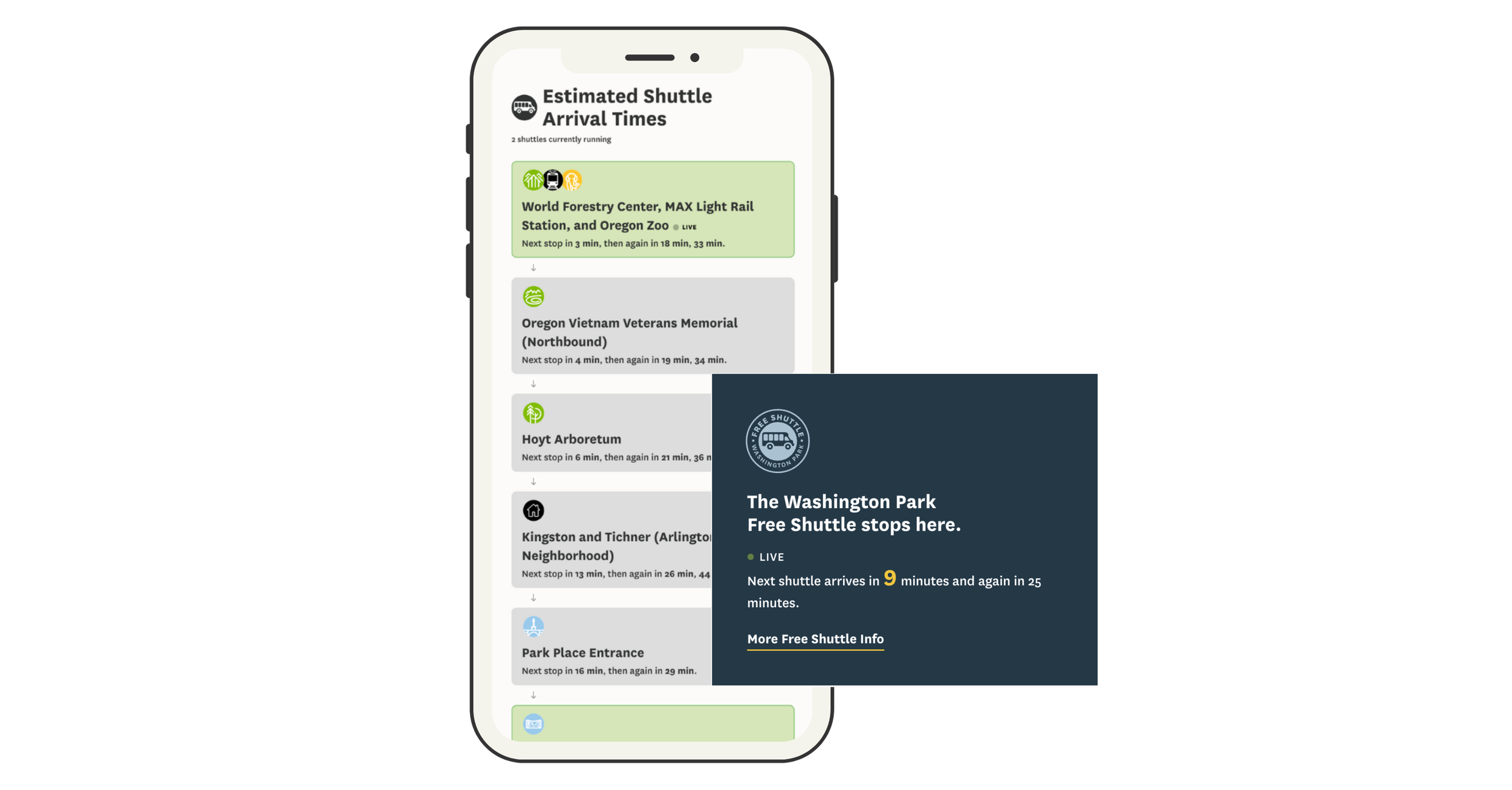
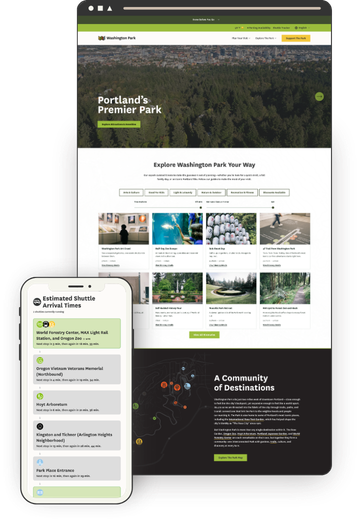
Live shuttle tracker - The old site had a tracker, but it wasn't mobile-friendly, which is a real problem when everyone using it is standing in the Park on their phone. Swiftly data now shows active shuttles, upcoming stops, and arrival estimates refreshing every 30 seconds.
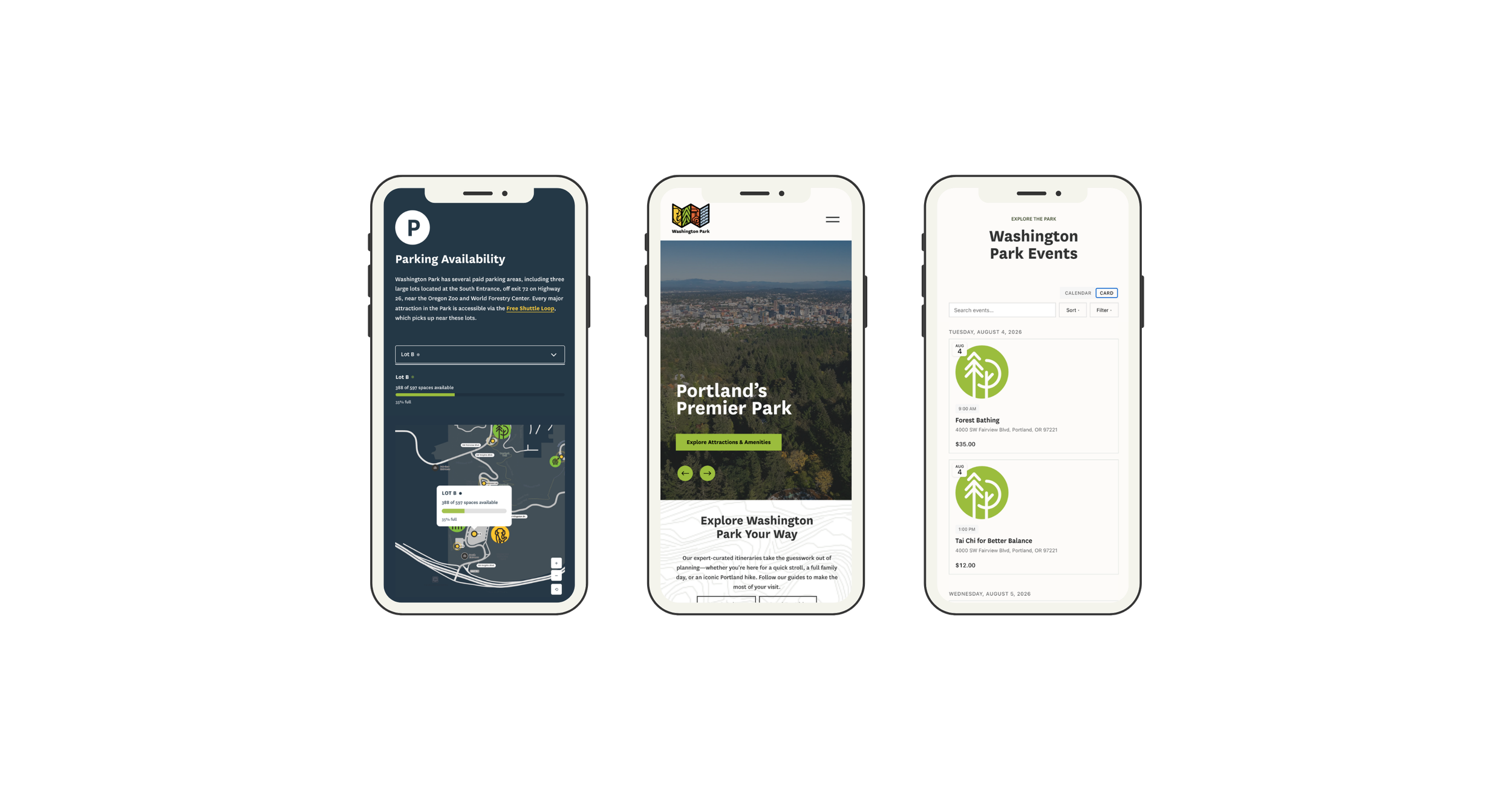
Real-time parking availability - Open spaces for the three major lots from Parking Logix, rendered in EWP's brand on a custom interactive map rather than as a bolted-on widget.
Interactive maps - It's easy to get lost in 410 acres, so giving visitors a sense of where things actually are mattered as much as telling them what's there. Transit stops, ADA parking, rideshare pickup, and car-free entrances, with every marker connected to a location list. Bonus: most map interfaces are notoriously inaccessible, but this custom solution works for all users, including those navigating by keyboard or screen reader.
Itinerary Explorer - EWP's team had already written some great itineraries - things like a Self-Guided History Tour, Cozy Car-Free Exploring, and (my favorite) Dog's Day Out - but they were buried in old blog posts where nobody found them. Now they live in one place, filtered by category, available time, and estimated cost, because "I have 3 hours and I don't want to hike in the rain" is the actual question people are asking. They're built to be fun and shareable, which matters: this is content EWP can now promote instead of just host. Designed so EWP staff can publish new itineraries without a developer.
Transit first - The "How to Get Here" pages don't just list transit as an option, they recommend it above all others: the MAX or a bus is the easy, safe way in, with no traffic and no parking to think about. Every attraction page carries the same message, with the recommended route highlighted and a direct link to TriMet's trip planner.
Events calendar - Each major attraction runs its own event calendar, so this is the one place a visitor can see what's happening across the whole Park at once. When this project started, an events calendar at this level wasn't possible on Squarespace. It is now because of Eventually, an events platform Kelsey Gilbert-Kreiling and Zack Gilbert were building at the same time - I was its first tester, and EWP was built alongside it. Some of what EWP needed found its way into the product along the way, and this site got a calendar nothing off the shelf could match.
Accessibility information - Paved trail information, places to stop for a rest, available accommodations, and what to expect at each attraction, treated as primary content rather than a compliance page. This is the information that decides whether someone visits at all, so it lives where people plan, not hidden in a footnote.
“Having spent the last 20 years working with Squarespace websites, I have rarely been as bowled over as I was by the Washington Park website. Kristine has skillfully pulled together many complex elements and turned them into an incredibly user focused and inclusive website. I honestly couldn’t think of any ways this could be better. This website is truly a model for other venues like this.”
Accessibility as a discipline, not a badge
Accessibility shaped design decisions from the first wireframe, not the final QA pass. When the build was done, an independent consultant, Nicole Nault, audited the site, identified what still needed remediation, and ran user testing. I made the fixes, she verified them, and the site was certified WCAG 2.1 Level AA. The hardest parts were exactly where most "accessible" sites fall short. Heading hierarchy on native elements that Squarespace won't let you control. Keyboard navigation through custom components like the maps and the shuttle tracker, which is why having a developer who structures things properly matters - code thrown together to "just work" doesn't work for a screen reader. And color: I built area-specific color themes from EWP's brand palette so the site could carry the Park's visual identity while keeping text almost entirely black on white.
“Kristine asked smart questions, welcomed feedback, and was always willing to refine the work until we got it right.”
One Person to Call
A project like this has a lot of moving parts: a custom development partner, an accessibility consultant, three data providers with their own APIs, an events platform still in development, a client team, organization partners, and community stakeholders. My job was to take all of that off Meghan's plate, and to be someone she could trust to do it. I decided where I was most effective and when to tap in Will Myers, a key engineer on this project and a true collaborator rather than a subcontractor.
I kept vendors on schedule, timed the accessibility audit so the fixes landed before launch, and reported into the grant timeline - without anyone at EWP having to chase a single thread. And nearly every specialist on this project was someone I'd worked with before, which is the difference between hiring strangers and working with people who already trust each other.
The team included:
Will Myers - software engineer
Nicole Nault - accessibility consultant
Kelsey Gilbert-Kreiling and Zack Gilbert - events calendar
Meg Sheeley - design
Christy Price - consulting
Lily Price - content migration
Results
Launched on schedule and within grant funding. WCAG 2.1 Level AA achieved. Covered by Oregon Business. And per EWP's marketing director, the new site and maintenance process costs the organization 51% less than what it replaced.
“The site’s focus on accessibility and inclusion makes planning a visit easier for everyone.”
The grant's accomplishment report is due in November 2026. Results on visitor growth, trip-planning tool usage, and transit awareness will be added here then.
Reimagining Squarespace
I've started thinking about Squarespace differently - not just a place to build a site, but the foundation everything else stands on.
For years, when someone asked me why Squarespace, my answer was basically: because it comes with everything. The blocks. The built-in store. The blog. The gallery. The calendar. It was the whole kit and caboodle, and I loved that I could hand a client one login and say, here, this does all of it.
I pictured it like a hub. Squarespace in the middle, and everything a website needed radiating out from it. The center of the universe. One platform, one-size-fits-all, the be-all-end-all.
I don't see it that way anymore.
And it's not necessarily that Squarespace got worse (though we could argue about a few things). It's that what I want from it changed. Somewhere in the last couple of years - between the rise of what Lex Roman calls Cottage Code and the simple fact that anyone can now build a genuinely custom tool in an afternoon - the center-of-the-universe model just stopped making sense to me.
Because you know what they say about trying to be everything to everyone: you can't. Not really. So the blog is fine. And the store is fine. But "fine" is the ceiling when one platform is trying to cover every use case for every person on earth. And I'm not in the business of building just fine websites.
So I flipped the picture.
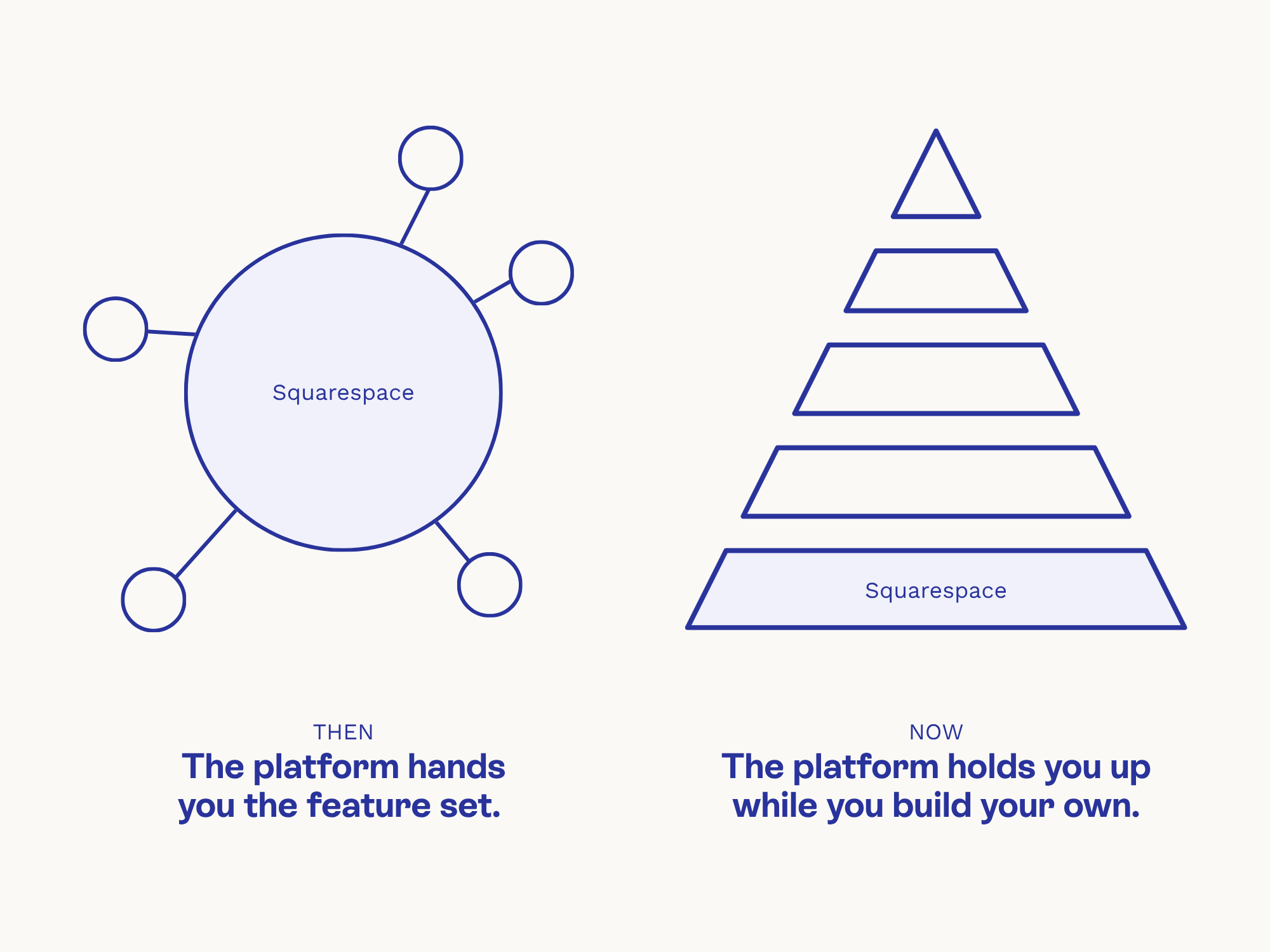
I don't want Squarespace in the center anymore. I want it on the bottom. The foundation. The frame, the wiring, the plumbing - the structural stuff that has to be up to code or the whole house falls down. And then I build exactly what I want on top of it.
Take the calendar. I genuinely do not care whether Squarespace's calendar block works the way I wish it would. I just need a page to exist - a real, live, secure page, with the markup and styling and schema already handled - and then I'll build the calendar I actually want right on top of it (hi, Eventually). Squarespace gives me the floor to stand on. I bring the furniture.
I think this is where web design is heading. Because as powerful as AI tools have become - and we absolutely should all be doing more Cottage Code™ - nobody actually needs to be building the basics from scratch. Nobody wants to hand-build SSL and security monitoring and proper page markup. That's not the fun part. That's the plumbing. So let Squarespace do the plumbing. Better yet, let it be the plumber you call at 3am when a pipe bursts.
It's earned the job. Squarespace was founded in 2003, which in internet years makes it downright ancient - no Facebook, no Twitter, not even any iPhones when it launched. Whole tech empires have risen and fallen while it just kept trucking along. And I don't know about you, but when I'm choosing what to build on, "has survived twenty years of internet chaos" counts for a whole heck of a lot.
I just don't need it to be the center of everything. I don't need its calendar block to work or its feature set to wow me. I need it to be stable, secure, easy to hand off to a client, and gloriously unremarkable in the best possible way - so that all the interesting, custom, weird, wonderful stuff gets to live on top.

How to Add Restaurant Online Ordering to Your Squarespace Site (and Keep More Profit)
Adding online ordering to your restaurant’s Squarespace site doesn’t have to mean rebuilding from scratch or losing profits to delivery apps.
If you’ve ever tried to add online ordering to a restaurant website, you already know the pain points: either you’re handing over a chunk of your profit to a third-party app, or you’re rebuilding your entire site just to make it work.
Neither is ideal, especially if you already like your Squarespace site and just want an easy way for customers to place orders directly with you.
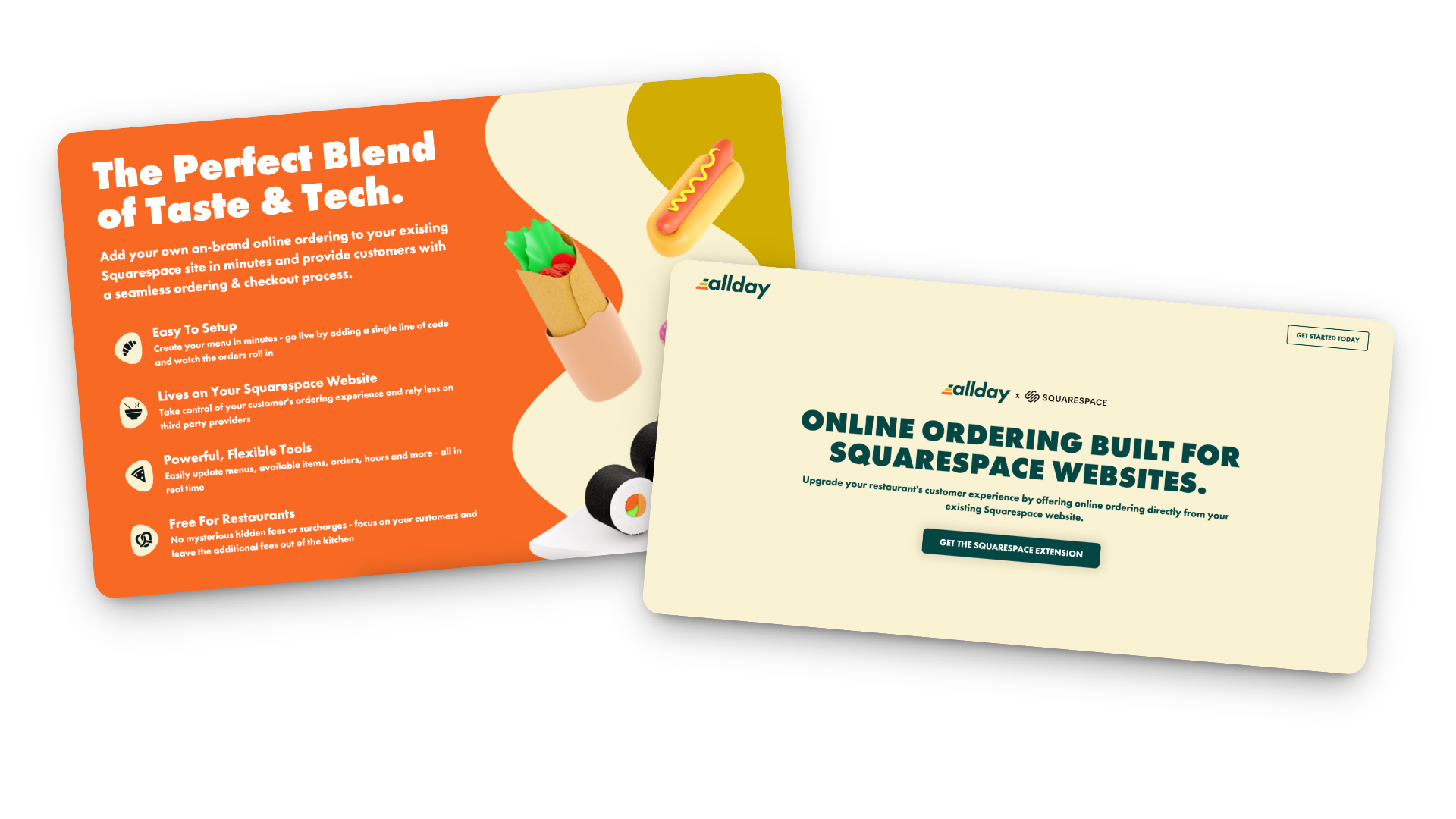
That’s where Allday Ordering comes in. It’s a new Squarespace extension that lets you add online ordering right to your existing site - no new platform, no technical chaos, and no middlemen taking their cut.
I’ve been testing it on a few projects lately, and I’m genuinely impressed by how simple it is to set up and how well it integrates with the way small restaurants actually run. So in this post, I’ll walk you through what it does, who it’s best for, and how to make it work harder for you.
What Allday Does (and Why It’s Worth a Look)
Here’s the gist: Allday connects directly to your Squarespace website and adds a complete online-ordering experience - one that looks and feels like part of your brand.
Customers can:
Browse your menu
Customize their order
Check out without ever leaving your site
You keep your design, your data, and your margins.
Setup is easy too: just add a small code snippet, configure your menu, and go live. Seriously so simple!
How the Pricing Works
Here’s my favorite part: it’s actually transparent.
For restaurants: completely free.
For customers: a flat $2 fee per order (clearly shown at checkout).
Processing: standard Stripe fees (2.9% + 30¢).
Contracts: none 🚫
Plus, you can start, pause, or cancel anytime. And because everything runs through your own website, you keep the customer data - meaning you can actually build relationships instead of renting them from delivery apps.
Who Allday is Best For
In my opinion, Allday is a great fit for:
Independent restaurants that want to modernize without switching systems
Cafés and bakeries that sell daily specials, pre-orders, or meal kits
Catering services and pop-ups that need flexible menus
Small restaurant groups that want a consistent setup across multiple locations
Basically, if you’re already using Squarespace and want a way to accept online orders that feels native to your site (and not like a clunky bolt-on), this is worth exploring.
How to Make Online Oredering Work Harder for You
This is where the magic really happens. Adding online ordering is great, but optimizing how people use it can make a big difference in your sales.
Make “Order Now” Impossible to Miss
Add it to your header, footer, homepage hero, and anywhere else customers tend to land. If they have to hunt for it, they’ll give up and go back to DoorDash.
Use Mouth-Watering Photos
A couple of great shots of your best-sellers go a long way. You don’t need a full menu gallery — just enough to make people hungry.
Keep the Menu Tight
Too many options = decision fatigue. Focus on what you can fulfill quickly and consistently. Clear categories and smart modifiers (“Add chicken +$2”) help too.
Promote Direct Ordering Everywhere
Remind customers they can order directly from your site. Add a quick line to your emails or posts:
“Skip the apps — order directly from our website and help us keep prices fair.”
Use QR Codes Strategically
Add them to menus, packaging, and in-store signage that lead straight to your ordering page. Repeat customers will thank you.
Pay Attention to the Data
Because you own your analytics, you can actually see what’s working — top dishes, busy hours, repeat orders, and even drop-off points. Use that info to improve your menu and marketing.
Integrate with Your Email List
If you use Flodesk (like I do) or another email tool, send simple reminders:
“New week, new menu — order ahead now.”
“Early access to our seasonal menu — pre-order today.”
Test and Adjust
Watch how customers interact with the page. Are they clicking “Order Now” right away, or scrolling first? Do certain items always sell out? Tiny layout or wording tweaks can have a big impact.
Keep It Fresh
Menus change, seasons change, and so do your customers’ habits. Make updating your online ordering part of your regular routine — swap in seasonal dishes, highlight new items, or feature a “staff favorite” now and then.
Bonus Tip: Not only does this keep regular customers engaged, it also signals to Google that your page is active (which can help with SEO).
Restaurant Ordering on Squarespace FAQs
-
Install the official Allday extension, add your menu, set your pickup/delivery options, and embed “Order Now” buttons on your site. It takes less time than you’d think.
-
It’s free for restaurants. Customers pay a small flat fee ($2 per order), plus standard Stripe processing.
-
Yep! You can set different menus, hours, and fulfillment options for each.
-
Yes! Everything happens right on your Squarespace site, so your fonts, colors, and overall style stay consistent.
-
I’d recommend it for small to mid-sized restaurants, cafés, bakeries, catering businesses, and pop-ups - basically anyone who doesn’t want to hand off their customer experience to a third-party app.
-
Visibility + communication. Make the ordering button clear, mention it in your emails and social posts, and highlight the benefits (lower fees, faster pickup, direct support for your business).
Bottom Line
Adding restaurant online ordering to your Squarespace site doesn’t have to be complicated or expensive. With Allday, you can keep your website, your brand, and your customer relationships intact - all while giving your diners a smoother, more personal way to order.
If you’re ready to give it a try, you can get started here. I’ll help you set it up and make sure it looks and functions exactly the way you want.
Because really, you should be focused on your menu - not a middle man.

Advanced Product Manager for Squarespace: Finally, Bulk Editing That Actually Works
If you've ever had to update prices across 50+ products in Squarespace, you know the pain. Here's the tool that finally fixes Squarespace's biggest product management bottleneck.
If you've ever had to update prices across 50+ products in Squarespace, you know the pain. Click into product one, change the price, save. Click into product two, change the price, save. Repeat until you question your life choices.
Or maybe you've tried the CSV import route - download, edit in a spreadsheet, re-import, fix the errors it inevitably throws, re-import again, and wonder why this feels like you're working against the platform instead of with it.
Here's the thing: Squarespace Commerce can work beautifully… until you hit scale. Once you're managing a catalog of any real size, the one-by-one product editing workflow becomes the bottleneck that can keep you stuck spending more time working in your business than on it.
That's exactly the problem Advanced Product Manager from SquareHero solves - and I've been lucky to be beta testing it for the past few weeks so I can tell you exactly what it does, what it doesn't do, and whether you should add this to your toolkit.
What It Actually Does
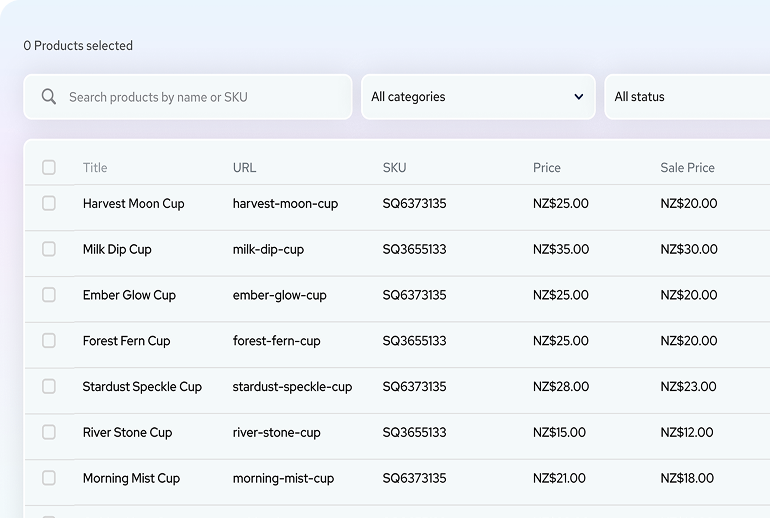
Advanced Product Manager is a plugin that gives you a spreadsheet-style view of all your Squarespace products. You can see everything in one, clean table and make changes instantly. No more clicking through products one by one every time you need to make a price increase.
Here's what you can edit in the table view (think Shopify-style spreadsheet):
Product titles: Edit product names directly in the table
URLs: Update product URL slugs
SKUs: Manage product SKUs
Categories: Add or remove categories
Pricing: Adjust regular and sale prices
Stock levels: Update inventory quantities
Bulk Editing aka The Real Magic
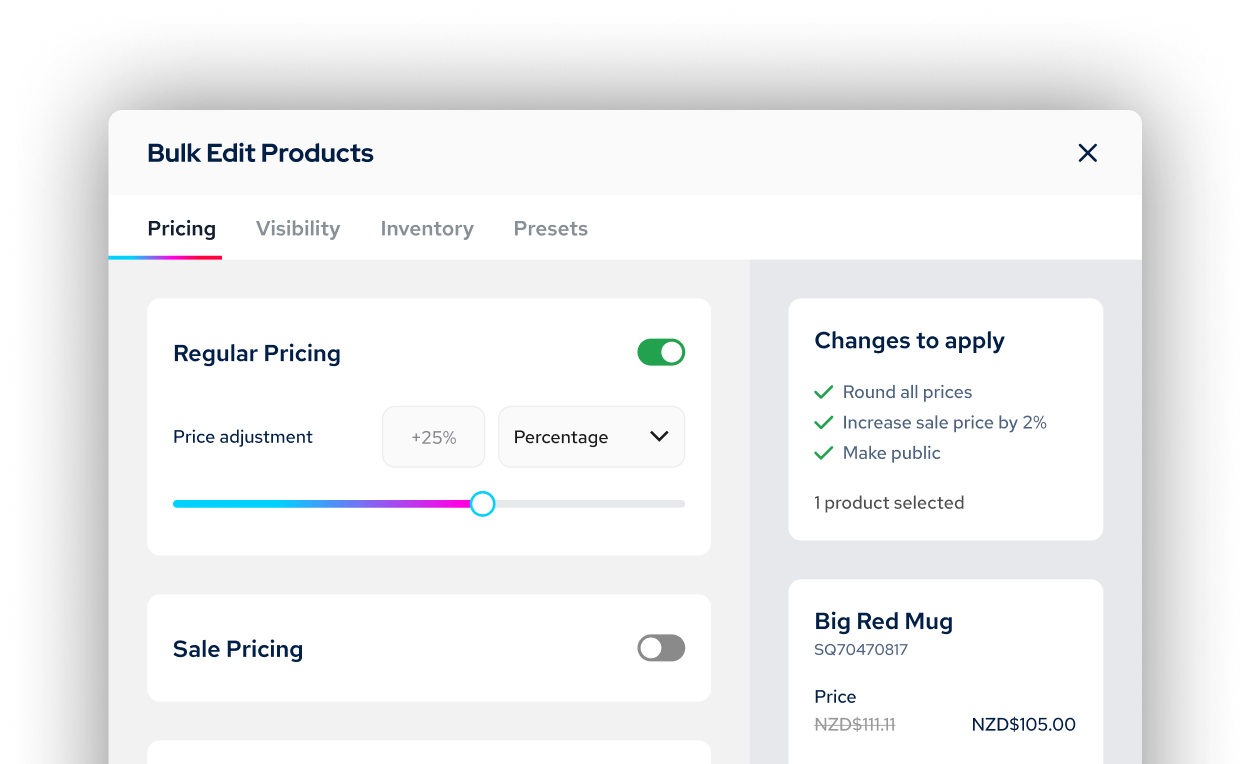
Things really get fun when you can make updates like this en masse:
Price changes: Adjust regular prices by percentage, dollar amount, or set a fixed price across multiple products. For sale prices, you can adjust based on the regular price (say, 25% off) or modify existing sale prices by percentage, dollar amount, or fixed price.
Smart rounding: This is particularly useful. If a 25% discount creates an awkward price like $24.93, you can set rounding rules to automatically adjust to $24.99, $24.95, a whole number, or a custom amount. The final price might not be the exact percentage you specified, but it looks better to customers.
Sale toggles: Turn sale prices on or off across multiple products at once.
Product status: Bulk change products between public, hidden, or scheduled.
Category management: Add or remove categories in bulk. This is useful when you want to do things like move everything into a "clearance" category and apply sale prices all at once 🪄
Inventory adjustments: This is for all the inventory managers out there who need to update their site to match physical stock levels. When you receive a shipment and need to add 25 units each across multiple products, you can make that adjustment in seconds rather than updating each product individually.
Who Actually Needs This
Let's be honest - if you have 10 products and update pricing once a year, you probably don't need this tool. But if any of these sound familiar, it's worth looking at:
You're running regular sales or promotions. Black Friday prep used to mean clicking through every single product to toggle sale prices on and off and entering the right prices. Now it's a bulk selection and one click. No math required.
You manage multiple collections with different pricing strategies. Think: food brands rotating seasonal menus, retail stores with different margin requirements per category, anyone managing wholesale vs. retail pricing - this saves you from juggling spreadsheets.
You're a designer managing client stores. SquareHero offers multi-site plans (3-site and 10-site options), which makes this particularly useful if you're maintaining product catalogs for multiple clients. You’ll literally look like the hero when clients ask if you can make price updates and you have that done in minutes vs. days.
You're just tired of the CSV workflow. Honestly, same - and you know I love a spreadsheet! The CSV export/import process in Squarespace works really well, but I know that it can be overwhelming for a lot of people. This is faster and, honestly, just way less frustrating.
How It Works
Installation is genuinely super simple - it's a quick code snippet added once to your site and you’re done.
Once installed, you'll see the SquareHero icon in your editor and you can click on that to display your products in a sortable, filterable table. Select the ones you want to edit, make your changes, and save. The updates happen directly in Squarespace, so everything stays in sync.
One feature I particularly appreciate: demo mode. You can try the full product before buying, no credit card required. Test it with your actual product catalog and see if it solves your specific workflow problems before committing.
The Real Talk Section
This isn't going to solve every Squarespace Commerce limitation. It won't give you more advanced selling features, it won't replace a proper POS system if that's what you need, and it won't magically make Squarespace's variant system work any differently (though it does make editing pricing for those variants much, much faster).
The tool is for pricing or inventory updates and not things like:
Editing product descriptions
Adding/removing variants
Adding/removing photos
Controlling advanced selling tool features such as product add-ons or custom forms
Editing the Additional Info section
But honestly? These are Squarespace limitations, not limitations of this tool. Within Squarespace's current constraints, this tool eliminates the most repetitive, time-consuming part of managing a Squarespace store at scale. And that's actually super valuable even if you need to do some of the other product management the old school way.

Pricing
I think the pricing structure is super fair and with single-site, 3-site and 10-site plans there’s something for you whether you’re a site owner yourself or a web designer or store manager on multiple sites. Even on the single site plan at $14/mo paid annually, I’d say if you're spending even an hour per month on bulk product updates, this pays for itself pretty quickly.
The Bottom Line
If you're running a Squarespace store with more than a handful of products and you regularly need to make bulk changes, this tool does exactly what it promises. For Squarespace users who've been stuck with one-by-one editing for years, this actually feels, dare I say, revolutionary - even if it's just bringing the platform up to what other eCommerce platforms have offered all along. But it's really well-executed - and honestly, that's what matters when you're trying to actually run a business instead of fighting with your website.
It’s quick to install, demo mode lets you test before buying, and the interface is clean enough that you won't need a tutorial to figure it out.
Squarespace Commerce is a solid platform, but the product management workflow has always been its weakest point at scale. Advanced Product Manager fixes that specific problem without overcomplicating things.
Full disclosure: I beta tested this product and received access in exchange for an honest review. This post contains affiliate links - if you purchase through them, I earn a small commission at no extra cost to you. I only recommend tools I actually use and believe solve real problems.

Why Boring Websites Often Convert Better
Sometimes “boring” is just another word for effective.
We’ve all seen those websites - loud, over-designed, stuffed with animations. Why is everything scrolling and floating everywhere? Are we playing a game of chase the button? What is going on??
Sites that are trying to do so much and yet still somehow leave you feeling very, very confused.
Landing on one is like watching a movie that’s all explosions, chase scenes, and stupid sound bites - but at the end you walk out of the theater still wondering what the movie was... about? Flash may grab your attention, but it doesn’t hold it. Without a story or a clear plot, its all just noise.
The same thing happens online when a website tries way too hard to impress without giving visitors something to understand or trust right away.
So here's your permission slip (not that you needed one) but you don’t need a louder website. You need one your audience’s brain doesn’t have to decode.
Because clarity, not chaos, is what earns trust.
We live in a design world obsessed with “standing out,” but the truth is, the sites that quietly guide visitors with confidence are the ones that win. The best part is that this all isn’t just luck - it’s proven psychology. And double bonus? It doesn't take a zillion dollar mega studio budget to pull off.
🎥 Related Watch: Why "Boring" Websites Convert Better
The Science of Familiarity Bias
Humans are creatures of habit. When something feels familiar, our brains release a little hit of safety. That’s familiarity bias - we naturally trust what we recognize. And while we should all work hard to overcome our biases IRL, when it comes to UX and web design it's time to embrace our little monkey minds.
It's why checkouts from Amazon to Target look nearly identical.
It’s why “Add to Cart” buttons are usually in the same spot across eCommerce stores.
It's how we nearly all know to scroll to the footer for more info or click on a logo to go to the home page.
Consistency helps users relax and focus on the content, not the structure. For websites, it’s the same principle. A clear CTA in a predictable place outperforms an experimental layout every time.
Predictability builds trust, and trust builds action.
Cognitive Load: The Hidden Conversion Killer
Every unexpected design choice adds mental effort - what psychologists call cognitive load. The more effort it takes to understand your site, the faster people leave. Because let's face it, we've all got enough going on and are processing just an insane amount of information every day. Unless your site is the NYT puzzles app, I simply do not want to have to work at it.
And I'm not just making this up based on my own inclination towards simple. Studies show that visitors make a stay-or-go decision almost immediately - often within just a few seconds of landing on a page - and the likelihood of them leaving drops sharply after the first 30 seconds, which is forever in internet time.
In short, if they don’t feel confident they can find what they need right away, people will bounce.
Your job as a designer or as a brand owner is this: make every step effortless. Now, this doesn’t mean boring or without friction where needed; it means intentional.
The Predictabile to Professional Pipeline
Predictability doesn’t just make a website feel polished - it signals competence.
When visitors see consistent spacing, steady typography, and patterns that behave the way they expect, they subconsciously read that as professionalism. It’s the same reason we trust brands whose tone and visuals never feel off-script. Basically, consistency = credibility.
The trick here is just to not confuse predictability with sameness.
The best sites balance consistency with a little spark - something that’s uniquely you but still easy to navigate. It’s the tension between structure and surprise that keeps visitors engaged.
If your website were a film, predictability would be the plot structure. It’s what keeps people oriented so your creativity can shine in the details: the cinematography, the dialogue, the pacing. Good design, like a well-told story, gives your audience clarity about what they’re watching and, ultimately, why they should even care.
Familiar layouts don’t just make users comfortable - they make your brand feel established. A calm, structured website signals confidence. An over-designed one often reads as overcompensating. The brands that “feel big” usually aren’t the loudest, they’re the clearest.
👉 Further reading: You Don’t Need More Traffic, You Need More Trust
The Bottom Line
At the end of the day, clarity and consistency aren’t the enemies of creativity - they’re what make it possible. Predictability gives your story structure; creativity gives it spark. A great website blends the two so effortlessly that users don’t even notice the design, they just feel understood.
So, if your site is the movie trailer, your job isn’t to boost the pyrotechnics budget. It’s to make sure people know exactly what they’re signing up to watch and hype them up so that they can’t wait to see more.
That’s not boring. That’s brilliant design.

Flodesk + Squarespace Commerce: A Real Look at The New Integration
Flodesk’s new integration with Squarespace Commerce means no more Zapier hacks. Now you can sync customers instantly, trigger post-purchase workflows, and build smarter automations - without extra tools.
If you’ve ever strung together Squarespace and Flodesk with a series of zaps and a prayer, I know you’ve thought: surely there must be a better way? Good news: Flodesk now offers a direct integration with Squarespace Commerce. No Zapier or duct tape necessary. But real talk: there are still a couple of kinks to iron out and some pitfalls you’ll want to look out for. Let’s break down exactly what you can do, the smart ways to take advantage of this update, and what you still can’t, so you can plan your automations confidently.
What This Integration Actually Enables
Finally! Here’s what you can now do with Squarespace x Flodesk:
Customer Sync: Automatically import all customers into Flodesk as a segment.
Post-Purchase Triggers: Launch workflows the moment a purchase completes - just pick Squarespace as the trigger in Flodesk (Makes a purchase → On the store …), then optionally filter by product.
Powerful Workflow Capabilities: From cart purchase to final email, Flodesk handles the workflow logic. Use delays, conditions, and design strategic sequences to ask for reviews, cross-sell, or welcome repeat buyers. (More on this below!)
What It Still Doesn’t Do :(
No Abandoned Cart Emails: Squarespace's API doesn’t support the detection of abandoned carts, so recovery sequences still aren’t possible. No tool outside of Squarespace’s own email campaigns can trigger upon cart abandonment yet.
No Real-Time Form Opt-In Sync: New sign-ups via Squarespace forms are only synced to Flodesk every six hours, unlike purchases, which sync instantly. IF you need form submissions to sync instantly that’s not a problem though - just embed your Flodesk forms like normal vs. using the integration.
Doesn’t Replace Squarespace Transactional Emails: This integration does not replace the automated Squarespace customer notifications, such as the order confirmation email or shipping confirmation email. Those are transactional and are handled by Squarespace. Flodesk handles the relational follow-ups. You can’t turn off Squarespace’s system emails, so make sure you customize and brand them (more on that in this post).
What Gets Sent via Squarespace vs. Flodesk Cheat Sheet
Via Squarespace
Order confirmation (via Customer Notifications)
Shipping confirmation (via Customer Notifications)
Abandoned Cart (via Campaigns)
Via Flodesk
Product-specific emails or workflows
Customer-specific emails or workflows
Wildcard
Review Request email - your pick on this one! Just make sure that if you enable the automatic Squarespace review email that you don’t set one up via Flodesk and vice versa.
How the Integration Works Behind the Scenes
When you connect, a segment is automatically created and named after your Squarespace store URL. You can rename it after the fact without breaking the sync.
The initial import includes all customers who’ve opted into marketing.
Ongoing sync runs automatically every six hours for form opt-ins. Purchases sync immediately and are marked as either Unconfirmed (if not opted into marketing) or Active (if opted-in).
How to Connect Squarespace & Flodesk
Ok, so you’re into this? Making the connection is super easy! Just go to Account settings > Integrations, click Connect on the Squarespace card, and follow the prompts!
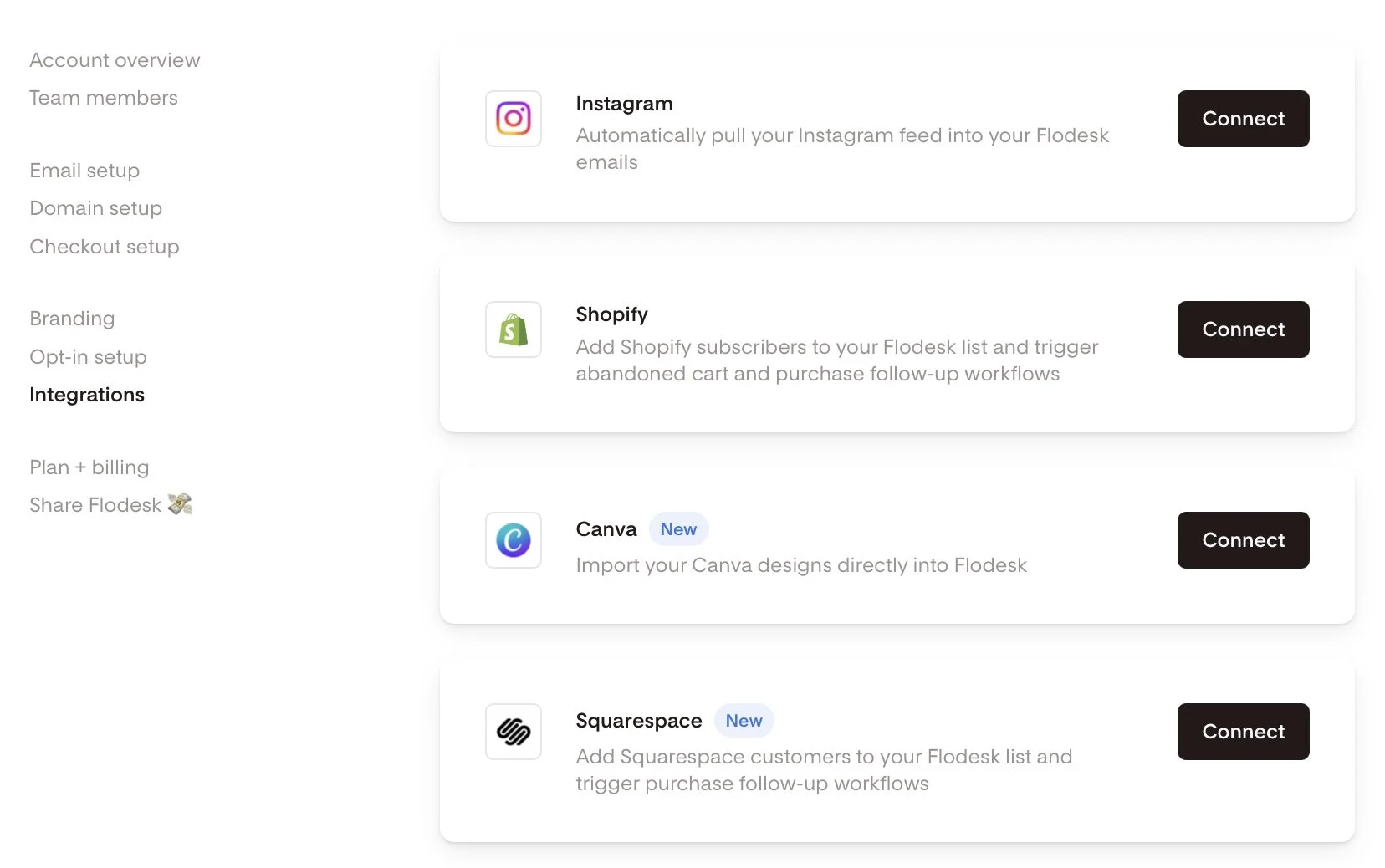
Screenshot of Flodesk and Squarespace integration
How to set up a Squarespace Purchase Follow-up workflow in Flodesk:
Alternatively, if you haven’t done that yet and you’re in the middle of building out a workflow, you can also do it right there by choosing Squarespace as a trigger in a purchase follow-up workflow.
Head to the Flodesk dashboard under Workflows → + New → Purchase follow-up.
Select Your Trigger: Choose 'Makes a purchase' and select your Squarespace store.
Product-Specific Workflows: Filter by product if needed. Note that each workflow currently supports filtering for one product, requiring a specific workflow for each.
Build Your Customer Journey: Incorporate time delays, conditions, and multiple emails to craft a personalized customer experience.

Setting up a workflow in Flodesk
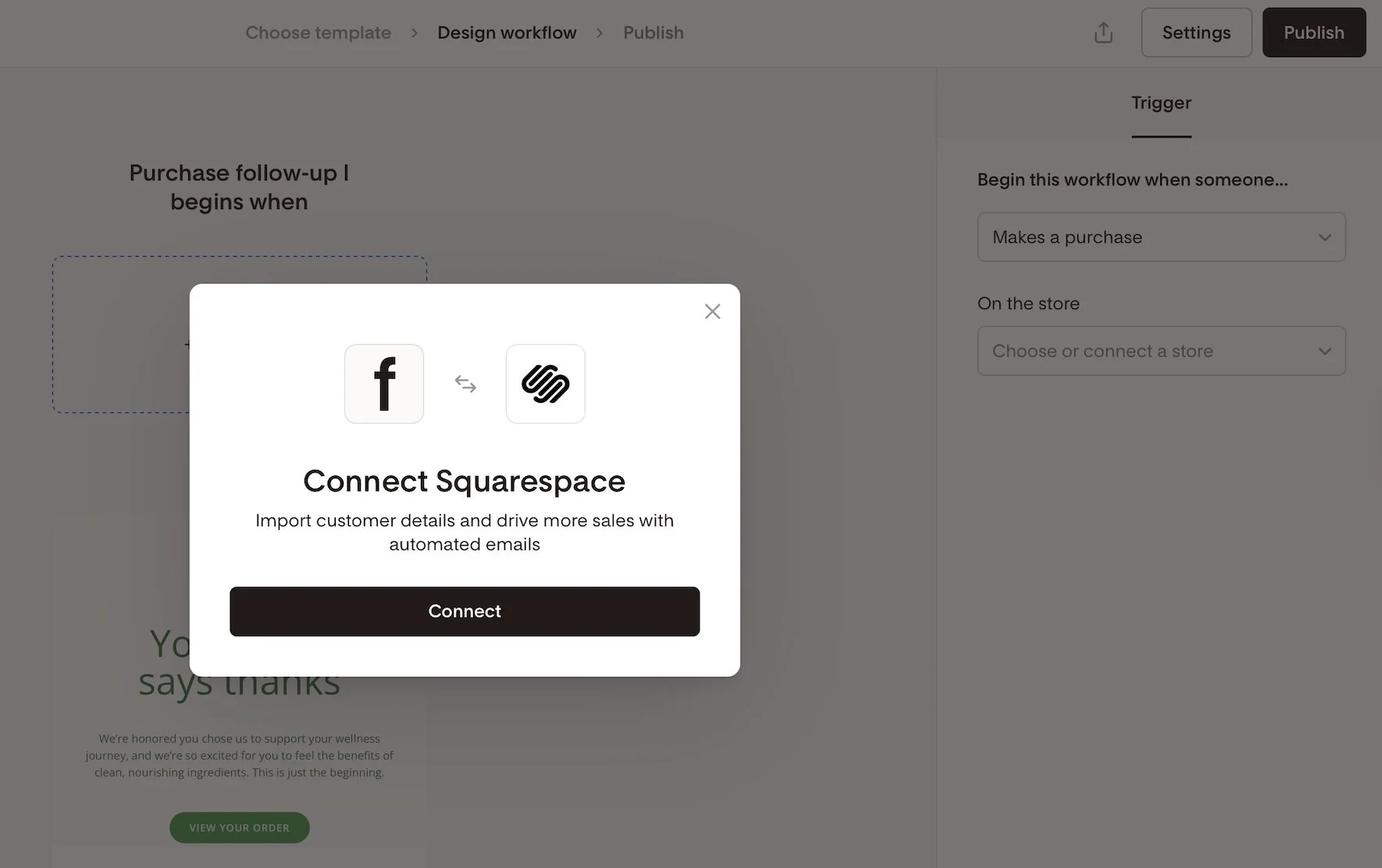
Connecting Squarespace as an integration in Flodesk
Creative Workflow Implementation Ideas:
Not sure where to start with commerce-related workflows? Here are some ideas to get the wheels spinning!
Thank-you email after a purchase
Detailed how-to-use instructions for a product
Address common product or service FAQs
Upsell or cross-sell related products
Send a review request email post-delivery
Offer an exclusive discount for repeat buyers
Invite customers to join a membership, subscription, or community
Implement seasonal or collection-based follow-ups
Squarespace x Flodesk FAQs
-
Nope. Everything you can currently do (customer sync and purchase-triggered workflows) happens natively.
-
Not currently - Squarespace doesn’t send that kind of trigger through the API.
-
Form opt-ins every six hours; purchases are synced instantly. If you need forms to sync instantly though, just embed a Flodesk form!
-
In a dedicated segment named after your store URL - you can rename it later if you’d like.
-
Absolutely - but note that each workflow only supports a single product filter. So if you want to send 3 unique automated emails for 3 specific products, just set up 3 workflows in Flodesk.
-
Flodesk workflows could overlap. To avoid duplicates, disable Squarespace post-purchase emails if you’re using Flodesk for follow-ups.
-
On Squarespace, go to Settings > Selling > Checkout and toggle Email Signup ON. You can also customize the text displayed in the signup box by clicking on Email Signup Settings.
Bottom Line
This new integration is exactly what so many Squarespace sellers have been hoping for. Now, you can finally say goodbye to Zapier, create purchase-triggered workflows, and send out beautiful follow-up emails—no complicated workarounds needed. While things like abandoned cart emails and instant form syncing are still on the wish list, this update is a big step forward for building stronger customer relationships right inside Squarespace.
If you’re excited to try it out, you can sign up using my Flodesk affiliate link. Not only will you get access to these handy new features, but you’ll also be supporting more tutorials like this one in the future. It’s a win for your business and helps our whole community grow!

Nonprofit Website Essentials for Squarespace
Essential Squarespace tools for nonprofits that need to do more with less. From accessibility widgets to donation optimization, these tools help mission-driven organizations punch above their weight.
Nonprofit websites have to work harder than most.
You're not just showcasing services or selling products - you're building trust, telling stories, and inspiring people to take action. Your website needs to handle volunteer applications, event registrations, newsletter signups, and about a million other things, all while looking professional on a shoestring budget.
I've worked with nonprofits ranging from small local organizations to national advocacy groups, and here's what I've learned: the right tools can make any team big or small feel like a marketing powerhouse. The wrong ones will eat up your limited time and budget with nothing to show for it.
Here are the tools that actually move the needle for mission-driven organizations.
The Foundation
Squarespace - Perfect for nonprofits who need a professional website without a professional budget. Built-in donation pages, event management, email campaigns, and member areas mean you can manage everything in one place instead of juggling multiple platforms. Use code KRISTINE10 for 10% off your subscription.
Termageddon - Nonprofits face extra scrutiny when it comes to privacy and data handling. This tool automatically updates your privacy policies and terms to keep you compliant without needing a legal team on retainer. Trust me, this is worth every penny. Use code KRISTINE for 10% off your first year.
Accessibility Matters
Accessibe - Making your website accessible isn't just the right thing to do - it's often legally required. This tool helps ensure your content is accessible to everyone, which aligns perfectly with most nonprofit missions. Simple to implement and shows your commitment to inclusion.
Better Forms for Better Data
Paperform - Volunteer applications, event registrations, program intake forms - nonprofits need forms that can handle complex information gathering. Paperform makes it easy to create professional forms with conditional logic, file uploads, and payment processing when needed.
Email That Inspires Action
Flodesk - Your newsletters need to compete with everything else in your supporters' inboxes. Flodesk creates beautiful, engaging emails that help you tell your story and drive action - whether that's donations, volunteer signups, or event attendance. Use coupon code K4I8S1 for 50% off your subscription for LIFE.
Custom Solutions
Will Myers - When your Squarespace site needs custom functionality - like specialized team member bio pages, layouts to impress potential supporters, or unique design to draw in volunteers - Will's code solutions are the most reliable option. I use his work on every site I build.
The Nonprofit Reality
Here's what most people don't understand about nonprofit websites: they need to do everything a business website does, plus tell compelling stories, manage volunteers, handle events, and often process donations - all while looking professional and trustworthy.
These tools aren't nice-to-haves for nonprofits - they're essentials that help you punch above your weight class. When your website works smoothly, your small team can focus on the mission instead of wrestling with technology.
Start with Squarespace and Termageddon for your foundation, prioritize accessibility with Accessibe, then add the other tools as your programs grow and your needs become more complex.
Your cause deserves a website that works as hard as you do.
P.S. Some links in this post are affiliate links, which means I earn a small commission if you purchase through them - at no extra cost to you. I only recommend tools I genuinely use and believe in.

How to Improve the Add to Cart Rate on Your Squarespace Website
Tired of low "Add to Cart" rates on your Squarespace store? This post reveals why focusing before the click is crucial for organic sales. Learn how a blog can build trust, answer customer questions, and drive traffic, turning your Squarespace site into a powerful sales tool.
You’ve built a beautiful Squarespace store. Your product pages are polished, and your “Add to Cart” button is ready for action.
But… no one’s clicking it.
Here’s the problem: most small product-based businesses focus all their energy on the store itself—on what happens after someone lands on the site. But if you want more organic sales, you need to start earlier in the journey.
The Journey Before the Click
As Kristine Neil often says, the real strategy is about what happens before your customer clicks “Add to Cart.” It’s not enough to hope your product pages will do all the heavy lifting. You have to guide people there with purpose.
What questions are your customers asking before they even land on your site? What hesitations do they have? What would help them feel confident in their decision to buy from you?
That’s where content comes in.
The Blog: Your Most Underrated Sales Tool
Most Squarespace eCommerce sites don’t have a blog—and it shows.
A blog isn’t just a place to “share updates.” It’s the mechanism by which your business gets discovered—because people are already going to Google searching for what you offer.
Your blog is also a tool to:
Build trust with potential customers
Position you as the authority in your industry
Show your product in real-life context
Answer questions people didn’t even know they had
Good news! Squarespace makes blogging easy–and it's built right into your Squarespace website. You can easily format your posts, optimize them for search, and use features like Summary Blocks to strategically guide visitors to your products or other key pages on your site.
In short: A blog creates connection, clarity, and compelling reasons to take action.
"But I Don’t Have Time to Blog…"
Totally fair. Most makers and small product business owners are already stretched thin. You’re managing inventory, fulfilling orders, handling social media… and blogging sounds like one more impossible task.
But here’s the thing: Instagram posts disappear in 24 hours. Blog posts live on your website forever and continue working for you for weeks, months, and even years—building a robust resource library that brings in new traffic and supports your business growth long-term.
It’s a much better investment of your time than content that disappears in a day—and if you decide to keep using social media, having blog content makes it much easier to create posts—providing tons of content that can be repurposed anytime, not only by you, but also by anyone helping you in your business.
You don’t need to blog every week. You don’t even need to write it all yourself. You just need a plan. (And yes, you can outsource this.)
“What Should I Blog About?”
If you're not sure where to start, here are a few ideas for product-based blog posts:
How to Use Your Product: Tutorials, styling tips, or recipes.
Behind the Scenes: Share your process, materials, or inspiration.
Customer Spotlights: Tell stories about how people use and love your product.
Seasonal or Gift Guides: Help people find the perfect item for any occasion.
Problem/Solution Posts: What’s a challenge your product solves? Write about that.
Each post brings new people to your site—and each one moves them a step closer to buying. And remember: your blog shouldn’t be all about your business—it should be about your customer. Stay focused on helping them, answering their questions, and meeting their needs, and you’ll see better results.
Scale Beyond Social
If Instagram is your main marketing tool, you’re building your business on rented land—you don’t own your account or your followers. If your account gets shut down (and this does actually happen), you lose everything.
It’s also impossible to know whether your so-called “audience” is even made up of potential customers. It’s not uncommon to see someone rack up likes and followers while selling zero products. A blog on your own Squarespace site gives you a lasting, scalable way to grow your business by building a real connection with the right people.
Even better: you can use your blog to grow your email list. Remember that people are far more likely to engage when they get something in return. Offer a discount or freebie in exchange for an email address, or invite readers to subscribe for early access to new products or behind-the-scenes content. Lead generation is just as important for product-based businesses as it is for service-based ones—and your blog can be the engine that drives it.
Want to learn how to make this work for your business?

Learn the Framework
I created a free class called The 3-Part Framework for Increasing Organic Traffic to Your Squarespace Website, and it’s designed for small business owners just like you.
I’ll show you how I used this method to grow my traffic without ads or social media—and how you can use it to attract more of the right customers to your site and transform your business into the one you imagined when you started your business in the first place.

This article was written by Jennifer Barden, founder of Jen-X Website Design and Strategy.
Many Squarespacers feel defeated when their websites don’t attract and engage visitors.
In my blog, I share my secrets for effective Squarespace website design and strategy so that DIYers and Squarespace Website Designers can learn tips for building Squarespace websites that attract and engage the right visitors.

Service Provider's Squarespace Toolkit
Strategic Squarespace tools for service providers who want professional client management. From booking systems to intake forms, here's my curated toolkit for coaches, consultants & agencies.
Running a service-based business is different than selling products - and your website tools should reflect that.
While everyone's talking about eCommerce this and online store that, service providers have their own unique challenges. You need to book clients, not process orders. You want professional intake forms, not product catalogs. You're building relationships, not managing inventory.
I've been quietly building websites for coaches, consultants, agencies, and other service providers for years (even though I got known for the eCommerce stuff). Here's the toolkit that actually makes sense for your business model.
The Foundation
Squarespace - Still the best choice for service providers who want a professional website without the headache. Built-in scheduling, beautiful portfolios, and integrated blogging make it perfect for showcasing your expertise. Use code KRISTINE10 for 10% off your subscription.
Termageddon - Whether you're a photographer or a business coach, you need solid terms and privacy policies. This tool automatically updates your legal pages so you can focus on serving clients instead of worrying about compliance. Use code KRISTINE for 10% off your first year.
Client Management That Actually Works
Breely - Built by the founder of Acuity (which was genius), this is the new generation of scheduling tools. Clean, professional, and integrates beautifully with your Squarespace site. Perfect for consultations, strategy calls, or any kind of appointment-based business.
Dubsado - This is where the magic happens for client management. Contracts, invoicing, questionnaires, project management - it handles the business side so you can focus on the actual work. Game-changer for anyone who's tired of juggling ten different systems. Use code KRISTINENEIL for 20% off your first month or year.
Forms That Do More
Paperform - Squarespace forms are fine for basic contact info, but service providers need more advanced functionality. Client intake questionnaires, project briefs, proposal requests - Paperform handles complex forms with conditional logic and actually looks good doing it.
Email That Converts
Flodesk - Your emails should look as professional as your services. Flodesk creates stunning newsletters and sequences that help you stay top-of-mind with prospects and nurture existing clients. Use coupon code K4I8S1 for 50% off your first year.
Custom Functionality
Will Myers - When you need your Squarespace site to do something it doesn't do out of the box - like custom list section layouts or unique design tweaks - Will's code solutions are the answer. I use his snippets on every single site I build.
The Bottom Line
Here's the truth: most service providers try to piece together their business with whatever free tools they can find, then wonder why everything feels disconnected and unprofessional.
These tools cost money, yes. But they also save you time, help you look more professional, and actually help you serve your clients better. Think of them as business investments, not expenses.
Start with Squarespace and Termageddon for the foundation, add Breely when you're ready to streamline your booking process, and layer on the others as your business grows.
Your clients are paying for expertise and professionalism. Your tools should reflect that.
P.S. Some links in this post are affiliate links, which means I earn a small commission if you purchase through them - at no extra cost to you. I only recommend tools I genuinely use and believe in.

Essential Squarespace Tools for eCommerce Stores
Discover my vetted list of essential Squarespace eCommerce tools that actually work. From shipping solutions to custom code, these are the exact tools I use with clients to build successful online stores.
Look, I get it. You chose Squarespace because it's supposed to make running an online store easier, not give you a headache trying to figure out which third-party tools you actually need.
After years of building eCommerce sites (and being called the "Squarespace eCommerce Queen" more times than I can count), I've learned that the right tools can make or break your online store. But here's the thing - you don't need 47 different apps. You need the right ones that actually work with Squarespace and solve real problems.
So let's cut through the noise. Here are the tools I actually use and recommend for my eCommerce clients - no fluff, just the ones that earn their keep.
The Foundation
Squarespace - Obviously, right? But seriously, this is still my #1 recommendation for small to medium businesses who want to manage everything in one place. eCommerce, blogging, scheduling, email campaigns - it all just works together. Use code KRISTINE10 for 10% off your subscription.
Termageddon - Privacy policies and terms that automatically update for you. If you're selling online, you need this legal protection, and this is the easiest way to cover your bases without hiring a lawyer. Magical, honestly. Use code KRISTINE for 10% off your first year.
Shipping Made Simple
Easyship - This one's a no-brainer for me. Connect your store, sync orders, generate labels - even their free plan gets the job done. I've written about them several times because they just work, especially for smaller stores that don't need enterprise-level shipping solutions.
Beyond Basic Forms
Paperform - I love Squarespace's built-in forms for most things, but when you need custom order forms, wholesale inquiries, or anything with advanced calculations or logic, Paperform is your answer. Super powerful yet stunningly simple - honestly one of my favorite tools ever.
Code & Customization
Will Myers - Hands down, the best custom code solutions for Squarespace. I use Will's code snippets on literally every site I build. If you want to add functionality that Squarespace doesn't offer out of the box, this is where you go first.
Custom Codey - AI-powered coding assistant specifically built for Squarespace. When you need custom code but don't want to learn CSS from scratch, this tool is a game-changer. Plus, it's built by someone who actually understands Squarespace inside and out. Use code KRISTINENEIL for a discount!
The Bottom Line
Here's what I've learned after building hundreds of eCommerce sites: the best tech stack is the one you'll actually use. These tools have earned their spot because they solve real problems, integrate well with Squarespace, and don't require a computer science degree to figure out.
Start with the foundation (Squarespace + Termageddon), add shipping when you need it (Easyship), and layer on the others as your business grows and you hit specific pain points.
Your online store should work for you, not against you. These tools help make that happen.
P.S. Some links in this post are affiliate links, which means I earn a small commission if you purchase through them - at no extra cost to you. I only recommend tools I genuinely use and believe in.

Kristine Neil
Fractional Web Partner
I'm Kristine Neil - a communications strategist who has spent 20+ years designing websites, first running a full-scale design and marketing agency, and now leading my own studio. I've been the creative director managing the work, the coder quietly fixing what others couldn't, and the strategist in the room asking why before how. Somewhere between the MBA and the other degrees, I decided web design was just one tool in a much bigger toolbox - the real work is figuring out what you're trying to say, who needs to hear it, and what's getting in the way. A website is just where all of that comes to life.
I build on Squarespace, and after years deep in the platform I know how far it can go and when to push past its limits. These days, I'm especially drawn to working as a fractional partner - getting to know an organization over time and helping with whatever moves them forward, whether that's a full redesign, an ongoing hand with content and strategy, or just being the person who knows their site best. I write here about eCommerce, web strategy, and making the complex feel a little more human.