

Notes on building smarter websites for actual humans.

A Minimalist's Guide to Squarespace Sales & Marketing Extensions
Launching an eCommerce website is not a “build it and they will come” situation - you’ve got to do your work on sales & marketing! Here is my take on all the Squarespace extensions that can help you with things like getting customer testimonials, running digital ads, and syncing your product feed to other sales platforms or channels.
UPDATED: March 2026
Launching an eCommerce website is not a “build it and they will come” situation - you’ve got to do your work on sales & marketing! Squarespace has a few extensions just for things like getting customer testimonials, running digital ads, and syncing your product feed to other sales platforms or channels. Here’s the 411 on all of them!
Ad Manager
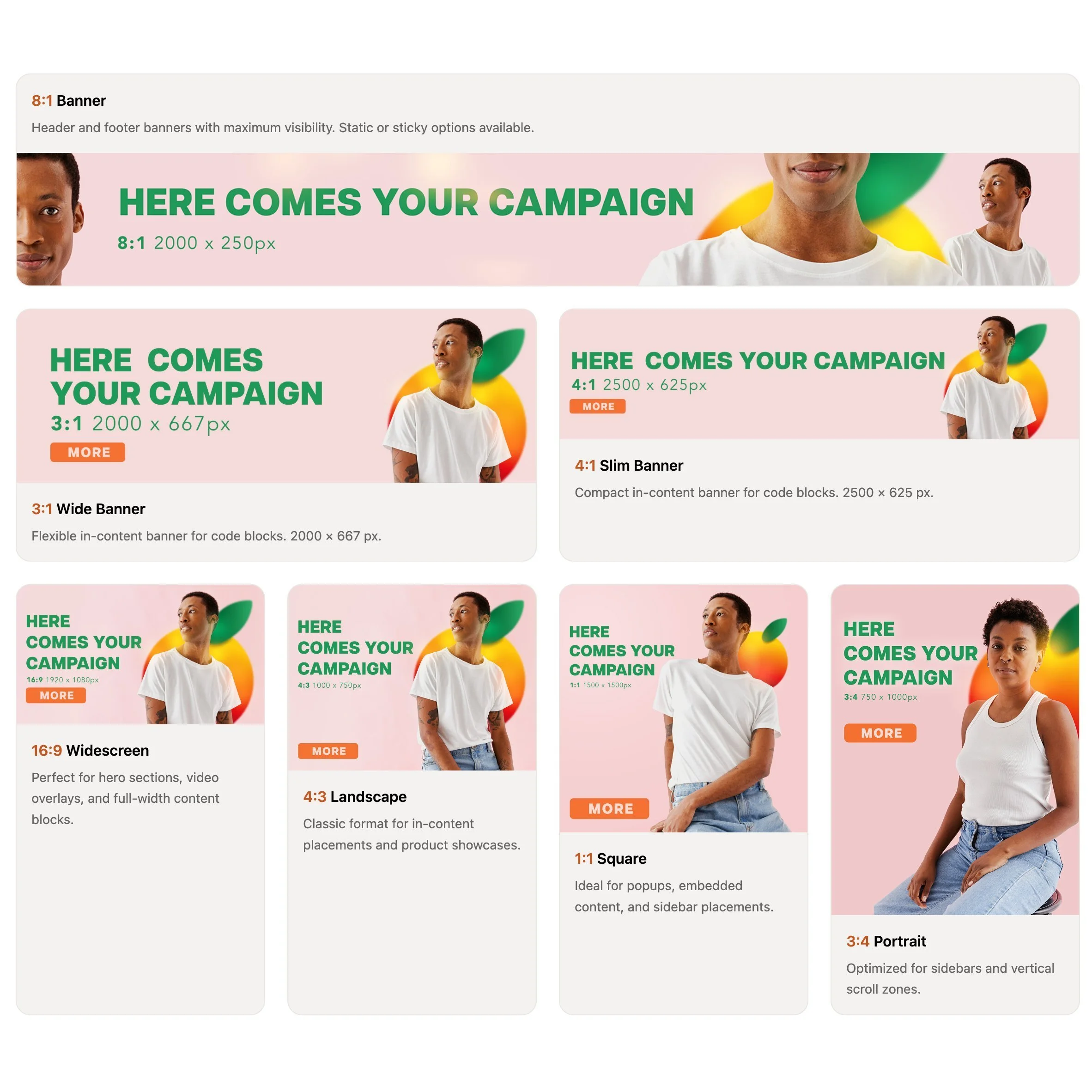
If you've ever wanted to run ads, promotions, or sponsored placements on your Squarespace site without handing the keys (or your sanity) over to Google AdSense, Ad Manager is worth a look. It was built by fellow Squarespace Platinum Partner Braunsberger Media after years of running into the same problem with clients - they wanted control over what showed up on their sites, and traditional ad networks just weren't it. I love tools built by fellow Squarespace pros because I know they have first hand knowledge of what it takes to solve real problems! With AdSense, you don't get to pick what shows up, the ads rarely match your brand, and they take a cut. Ad Manager flips that on its head.
What it does:
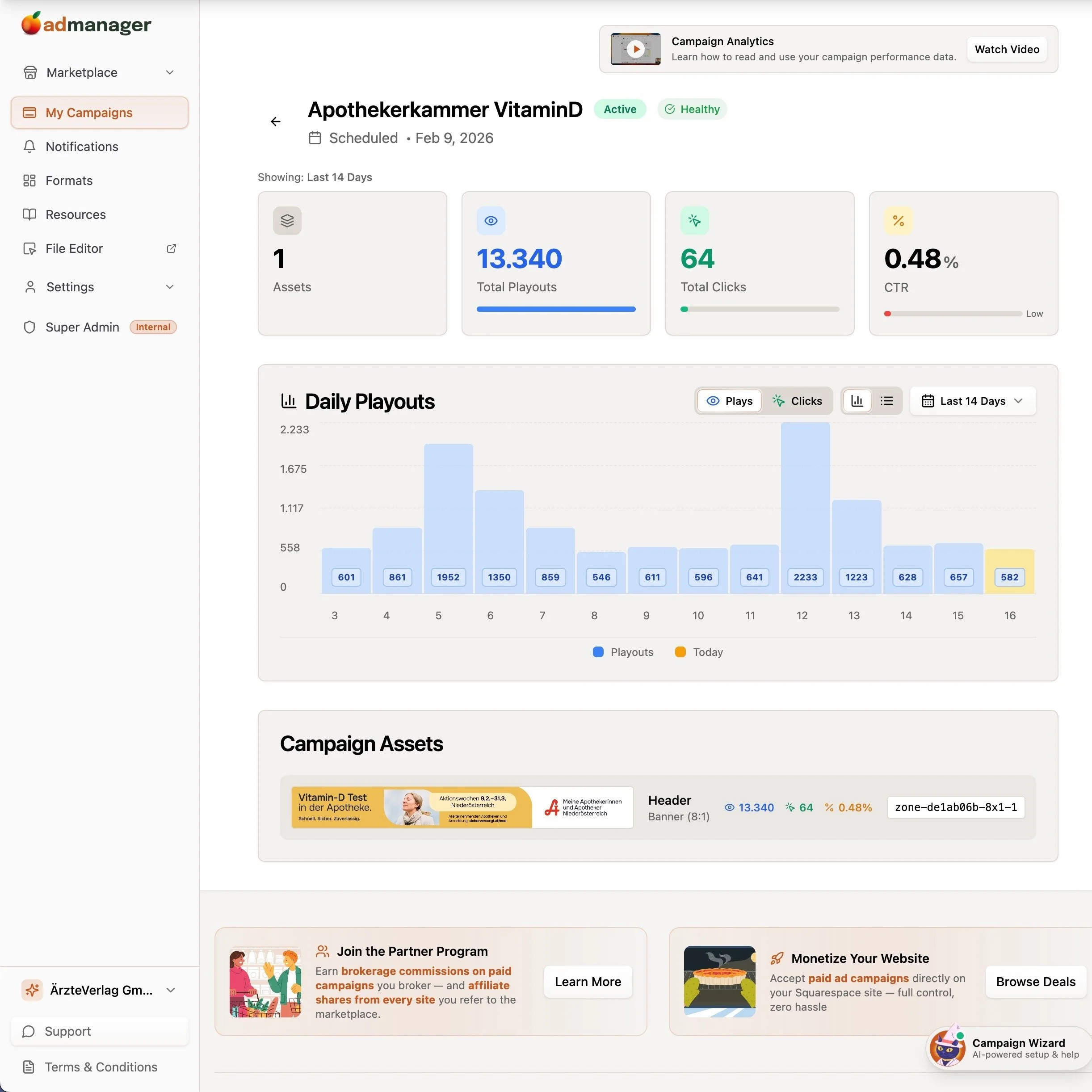
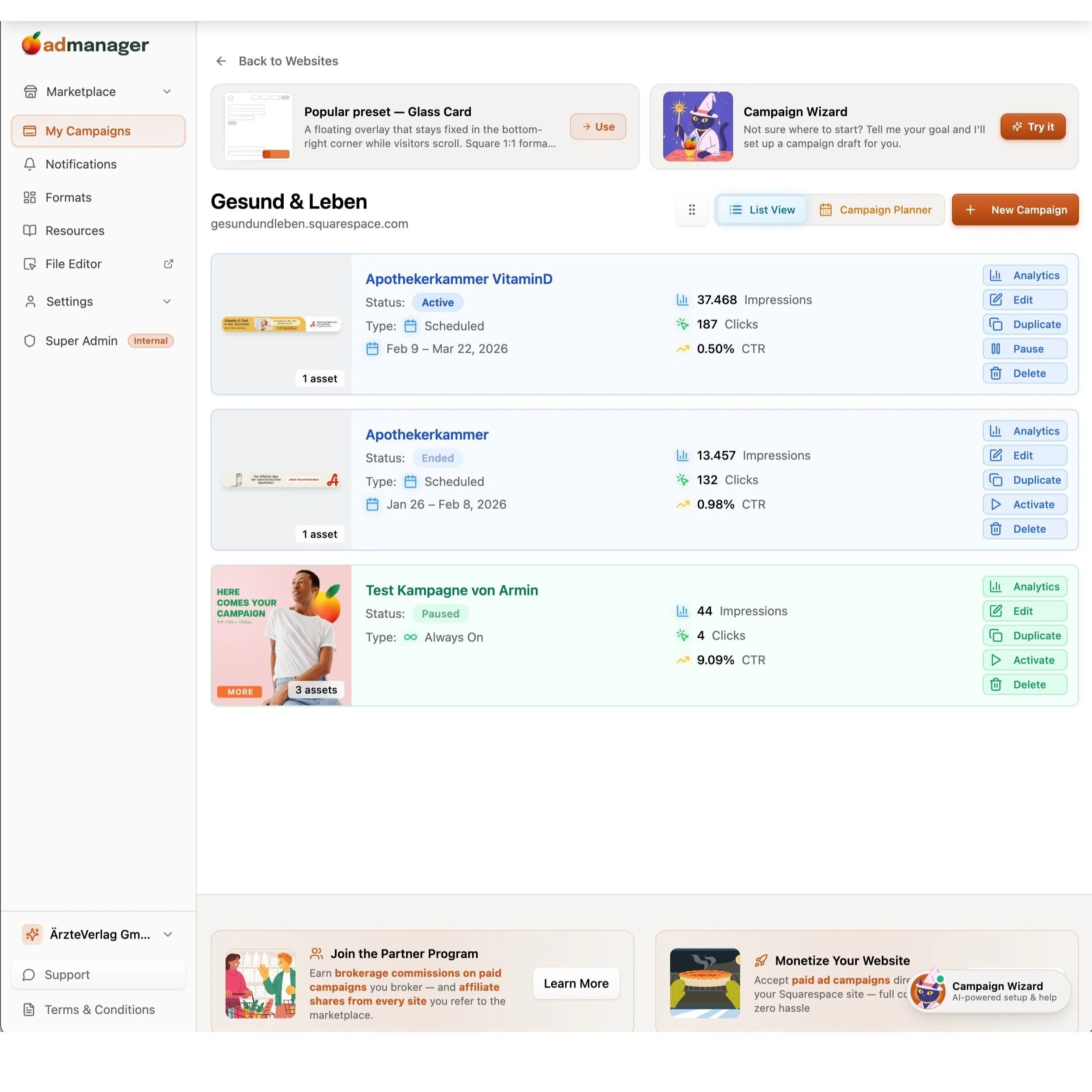
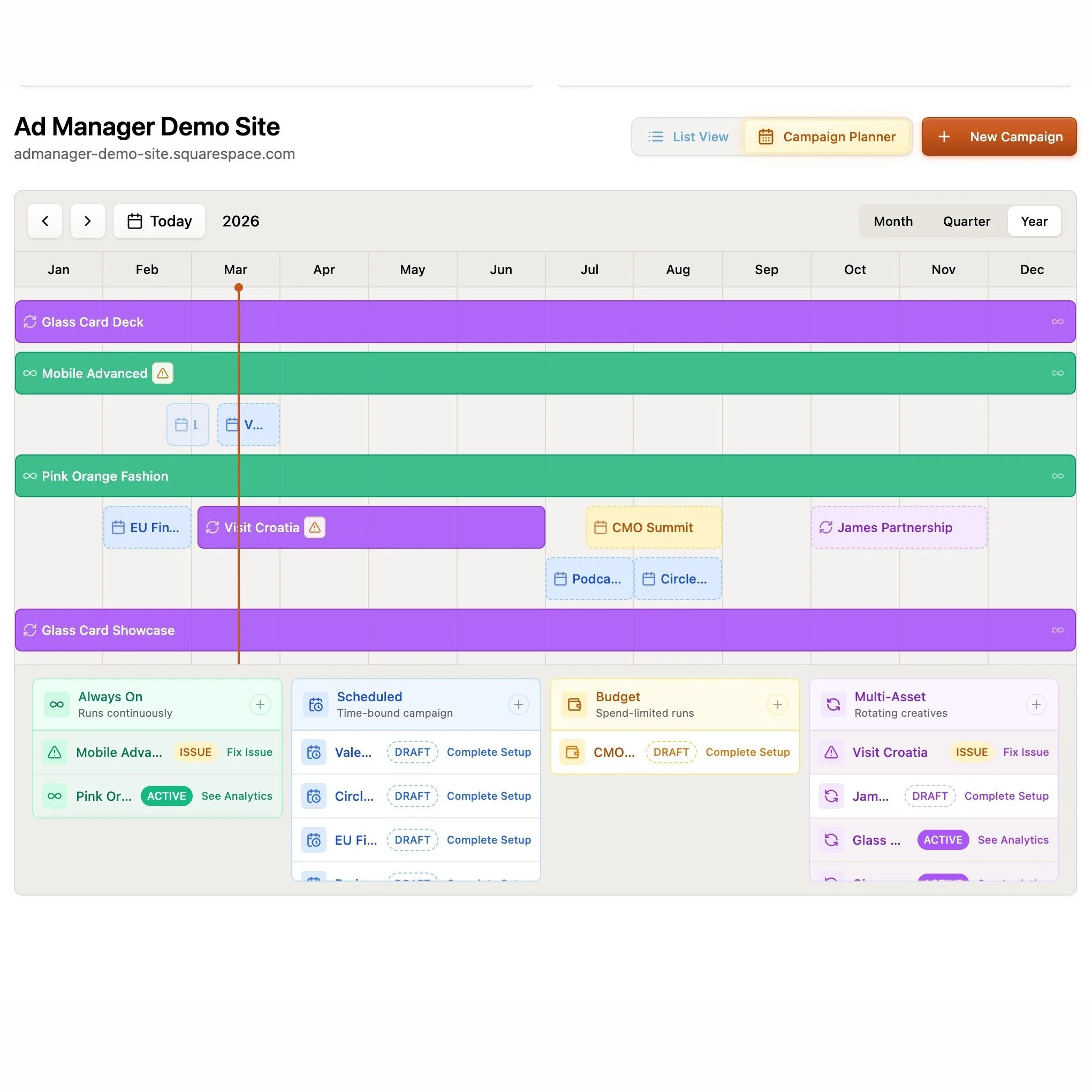
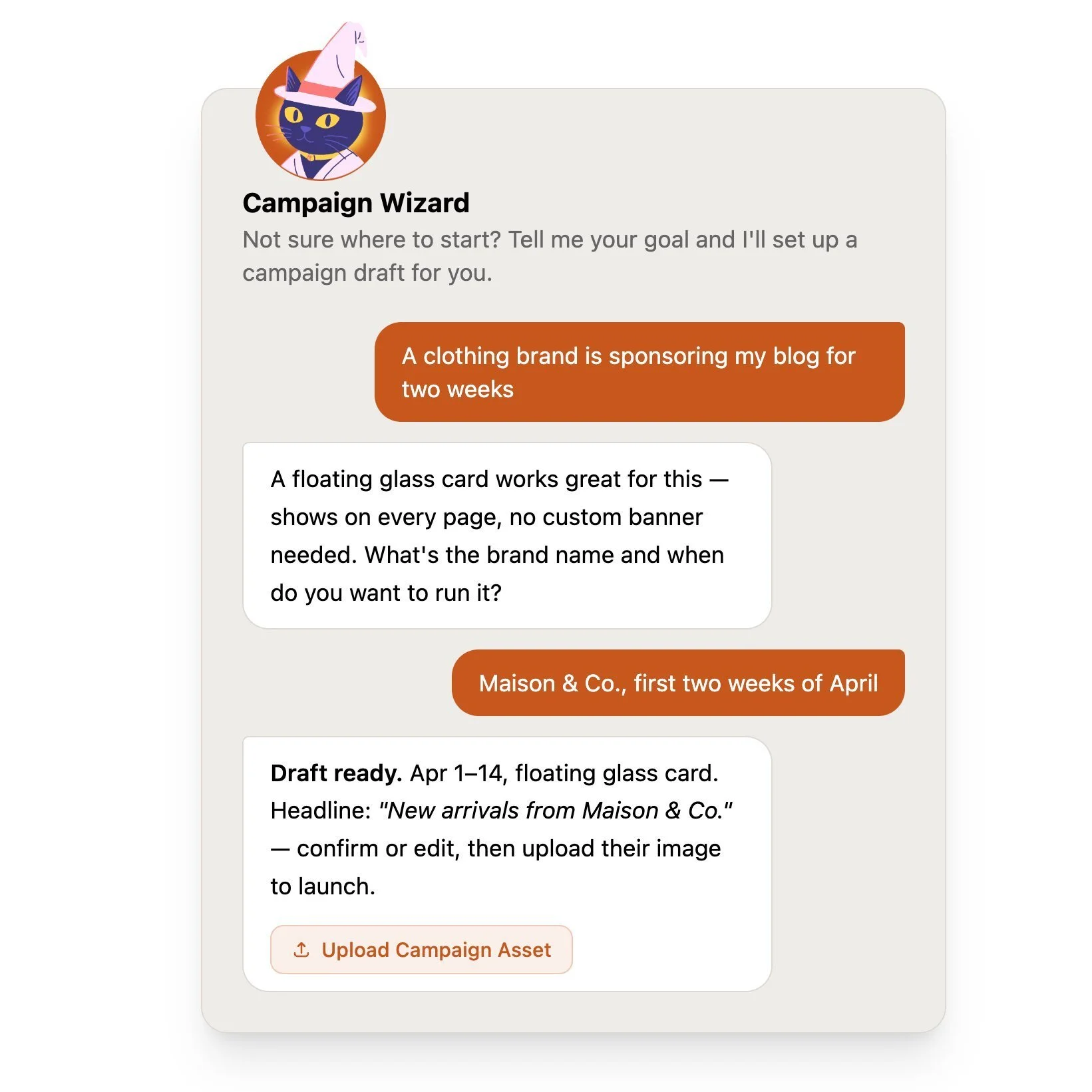
Gives you a central dashboard to create, schedule, and track your own promotional content - banners, timed campaigns, sponsored placements, rotating creatives - directly on your Squarespace site. Setup is a one-time code injection paste and then everything else is managed from their dashboard. You also get real-time analytics for impressions, clicks, and click-through rates, plus a built-in image editor so you're not bouncing between tools.
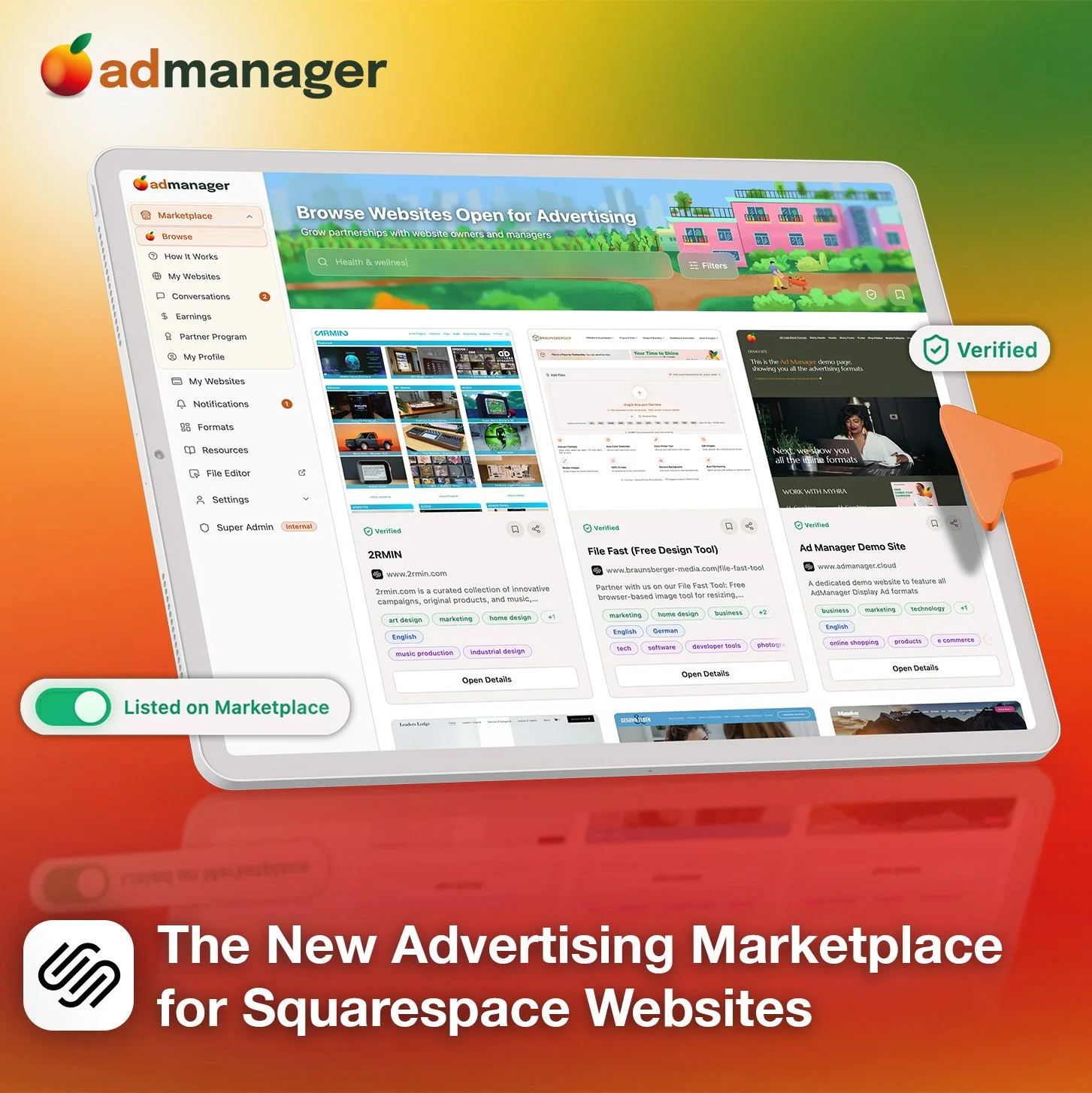
What makes it really interesting is the marketplace model. You can collaborate with other site owners - either advertise on their websites or field proposals from brands who want to run campaigns on yours. The platform handles the money through an escrow system powered by Stripe Connect, so the website owner gets paid once the campaign has actually run. That's a smart setup for anyone looking to monetize without chasing invoices.
Who should try it:
Anyone who wants to monetize their site with ads or run partner campaigns but doesn't want a third-party network deciding what shows up. This is especially useful for bloggers, content-heavy sites, or agencies managing promotions for clients. You keep 100% of the revenue, which is a pretty big deal compared to the AdSense model.
Pricing:
You can use Ad Manager privately on up to 5 of your own websites for free. The marketplace features go beyond that, and the platform only takes a share on actual transactions - so you're not paying for something you're not using.
Delighted
Making sure that your customers had a great experience is obviously super important for brands of all sizes but Delighted makes it easy even for small businesses to get super actionable feedback from customers in the same way huge companies like Target, Uber, and Instacart do. Most importantly (to me, at least) is that it’s automated since this extension will automatically pull from your Squarespace order data.


What it does:
Allows you to send one-question surveys of several different types to customers either right after they order or on a specified delay. You can collect feedback in one area, track trends, or even automatically send responses to certain people on your team so they can follow up.
Who should try it:
Anyone looking to build up social proof with positive testimonials from customers without having to do a ton of setup tracking them down. Since the surveys are so simple and easy, customers are super likely to submit their feedback, which you can use on social media or your website to delight future customers. And the circle continues.
Pricing:
Free plan available that includes up to 1000 trackings per month and 3 users which I think would work for most teams. You only get one survey type on the free plan but everything can be automated so if you’re running a smaller shop, this would work great for you.
GoDataFeed
Not going to lie to you that setting up data feeds for shops on Facebook, Instagram, Google or Pinterest is NOT my jam. I know people who are great at this and am happy to refer them but for those that are looking to run online ads without having to worry about syncing product data across multiple channels or platforms, GoDataFeed will save you so many headaches.


What it does:
GoDataFeed automatically pulls in your Squarespace product data and optimizes your catalog for multichannel marketing. You can manage all your product info from one place, create optimized ads and make it so much easier for you to manage digital marketing campaigns in-house.
Who should try it:
Anyone who is looking to run ads or sell on platforms like Google, Facebook, Instagram, Pinterest, or 200+ marketing channels.
Pricing:
The lite plan is $39/mo will cover up to 1,000 SKUs and is still super robust in terms of all the other features (unlimited stores, users, and data modifications) compared to the Plus plan which is $99/mo. The right plan for you will really depend on how many products you have but the time GoDataFeed will save you on either plan is well worth it in my opinion.
Outfy
A lot of people have “social media” on the marketing to-do list but realize it can be… a lot. With Outfy, you can automate social media posting, saving you a ton of time working on getting new traffic to your site. You can easily create videos, GIFs, collages, or even put the whole thing into “autopilot” mode.


What it does:
Once you sync your Squarespace site to Outfy, you can easily generate ads for Facebook, Instagram, and Google for any product in your shop. Share on social media, automate posting or create graphics all from the Outfy dashboard.
Who should try it:
Anyone who wants to try their hand at social media marketing without needing to hire a graphic designer or digital marketer.
Pricing:
All the plans basically include the same features so you’re basically just going to pay for how much you use or share via the app. The free plan gets you 30 credits/month, where one credit = one post to a social network. If you want to use any of the GIF, video, or collage layouts those are more credits.
Bottom Line
Running an eCommerce business on Squarespace is made even more powerful by taking advantage of some of the extensions that are available to supercharge the experience. (See also: this post all about Squarespace shipping extensions!) If you’re looking to get more eyes on your store either through social media marketing, selling on other platforms, running digital ads, or building up a huge roster of satisfied customers, give one of the sales & marketing Squarespace extensions a try.

Flodesk + Squarespace Commerce: A Real Look at The New Integration
Flodesk’s new integration with Squarespace Commerce means no more Zapier hacks. Now you can sync customers instantly, trigger post-purchase workflows, and build smarter automations - without extra tools.
If you’ve ever strung together Squarespace and Flodesk with a series of zaps and a prayer, I know you’ve thought: surely there must be a better way? Good news: Flodesk now offers a direct integration with Squarespace Commerce. No Zapier or duct tape necessary. But real talk: there are still a couple of kinks to iron out and some pitfalls you’ll want to look out for. Let’s break down exactly what you can do, the smart ways to take advantage of this update, and what you still can’t, so you can plan your automations confidently.
What This Integration Actually Enables
Finally! Here’s what you can now do with Squarespace x Flodesk:
Customer Sync: Automatically import all customers into Flodesk as a segment.
Post-Purchase Triggers: Launch workflows the moment a purchase completes - just pick Squarespace as the trigger in Flodesk (Makes a purchase → On the store …), then optionally filter by product.
Powerful Workflow Capabilities: From cart purchase to final email, Flodesk handles the workflow logic. Use delays, conditions, and design strategic sequences to ask for reviews, cross-sell, or welcome repeat buyers. (More on this below!)
What It Still Doesn’t Do :(
No Abandoned Cart Emails: Squarespace's API doesn’t support the detection of abandoned carts, so recovery sequences still aren’t possible. No tool outside of Squarespace’s own email campaigns can trigger upon cart abandonment yet.
No Real-Time Form Opt-In Sync: New sign-ups via Squarespace forms are only synced to Flodesk every six hours, unlike purchases, which sync instantly. IF you need form submissions to sync instantly that’s not a problem though - just embed your Flodesk forms like normal vs. using the integration.
Doesn’t Replace Squarespace Transactional Emails: This integration does not replace the automated Squarespace customer notifications, such as the order confirmation email or shipping confirmation email. Those are transactional and are handled by Squarespace. Flodesk handles the relational follow-ups. You can’t turn off Squarespace’s system emails, so make sure you customize and brand them (more on that in this post).
What Gets Sent via Squarespace vs. Flodesk Cheat Sheet
Via Squarespace
Order confirmation (via Customer Notifications)
Shipping confirmation (via Customer Notifications)
Abandoned Cart (via Campaigns)
Via Flodesk
Product-specific emails or workflows
Customer-specific emails or workflows
Wildcard
Review Request email - your pick on this one! Just make sure that if you enable the automatic Squarespace review email that you don’t set one up via Flodesk and vice versa.
How the Integration Works Behind the Scenes
When you connect, a segment is automatically created and named after your Squarespace store URL. You can rename it after the fact without breaking the sync.
The initial import includes all customers who’ve opted into marketing.
Ongoing sync runs automatically every six hours for form opt-ins. Purchases sync immediately and are marked as either Unconfirmed (if not opted into marketing) or Active (if opted-in).
How to Connect Squarespace & Flodesk
Ok, so you’re into this? Making the connection is super easy! Just go to Account settings > Integrations, click Connect on the Squarespace card, and follow the prompts!
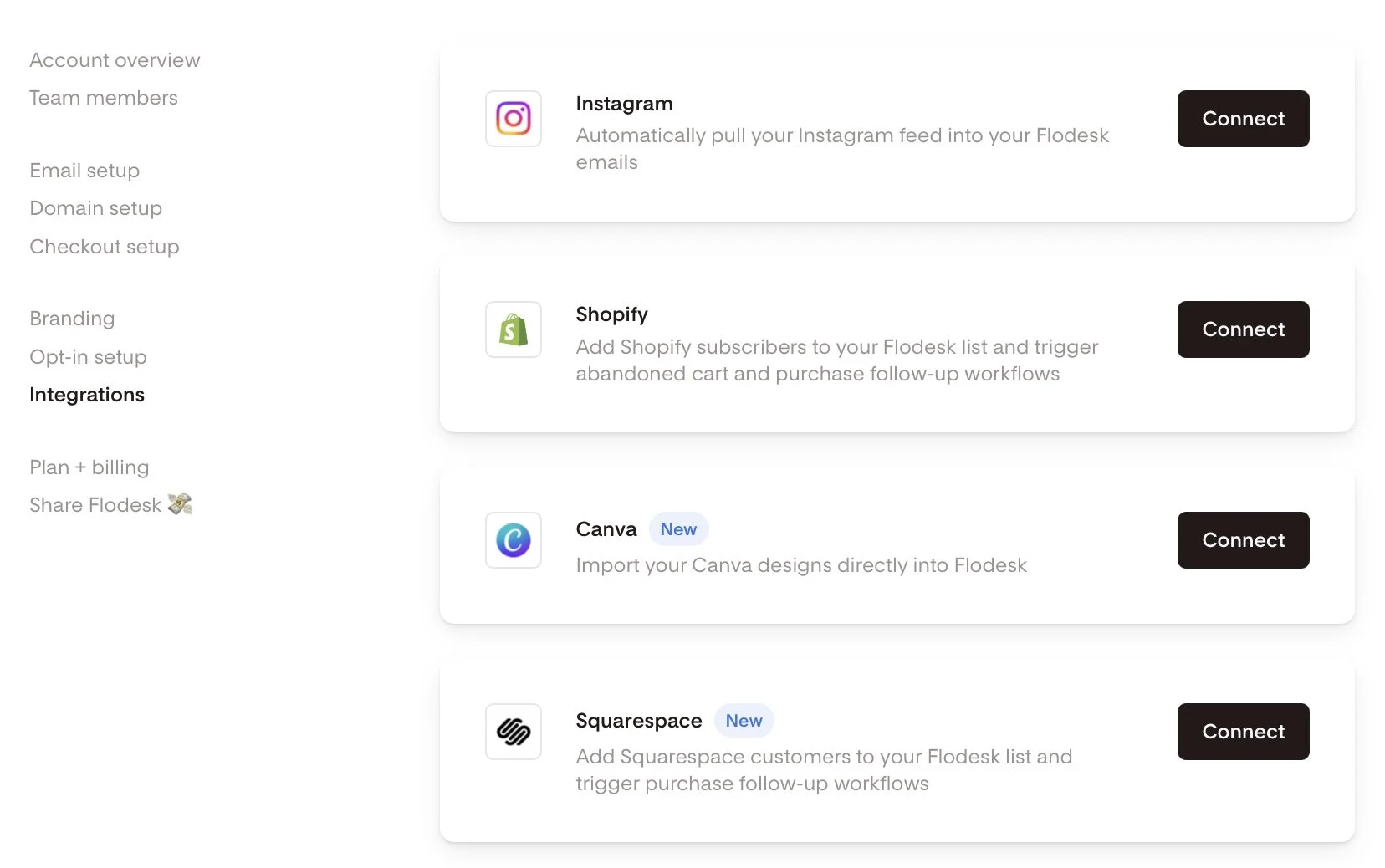
Screenshot of Flodesk and Squarespace integration
How to set up a Squarespace Purchase Follow-up workflow in Flodesk:
Alternatively, if you haven’t done that yet and you’re in the middle of building out a workflow, you can also do it right there by choosing Squarespace as a trigger in a purchase follow-up workflow.
Head to the Flodesk dashboard under Workflows → + New → Purchase follow-up.
Select Your Trigger: Choose 'Makes a purchase' and select your Squarespace store.
Product-Specific Workflows: Filter by product if needed. Note that each workflow currently supports filtering for one product, requiring a specific workflow for each.
Build Your Customer Journey: Incorporate time delays, conditions, and multiple emails to craft a personalized customer experience.

Setting up a workflow in Flodesk
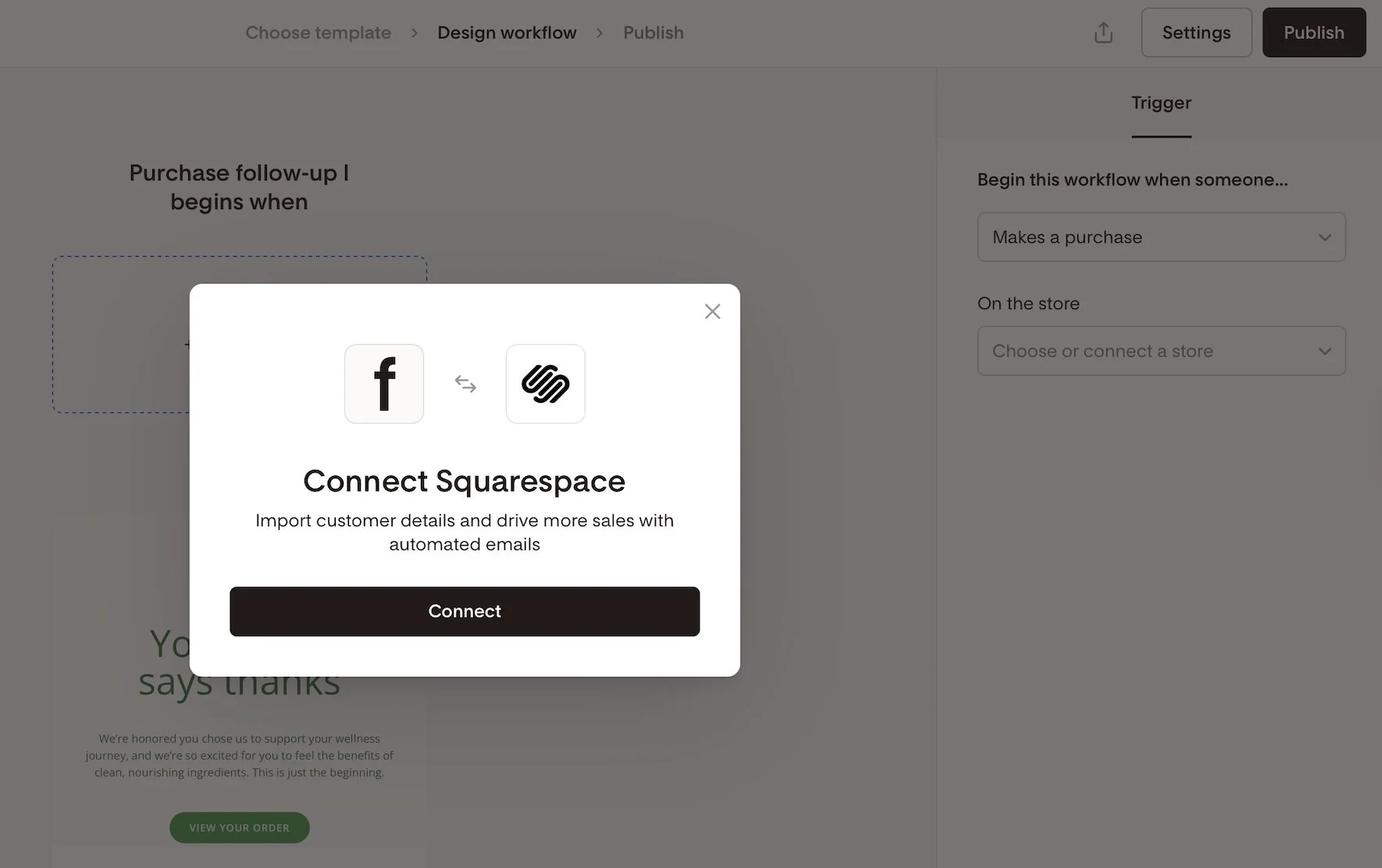
Connecting Squarespace as an integration in Flodesk
Creative Workflow Implementation Ideas:
Not sure where to start with commerce-related workflows? Here are some ideas to get the wheels spinning!
Thank-you email after a purchase
Detailed how-to-use instructions for a product
Address common product or service FAQs
Upsell or cross-sell related products
Send a review request email post-delivery
Offer an exclusive discount for repeat buyers
Invite customers to join a membership, subscription, or community
Implement seasonal or collection-based follow-ups
Squarespace x Flodesk FAQs
-
Nope. Everything you can currently do (customer sync and purchase-triggered workflows) happens natively.
-
Not currently - Squarespace doesn’t send that kind of trigger through the API.
-
Form opt-ins every six hours; purchases are synced instantly. If you need forms to sync instantly though, just embed a Flodesk form!
-
In a dedicated segment named after your store URL - you can rename it later if you’d like.
-
Absolutely - but note that each workflow only supports a single product filter. So if you want to send 3 unique automated emails for 3 specific products, just set up 3 workflows in Flodesk.
-
Flodesk workflows could overlap. To avoid duplicates, disable Squarespace post-purchase emails if you’re using Flodesk for follow-ups.
-
On Squarespace, go to Settings > Selling > Checkout and toggle Email Signup ON. You can also customize the text displayed in the signup box by clicking on Email Signup Settings.
Bottom Line
This new integration is exactly what so many Squarespace sellers have been hoping for. Now, you can finally say goodbye to Zapier, create purchase-triggered workflows, and send out beautiful follow-up emails—no complicated workarounds needed. While things like abandoned cart emails and instant form syncing are still on the wish list, this update is a big step forward for building stronger customer relationships right inside Squarespace.
If you’re excited to try it out, you can sign up using my Flodesk affiliate link. Not only will you get access to these handy new features, but you’ll also be supporting more tutorials like this one in the future. It’s a win for your business and helps our whole community grow!

How to Improve the Add to Cart Rate on Your Squarespace Website
Tired of low "Add to Cart" rates on your Squarespace store? This post reveals why focusing before the click is crucial for organic sales. Learn how a blog can build trust, answer customer questions, and drive traffic, turning your Squarespace site into a powerful sales tool.
You’ve built a beautiful Squarespace store. Your product pages are polished, and your “Add to Cart” button is ready for action.
But… no one’s clicking it.
Here’s the problem: most small product-based businesses focus all their energy on the store itself—on what happens after someone lands on the site. But if you want more organic sales, you need to start earlier in the journey.
The Journey Before the Click
As Kristine Neil often says, the real strategy is about what happens before your customer clicks “Add to Cart.” It’s not enough to hope your product pages will do all the heavy lifting. You have to guide people there with purpose.
What questions are your customers asking before they even land on your site? What hesitations do they have? What would help them feel confident in their decision to buy from you?
That’s where content comes in.
The Blog: Your Most Underrated Sales Tool
Most Squarespace eCommerce sites don’t have a blog—and it shows.
A blog isn’t just a place to “share updates.” It’s the mechanism by which your business gets discovered—because people are already going to Google searching for what you offer.
Your blog is also a tool to:
Build trust with potential customers
Position you as the authority in your industry
Show your product in real-life context
Answer questions people didn’t even know they had
Good news! Squarespace makes blogging easy–and it's built right into your Squarespace website. You can easily format your posts, optimize them for search, and use features like Summary Blocks to strategically guide visitors to your products or other key pages on your site.
In short: A blog creates connection, clarity, and compelling reasons to take action.
"But I Don’t Have Time to Blog…"
Totally fair. Most makers and small product business owners are already stretched thin. You’re managing inventory, fulfilling orders, handling social media… and blogging sounds like one more impossible task.
But here’s the thing: Instagram posts disappear in 24 hours. Blog posts live on your website forever and continue working for you for weeks, months, and even years—building a robust resource library that brings in new traffic and supports your business growth long-term.
It’s a much better investment of your time than content that disappears in a day—and if you decide to keep using social media, having blog content makes it much easier to create posts—providing tons of content that can be repurposed anytime, not only by you, but also by anyone helping you in your business.
You don’t need to blog every week. You don’t even need to write it all yourself. You just need a plan. (And yes, you can outsource this.)
“What Should I Blog About?”
If you're not sure where to start, here are a few ideas for product-based blog posts:
How to Use Your Product: Tutorials, styling tips, or recipes.
Behind the Scenes: Share your process, materials, or inspiration.
Customer Spotlights: Tell stories about how people use and love your product.
Seasonal or Gift Guides: Help people find the perfect item for any occasion.
Problem/Solution Posts: What’s a challenge your product solves? Write about that.
Each post brings new people to your site—and each one moves them a step closer to buying. And remember: your blog shouldn’t be all about your business—it should be about your customer. Stay focused on helping them, answering their questions, and meeting their needs, and you’ll see better results.
Scale Beyond Social
If Instagram is your main marketing tool, you’re building your business on rented land—you don’t own your account or your followers. If your account gets shut down (and this does actually happen), you lose everything.
It’s also impossible to know whether your so-called “audience” is even made up of potential customers. It’s not uncommon to see someone rack up likes and followers while selling zero products. A blog on your own Squarespace site gives you a lasting, scalable way to grow your business by building a real connection with the right people.
Even better: you can use your blog to grow your email list. Remember that people are far more likely to engage when they get something in return. Offer a discount or freebie in exchange for an email address, or invite readers to subscribe for early access to new products or behind-the-scenes content. Lead generation is just as important for product-based businesses as it is for service-based ones—and your blog can be the engine that drives it.
Want to learn how to make this work for your business?
Learn the Framework
I created a free class called The 3-Part Framework for Increasing Organic Traffic to Your Squarespace Website, and it’s designed for small business owners just like you.
I’ll show you how I used this method to grow my traffic without ads or social media—and how you can use it to attract more of the right customers to your site and transform your business into the one you imagined when you started your business in the first place.

This article was written by Jennifer Barden, founder of Jen-X Website Design and Strategy.
Many Squarespacers feel defeated when their websites don’t attract and engage visitors.
In my blog, I share my secrets for effective Squarespace website design and strategy so that DIYers and Squarespace Website Designers can learn tips for building Squarespace websites that attract and engage the right visitors.

7 Proven Email List Building Tips for Squarespace Shops
Discover 7 effective strategies to grow your email list and boost sales on your Squarespace eCommerce site. Learn how to attract subscribers and drive customer loyalty.
If you're running a Squarespace Commerce site and haven't tapped into the power of email marketing yet, you're missing out on some serious revenue potential. Trust me, as a seasoned Squarespace expert and eCommerce strategist, I've seen firsthand how a well-crafted email strategy can skyrocket your sales and customer loyalty.
But here's the thing: Before you can start crafting compelling email campaigns, you need to build a list of eager subscribers ready to engage with your content and offers. Luckily, with a few savvy strategies and some irresistible incentives, you can transform your Squarespace site into an email list building powerhouse.
So, grab your favorite beverage, get comfy, and let's dive into my top 7 tips for growing your email list like a pro. These tried-and-true tactics have helped my clients boost their subscriber count and drive real results. Let's get started!
Offer an irresistible sign-up incentive - A discount code or offer of free upgraded shipping on their first order can be just the motivation people need to sign up for your emails. This strategy works especially well for new, small, or lesser-known brands that may need an extra nudge to encourage potential customers to try their products.
Leverage Squarespace's promotional pop-up feature - Grab your browsing shoppers' attention and drive sign-ups by utilizing Squarespace's built-in promotional pop-up tool. Customize the design and messaging to align with your brand and offer a compelling reason to join your list.
Include an email opt-in form in your website footer - Ensuring you have an email sign-up form in your footer means it will appear on every page of your site, maximizing conversion opportunities. Keep the form simple and straightforward, highlighting the key benefits of subscribing to your list.
Incorporate email sign-up into your checkout process - Make joining your email list a seamless part of your Squarespace checkout process. Add a checkbox or opt-in field to your checkout page, making it easy for customers to subscribe while completing their purchases. For more tips on optimizing your checkout, check out my post on creating a seamless checkout experience.
Create exclusive, gated content upgrades - Develop valuable content pieces related to your products or niche, such as guides, checklists, or insider tips. Position these resources as "VIP customer access" materials, requiring an email address to unlock them. This approach helps build your list while providing genuine value to your audience.
Pitch your list in post-purchase emails - After a customer makes a purchase, use the auto-confirmation email to highlight the benefits of joining your email list and include a sign-up link. This is a great opportunity to engage with customers who have already shown interest in your brand. If you want to take your post-purchase emails to the next level, check out this post on customizing transactional emails.
Experiment with creative calls-to-action - To find what resonates best with your audience, test different calls-to-action on your email sign-up buttons. Try phrases like "Join the VIP List," "Become an Insider," or "Get Exclusive Offers" instead of generic phrasing like "Subscribe." Track which CTAs drive the most conversions and optimize accordingly.
Actionable Takeaways
Choose an enticing sign-up incentive that aligns with your brand and target audience
Set up a pop-up and footer opt-in form on your Squarespace site today
Brainstorm a valuable content upgrade you can offer as a "VIP" opt-in incentive
Test at least 2 different CTA phrases on your sign-up buttons this week
FAQs
-
Aim to email your list at least once a month to keep your brand top-of-mind, but not so often that you overwhelm your subscribers. Consistency is key!
-
Mix it up with a blend of valuable content, exclusive offers, product updates, and behind-the-scenes peeks into your brand. Focus on providing value, not just pushing sales.
-
Keep an eye on your open rates, click-through rates, and conversion rates. If you're not seeing the results you want, don't be afraid to experiment and try new approaches.
Bottom Line
There you have it – 7 powerful strategies to supercharge your email list growth on Squarespace. Remember, building a thriving list takes time and consistency, but with these tips in your toolkit, you'll be well on your way to cultivating a community of loyal subscribers who can't wait to hear from you. So, pick a strategy, implement it on your site, and watch your list and your sales grow! You've got this!

Squarespace and ConvertKit: The Dynamic Duo for Your Online Business
Unleash the power of Squarespace and ConvertKit! They're the ultimate tech combo that turbocharges your online business. Discover how this dynamic duo takes your eCommerce email marketing to new heights.
There's a dynamic duo in the tech world that's been flying under the radar for too long: Squarespace and ConvertKit. They're like the perfect pair, just as inseparable as peanut butter and jelly or Batman and Robin. Squarespace is the master of providing a seamless selling experience, while ConvertKit swoops in with its superpowers in email marketing. Together, they create an unstoppable force that can turbocharge your online business and take it to new heights. Forget about ordinary, these two are extraordinary when combined.
Seamlessly Sell with Squarespace Commerce
Squarespace Commerce is renowned for its user-friendly interface and stunning templates that make setting up an online store a breeze. But when you combine Squarespace Commerce with ConvertKit, you unlock a world of possibilities. With Squarespace Commerce, you can showcase your products, securely handle transactions, and effortlessly manage your inventory. And with ConvertKit, you can automate post-purchase emails, recommend related products, and keep your customers engaged long after they've made a purchase.
One of the standout features of Squarespace Commerce is its integration with popular payment gateways, such as Stripe and PayPal. This ensures a seamless checkout experience for your customers, increasing trust and reducing cart abandonment. By connecting ConvertKit to Squarespace Commerce, you can leverage these selling capabilities and send targeted emails to customers based on their purchase history, interests, or other criteria. This level of personalization and segmentation can significantly improve the effectiveness of your email campaigns and drive repeat business. With an email list, you’re no longer reliant on social media!
Unleash the Power of ConvertKit's Email Marketing
While Squarespace does offer its own email campaigns feature, there's no denying that ConvertKit takes email marketing to a whole new level. With ConvertKit, you'll have the ability to create highly targeted and personalized email sequences that are triggered by specific customer actions. This means you can send product-specific emails to your customers, nurturing them throughout their buying journey and increasing the chances of repeat purchases.
ConvertKit's automation feature allows you to set up workflows that automatically send emails based on customer behavior, such as purchases or website interactions. This helps you deliver timely and relevant content to your subscribers, boosting engagement and driving sales. With ConvertKit, you can say goodbye to generic email blasts and hello to personalized, conversion-focused communication. (Not sold on ConvertKit yet? Check out this post where I break down my top 3 email marketing platform picks.)
How to Connect Squarespace and ConvertKit: Simple Step-by-Step Guides
Now that you're ready to harness the power of this tech combo, let's walk through how to connect Squarespace and ConvertKit.
Two Options for Collecting Subscriber Info
Option 1: Embedding a ConvertKit Form onto Squarespace
This option is perfect if you'd like to use ConvertKit's forms for collecting subscriber information. The best part is even though you can customize and tweak each form within ConvertKit, you also have freedom to customize these forms with your very own custom CSS on Squarespace.
In your ConvertKit account, create a captivating form that captures the information you need from your website visitors. You can customize the fields and design to align with your brand.
Copy the provided embed code from ConvertKit. Don’t worry, it’s just one line of code - you can’t mess this up!
Head over to your Squarespace website and navigate to the page where you want to add the form.
Edit the page, then add a Code Block.
Paste the ConvertKit embed code into the Code Block.
Save your changes, and like magic 🔮 your ConvertKit form seamlessly integrates into your Squarespace website.
Option 2: Adding Squarespace Subscribers to ConvertKit
If you'd like to use Squarespace's own forms for collecting email addresses instead of embedding a ConvertKit form, don't worry! You can still easily send the subscriber data to ConvertKit. All you have to do is create a Zapier account, which you can sign up for absolutely free. Just remember that to access the API and use this integration, a paid ConvertKit plan is required. With Zapier, you can automate the process of transferring subscriber data from Squarespace to ConvertKit, ensuring a seamless and efficient workflow for your email marketing efforts.
Connect your Squarespace form to Zapier:
Click on your Squarespace form and go to the Storage tab.
Click on the Connect button next to "Zapier".
Save your work and go back to your Home Menu.
Navigate to Settings > Advanced > Developer API Keys.
Click on Generate Key and name your key. Check the "Forms" box.
Click on "Generate Key" and Copy Key to copy the API key.
Set up the Zapier trigger step (Squarespace):
Go to zapier.com and create a new automation workflow or "Zap".
Choose Squarespace as the Trigger App and New Form Submission as the Trigger Event.
Connect your Squarespace account with Zapier using the API key.
Select the Squarespace form you want to send subscriber data to ConvertKit for.
Test the trigger to ensure everything is set up correctly.
Configure the Zapier action step (ConvertKit):
Choose ConvertKit as the Action App.
Select the desired Action Event (e.g., Add Subscriber to Form, Add Tag to Subscriber). For example, you may have a form called "Freebie XYZ." When someone signs up through that form, ConvertKit can tag them as "Freebie XYZ". This tag allows you to trigger various automations and sequences. This allows you to serve your subscribers a customized experience, tailored just for them!
Connect your ConvertKit account to Zapier.
Map the Squarespace subscriber data to ConvertKit's subscriber fields.
Test the Action to confirm it's working as expected.
Name your Zap and turn it on to activate the integration.
This integration eliminates the need for manual importing or exporting of subscriber lists, saving you time and ensuring accurate data.
How to Capture Squarespace Customer Info in ConvertKit
The ConvertKit + Squarespace Commerce integration allows you to send product-specific, post-purchase emails to your customers, nurturing them and encouraging repeat purchases. By setting up automations in ConvertKit, you can create a personalized customer journey that keeps your audience engaged and increases their lifetime value. With ConvertKit's analytics and reporting tools, you can also track the performance of your email campaigns and optimize your marketing efforts for maximum results.
Using The ConvertKit + Squarespace Commerce Integration
Generate an API Key in Squarespace:
Go to Settings > Advanced > Developer API Keys in Squarespace.
Click the 'Generate Key' button.
Give your key a name and select 'Orders' > 'Read and Write' under Permissions.
Click 'Generate Key' and then 'Copy Key' to save the API key.
Connect the Integration in ConvertKit:
In ConvertKit, go to Automations > Integrations.
Click on Squarespace.
Paste the API Key from Squarespace into the API Key field in ConvertKit.
Click Next and then click the 'Sync Squarespace orders to ConvertKit' button.
Click Next again, and now you can track your Squarespace Commerce purchases from within ConvertKi
Now, here's the icing on the cake: this integration doesn't require any coding or complex workarounds. It's designed with small business owners and startups in mind, making it accessible to everyone. Give Squarespace and ConvertKit a try today and see how they can transform your eCommerce email marketing. With this dynamic duo by your side, you'll have the tools to grow your online business and engage your customers like never before.

6 Steps to a Great Sales Page
If you're struggling with how to sell without feeling like a used car salesman, this post is for you! Six easy steps to show you that it's really all about building rapport and trust with your customers by clearly outlining your offer. This foolproof formula works every time!
Updated Sept 2022
“Sales page” does not have to be such a yucky word! Like, seriously, doesn’t just reading it skeeve you out a little?! Like I feel a little gross just typing this out! But, I will persist just for you! Because sales pages are important and done right can get you RESULTS.
Here’s the thing: kinda all the pages on your website are sales pages. Or at least they should be. Because really all a sales page is, is a page that is doing its damndest to get someone to buy. And isn’t that the point of your whole website? Anyways, let’s forge on.
According to Neil Patel, these are the 11 (count ‘em - eleven) components of a highly converting sales page:
Headline
Subheadline
Image
Video
Brief copy
Call to action
Trust signals
Explanation of the product or service
Benefits of the product or service
Testimonials
More CTA
Seems easy enough, right? Well, I would say that you could make it even easier! Here’s a simplified, pared-down version with just six key parts that anyone can do!
A Sales Page in Six Steps

Tip #1
Start With A Great Headline
Here’s where Neil and I (and generally the rest of the internet) are on the same page. You’ve got to start off strong with a short, compelling reason to get people to stay on the page and keep reading. Our tendency when writing is to focus on ourselves (“Here’s what I offer!) but a stronger headline would help the visitor feel heard or understood, reassuring them that they are in the right place and that the answers to whatever problems you’re going to solve for them are just a bit down the page.
Example: Sonder.com shows off how they’re different but keeps it focused on what their customers want: short term rentals with impeccable design.

Tip #2
Build Some Rapport
After you’ve caught their attention, help readers know that you really do understand them. Tell a brief story they may relate to, use words or phrases they may use, show them that you know how they are thinking or feeling right in that moment. Remember, they landed on your page because they are actively thinking about a problem they are having.
Example: Ruby.com focuses on how their services can alleviate pain points for their customers.

Tip #3
Throw Out The Opening Pitch
You’ve gotta tell them what you’re selling and ideally (if you did your job right in step #2), your offer is the answer to all their problems! 😉If you’re a service-based business, selling what you offer in the form of a product can be very powerful and really help people understand what they’ll be getting.
Example: Purebarre.com invites beginners to try a free class or download their app to jump into training.

Tip #4
Be Transparent About Cost
This doesn’t have to be a super awkward slide-a-piece-of-paper-across-the-desk moment. Again, if you’ve done a great job at framing things as problem > solution above the price almost becomes irrelevant. Also, sorry to be obvious here, but no one is under the delusion that you’re doing what you do for free so just putting the price out there in plain sight is way less awkward than having them contact you only to realize that you’re selling champagne and they have a beer budget.
Example: Headspace.com flips the script a little by leading with their cost right up front but I love how simple it is!
Tip #5
Prove You’re Worth It
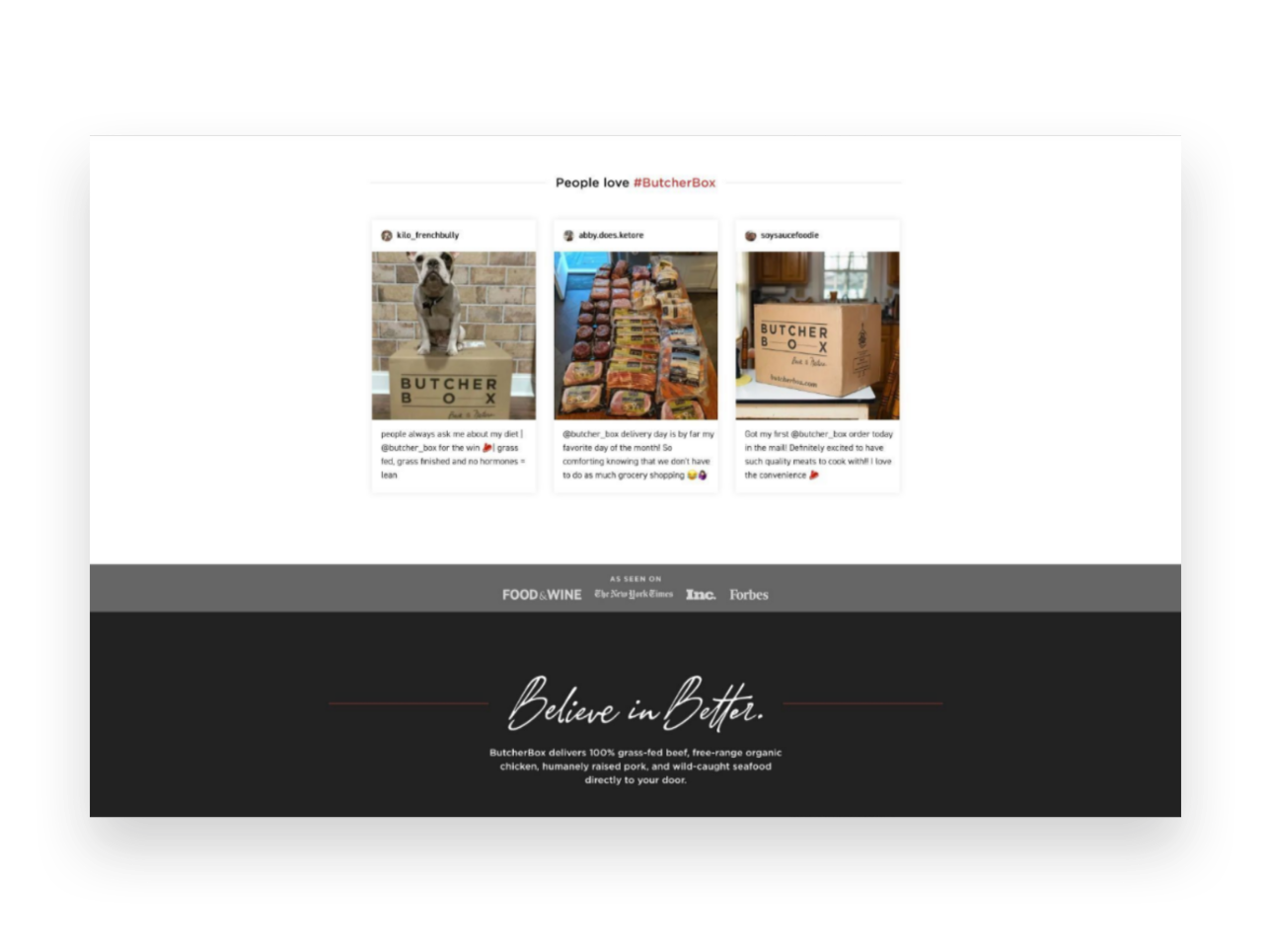
Back up your claims to greatness with testimonials from past clients and/or descriptions of any guarantees you may offer. Help customers feel reassured that you’re legit and they’ll start to see themselves as one of the positive outcomes!
Example: Butcherbox.com shares testimonials people have posted to social media for a great dose of street cred!

Tip #6
Make the ask!
Whatever it is: your {“Buy Now” “Book Now” “Download Now”} button goes here! At this point, remember the 4 S’s and make it short, sweet, straightforward, and simple!
Example: Anchor.fm ends a great sales page with a simple & bold CTA - get started!

11 Lead Magnet, Offer & Freebie Ideas to Grow Your Email List
Smart, strategic ideas for lead magnets, offers and freebies that go beyond the typical to help you build your email list.
One of your best business assets may be something you don’t suspect. It’s not your website or your super-secret trademarked process or even your brand recognition or goodwill. It’s your email list! And if you’re not using your website to actively build a list, you are leaving money on the table.
Like I’ve mentioned before, you can’t count on social media to connect with your audience, and done right people are not annoyed or bothered by getting emails. Here are some quick email marketing stats (all stats from here.):
72% of consumers say that email is their favorite method of communication with companies they do business with. '
81% of US online shoppers are more likely to make additional purchases, either online or in a store, as a result of emails based on previous shopping behaviors and preferences.
66% of consumers have made a purchase online as a direct result of an email marketing message
Why Email Works
If you’re running an online business or have something to sell (your products, your services, even your time!) - the chances are good that it’s going to take more than one contact with a potential customer to get them to fork over some cash. Do you know what odds aren’t good? Hoping that the client comes back to your site on their own to check you out multiple times. So, email gets you in front of people who have already expressed at least some moderate amount of interest in what you have to offer on a timeline you can control.
Here’s the secret: you’ve got to sweeten the deal
Sorry but no one is signing up to your list just because they’re hoping to get an email from you at some point. Email isn’t that magical. But people want to feel connected to brands they are interested in so let potential subscribers know that discounts and the VIP treatment awaits and they’ll be more than happy to sign up! And, of course, while this post is all about how to grow your email list don’t forget that email marketing success is really about sending consistent content that’s of high value to your subscribers. Just think of all the ways you can be a resource to your customers or how you can help them get the most out of their purchases from you. (Related post: 4 Post-Sale Emails Every eCommerce Site Needs)
Lead Magnet, Offer & Freebie Ideas
We’ve all seen the sign up boxes offering a discount off our first order and those are good but I want you to think about how you can set up a sign up box with a message that 1) aligns with your brand and 2) isn’t just about dishing out discounts left and right. I do think that a welcome discount code can be good so I’ll share with you exactly how to set that up below but remember the goal is to think of ways that you can give something of value to subscribers and start to build a relationship with them. We’re not just looking for one-time signups who will unsubscribe as soon as they get their coupon code here!
Offer a Free Gift with Purchase. I especially like this over a pure discount because it doesn’t de-value your products.
Offer a free gift with purchase by creating a coupon code for one of your smaller “add-on” type items. To prevent people from taking advantage of things, just set a dollar limit. (i.e. Free XYZ with any purchase of $$$ or more.)
Offer free shipping - but only for first-time customers who spend $X
Offer a discount code that only applies to certain shop categories like your best sellers to encourage people to try you for the first time
Offer a “digital gift card” instead of a coupon code - it feels more special!
Offer a companion guide to your products. For example, if you sell genuine Italian leather goods, offer a free guide on how to take care of leather accessories.
Send free samples. For example, if you sell candles pop a free wax melt in the mail so people can try out your scents!
If you sell services or digital goods:
Use a free Canva template to create a workbook, cheatsheet, checklist, or printable that aligns with your larger services.
Offer a teaser of what to expect from your larger offering i.e. just the first chapter of your ebook (with a link to buy the full one at the end, obviously)
Giveaway access to a “resource library” of files (ex: Grab my 10 favorite business checklists!)
Create an email “mini-course” that triggers upon signing up
Offer a free trial or way to engage with you at low/no risk for a limited period of time
Whatever you decide upon, you’re sure to start seeing new list signups start flowing in!
How to Set Up an Automated Welcome Offer
Create/set up your freebie. It doesn’t have to be fancy! (See below for ideas if you’re struggling to think of what to offer.)
Add a newsletter block or popup to your site. Most people throw their newsletter signups in the footer but, hey, go crazy and put them wherever! Don’t feel like you can’t pop a signup mid-page if it makes sense. Or, if you’ve got something cool you don’t want people to miss, use the popup feature!
Don’t ask for more info than you need to. Email address only or email + name, max. That’s it.
In your email marketing system, create an automatic “welcome” email that goes out to anyone who has just signed up for your list and includes the offer within the body of the email, or use a link/button to attach a download.
Not sure which email marketing software to go with? Check out Email Marketing Platform Showdown (ConvertKit vs. Flodesk vs. Squarespace Email Campaigns) for my recommendations!

How To Set Up an Affiliate Program for Your Squarespace Shop
Word of mouth marketing should definitely be part of your eCommerce toolkit so I’m sharing all the benefits, the differences in types of programs and my #1 tool to make it all happen on Squarespace like a dream.
Affiliate marketing is a “trend” that has turned into an industry mainstay. It really is such a great way to market your eCommerce business! Don’t worry if you don’t already have a referral or affiliate marketing program set up or aren’t sure where to start. In this post, I’m going to first remind you why you should definitely give this a go, then make sure you know which type of program to set up (affiliate or referral), and finally give you my #1 recommended tool to make the whole thing super easy breezy on Squarespace! Let’s go!
Why try affiliate or referral marketing?
So you don’t have all your marketing eggs in one basket! If I had a dollar for every eCommerce store owner who described their marketing plan as something along the lines of “I’m just going to post on Facebook” 🙈… well, let’s just say that I’d have a lot of dollars. But what happens when the algorithm doesn’t go your way, when Instagram crashes for the day again, or when Google ads stop working? Well, nothing will ever beat how effective it is to hear a friend say that you absolutely MUST try something. Rewarding your loyal fans and customers for every time they do what they do, well - that’s algorithm-proof.
So you can expand your reach on a limited budget. The other thing about paying for ads or boosting posts is that you’re fronting the costs on the mere hope that they will turn into sales. But with affiliate or referral marketing, you don’t pay unless you make a sale. It’s a win-win! Affiliate marketing also allows you to control your costs since it’s easy to know exactly what you’ll be spending on marketing for every dollar you make and can just build it into your budget accordingly. If you don’t have a lot of money to spend on marketing, I’d put it towards building an affiliate or referral program and email marketing first before I ever spent a dime on social media.
To boost brand awareness amongst your key demographic. Because all the web traffic in the world doesn’t mean a thing if the people visiting aren’t actually potential customers. And you know who may know people who could be your potential customers? That’s right, your current customers. Instead of trying to figure out how to build a fake buyer persona and replicate it in Google AdWords (mind numbing, if you ask me) - why not just… have your current customers do it for you? They know your people better than anyone!
Referral Programs vs. Affiliate Programs
Ok, before we get into which affiliate program is best for Squarespace let’s sort out the differences between referral programs and affiliate programs. Because they’re both kind of the same but very different and it’s just nice to know what’s what. Also, don’t worry, because my favorite tool can do both!
Referral Programs
A way to reward your current loyal customers who share about your brand.
Examples:
Refer a friend and save 5%!
Give $20, Get $20.
Get $10 off for every friend you refer.
Get a free sticker for referring a new client.
Affiliate Programs
A way to incentivize influencers (and micro-influencers!) to promote your brand.
Examples:
Receive 10% recurring commission on every new subscription.
Get $10 for every referral to our store.
Share your affiliate link and receive $5 for every sign up.
Use your affiliate code and receive 20% commission from every sale.
As you can see, both referral marketing and affiliate marketing are very similar. Both reward people for sharing about your business. The difference is that referral marketing is geared towards working with people who are also your customers and affiliate marketing would be more appropriate if you have fellow industry leaders or influencers that you’re hoping to partner with to build your brand. Both have their place and you may, in fact, someday use both strategies! To get started you may decide that one fits more with your current goals than the other.
Which affiliate program is best for Squarespace?
There are lots of affiliate marketing platforms out there that you could certainly try out but you know what? I’m not even going to bother linking all of them here. I’m going to help you cut to the chase and just go with the best: Peach’s (<— affiliate link). Here’s why:
You can set up either a referral program OR an affiliate program (or both!)
It’s made FOR Squarespace and integrates like a dream.
It’s super easy to use and their customer support is A+
It helps you keep everything organized and on (almost) 100% auto-pilot
There are lots of ways to customize to set up the perfect program for your business needs.
No commission fees!

You can try Peach’s free for 14 days. After that, their referral software is $49-149/mo and the affiliates one is $59-$199. Well worth the price for either one or both for how powerful these tools are!

How to Connect Your Squarespace Shop to Instagram
Interested in selling on social media? Here are the exact steps to connecting your Squarespace site to Instagram plus all the pros, cons, alternate options, and ideas to improve the experience for your followers.
Updated March 2022
I’m going to preface this post by reminding you that social media is not my jam. I am a huge proponent of not relying on social media for business and I think there are better, more organic ways to connect with your audience. THAT BEING SAID, this is one of the more popular questions I get so I wanted to put together some info and ideas for you. Depending on your industry (and your number of followers!), selling on social media - especially Instagram - is important to be able to do. Let’s jump in!
Squarespace Tools for Selling on Instagram
Squarespace has recently simplified the way you connect your eCommerce shop to Facebook and Instagram which is great because it used to be a little bit of a… process. The other good news is that once you’re all connected to Meta Commerce Manager you’ll be able to add products from your site to your Instagram profile or Facebook page, tag products in Insta posts & stories and use FB pixel for ad retargeting if that’s something you want to do. Basically all the social things!
Step-by-step instructions to connect Squarespace & Instagram
To get started, navigate to Commerce > Facebook & Instagram when logged into your Squarespace site
On this page, you’ll see a URL link that you will need to copy into Meta Business Suite. You can copy it now or just keep this window/tab open to grab it in a minute.
Open Meta Business Suite by clicking on the Add Link to Meta button
In the new Facebook window that opens up select Create a Catalog > Get Started
Select Ecommerce as the catalog type > Next
Select Upload Product Info > enter a name for your catalog > Create
Click View Catalog > Add Items
Select Data Feed
Answer “Yes” to “Is your spreadsheet or file ready”
Answer “Use a URL” when asked "Choose how to upload your file"
Click on Schedule Feed
Here’s where you paste in that URL that you copied from Squarespace! Paste it into the Enter URL box > Next. (Don’t worry about entering any login details!)
You’ll be asked how often you’d like Meta Business Manager to update your products. Hourly is the recommended interval here but you can toggle “Add automatic updates” on.
Name your data source (just call it your shop’s name) > Upload
Your Squarespace storefront is now being reviewed by Instagram for approval!
Q: How long does it take to get approved to post on Instagram?
A: You’ve just clicked through all of that and you’re ready to post on Instagram right away but you do have to wait for your catalog to be reviewed and approved first. The review process happens automatically once you’ve correctly completed the steps above and it can take anywhere from a few days to a couple of weeks. There’s nothing Squarespace can do to speed this process up, the ball is in Meta’s court on this one.
You’ll know you’re approved and can start tagging products when you receive a notification in your Instagram app. You’ll also see a “shopping” option show up on Instagram which is your green light to start tagging!
Q: What product info from Squarespace is synced to Meta/Instagram?
A: For each of your products, the product name, the main product description (NOT including what’s in the additional info section), and the price are pulled. Note that if you have a product with multiple variations the lowest price for the product will be displayed.
Q: What type of products can you tag on Instagram?
A: You can only tag physical Squarespace products on Instagram. So if you sell digital products or services check out some of my other solutions below! At this time, you’re also not able to tag gift cards as products so for those, again, you’re going to need to go the alternate idea route.
Q: What are the requirements to be able to tag your Squarespace products on Instagram?
Make sure your products follow Meta's commerce policies
Have the same Facebook Page connected to both your Facebook Business Manager and your Instagram business profile
Have an Instagram Business account in one of Instagram's supported countries
Q: The data feed URL has my built-in Squarespace domain. Is this correct?
Yes! Don’t worry - even though the URL you copy from Squarespace shows your built-in domain name (ex: your-site.squarespace.com), this is just for the back end and no one will ever see it!
Q: What happens when someone clicks on your product tag on Instagram?
A: In posts or stories where you’ve tagged one of your Squarespace products, your followers on Instagram can see the product details and tap on a button that says “View Website.” From there, they’ll be taken directly to the product on your site to complete their purchase. It is a super easy, frictionless checkout process for your customers and followers!
Q: How do I change where people are directed to after clicking on a tagged post?
A: On Squarespace, you can select whether you want people to be directed to the product details page or be sent directly to the checkout once they tap on the tag. To change this, on Squarespace go to Commerce > Facebook & Instagram and select the option you’d like from the drop-down. Note that even if you select to send people directly to checkout that if your product has multiple variations that the product details page will still show up first instead so that people can make their selection(s) from the options. Same goes for subscription products like subscription boxes - this is just to give people a chance to review the details before checking out.
Other Ideas
I mentioned some reasons above why you may not be able to use Squarespace’s native Instagram connection - namely that you sell digital products, service products or gift cards that you want to be able to “tag” or mention on social. You may also just not be into having your shop be inextricably linked to Meta & Co and want to have a little more control over the experience and information. It’s actually super easy to set up your own “integration” especially when you consider that the only thing it’s doing is just directing people to buy from your website anyways. There’s really not a lot of magic there from a functional standpoint so here are some alternate ideas to explore:
Just add links to your stories! This ability used to be limited to accounts with over 10k followers but now everyone can just add a link in stories to any url. This is basically all a shop tag is anyways - just a fancier looking link.
Add a “link in bio” page. There are several tools out there that allow you to do this but some popular ones are FeedLink, Lnk.Bio, Link in Profile, and linkit by Planoly. These options are all ways to add a clickable, shoppable grid without having to go through the headache of setting up a Facebook shop, etc. You’ll be in complete control of where things link to and what information is presented to your audience and your bio will have a history of all the links you’ve shared. If you wanted to use something that was connected to / created by Squarespace, check out Unfold Bio Sites!
Create your own landing page on Squarespace. If you don't need some of the other services offered by the apps above such as being able to schedule posts, why not keep things simple and create your own landing page on Squarespace? To do this, create a new page in the unlinked area of your site and add text, images or buttons to direct people to your most popular content or products. Use this page as your link in bio and you're in business. Remember that since most people coming to this page will be on mobile that it's ok if it looks a little weird on desktop. Simple is best.
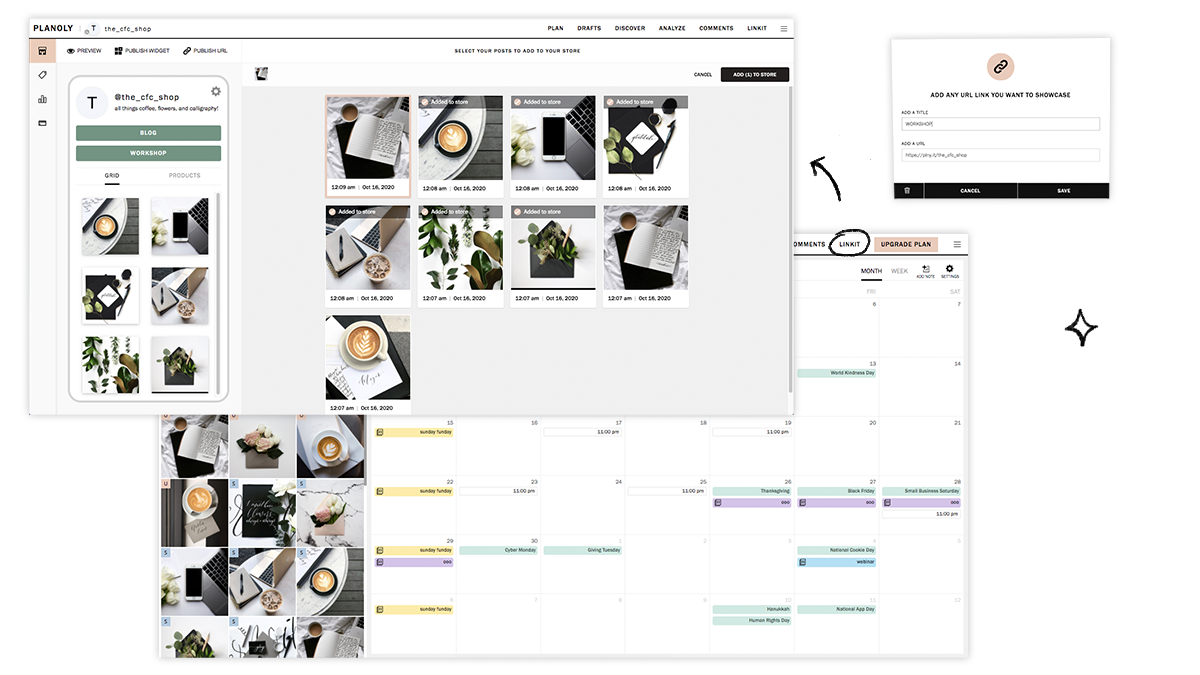
Image Caption: linkit by Planoly, which is my fave. When I was active on social media back in the day, I loved being able to visually plan content on Planoly and the linkit tool is a free add-on that can help you drive major traffic to your site by creating a clickable gallery of your Instagram posts.
My #1 Recommendation for Selling on Social
Focus on creating great content and organic engagement. While it’s true that a button or link makes it convenient to be able to buy from our favorite brands online, these aren’t where the magic lies. The decision to buy happens because followers feel inspired by or connected to a brand, not because a button is compelling them to. If you have a well-organized and mobile-friendly website I would argue that you don’t even need any of the apps above; a simple link to yourstore.com/shop is all they’ll need :)

How To Decide Between Sales & Discounts
Sales and discounts are the same, right? Wrong-o! Discover when to put items on sale, when to discount, and how to match each method up to your business goals in this post all about discounts vs. sales. You’ll learn that not only are these two merchandising features not the same but that there are strategies you can use on your Squarespace site to ensure you’ll always have a successful promotion!
A discounted product and a product on sale are exactly the same, right? After all:
Product A retails for $100 but is on sale for $90 = $90 total
Product B retails for $100 but is discounted 10% = $90 total
But I’m here to tell you that these are, in fact, two very different promotions and there are very clear use cases for when to discount a product versus when to put it on sale.
Long story short: discounts and sales may seem interchangeable but they really aren’t!
Keep reading to learn about how to choose the right promo option to match your goals and how each option works so that you can select the right one for you each time.
First, what are your goals?
There are lots of reasons why you may be thinking about putting something on sale or running a discount promo and it’s important before jumping into the specifics of each to stop and identify what you’re trying to achieve. For example:
Are you trying to clear out some stale inventory? Is it for a specific product or an entire product line or category?
Are you looking for a quick sales boost? Or just encourage higher average cart values in general?
Are you trying to attract new customers or reward existing ones?
Keep the end goal in mind because it will ultimately help you choose the right marketing tool for the job and you’ll see better results in the end. I often hear from clients that are frustrated about sales but it turns out that their sale/discount strategy is actually just working against them and doesn’t match their goals.
Sales
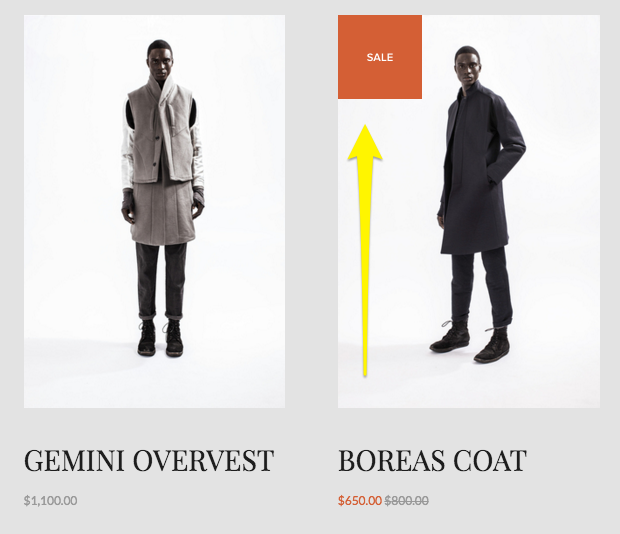
Just like in a brick and mortar shop, sales on Squarespace can be a useful merchandising tool. When you put an item on sale here’s what happens:
A “Sale” badge gets added to the item in summary blocks and on the main shop page.
The original price is shown as crossed out and the sale price is highlighted (usually in a bright/contrasting color but depends on your site styles). This shows up in all places where the price is displayed: summary blocks, product blocks, shop page and product details page.
If your product has variants with different costs, the pricing will display a “starting at” price using the lowest priced variant
Sales Rules
Since sale pricing is set at the site level, it will be available to all customers. There is not a way to have a sale that only a certain subset of your visitors/customers are eligible for. To do that, create a discount instead.
How to Set Up Sale Pricing
You have a few options for setting up sale prices:
Manually - You can set the sale price manually by going into the product editor and toggling sale pricing on/off. The price you enter in the sale box will only show up if the “On Sale” toggle is on; just having a sale price entered does not put the item on sale.
In Bulk via Spreadsheet (recommended) - You can update the prices in bulk via a CSV import. This is my favorite way to set up sales quickly if it needs to be done for more than a handful of products. Using a spreadsheet to manage inventory and edit product info makes it easy to bulk edit prices and toggle sales on/off.
In Bulk via Plugin - If you are spreadsheet adverse but somehow totally into managing a little bit of (pretty easy) code ¯\_(ツ)_/¯ you can use a plugin like this one to apply sales prices to entire shop categories quickly at once.
When to Use Sale Pricing
So when should you put something on sale? Here are the best use cases for sales over discounts:
You want to attract new customers who may want to try your products out but who are leary of buying something full priced
You want to clear out seasonal inventory
You want to boost conversion rates on specific products
You’re not on a tight timeline and just want to run a sale until inventory runs out
Discounts
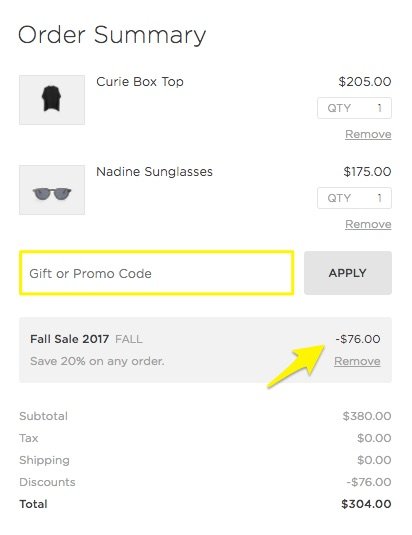
We’re all familiar with discounts and promo codes online! They are different from sales in that they are more targeted and often active only for short time periods in order to spur activity. Here’s what happens what you create a discount:
If you’ve created an automatic discount, the promo details are displayed in the cart at checkout once the criteria you’ve specified has been met.
If you’ve created a discount that requires a promo code, the details are displayed in the cart at checkout only once the code has been entered.
In both cases above, there’s no obvious indication on the product itself that a discount is available so you’ll need to promote it yourself. (This is both a good thing and a bad thing - tips on that below!)
Discount Rules
One of the advantages of discounts over sales is that you can be super specific about the criteria and conditions that must be met. Remember, sales pricing is visible to everyone and the option is either 1) sale pricing on or 2) sale pricing off. That’s it. With discounts you can:
Offer a flat dollar amount or a certain percentage off.
Specify which items or categories are eligible for your promotion.
Apply promotions at the cart level to entire orders and offer free shipping.
Decide whether you want to require a promo code or if the discount will be applied automatically.
Keep track of how often each discount is used/applied.
And more! Squarespace discounts can actually be as simple or as complex as you need them to be. I go into all the nitty gritty details and specifics more in this post.
How to Set Up Discounts
All discounts are created within Squarespace by going to Commerce > Discounts. From this screen you can see all active and scheduled discounts as well as create new ones. (Tip: you can also create and manage discounts on the go using the Squarespace app!)
When to Use Discounts
Now that you know more about how discounts work, here’s when they are the best choice:
You want to offer a promo to a specific subset of customers/visitors. For example, by providing a coupon code to past customers via email or to new customers via social media.
You want to increase average cart values. (Creating a free shipping offer, for example, for orders over a certain amount is one of the easiest ways to get people to spend just a little more than they may have been planning to otherwise.)
You need to spur a quick boost of sales activity. (Setting an expiration date on your promo can create a sense of urgency that can motivate customers to buy.)
You want to highlight or feature new categories of products (or a specific product/service) and encourage people to try it with a discount.
You need to be able to clearly track how often the discount is used/redeemed. While you can definitely track sales using Squarespace commerce analytics, you’ll need to just rely on inferences and assumptions around the exact reasons why people chose to buy. With discounts, you can clearly see exact numbers. You could even get super specific by creating multiple discount codes or promos for each marketing channel so that you can further measure each campaign’s effectiveness.
Miscellaneous Sales & Discount Tips
If you’re using sale pricing, create a “Sale” category and add it to your site’s navigation alongside other categories. There’s not a way to automatically filter all products that are on sale so by creating a special category of your own, you can make it easier for customers to find those products in your shop.
Use built-in features like an announcement bar, pop-ups, related products and limited availability labels to highlight products and sales/discounts. Check out these posts for more sales & marketing tips:
Bottom Line
I hope you can see now how to match your goals up to the right merchandising strategy. Whether you put on an item (or entire shop category!) on sale versus offering a discount will depend on who you’re trying to appeal to and why. If things are still feeling a little vague, I typically boil it down to this:
Use sales to encourage and discounts to reward.
Let’s revisit our example from the very top of this post, imagining now that both products are swimsuits.
Swimsuit A retails for $100 but is on sale for $90 = $90 total
Swimsuit B retails for $100 but is discounted 10% = $90 total
A sale would make sense for Swimsuit A at the end of summer. This would help clear out seasonal inventory and to encourage casual customers to give the brand a try.
A discount would make sense for Swimsuit B to reward loyal customers with exclusive access and VIP pricing.
Both cases result in a $90 order but you can see now that the right method was chosen for each situation.

Email Marketing Platform Showdown (ConvertKit vs. Flodesk vs. Squarespace Email Campaigns)
Email marketing should absolutely be at the top of your marketing strategy but what platform should you go with if you’re selling on Squarespace? In this ultimate showdown software battle, we’ll check out my top 3 faves and help you find the right fit for your business.
Updated December 2023
I’ve talked alot before about the virtues of email marketing. We’ve covered why email beats social media, how to use email marketing to increase customer lifetime value, and lots of other things that all boil down to this: email marketing needs to be a part of your eCommerce strategy.
And not just a small part. Like, actually - a pretty big part. Some quick stats for the uninitiated:
Email generates $42 for every $1 spent. A 4,200% ROI is CRAZY, and also means this is a marketing strategy that you should absolutely be using, and using better.
Roughly half of all consumers want to hear from their favorite brands on a weekly basis.
Marketing and advertising emails influence the buying decision of more than half of customers.
Email is 40% better at converting compared to social media.
TL;DR - email marketing is super effective, customers want to get emails from you and they are willing to make purchases as a result of receiving an email from you.
Now for the big question: what email marketing platform to go with - especially if you’re using Squarespace for eCommerce? I’m comparing my top three faves below but first, a quick note about the emails your site sends automatically.
Non-Marketing Emails
There are some eCommerce emails that your Squarespace site is going to send automatically, no email marketing platform required. These are things like:
Order confirmation emails
Shipping confirmation emails
Abandoned cart emails
Waitlist notification emails
Etc.
You can find out more about these types of emails in this post, which also covers how you can customize them to match your brand and how you can personalize them to improve customer experience.
These emails don’t require you to receive any special consent or approval from your customers since they are sent as a result of an action they’ve already taken on your site: making a purchase (or not), or signing up for an out of stock email reminder, for example.
On the other hand, the emails we’re going to be talking about sending from an email marketing platform below are emails that are above and beyond the basics. These are emails that welcome people who sign up to your list with a special coupon code or offer, marketing promos that shout out a new product drop, or sales emails that invite past customers to revisit your shop.
Getting Approval to Send Emails
Anti-SPAM laws help protect people from getting junk they didn’t sign up for by outlining who you can send to and what needs to be included in each email. Luckily, all the email marketing platforms out there help make this easy by not allowing you to send emails to people that haven’t given their approval and by including an unsubscribe link in the footer of every email, amongst other protections. The important thing to note here is that customers can opt in/out of marketing messages while still receiving things like order confirmation and abandoned cart emails that are sent automatically from Squarespace.
Comparing Platforms
All this being said, all email marketing platforms are not created equal. There are definitely reasons why you may want to choose one over the other and the one that works best for you may be the worst choice for someone else. That’s why we’re going to look at the top 3 choices (ConvertKit, Flodesk and Squarespace Email Campaigns) within the lens of eCommerce and also as a Squarespace user.
Here’s the criteria that I think matters most:
Ease of use
Looks
Automations
Integration
Cost
Let’s jump in!

Squarespace Email Campaigns
I’m kicking off our email marketing platform battle with Squarespace’s built-in option: Squarespace Email Campaigns. There have been a lot of improvements to this feature since it first launched a few years ago making it a great option if you’re needing something relatively simple that has all the features you need and none that you don’t.
Ease of use - You literally cannot get any easier than Squarespace Email Campaigns. You can connect any newsletter block to your list with just one click. It’s super easy to style your emails to match the rest of your site since everything is in the same place. Adding content to emails is also a breeze; things like text, image and button blocks are as simple to use as those on your regular site. The fact that it looks and works just like the rest of your website is one of Squarespace Email Campaigns stronger selling points if you feel like the last thing you need is to learn yet another piece of software!
Looks - Squarespace emails look pretty great! There are lots of pre-styled templates you can use as a jumping off point but it’s also easy to make your own branded templates that you can re-use again and again to keep things consistent. Pulling in assets from your website like your logo, some images and your color palette is as easy as pressing one button but the font choices for emails are purposefully kept to a limited selection to make sure that your emails come through into pretty much every email tool and on any device. You can create nice-looking email layouts that feature your site’s content (or new content that you upload) and the options for controlling how each block displays are pretty intuitive.
Automations - You’ll need to be on the Core plan or above to have access to automations that allow you to create things like welcome emails or other emails based on subscriber or customer activity. You can create series of emails triggered by an event but those emails aren’t as organized or visual as those on ConvertKit or Flodesk. Squarespace Email Campaigns also doesn’t yet have some advanced workflow things like being able to tag people based on activity or route them down different paths based on variable conditions.
Integration - You can add product and blog info right into emails without needing to copy/paste links or other info which is AMAZING. And it should go without saying that because this is a tool that’s built right into Squarespace that there’s no need to fuss with embed codes or trying to figure out how to get different programs to play nice and talk to one another. One of the stronger points is that for simple purchase follow-up emails, you can use product purchases as a trigger for an automation due to the fact that this tool is built right into your eCommerce website. Having everything in one place sure is nice!
Cost - It costs nothing (nada, zip, zero!) to use Squarespace Email Campaigns to build your email list and you can also send your first three email campaigns for free. After that, the pricing tiers start at $5/mo and go up to $48/mo (Starter Plan and Max Plan, respectively - paid annually). Most people will want to skip the Starter plan though because it doesn’t offer email automations which I think are absolutely necessary for any eCommerce business. Beyond that, there is no difference between the other plans aside from how many campaigns and emails you’re allowed to send monthly (you’re allowed unlimited subscribers). If you’re just starting out, I recommend the Core plan which is super reasonable at just $10/mo and allows for up to 5 campaigns and 5,000 emails.
Overall Thoughts
There’s a lot to love about this simple email marketing solution and if you’re just getting started it should definitely be on your radar as a great all-in-one tool.
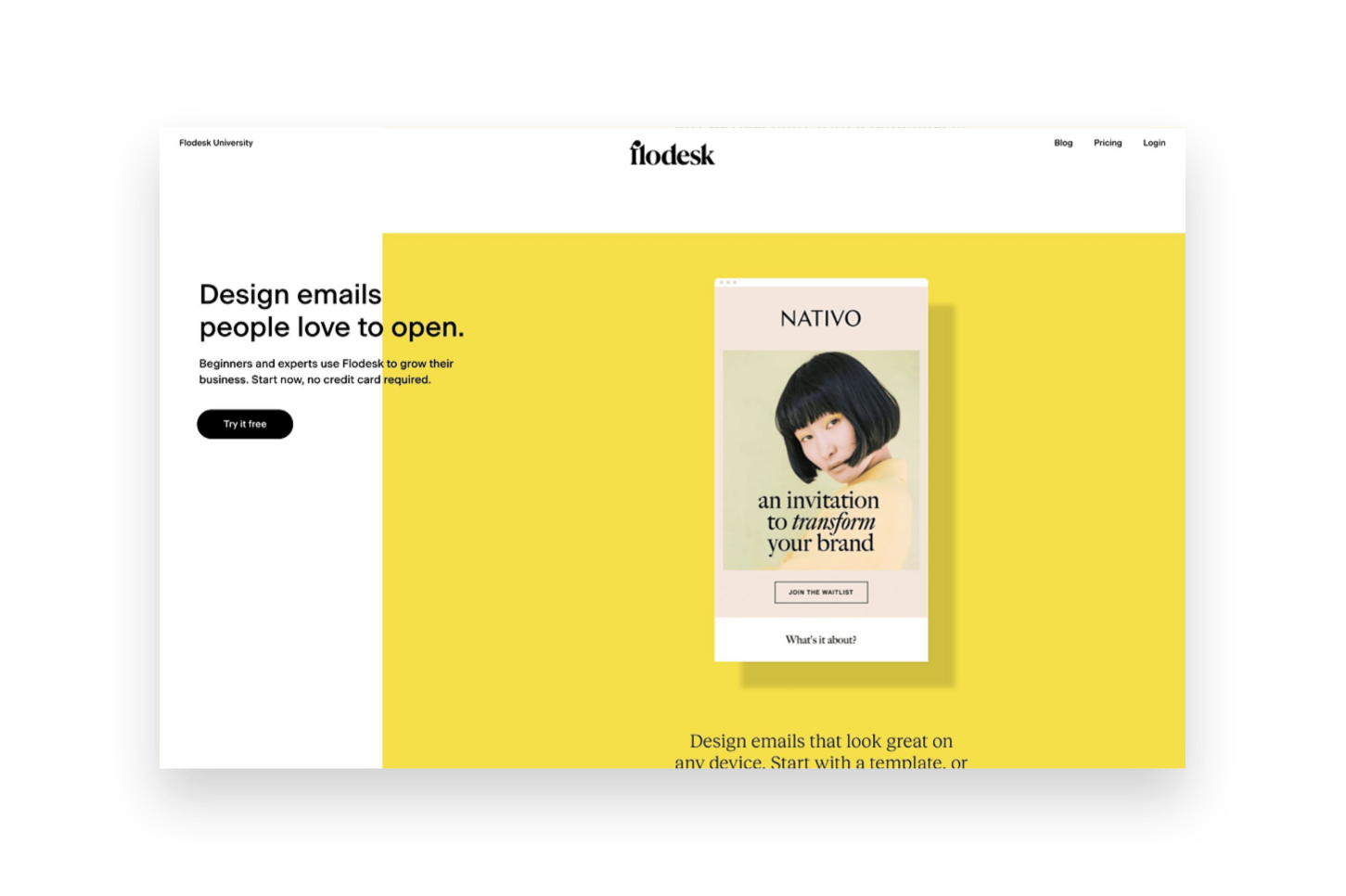
Flodesk
Flodesk is a relative newcomer to the email marketing arena but - hoo boy - did they come in like a wrecking ball! Everyone seemed to fall in love instantaneously with their great-looking templates and the simple pricing setup. Flodesk is a great option for beginners and more advanced marketers alike and it’s easy to incorporate into Squarespace. That said, it’s not without it’s own quirks and issues.
Ease of use - Based just on the simplicity of the interface alone, Flodesk is a dream to work with. It’s clean, modern and minimal which is a breath of fresh air over some other platforms that seem to make things unnecessarily cluttered. So for that alone, Flodesk wins points in my book. The interface is broken down into four parts: Emails, Forms, Workflows & Audience. Emails are where all the one off, newsletter-type emails live. Forms are where you can create either forms or landing pages to embed onto Squarespace for collecting sign ups. Workflows are where you can create visual automations like welcome sequences. And, lastly, Audiences is where you can create mailing list segments.
Looks - All of the pre-made forms, email layouts and layout blocks for within emails are very visually appealing and that’s a lot of what attracts people to Flodesk. You can also save some settings like your logo and custom color palette so that it’s easy to make sure those aspects are on brand every time. The one thing that kind of drives me crazy about Flodesk though is one of the most important: fonts! Every single time you add new blocks or copy in new text (which is likely going to be every single email you send since who sends the same thing each time?) you need to redo the font settings. This can either be really time consuming (if you actually take the effort to do it) or result in sloppy looking emails (if you don’t).
The other thing to note about the super pretty layouts is that a lot of your email will get converted into an image when it shows up in people’s inboxes. There are some studies out there that show that this can negatively impact deliverability rates and/or increase the chances of your email getting filtered into the promos tab or marked as spam. This is just a word of caution that while the layouts look really good that relying too much on them can mean that your emails also don’t have actual “readable” text in them that could be an accessibility issue.
Automations - Flodesk workflows are actually pretty powerful considering the interface is so simple - you may not realize all that you’re really able to do! Workflows are kicked off when someone is added to a segment and can include as many emails as you like set apart by any time delays you specify. Unlike Squarespace Email Campaigns, all the emails for a specific action are kept in one place which makes it easy to organize. You also have lots of advanced thing like conditional actions which are things like if/then rules based on whether someone clicks a link or has opened up the message that was sent prior.
What’s not so easy is setting up automations based on commerce activity, such as those on Squarespace that allow you to send emails after someone buys a certain product, for example. However, they recently launched a new Checkout add-on that allows you to set up sales pages and checkout pages, add upsells, accept payments and follow up instantly. This could be a pretty cool option if you’re not needing a full platform such as Podia to sell digital goods.
Integration - There are two ways to integrate Flodesk & Squarespace. The first is by embedding the code that’s automatically generated by Flodesk into a code block on Squarespace which is as easy as copy-and-paste! The second is by setting up Zapier so that you can use Squarespace forms but then map those submissions to various Flodesk segments. The latter option is great if you want to make sure your forms still always match the rest of your website 100%. An other option if you do use Podia is that Flodesk is now a native integration for that platform making it super easy to connect those two pieces!
Cost - The pricing on Flodesk is crazy simple: it’s a flat rate $38/mo and it includes unlimited everything, forever. You do get a month free if you pay annually and all new sign ups also come with a 30 day free trial of the software. This pricing set up is great because you’ll never pay more as your list grows and all the features are included so long as you’re a subscriber. The Checkout add-on can be purchased separately from email or in a bundle with it and increases the cost accordingly. (Bonus: use my link here to save 50% on your Flodesk subscription!) All this being said, there are more affordable plans with both Squarespace & Convertkit - especially for those with smaller lists.
Overall Thoughts
Flodesk is a good option if you’re looking for something that has a great user interface and if image-based emails are important to you. It integrates well with Squarespace but more so for traditional email marketing & list building than for eCommerce-specific automations.
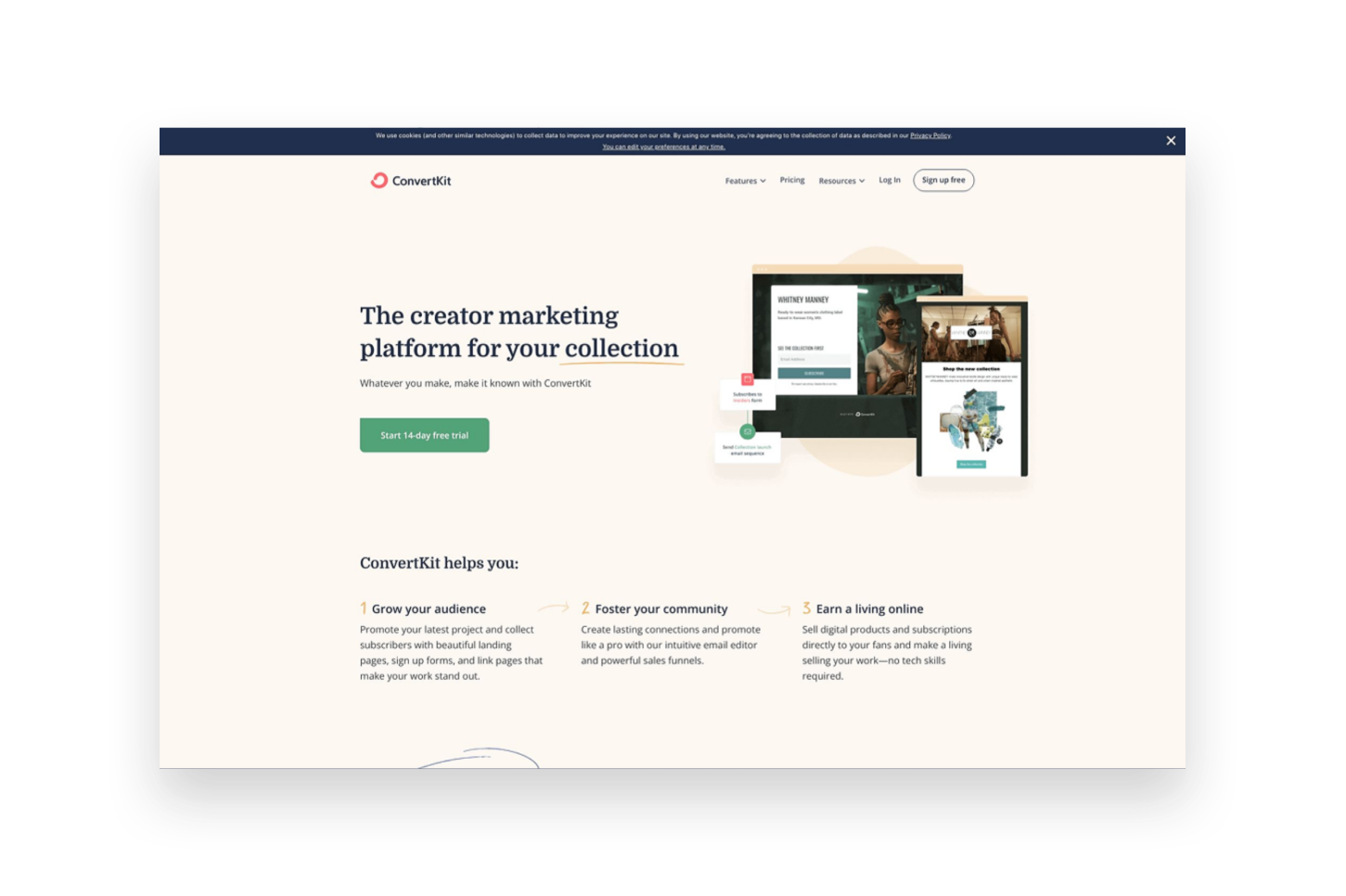
ConvertKit
ConvertKit is an OG in the email marketing space and it shows. It has a robust suite of tools available to email marketers of all sizes and super powerful tools to help you automate and sell online. It has a bit of a bad rep for creating “ugly” emails but stay tuned because there may be a little method to the madness!
Ease of use - Even though Convertkit has been around for a long time, they still work on releasing improvements to the product which I really appreciate! For example, when I first tried Convertkit back in the day the interface was a little confusing and overwhelming but today it’s clean, simple and well-organized. It’s easy to see all the tools and understand how they relate to one another and even things like their email templates have received a nice facelift! The main dashboard is broken up into 4 main parts. The first is “Grow”, which houses all your subscriber info, forms and landing page. “Send” is where you can find broadcasts, sequences, email templates and snippets. “Automate” has visual automations, rules, integrations & RSS. And, lastly, “Earn” has products, tip jars, and payouts. Whew! So you can see that there are so.many.tools to choose from!
Something else worth noting is that of all the programs reviewed in this post, I find the dashboard of Convertkit the most helpful. It’s so easy to see stats and analytics at a glance!
Looks - Ok, on to the contentious topic of ConvertKit’s looks. And this is not in regards to the platform itself which is really great-looking but instead about the emails it sends. I mentioned above that ConvertKit tends to have a reputation for creating somewhat “boring” text-based emails. However, ConvertKit’s founder makes a very strong argument for this type of email (you can read more about it here) and I think that so many people have made a turn towards overly visual emails these days that text-based emails may have an even stronger appeal than they did almost a decade ago. All this is not to say that you can’t create nice-looking emails in ConvertKit because you actually can, just know that they will be somewhat less flashy than those created in either Squarespace Email Campaigns or Flodesk. You can still add nice images, brand colors and fonts - all the bare components of those other platforms - they’re just going to be a little more simple overall.
Automations - ConvertKit probably has the most powerful automations of any of the tools we’re looking at in this post! So much so that it actually breaks them down into two parts: Sequences and Visual Automations. Sequences are the simpler of the two and they can be compared to workflows in Flodesk. Sequences are a series of emails set off by an event such as signing up for a freebie or opting in to receive email updates. Visual Automations are Sequences on steroids and have some of the same features as Flodesk workflows but then 1,001 other options as well. You can do things like filter subscribers based on conditions, take actions based on when products/services are purchased, create multiple paths into the automation, add/remove subscriber tags, etc. If any of this all seems overwhelming, ConverKit also has automation templates that you can just duplicate and customize for everything from creating a paid newsletter to promoting and upselling other products.
Integration - ConvertKit integrates with Squarespace in much the same way as Flodesk, with one major notable addition. For basic things, you can either embed ConvertKit forms right into your Squarespace website using a code block or use Zapier to pull info into Flodesk from Squarespace forms and newsletter blocks. Where things get really cool though is the Squarespace Commerce API integration with ConvertKit. IT. IS. AWESOME. Once connected, this means that you can pull purchase activity from Squarespace into Flodesk and use it to tag subscribers, trigger automations - all sorts of things! You can even track revenue data for each subscriber and also see previous purchase history. ConvertKit also has integrations with tools like Teachable, Stripe and Podia so if you use any of those in other parts of your business it would be a great place to pull all your eCommerce data together on the marketing front.
Cost - ConvertKit has a free plan that would be great if you’re just getting started out and have a list of 300 subscribers or fewer. However, most people will want to subscribe to the Creator plan at $9/mo (if paid annually) in order to send automated emails and sequences. Plans go up to $49/mo if you have 3,000 subscribers, or more if you have more. There’s also a Creator Pro plan that includes things like subscriber scoring, advanced reports and a newsletter referral system that starts at $29/mo.
Overall Thoughts
If you’re as serious about email marketing as you are about selling online, ConvertKit should be at the top of your list of tools! It’s powerful where it needs to be and simple where it matters; it’s clear that everything about it is geared to convert.
Bottom Line
The good news is that in our email marketing software epic showdown battle, you really can’t go wrong. But you can definitely do… more right? Here’s how I think things shake out:
Choose Squarespace Email Campaigns … if you’re just getting started with both eCommerce and email marketing.
Choose Flodesk … if you’re focused on building your list but don’t necessarily need it to be based on Commerce activity.
Choose ConvertKit … if email marketing is the corner piece of your marketing strategy and it’s important to you that it’s integrated with all the places you sell online.

Pricing & Product Lineup Strategies for Sustainable Business Growth
In building your profitable eCommerce business, both pricing and inventory management are crucial to your success. You can price your products perfectly and still confuse buyers by offering too many options. Learn that it’s not just how you price but what you sell that matters!
One of the things that really sets eCommerce web design apart from just regular, old, everyday web design is that there’s a lot of science and strategy that needs to go into almost every decision.
On an informational, brochure website most of the decisions have to do with either aesthetics or making sure your message is being communicated well.
On an eCommerce site, you have to do those things PLUS make sure you’re pricing your products right and choosing the best inventory lineup possible.
And while there’s lots of information out there on these topics I think a lot of it misses an important factor and that is: how to select the right inventory lineup, at the right price points in order to build a sustainable, long-term eCommerce business.
Because it can’t all be about discounts and cost savings and how to low you can set your prices. Those things do nothing but pave the way to insolvency. You simply cannot expect to grow and scale a business that’s based on unsustainable profit margins.
The math simply does not work.
Pricing & inventory are so important to the success of your business now and into the future. How you price your products and what products you choose to sell ultimately impact everything from your cash flow to your profits. Ultimately pricing and inventory impact every single aspect of your business and I’m here to help you get them right.
First, some words of encouragement!
Ok, I definitely made pricing and inventory sound super scary in that last paragraph, didn’t I? Eek! Don’t worry! Because here’s the good news that I hope prevents you from stalling out at this phase in your eCommerce journey:
You can always revise.
That’s right - you can always update your prices. Change your inventory lineup. Modify your messaging. Revamp your sales strategies. All of it.
Nothing is set in stone.
The best thing you can do is launch something and the tips I’m going to give you about pricing and inventory are great places to start.
That’s one of the best things about running your own small business; you can respond swiftly to feedback and changes in the market. You can be nimble and flexible when the big guys are stuck jumping through a bureaucratic series of hoops to make one small change.
I talk a bit more about responding to feedback and analytics a little more down below but I think it’s important enough to mention it in this post twice!
The best thing you can do is launch something and the tips I’m going to give you about pricing and inventory are great places to start.
I want you to have a solid footing for a jumping-off point but where you begin should definitely not be where you end.
There’s a lot of science that goes into pricing and inventory but it’s also a little bit of an art. So the best thing you can do is just begin and then be open to adjusting as you go along!
Ready to jump in? Let’s start first with pricing!
Pricing Factors to Consider
I think by now you definitely get that this post is not going to be about discount strategies you can use to boost sales in the short run. (I’ve got other posts for that!)
Nope, we’re going to talk pricing from a business standpoint - one that takes your long-term viability into consideration. So bust open a spreadsheet (or get a notepad, or whatever - you do you) because it’s time to do some math.
Step 1: What are your costs?
To understand what you need to price something at, you first need to know what it costs you to acquire (or produce) it. This seems simple but I see a lot of startups come and go because they failed to take allllll their costs into consideration.
Variable Costs

For each product that you offer, there’s a cost of goods sold. This is what it costs you to buy what you’re selling wholesale or to purchase the raw materials you need to make your product. This seems like a no-brainer. But there are lots of other variable costs that need to be factored into your prices as well. This includes things like:
Labor
Packaging
Shipping
Promotional Materials, etc.
Add all these costs up for each product.
Fixed Costs
It’s easy to do the math on variable costs because we can see how they directly relate to each product, however, it’s important to factor in the fixed costs of your business as well.
Fixed costs are things like your rent, insurance, the cost of your website - basically things that would stay the same whether you sold 1 unit or 10,000 units.
The best way to make sure you can cover your fixed costs is by doing a break-even analysis. In this process, you’ll add up all your fixed costs and determine how many units of each product you’ll need to sell in order to cover them. Everything above that point is profit.
The SBA offers an easy, free tool to help you with this here: Break-Even Calculator
Step 2: How much do you need to make?
Up until this point, pricing has just been about covering costs and breaking even. But that’s not what we’re here for - we need to make a profit!
You know your lifestyle and industry best so it’s going to be difficult for anyone else to tell you what your profit margins should be. And even though I’m going to tell you in a minute that you don’t really need to pay attention to your competitors, you definitely need to consider how much you can reasonably mark something up while still staying competitive and marketable.
Step 3: Putting It Together
Here are some calculations to help you put all the above together!
Variable Costs = Cost Per Unit / Total Number of Units
Break Even Point = Fixed Costs / (Price Per Unit - Variable Costs)
Target Price = Costs + Profit Margin %
Why what your competitors are charging doesn’t (really) matter
It’s really important that you do all of the above for YOUR business and let the outcome be what the outcome is. Why? Because there’s really no way at all that your competitors have the same costs as you.
This means that arbitrarily setting your price points without taking your own actual numbers into account does you no good. Remember, we want to make sure you’re setting your prices at a point that’s sustainable - and profitable! - for YOU!
Whether you’re able to market and sell the products you want to competitively only matters if you’re also able to do it without seeing red.
Now that we’ve learned all about how to make sure your prices are set so that you can grow your business profitably, let’s see how what you sell matters just as much!

How to Choose the Right Product Lineup
You know how at Costco they typically just sell one brand of something? Like, if you want some mayo, you’re gonna get a great deal on 7 gallons of it but they don’t have a million different varieties. It’s just the mayo. One brand. One size. One variety. The price is what the price is. Take it or leave it.
Costco has an easier time selling one of anything regardless of price.
At the regular grocery store, you can get mayo made with olive oil, mayo made with cage-free eggs, mayo in different flavors, all sorts of different brands and sizes and types. There’s a lot to choose from and maybe you don’t even think you think too much about it because you’re probably thinking that “choice is good” and “people like having options” and yadda yadda yadda.
Wrong.
Here’s the real truth: Costco has an easier time selling one of anything regardless of price than other stores have selling lots of everything, even when products are priced more affordably. Why? Because although we all say we like to have options to choose from, humans are notoriously bad at making decisions or at least get really fatigued and overwhelmed by having to make too many of them.
Using our mayo example, here’s the number of choices a shopper has to make:
At Costco
You want mayo? Y/N
At a regular grocery store
You want mayo? Y/N
What brand?
What size?
What are the ingredients?
Organic or not?
Special flavor?
On sale?
Coupon?
Etc...
I don’t know about you but I know that I can certainly make one decision (and feel better about it) than I can make 8 or more. And it’s not even about the price! Of course, there’s a little bit of selling psychology at play here that we can apply to eCommerce sites so let’s learn a bit about it!
What is Hick’s Law and what does it mean for eCommerce?

I promise this is more about psychology than math but Hick’s law is a principle that basically says that as the number of choices increases that the amount of time it takes to decide amongst those choices increases logarithmically.
Basically, more choices = more decision time.
When we combine with what we know about how long we have to capture people’s attention online (I.e. NOT LONG), what’s the verdict? Well, for me it’s that you should aim to be more like Costco and less like your traditional grocery store. And, no, this doesn’t just involve mayo.
Here’s how:
Tip 1
You’ll see higher conversion rates if you offer fewer choices.
In a famous experiment on decision-making that researchers always point to on this subject, grocers alternated between days where they sold just 6 varieties of jam and days where they offered 24. Four times the product must mean 4x the profit, right? Wrong.

As you can see, the days with fewer varieties had much higher conversion rates than those with more options available. There are a couple of different reasons for this (more tips on this below) but the takeaway for eCommerce is that sites that offer either a highly curated selection of products or who use navigation and menu organization strategically to only show the most profitable categories, while mitigating the others, will outperform those that put it all out there.
It’s also important to point out the obvious here and that’s that the boosting conversion had absolutely nothing to do with lowering prices!
Tip 2
Only offer distinct variations.
One of the lessons from the jam experiment is that people have a really hard time when there are too many options that aren’t clearly distinguishable from one another. It may seem nice to offer lots of options but customers will often feel overwhelmed by trying to suss out what the discrete differences are amongst them and are prone to just give up and go elsewhere.
This means that your products can be priced right and you can still miss out on the sale simply by offering too many choices that are indistinguishable from one another.
What to do instead? Pare down your offering to only distinct variations. Simple variations are easier to talk about, easier to sell, easier to market, and easier to buy!
Tip 3
If you have a complex product or service, bundle options together to minimize decisions.
If what you have to offer is inherently complex (for example: if it’s highly technical or super customizable) you may not be able to remove options or variations. They are what make your offering unique, after all! But you can help ease the decision-making burden by bundling together presets that make the most popular decisions for your customers.
What I’ve found for most shops that offer “customizable” products is that the majority of purchases can actually be boiled down to a few simple combos.
The lesson here is that just because you can offer infinitely customizable products doesn’t mean you should. Taking away decisions isn’t a bad thing! Customers will feel more confident in you telling them that the bundle you’ve put together represents the most popular combination of product features and you can’t put a price on that!
Fast decisions = happy customers!

We all want our customers and clients to be satisfied with what they’ve purchased from us and there are tons of things people do to try to improve customer service. It should be no surprise at this point though that one of the best things that you can do to make happy customers is helping them make fast decisions.
When people are paralyzed by too many options, they get stuck overthinking things, fearing they’ll make the wrong choice or over-analyzing their choices. Studies have shown that the longer it takes someone to make a decision, the less confident they are in the outcome. So, faster decision-making = happier customers, regardless of price!
There are easy ways to help reassure people that they are making a great choice by shopping with you; whether it’s by providing super clear shipping & return policies, simple forms that don’t ask for unnecessary info, or a streamlined checkout that keeps things on one page or auto-fills past info if you have it. The goal is to just make things as easy as possible for people, being empathetic to their situations and helping them feel confident in their purchase.
Launch, Get Feedback & Adjust Accordingly
I told you at the beginning of this post that the goal was going to be to just LAUNCH and that we’d be open to circling back later to revise things as needed. So what does that actually look like? It can mean a few things - here are some ideas:
Use your site’s analytics to see what products sell and which don’t. (Here’s a great article about how to understand the Squarespace Analytics panel to get you started.)
Take seasonality into account. Is what you’re selling more appealing at one time of year over another? Is there a companion product you can launch to round things out the rest of the year?
Are you making enough? After a few months, you’ll know whether your cash flow is feeling good or not. Could you adjust the profit margins in your pricing calculations to better optimize cash flow?
Have you considered not just the prices of your products but the product lineup itself? Is there room to simplify your offerings to help people make buying decisions faster?
If you sell multiple products, can you increase profits without raising prices by eliminating your underperformers? How would making different purchasing decisions affect your fixed or variable costs?
Bottom Line
In building your profitable eCommerce business, both pricing and inventory management are crucial to your success. You can price your products perfectly and still confuse buyers by offering too many options.
The good news is that you now have the tools (and formulas) to make sure that each product you sell doesn’t just get you to break even but makes sure to add a little to your bottom line. And I don’t know about you but just knowing that some of the best performing shops offer the simplest product lineups is such as relief - and not just because it makes all the math a whole lot easier! 😂 Keeping your product lineup simple is easier to manage, easier to market, and easier to sell!

Don't Bank on Social Media: Why You Need to Build an Email List
Hot take: social media is not your small biz best friend. Here are four big reasons why building an email list is a much smarter eCommerce marketing strategy in the long run than banking on a social media following for traction.
A website is a must-have when it comes to business but it's not a standalone tool. Even though your website is going to help you look legit, help you sell your products or services, and is totally great for SEO - no website is an island. The cheese does not stand alone!
This means that your site needs to do all the eCommerce things, connect to your active social media accounts, and help you build your email list.
What’s an Email List?
This is the list of people (customers, clients, leads, people who like your blog, probably your mom) who have agreed to give you their email address in exchange for something of value that you have to offer. This could be informational like a newsletter filled with helpful tips or something more actionable like a freebie download or a discount on a future purchase from you.
Why Not Just Social?
Facebook and Instagram are okay enough tools to connect with others and get outside your initial sphere of influence but if this is where all the attention goes, what are you really building? Aside from physical business assets like equipment or inventory or your Macbook - your book of business is what it's all about. It's your contacts, your relationships, your everything.
So if all your interactions with your most valuable business asset are on social media, what happens when new platforms crop up, algorithms change, people leave? What happens when services crash and access to new leads dries up? How do you connect? Would you be starting from zero again?
Instead of waiting until that happens, I want you to start thinking now about how to build your amazing future-proofed online business. The best part is that you can still hang out on social media if you want but you know that you'll just be using those platforms as tools to drive new contacts you meet back to the real heart of your brand - your website and, yes, your email list.
4 Reasons Why You Need an Email List
So you can own your own contacts. Remember this is your #1 business asset! If you interact with your people only on social media, guess what you have? Nothing. Nada. Zip. Zero. This is no bueno, my friend. Take ownership of what's yours!
So you can stop worrying about algorithms. There are lots of competing stats out there on this but it's estimated that only 6-10% of your followers are actually seeing your posts. That is also no bueno. But guaranteed that if you pop up in their inbox with something of value for them that they will pay attention. This keeps your company top of mind for them and also allows you to build more personalized brand experiences. Let your competitors waste their time getting lost in the feed. You'll be right there in your customer’s inbox!
So you can show off your expertise. Notice the bit of emphasis from that last point: so you can provide something of value for them. That's the secret sauce. And it's super simple. In an email, you can get personal and provide tips, advice, tools, and resources that help establish you as an expert in your field. People want to learn and if you can solve a small problem for them for free (instead of just worrying about getting likes) they will turn to you when they're ready to make a bigger purchase.
It’s the best bang for your marketing buck! Email marketing can feel overwhelming at first since it definitely takes a bit of upfront work — but the payoff is so worth it! Email marketing brings in more ROI than SEO, display, advertising, and other forms of digital marketing. Studies have shown that for every $1 you spend on email marketing, you can expect an average return of $42.

4 Things You Can Do Today to Boost Website Sales
Sometimes you just need a few quick wins. If you’re feeling like you need to drum up some sales real quick, here are four strategies you can implement today to do just that!
Updated September 2021
Running an eCommerce business isn’t a “build it and they will come” situation. I mean, it would be nice if a live website automatically = sales but that’s just really not the case. This is because getting traffic to your site is one thing but converting those visitors into paying customers is something else entirely.
Disclaimer: If your site’s traffic is pretty solid but you’re just not seeing any sales, I would first take a good, hard look at the site’s branding, positioning, and messaging. A complete lack of sales when you have pretty good traffic is often symptomatic of some deeper issues in one or more of those areas. Customers who are inspired by (and fans of!) your brand will usually find any way possible to buy from you so before you go crazy with the coupon codes, do a little self-reflection and see if you have some work to do to improve your brand positioning. For more help understanding your site’s analytics, check out this post.
Ok, got everything in tip-top shape and ready to boost your sales? Here are four things you can do today to help motivate folks to hit that “add to cart” button!
1. Have a Sale or Create a Discount
Discounts and sales are tricky because you can sometimes train your customers to only buy from you when there’s a discount. However, if you have a new product or service to promote or are looking to entice back people who possibly weren’t otherwise going to buy from you, discounts can be a great tool.
Squarespace allows you to easily create and manage discounts and sales. Here’s when to use each:

What sale items look like on Squarespace.
When to put items on sale - Sales are great if you’re wanting to mark down prices to move excess inventory, book spots that were going to otherwise go unfilled, or draw attention to specific products in your shop. Customers don’t need a discount code to get the discount - it’s just automatically sold at the “sale” price. Putting items on sale also has the added benefit of a special tag being displayed on your shop’s main page to attract attention.
When to use automatic discounts or coupon codes - coupon codes are a great way to offer a discount to a segmented or targeted group of people (i.e. your email list) without giving everything away to just anyone. You can also pair discount codes with some personalized marketing content to help seal the deal or as a way to attract new customers or clients in general. Unlike sale pricing, which is set manually per product, you can use discounts to discount entire shop categories or orders. You can also set up free shipping offers to boost average cart values. For more on discount rules & what you can do with codes and offers on Squarespace, check out this post.
2. Use an Announcement Bar or Pop Up
Don’t expect people to go digging for what you’re offering - show them right up front! Adding an “announcement bar” above your site’s regular navigation area or incorporating a pop-up message to your site can help draw attention to the sales, discounts, or coupon codes you’re running at the moment. An announcement bar is great for highlighting temporary messages without the need to edit any of your main content. A pop-up can do the same things but just has a bit more real estate and styling options to really highlight your message. You can include an image, simple text, and a strong call-to-action button or link to really make them effective. Here are some ideas to help use these features to boost sales:
Let people know about sales or promos that you set up (per above)
Share limited offers or coupon codes available to everyone
Link directly to new products or services
Post deadlines to create a sense of urgency
Highlight awards or press about your products or services
Remember that these selling tools are most effective when you don’t always have them turned on. Website visitors are quick to become blind to them and will often just skip right over them after seeing them more than a few times. I suggest turning one or the other on when you have something genuinely important to promote, then turn off for a while and switch things up so that things feel fresh and current to repeat visitors. To access the settings for these tools on your Squarespace site just go to the Marketing tab!
3. Get Strategic with Paid Ads
Paid ads, when done thoughtfully, are a powerful way to promote your products to targeted shoppers. But to make the most of your ad spend, be sure to:
Identify the 1-2 platforms where your audience is most active and focus your efforts there.
Craft compelling creative and messaging tailored specifically to connect with your customers.
Test different audiences, placements etc. and optimize based on performance data. Start small!
Stay up to date on emerging ad formats and features on your chosen platforms. Capitalize on new opportunities early.
Make the most of any promotional ad credits when available.
Use robust analytics to continuously improve campaign performance over time. Set it and forget it is not effective!
With a strategic, test-and-learn approach, paid ads can be an impactful sales driver. Take the time to understand your customers, craft thoughtful messaging, and keep improving based on data. This will set you up for success as you boost website sales.
4. Hit Your Email List
One of the best reasons to have an email list is that it allows you to have direct access to people who have either bought from you in the past or already expressed interest in you and your products or services! It completely takes away the need to depend on social media! There are so many great email tools available to you, especially if you use Squarespace Email Campaigns in conjunction with your Squarespace eCommerce website! This is a topic I’ve written a lot about so I’ll just drop a link to everything tagged “email marketing” so that you can jump in whether you’re just getting started or are already set up and just in need of a few new email marketing ideas.
Bottom Line
There are lots of great built-in tools in Squarespace to help you boost sales and half the battle is just learning about all the resources available to you! My last piece of advice is that even though this post technically implies that you can do all these things TODAY that my real hope is that you factor all of these elements into a longer-term marketing plan that’s not hurried or rushed. Understand how all these things can fit together to support your business and use the metrics and analytics available to you to make changes and adjust as needed. Soon, you’ll have no problem converting all that great website traffic into a steady stream of sales!

UX Tips for Every Phase of the eCommerce Journey
Explore specific ideas and recommendations to get the most out of the Squarespace tools available to you. Learn how to translate your customer’s needs to specific website content and design elements to improve user experience for every phase of the customer journey.
This is the second post in a 2-part series about how to create a user-focused eCommerce website. If you missed Part 1 where I show you how to quickly and easily identify information that your customers need to know and walk you through how to map it to the decision-making process you can check it out here. In this step, we pick up where we left off with some concrete ideas on translating your customer’s needs to specific website content and design elements to improve your eCommerce UX.
Understanding what customers need to know and when they need to know it will help you cater to people in each phase of the decision-making process so you’re not coming out guns blazing while people are still getting to know you or not providing the right CTAs when it comes time to close the deal.
More importantly, becoming super focused on the needs of your customers is your opportunity to stand apart from big box stores and mega online retailers who have to lump everyone into one mass, generic “buyer persona” and aren’t able to niche down and be as laser-focused or as personalized as you can be. This is your chance to really shine and make sure that your website has content and CTAs that cater to people in each phase of the decision-making process. As a reminder, these are the 4 phases of the decision-making process:
Awareness → Consideration → Decision → Post-Purchase
In this post, we’re picking up where we left off using the list of what my Fake Plant Co. customers need to know and when they need to know it. For a refresher, here’s the list we made using the activities from part one along with the phases I mapped them to:
What types of plants are available (Awareness)
Why our plants are better than the kind from their local big box store (Awareness)
How we ship plants without killing them (Consideration)
Where plants are grown and sourced (Consideration)
How to decide which plants are best for them (Consideration)
What we do to guarantee their happiness (Decision)
How to place an order and what happens next (Decision)
How to care for their plant purchases (Post-Purchase)
How they can subscribe or join our plant membership club (Post-Purchase)
Let’s jump into how I can translate this road map into specific content areas and website design elements for maximum impact on an eCommerce website!
Awareness
In this phase, people are just discovering your brand and trying to quickly determine whether you’re what they’re looking for. You usually only have a few seconds to capture someone’s attention and convince them to stay. Here are some website features you can incorporate that cater to people in this phase:
Make sure you have a clear and unique header area (the info that’s “above the fold”) to capture people’s attention visually.
Include a tagline or “brand bio” that tells people about your business in one simple phrase or sentence.
Include simple navigation that highlights the categories of your shop without a whole lot of other clutter or unnecessary links.
Add a bold CTA - either a button or an announcement bar - that links to content that addresses the biggest objection you need to overcome or the main action you want people to take when first landing on your website.
Example
For my Fake Plant Co. I mapped the following two pieces of content to this phase:
What types of plants are available
Why our plants are better than the kind from their local big box store
Here’s how I could address each of them with my site’s content and design:

Since I know that most people’s first question is really going to be why they should even care to buy from Fake Plant Co. versus just hitting up their local big box store I would address that head on in the header section above the fold. In this case, I added it to the copy along with a compelling tagline. Right away, it's made clear to visitors that Fake Plant Co. will provide them with more personalized service at lower prices than they could get somewhere else. That takes care of quickly answering a couple big objections right up front!
After that, I think people would be most interested in just getting an idea of what type of plants are available so I would make sure that the top navigation (the links at the top of every page) feature the shop categories.
Now, when someone new lands on the homepage I know that I’m giving them what they need to know without them having to do any scrolling or clicking which is great!
Consideration
In the Consideration phase, people already kind of have a gist of what you’re all about and are thinking more seriously about making a purchase. They may still have some lingering doubts or questions but they like what they’ve seen so far! Here’s how you can cater to them with your website content and layout:
Highlight features and selling points midway down your homepage.
Create a FAQ page and link to it in your website footer (the links that appear at the bottom of every page).
Create educational content to help people feel guided and supported in their purchase.
Example
For Fake Plant Co. I mapped the following three pieces of info to this phase:
How we ship plants without killing them
Where plants are grown and sourced
How to decide which plants are best for them
And here’s how I could incorporate those things into my site design:

On the homepage, I would turn the things I want people to know into an easily scannable list. It doesn’t take a lot of words to help people learn about the company or address concerns or objections. In this section that I would include about midway down my home page, I turn questions I know a lot of people have while considering a purchase into features. This section has fewer than 50 words but has a major impact in moving people towards making a purchase.

Another feature that I could incorporate that would help people who are still pondering a purchase is a section that provides access to a free PDF guide that covers all the types of plant that Fake Plant Co. sells and helps people identify good picks based on lighting conditions, care needs and whether the plants are safe around kids or pets. Not only does information like this help people feel confident about their purchase it’s also a great way to build an email list!
Decision
So you’ve introduced yourself and provided all the right info people need to think about making a purchase and guess what? You convinced them! You may think that once you get here that it’s as simple as slapping in an “add to cart” button and sailing right across the finish line. But your work (and the customer journey are just barely half over) so it’s not time to let off the gas.
Remember that it may not be until several sessions in before customers decide to make a purchase so you can’t count on them remembering how to pick up where they left off - you need to explicitly guide and show them!
With those things in mind, here are some ideas for this section:
Use product tags and categories to help people move around your shop.
Enable the shop category sidebar and breadcrumbs.
Enable the Squarespace related products feature.
Highlight any guarantees directly on product pages.
Bonus: Product Pages & Checkout
Luckily, Squarespace takes care of a lot of the hard work of creating a smooth checkout experience for us but there’s always room to personalize and optimize. Here are two posts that provide even more detail if you want to dive even deeper:
Example
I identified two things that I thought people really needed to know during the decision phase for Fake Plant Co.:
What we do to guarantee their happiness
How to place an order and what happens next
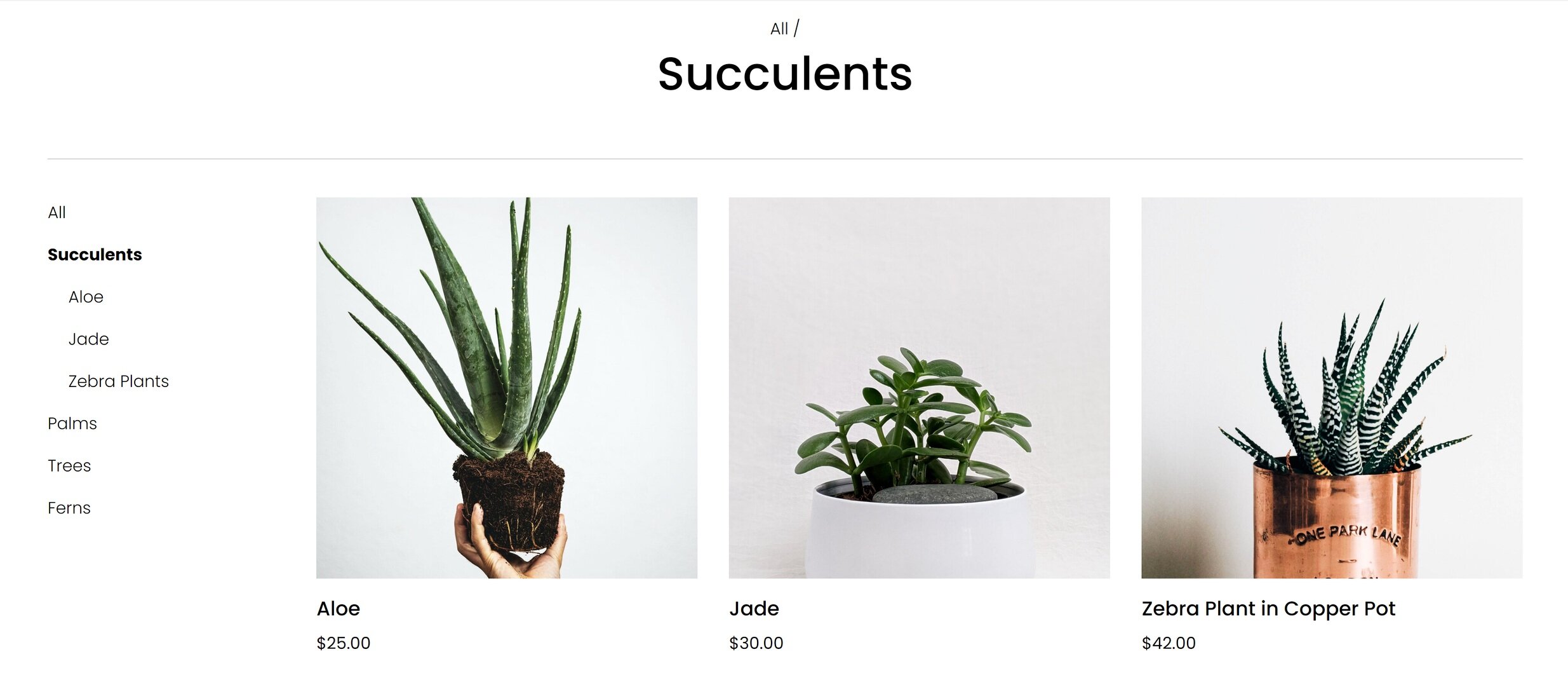
Since in this phase it’s important to make sure that people can easily find the products they are looking for, I would make sure that each of my products was assigned a category (and a subcategory, too, if that’s relevant). On Squarespace you can have up to three levels of nested categories to help people quickly find exactly what they’re looking for.

It can also be beneficial to repeat any brand promises that you may have made early on in the customer journey right on the product page where customers can see them without having to click away. Because I think that some people may still be a bit nervous about buying plants online, I referenced Fake Plant Co’s “Plant Happiness Guarantee™” right in the product description. I obviously would have detailed this elsewhere on the site (home page, FAQ page) but just referencing it here would be a good reminder to shoppers that their satisfaction is important to Fake Plant Co.
Post-Purchase
Depending on who you ask, it can be up to 25x cheaper to retain an existing customer than to acquire a new one. Knowing this, I always wonder why small eCommerce businesses with presumably limited marketing budgets seem more concerned about new customer acquisition than finding ways to build better relationships with past and existing customers ¯\_(ツ)_/¯ That’s a mystery we’re going to have to solve another day!
In the meantime, here’s how you can make sure your customers don’t fall off the map post-purchase:
Enable the option to sign up for email newsletters at checkout.
Send regular email communications out. (Bonus: use customer profiles to cater communications just to those who’ve purchased in the past to really personalize the experience!)
Provide options via tools like Member Areas or Squarespace Scheduling to create an ongoing relationship with past customers.
Example
Here are some opportunities I identified for Fake Plant Co. to connect with customers after their purchase:
How to care for their plant purchases
How they can subscribe or join our plant membership club

Since I already have all my customer’s data right inside Squarespace, sending super targeted post-purchase emails to customers using Squarespace Campaigns would be a no-brainer. Big companies rarely follow up on purchases in such a personalized way so it’s a great opportunity to use the tools at your disposal to easily connect in a meaningful way.

I think some of the most successful small businesses think beyond simple eCommerce transactions and consider ways to build lasting relationships with their customers. Fake Plant Co. could leverage Squarespace’s membership areas technology to provide super-personalized service with a side of bonus recurring revenue! Win-win!
Bottom Line
Carving out areas on your website that cater to customers on each phase of their journey isn’t just smart web design - it’s absolutely necessary to be competitive online. Small and medium businesses are rarely able to compete with Amazon or Walmart when it comes to price, fulfillment capabilities, or purchasing power. But they (and you!) have so many opportunities to connect with customers on a much deeper and more personal level.
Stop thinking about what you sell as a mere commodity and start thinking about the opportunities you have to create an experience for your customers that no one else can replicate. After all, being super focused on your niche is really the best UX tip!

How to Map Your eCommerce Customer Journey in 2 Simple Steps
Learn how to map your customer’s journey from discovery to purchase and beyond by answering 2 simple questions. This post features a series of guided activities to help you identify copy or design holes on your website so that you can create a compelling eCommerce experience that’s perfectly tailored to your niche audience.
This is the first post in a 2-part series about how to create a user-focused eCommerce website. In this step, I’ll show you how to quickly and easily identify information that your customers need to know and walk you through how to map it to the decision-making process. In part 2, we take things a step further and I’ll show you some concrete ideas on translating your customer’s needs to specific website content and design elements to improve your eCommerce UX.
I hear from a lot of small to medium business owners who just seem worried sick about how to compete with Amazon and other large retailers. The truth is that if you think you’re going to be able to compete with them and win when it comes to price or fulfillment or purchasing power, you’re wrong.
But all is not lost. Especially if you stop thinking about what you sell as a mere commodity and start thinking about the advantages you have to create an experience that the big guys simply can’t. The experience you create for your customers is the je ne sais quoi, the secret sauce that you offer that no one else can replicate.
Cultivating an exceptional user experience begins by understanding the path that customers take from discovering you to becoming lifelong fans. From there we can use what we’ve learned to create a user-focused eCommerce website that caters to different customer segments at each stage in their journey.
How To Map Your User’s Journey in 2 Simple Steps
If the phrase “user journey” kind of makes you want to roll your eyes because it seems super contrived and too much like marketer-speak, I don’t blame you. But it doesn’t have to be complicated! In my post about designing an effective home page, I actually gave you a quick way to be able to identify where customers are at on their user journey - even if I didn’t use that precise phrase.
So here it is. The only two questions you need to ask yourself to be able to understand your customer’s path from A -> Z:
What do customers need to know?
When do they need to know it?
That’s it. Your answers to these two simple questions will help you write better content, create a more engaging website, attract more customers and make more sales.
Activity
Get out a piece of paper or open up a blank doc. Make a list of what people need to know about your products and services. Don’t worry yet about the when, just focus on the what. Here are some writing prompts to get you started:
What’s the biggest problem your products or services solve?
What do customers need to know about how to purchase or how things work?
What do they need to know about your company, your process, your people?
What information will help people feel more confident in buying from you?
Remember, this list shouldn’t focus on what you want customers to know. What matters is what they need to know. The goal is to cut things down to the most basic, elemental key points. Customers don’t need to know your life story. There’s also no need to make this list super long. In fact, I would say the shorter and more concise you can make it, the better.
Example
Here’s an example using a fake company that I just made up right now called Fake Plant Co. that sells (real) plants. These are the things that my customers might need to know:
What types of plants are available
Why our plants are better than the kind from their local big box store
How we ship plants without killing them
Where plants are grown and sourced
How to decide which plants are best for them
What we do to guarantee their happiness
How to place an order and what happens next
How to care for their plant purchases
How they can subscribe or join our plant membership club
The 3 Stages of Decision-Making
If you google “decision-making process” you will get 1,001 variations of this flow:
Awareness → Consideration → Decision → Post-Purchase
This really just boils down to that for every purchase we all make, we move through each of these four phases: learning about the company and/or products, thinking about buying, making the purchase, and then whatever happens after that.
Activity
Can you see how this flow looks in your business? Below are some questions to help you think about the path your customers take. Jot down notes if you find them helpful, otherwise, just think about your average customer’s experience.
Do people move through each decision-making phase quickly (hello, impulse buys!)... or are things more drawn out?
Think about all the touchpoints that people have with your brand and how they fit into this flow. Some examples:
Are people initially finding you on social media without much awareness at all about your brand?
Do you have a newsletter you send out to a growing list of regulars?
What percentage of your sales are from past customers or referrals?
For your unique business are there any additional phases you would add or changes you would make to the flow?
Putting It Together
So now you should have your list of what people need to know and you’ve thought about the decision-making process as it applies to your business. Putting the two together is super simple. We’re just going to take our “what they need to know” lists and decide which phase each item fits into best to cover the “when do they need to know it” question.
Example
I’m a spreadsheet type of person so if it was me I’d make two columns with my items from the first step of this exercise in the WHAT in the first column and WHEN in the second but you do you. I mean, sketch this out on a cocktail napkin if that’s what you have handy. For each piece of information, I decided where it should fit into the decision-making process.
What do they need to know?
When do they need to know it?
What types of plants are available
Awareness Phase
Why our plants are better than the kind from their local big box store
Awareness Phase
How we ship plants without killing them
Consideration Phase
Where plants are grown and sourced
Consideration Phase
How to decide which plants are best for them
Consideration Phase
What we do to guarantee their happiness
Decision Phase
How to place an order and what happens next
Decision Phase
How to care for their plant purchases
Post-Purchase Phase
How they can subscribe or join our plant membership club
Post-Purchase Phase
Note: I think it’s important to consider each item one-by-one because it forces you to really think about where each piece of information fits. For example, in the case of my Fake Plant Co. above, I first had “where plants are grown and sourced” classified in the “awareness” phase. However, the more I thought about it the more it seemed like something that people wouldn’t really need to know until they were more seriously considering a purchase. Initially, it makes more sense to focus on why customers should buy from an independent online plant seller versus a local big box store and give them an idea of the types of plants sold. Another way to think about it is that knowing where something is sourced doesn’t really matter if you don’t know what the thing is or why you should even consider buying it in the first place.
Activity
Take your list and map each item to a phase. Don’t worry about putting the items in order to start - just assign them a phase. You can come back when you’re all done and put them in order.
Keep in mind that for your products or services there may be no clear right or wrong answers; this can be a little bit of a chicken or egg game of just trying to pick which should come first. The best part of this is that you have complete control over things. As a small business, you’re able to be nimble and adapt quickly to customer behavior. This means that if down the road your analytics are telling you that some messaging might be off you can always revisit this list and see if there are some adjustments you can make to better connect with your audience.
Bottom Line
The end result of this exercise should be a road map that spells out a path for you to create a unique, user-focused eCommerce website. You should now be super clear with what customers need to know every step of the way and you have a checklist of sorts that can help you identify holes on your website that need to be filled.
If you need some ideas for website design elements and layouts I would recommend for each phase of the decision-making process, click here to check out part 2 of this post. It features mockups of an actual website so you can see how to turn your what/when list into a great eCommerce experience for your customers.

More Pricing Psychology Tips to Increase Sales
Improve your eCommerce pricing by implementing one of these 7 pricing psychology tips. Learn how to put things on sale the right way and how different scenarios call for different strategies in order to increase sales.
It’s been a while since I’ve done a post on pricing but it’s actually one of my favorite topics because I love looking at both the psychology and economics behind what motivates consumers to make a purchase. This post is another great example of this as is this one all about strategic sales. I also think that looking at pricing like this reminds us that we can (and should!) be constantly evaluating and tweaking our offering to maximize profits. It’s rare that you’ll nail things right out of the gate but once you have some sales data and analytics to help you gain more insight into how people are responding to your prices you can refine, refine, refine. Here are some common pricing strategies for you to try!
Discount Pricing
My first tip is just a formatting trick for when you decide to offer a discount. Studies have shown that for high dollar value items it’s best to display discounts in terms of dollars off (ex: Save $200!) but for lower dollar value items to display discounts as percentages (ex: Save 25%!). This is because a percentage of a small amount seems like a better deal than that same amount when displayed as a dollar value. For more on discount strategy, check out this post.
Instead of This

Was $9.99
Now $ 7.50
SAVE $2.49
DO This

25% OFF
Was $9.99
Now $ 7.50
Price Anchoring
Customers often make decisions based on the relative prices between items, especially if they may not have a firm grasp on what a “good price” for something is. By setting a “price anchor” you give shoppers a relative baseline to compare all other prices to. This works well if you sell a wide range of similar items. For example, if you sell denim and have low, mid and high end brands, setting the price of the mid-tier brand closer to the high-end cost may help you sell more of both. This is because people will see the mid-tier brand as a better value to the low-end option and may also then be willing to spend a few extra bucks for the premium brand.
It’s easier to justify a costlier option when there is a low price anchor

$9.99

$17.99

$19.99
Charm Pricing
We all see charm pricing every single day and even though it seems like we should be wise to how it works, we still all fall for it! Charm pricing is simply where you drop the price by one cent so instead of $10, it’s $9.99. This works because studies have shown that people are more likely to round prices down in their heads versus up. You’d also think this would only work on small dollar value items but there’s a reason why cars and real estate use the same strategies - it works!
Instead of This

$10.00
DO This

$9.99
Prestige Pricing
A common mistake some rookie entrepreneurs make is thinking that in order to be competitive they have to be cheaper. Prestige pricing works especially well if you have a product that you can position as higher quality or more luxurious than others on the market. A good example of prestige pricing would be looking at Sephora. They sell skincare and makeup at much higher prices than drugstore brands but have no problem doing so because of the real or perceived higher quality of the products. This pricing model works well if your branding is positioned as luxurious, high end or premium. I go way more into depth on this one plus some other strategies in this post!
People will pay for quality and luxury

$9.99

$18.99
Comparative Pricing
Implementing a comparative pricing strategy is very similar to price anchoring, above. The difference is that in this scenario instead of using a mid-tier product to anchor the price up, you set a decoy product at a comparative price just below your target. For example, if you’re selling pillows consider offering an upgrade to a premium pillow fill. People will compare the prices and you can sell them on the benefits of the premium option. They’ll be much more likely to buy the upgraded premium option when compared to the alternative than if it was sold on it’s own. (Hint: you can also use this tactic when setting up the shipping options for your website!)
Position an expensive option as an upgrade

$9.99

UPGRADE FOR $7
Price Differentiation
Shoppers don’t do well when having to compare between two items that are priced exactly the same. When this is the case, they often spend too much time trying to analyze the differences between the products in an attempt to find the one that is the better value. If you’re selling similar products, giving them slightly different prices will help people make a decision more quickly, which is proven to result in higher sales overall. The differences don’t have to be big to be effective; the important aspect of this strategy is to just not price them exactly the same.
It’s easy to compare products that have different prices

$9.97

$9.89
Price Bundling
This one is last because it’s my favorite! I love this not only as an eCommerce pro but also as a shopper! Bundling products is effective especially well if you offer things that work together as a set or when bundles contain one or two of your most popular products paired with complementary products. The reason why this works is that people are more concerned by the amount they are going to save from buying the bundle than the fact that they originally meant to spend less. When bundling, you’ll want to make sure that the total price is less than the sum of the individual products sold separately. Bundles have two other positive side effects; first, it makes it more difficult for shoppers to determine what the fair value of a product is because it’s technically “cheaper” when bought as part of the bundle. Second, it encourages repeat purchases of more items than the customer may have intended to originally purchase.
IF ALREADY SELL THESE

$9.99

$7.99

$6.99
Total Purchased Separately $24.97
OFFER THIS

Product Bundle
$21.99
Bottom Line
One of the most important things to remember isn’t that the strategies on this list shouldn’t be seen as ways to “trick” your customers. You don’t want to come across as smarmy or sleazy at all! But, if you sell products that fit into one of the scenarios above, these methods can help you increase sales. The ultimate goal to make sure that your pricing isn’t confusing so that people can compare quickly and add to the cart without second-guessing themselves or feeling frustrated. Done right, these pricing psychology tips can definitely help you boost your bottom line.

Built-In Features to Help You Sell on Squarespace
Squarespace has awesome built-in eCommerce features that make managing inventory, promoting products, and merchandising your online store easy and seamless - without the need (or expense) of added apps or plugins. Check out the latest to see what you can incorporate into your online store today!
Updated June 2021
When you’re ready to do some serious business on your website, the last thing you want to do is realize that you don’t have the tools you need to get the job done. I love that Squarespace offer so many ways to help you sell without the need to add extra plugins. Not only does this save you $$$ but you don’t have to worry about trying to string together a bunch of apps that may not play nice together. Even though there are so many built-in features to help you sell on Squarespace, my bet is you can find something new on this list that you could incorporate to help you convert more visitors into customers. Let’s dig in!

Related Products
Displaying related products allows visitors to find what they're looking for more easily and maybe even help them discover something new that they didn’t even know you had! The secret to displaying related products on Squarespace is just to make sure everything has a category or tag. From there, the related products section auto-populates based on your preferences; you can choose to display recently added products within the same category or tag, products with the highest available stock level, or just a random assortment of related products. You can even fine-tune what’s displayed on a product-by-product basis if you want even more control!

Product Waitlists
This feature is geared towards making sure you don't miss a sale if any of your items go out of stock but you could also easily hack this to build hype and collect email addresses for people interested in products that haven't even launched yet. So many possibilities! To be able to do pre-orders and gauge interest in out-of-stock items without any custom code or a plugin is 😍
Bulk Spreadsheet Editing
If you want to update all your product info there’s no need to go into each. individual. product. one. by. one. and update them - use a spreadsheet to make those edits in bulk! The ability to bulk edit things like prices, variants, categories, and inventory via spreadsheet makes managing your store on Squarespace super easy.

Limited Availability Labels
This one is simple but powerful. Showing people that stock is low creates a sense of urgency is a known purchasing motivator to potential buyers. You can enable this label for any physical or service product in your store. This would be a great feature to turn on to highlight the exclusivity of a service you offer or boost sales of a limited edition item in your shop. You have a ton of flexibility to edit exactly what this message says and looks like so that it can be 100% on-brand for you.
Customizable "Sold Out" Labels
Why is this so cool? Because it means you can use Squarespace to manage the inventory of things beyond physical products and use a customized "Sold Out" label to indicate that your class is fully booked or service is not accepting new clients at this time. Combine this with the Waitlists and Limited Availability features above and you have several very powerful and automated ways to show people what you offer, create a sense of urgency to buy, and collect info from those interested who may have missed their moment.
Product Variant Images
Show shoppers an image of exactly what they are looking for so there’s no need for them to use their imagination when it comes to your different product variations. This allows them to compare things like different colors, patterns, or bundles visually. It’s so nice to be able to click on an option and then see exactly what you’ll be getting. This is such an important way to build trust with your customers and reduce frustration, returns, or confusion. If you have products with simple or complex variations, I definitely recommend making sure you have a photo of each iteration!

Member Areas
Member Areas is a great Squarespace feature that allows you to turn virtually any content you have into gated content that members need to pay to gain access to. I dig into this more in this post but in short, this is a great way to sell classes, guides, workshops - and so much more! You can offer multiple membership tiers and everything is automated and self-managed all right within Squarespace.
Bottom Line
If you're selling on Squarespace, be sure you’re taking advantage of all these built-in features to help your store stand out and be as engaging as possible. Not only will they make sure that your customers have a great experience when browsing your site, but you also won’t have to worry about the pain (or the cost) of managing third-party plugins. Want to make sure you’re in on all my favorite high-functioning features? Check out this post!

4 Post-Sale Emails Every eCommerce Site Needs
Email marketing isn’t just about asking people to buy something -- it’s also a great way to interact with people after the purchase! Adding these 4 types of post-sale emails will help you take things from basic and automated to personal and engaging.
Of all the marketing options available to you as an eCommerce business owner, the one I think worthy of most of your time and attention is: email marketing. That’s right. Not social media. Not paid ads. Not influencer marketing. Nope, the thing worth most of your attention is probably one of the most straightforward.
The funny thing is that I’ve been hearing naysayers say for… oh, I dunno, at least the last 15 YEARS that email is dead and every year they’re proven wrong again and again. According to this study even though there are lots of marketing tools available to you if you look at effectiveness, email marketing reigns supreme with an ROI of 4400%. There are lots of reasons to not bank on social media but I would say that kind of ROI really should speak for itself.
The biggest mistake eCommerce businesses make when it comes to email marketing is assuming it’s all always about the sale. But there are lots of other reasons to send emails! Here’s a quick list to get you thinking outside the box when it comes to the types of emails you have in the queue. Of course, if you use something like Squarespace Email Campaigns, you can have these all automated, making life even easier!
Thank You Emails - Go beyond a basic order confirmation email and include a heartfelt thank you! After all, you just convinced someone on the internet to type their credit card information into a form. The least you can do is not be a robot. Taking the time to customize your shop’s email notifications to inject a little of your brand’s personality into the stock layouts and content will go a long way in starting to build brand loyalty.
Delivery Notifications Emails - People expect a shipping notification to know when their orders are going to arrive at their door. Luckily Squarespace makes it easy to send these out automatically along with the shipment tracking information! I say to take this a step further than that and send another follow-up email when their order is delivered. You can easily do this with a shipping extension like EasyShip + Zapier.
Product or Service Information Emails - Don’t assume that everyone reads your site or FAQ pages word for word and send out some helpful information on how to get the most out of your products after they’ve arrived. This could include helpful things like helpful PDF downloads if your product is very technical or even just links to blogs or video content about how to use or care for their purchase. If what you’re selling isn’t a thing at all but a service or something customers experience instead, send emails reminding them about their purchase and how to get the most out of it.
Surprise & Delight Emails - Another thing I love about customer profiles on Squarespace is how easy it makes it to send super-targeted emails. Use this tool to your advantage and send special promo codes, offers, or free gifts to your VIPS. You can narrow customer groups down based on how long people have been customers, how many purchases they’ve made, or even how much they’ve spent in total with you. Since you know that these are your most loyal fans make sure they feel seen and recognized!
Bottom Line
Email marketing isn’t just about asking people to buy something -- it’s also a great way to interact with people after the purchase! Adding these 4 types of post-sale emails will help you take things from basic and automated to personal and engaging. The best part is that for the most part this can all be done using Squarespace’s built-in tools!

How a Flash Sale or Strategic Product Drop Can Help You Increase Engagement & Boost Sales
Break out of the traditional sales rut and plan a promotion that puts you in control. Strategic product drops and flash sales can help control demand, increase engagement and boost sales. Here are tips on how to make this a successful part of your eCommerce strategy.
Updated: May 2021
Something I love about eCommerce is that it’s been such a disrupter to the traditional shopping seasons and really given merchants the ability to set their own rules - smaller shops especially! Merchants are shaking things up and spreading promotions throughout the year instead of focusing on just a few traditional sales seasons. This trend signifies that we’re really moving into a different era of eCommerce where there will be less reliance on things like holiday sales to create buzz and profits. There are so many popular brands that have already shown that things like flash sales or strategic product drops can be super successful any time of year. In this post, learn all about using product scarcity as a marketing method, all product drop strategy and why it works, and how to plan and promote a successful drop or flash sale.

The Psychology Behind Product Scarcity
When Skims sells out an entire new product drop in minutes, it doesn’t surprise my inner economist one bit. After all, we all know that low supply + high demand = major sales. And this isn’t a phenomenon that’s only cropped up as of late, as any of us who have parents who waited in long lines to score a Cabbage Patch Kid back in the day can attest to. The difference is that contemporary drop culture is less a result of true scarcity and more intentional, highly marketed, and hyped. This is a strategic scarcity that uses things like online flash sales or planned product drops to give shoppers that feeling of scoring a product with limited availability - no camping outside a big box store required. Turns out FOMO is a great marketing tactic!
Benefits to a Product Drop Strategy
Control your own timeline and message- planning a product drop with some strategic scarcity puts you in the driver’s seat. You don’t have to wait for traditional “sales holidays” like Black Friday (or Memorial Day weekend, or Back to School season, or whatever it is). The pressure to develop a sales strategy around arbitrary dates just because you feel like you have to is gone. This works on a couple of fronts. First, those dates just may not be ideal for your business - maybe you don’t have inventory ready or your production schedule requires something different. Second, having a sale on a traditional sales holiday just may not align well with your brand or messaging. So if you’d rather spend a popular holiday weekend holed up at an Airbnb having fun with your friends and family - you do it! You can have a sale whenever you want to!
Enjoy reduced competition - Trying to stand out during traditional or holiday selling windows can be tough for even the biggest of brands. If you’re a small to medium business, it’s a billion times harder to get noticed when everyone around you is also busy vying for attention. Planning a strategic product drop or flash sale can allow you to plan it so that you can be the #1 story.
Worry less about delays - If you’ve experienced longer lead times from suppliers or shipping delays that leave you with little inventory to sell anyways, transform “supply chain issues” into “marketing opportunities” and just make this part of the hype. Not only does this approach allow you to worry less, but it can also save you big bucks if you would have otherwise paid to expedite production or shipping. That’s taking lemons and making lemonade, friends. 🍋🍸
Boost social media engagement - As I said above, FOMO is a great motivator and there’s nothing better than getting people who love your brand to talk online with fellow fans about what's coming next. Word of warning: the one thing you don’t want to do is make people feel like you’re taking advantage of their excitement. So make sure that you’re doing everything you can to be transparent in your communications and that you’re offering the same value and experience regardless of the hype.
Ideas, Strategies & Tips for a Successful Product Drop or Flash Sale
After all of the benefits above, a product drop or flash sale may seem like the easy road to fast profits but a successful drop takes lots of preparation and work behind the scenes. Here are some tips!
Make sure you’re ready to ship.
After placing an online order, 66% of consumers expect things to arrive within 1-3 days and more than half are expecting overnight shipping. Blame Amazon for setting these high expectations if you want but the fact is that what happens after the sale is arguably more important than anything so make sure your shipping strategy is on point. For more on how to set up a profitable shipping strategy on Squarespace check out this post.
Plan out your social media & email marketing well in advance.
This includes mapping out all of your posts, emails, PR activities, and other content with your planned sale or drop in mind. Once things get going, the flurry of orders and customer service inquiries is going to keep you busy enough; you don’t want to be worrying about whether or not you posted an Instagram story that day on top of it all. My favorite tools for social media are Canva (for graphics) and Planoly (for planning and posting).
Train & prepare your customer service team.
Since product drops are engineered to sell out, you have to plan for what happens if some of your fans feel like they missed their moment. You can mitigate feelings of disappointment by being super clear and upfront well in advance that inventory is limited. This not only creates a sense of urgency that can motivate people to buy, but it also lets people know in advance that there’s a chance they won’t score.
You’re also bound to get more inquiries than normal leading up to and during a product drop so having some pre-scripted snippets that you can easily send to potential customers will make sure they get their questions answered quickly and get them back to their cart. Lastly, one of the best things you can do is add a live chat widget to your site to make sure shoppers have a quick and easy way to reach you. For more on this, check out my post 3 Live Chat Tips for Your eCommerce Website.
Schedule Product Publish Dates
Get all your products ready to go so you aren’t waiting up until 11:59pm on the day of your drop to flip the switch! This is just another thing you can prepare in advance so that you can focus on customer service. On Squarespace, you can set products to “Scheduled” status so they are only visible on the future date/time you choose. To schedule a product that you just added just hover over DONE and click SCHEDULE. Set the date and time that you’d like that product to become visible in your store and then click APPLY. On the product’s scheduled date, the status will change to VISIBLE.
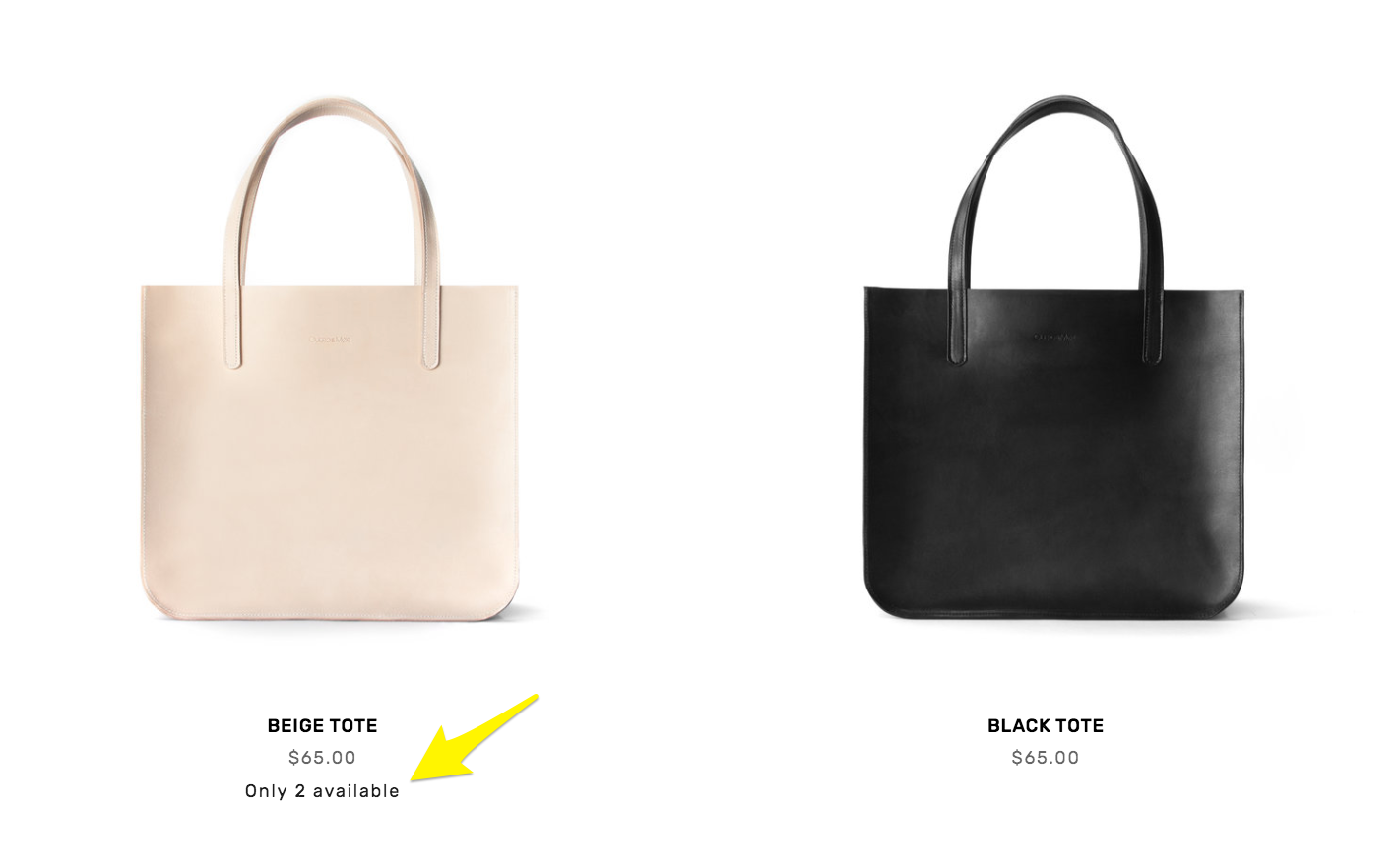
Limited availability labels can reduce disappointment in the cart and create a sense of urgency.
Track Inventory and Show Stock Levels
One way to reduce disappointment (and also build a little hype!) is to display stock levels along with your product descriptions. Both Shopify and Squarespace have this capability but I think that Squarespace makes it easiest! You can customize the message that’s displayed and at what point you’d like to display it. For example, if you only want a limited availability label to show up when the stock drops below a certain level that’s totally possible! Letting people know right up front what’s available is great customer service. For more on Limited Availability Labels check out this Squarespace support article.
Plan Website Updates
I’m realizing that this list is basically boiling down to: “get everything organized in advance.” But I mean it! Just because a flash sale or product drop seems spontaneous to customers doesn’t mean you shouldn’t plan out every little detail well in advance! You’ll most likely need to make a few small website updates to go along with your promo and things will go a lot smoother if you have them all mapped out in advance. Edits you may need to make are things like changes to your homepage or hero images, temporary changes in navigation, adding special landing pages for the event and scheduling changes to collections or categories. If you’re wanting to take some of the work out of updating prices for a sale, check out the Flash Sale plugin I highlight in this list of My Favorite Squarespace Plugins for eCommerce Sites.
Make It Exclusive
If you’re feeling like you may truly have way more demand than stock, consider offering promos to only certain groups of people, like past customers or VIPs who have already spent a certain amount in your shop. Making a flash sale or product drop exclusive can be a great way to treat repeat customers and build a community of loyal fans. I have a couple posts that might help you in your planning here. First, there’s one all about coupons, offers, discounts and promo codes and then be sure to also check out the one about building Customer Profiles on Squarespace. Together, you’ll be able to target very specific groups of customers with the perfect offer just for them!
Bottom Line
Changes in how people shop online mean you have an opportunity to break out of the traditional sales rut and plan a strategy that better suits your business and messaging. And this isn’t just good news if you’re staring down a holiday sales weekend without having already planned something 😱 because strategic product drops and flash sales are a great tactic that can help you control demand, increase engagement and boost sales!

Kristine Neil
Fractional Web Partner
I'm Kristine Neil - a communications strategist who has spent 20+ years designing websites, first running a full-scale design and marketing agency, and now leading my own studio. I've been the creative director managing the work, the coder quietly fixing what others couldn't, and the strategist in the room asking why before how. Somewhere between the MBA and the other degrees, I decided web design was just one tool in a much bigger toolbox - the real work is figuring out what you're trying to say, who needs to hear it, and what's getting in the way. A website is just where all of that comes to life.
I build on Squarespace, and after years deep in the platform I know how far it can go and when to push past its limits. These days, I'm especially drawn to working as a fractional partner - getting to know an organization over time and helping with whatever moves them forward, whether that's a full redesign, an ongoing hand with content and strategy, or just being the person who knows their site best. I write here about eCommerce, web strategy, and making the complex feel a little more human.