

Notes on building smarter websites for actual humans.

Advanced Product Manager for Squarespace: Finally, Bulk Editing That Actually Works
If you've ever had to update prices across 50+ products in Squarespace, you know the pain. Here's the tool that finally fixes Squarespace's biggest product management bottleneck.
If you've ever had to update prices across 50+ products in Squarespace, you know the pain. Click into product one, change the price, save. Click into product two, change the price, save. Repeat until you question your life choices.
Or maybe you've tried the CSV import route - download, edit in a spreadsheet, re-import, fix the errors it inevitably throws, re-import again, and wonder why this feels like you're working against the platform instead of with it.
Here's the thing: Squarespace Commerce can work beautifully… until you hit scale. Once you're managing a catalog of any real size, the one-by-one product editing workflow becomes the bottleneck that can keep you stuck spending more time working in your business than on it.
That's exactly the problem Advanced Product Manager from SquareHero solves - and I've been lucky to be beta testing it for the past few weeks so I can tell you exactly what it does, what it doesn't do, and whether you should add this to your toolkit.
What It Actually Does
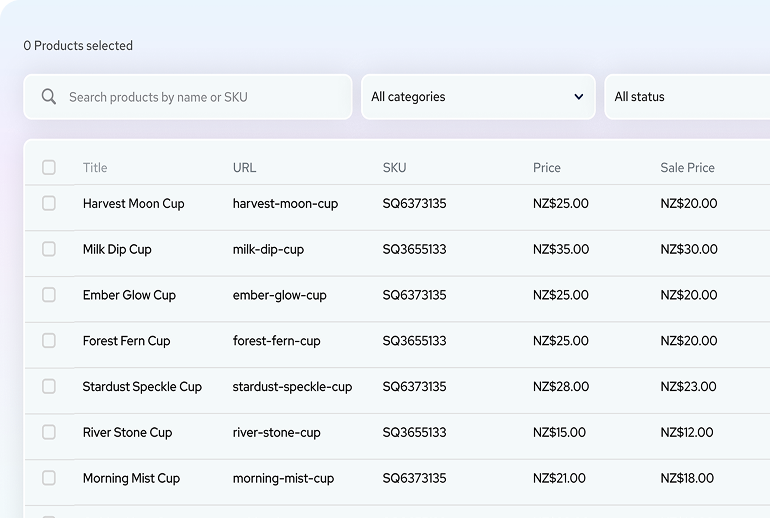
Advanced Product Manager is a plugin that gives you a spreadsheet-style view of all your Squarespace products. You can see everything in one, clean table and make changes instantly. No more clicking through products one by one every time you need to make a price increase.
Here's what you can edit in the table view (think Shopify-style spreadsheet):
Product titles: Edit product names directly in the table
URLs: Update product URL slugs
SKUs: Manage product SKUs
Categories: Add or remove categories
Pricing: Adjust regular and sale prices
Stock levels: Update inventory quantities
Bulk Editing aka The Real Magic
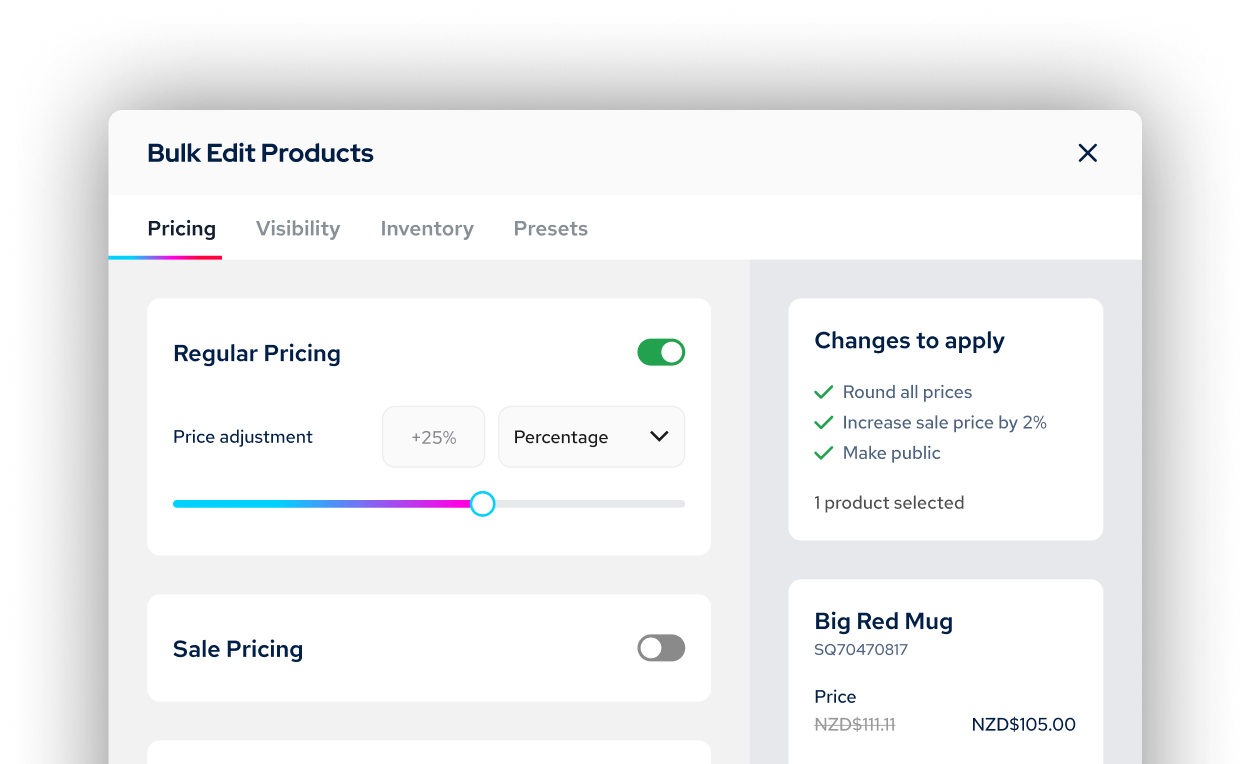
Things really get fun when you can make updates like this en masse:
Price changes: Adjust regular prices by percentage, dollar amount, or set a fixed price across multiple products. For sale prices, you can adjust based on the regular price (say, 25% off) or modify existing sale prices by percentage, dollar amount, or fixed price.
Smart rounding: This is particularly useful. If a 25% discount creates an awkward price like $24.93, you can set rounding rules to automatically adjust to $24.99, $24.95, a whole number, or a custom amount. The final price might not be the exact percentage you specified, but it looks better to customers.
Sale toggles: Turn sale prices on or off across multiple products at once.
Product status: Bulk change products between public, hidden, or scheduled.
Category management: Add or remove categories in bulk. This is useful when you want to do things like move everything into a "clearance" category and apply sale prices all at once 🪄
Inventory adjustments: This is for all the inventory managers out there who need to update their site to match physical stock levels. When you receive a shipment and need to add 25 units each across multiple products, you can make that adjustment in seconds rather than updating each product individually.
Who Actually Needs This
Let's be honest - if you have 10 products and update pricing once a year, you probably don't need this tool. But if any of these sound familiar, it's worth looking at:
You're running regular sales or promotions. Black Friday prep used to mean clicking through every single product to toggle sale prices on and off and entering the right prices. Now it's a bulk selection and one click. No math required.
You manage multiple collections with different pricing strategies. Think: food brands rotating seasonal menus, retail stores with different margin requirements per category, anyone managing wholesale vs. retail pricing - this saves you from juggling spreadsheets.
You're a designer managing client stores. SquareHero offers multi-site plans (3-site and 10-site options), which makes this particularly useful if you're maintaining product catalogs for multiple clients. You’ll literally look like the hero when clients ask if you can make price updates and you have that done in minutes vs. days.
You're just tired of the CSV workflow. Honestly, same - and you know I love a spreadsheet! The CSV export/import process in Squarespace works really well, but I know that it can be overwhelming for a lot of people. This is faster and, honestly, just way less frustrating.
How It Works
Installation is genuinely super simple - it's a quick code snippet added once to your site and you’re done.
Once installed, you'll see the SquareHero icon in your editor and you can click on that to display your products in a sortable, filterable table. Select the ones you want to edit, make your changes, and save. The updates happen directly in Squarespace, so everything stays in sync.
One feature I particularly appreciate: demo mode. You can try the full product before buying, no credit card required. Test it with your actual product catalog and see if it solves your specific workflow problems before committing.
The Real Talk Section
This isn't going to solve every Squarespace Commerce limitation. It won't give you more advanced selling features, it won't replace a proper POS system if that's what you need, and it won't magically make Squarespace's variant system work any differently (though it does make editing pricing for those variants much, much faster).
The tool is for pricing or inventory updates and not things like:
Editing product descriptions
Adding/removing variants
Adding/removing photos
Controlling advanced selling tool features such as product add-ons or custom forms
Editing the Additional Info section
But honestly? These are Squarespace limitations, not limitations of this tool. Within Squarespace's current constraints, this tool eliminates the most repetitive, time-consuming part of managing a Squarespace store at scale. And that's actually super valuable even if you need to do some of the other product management the old school way.

Pricing
I think the pricing structure is super fair and with single-site, 3-site and 10-site plans there’s something for you whether you’re a site owner yourself or a web designer or store manager on multiple sites. Even on the single site plan at $14/mo paid annually, I’d say if you're spending even an hour per month on bulk product updates, this pays for itself pretty quickly.
The Bottom Line
If you're running a Squarespace store with more than a handful of products and you regularly need to make bulk changes, this tool does exactly what it promises. For Squarespace users who've been stuck with one-by-one editing for years, this actually feels, dare I say, revolutionary - even if it's just bringing the platform up to what other eCommerce platforms have offered all along. But it's really well-executed - and honestly, that's what matters when you're trying to actually run a business instead of fighting with your website.
It’s quick to install, demo mode lets you test before buying, and the interface is clean enough that you won't need a tutorial to figure it out.
Squarespace Commerce is a solid platform, but the product management workflow has always been its weakest point at scale. Advanced Product Manager fixes that specific problem without overcomplicating things.
Full disclosure: I beta tested this product and received access in exchange for an honest review. This post contains affiliate links - if you purchase through them, I earn a small commission at no extra cost to you. I only recommend tools I actually use and believe solve real problems.

Nonprofit Website Essentials for Squarespace
Essential Squarespace tools for nonprofits that need to do more with less. From accessibility widgets to donation optimization, these tools help mission-driven organizations punch above their weight.
Nonprofit websites have to work harder than most.
You're not just showcasing services or selling products - you're building trust, telling stories, and inspiring people to take action. Your website needs to handle volunteer applications, event registrations, newsletter signups, and about a million other things, all while looking professional on a shoestring budget.
I've worked with nonprofits ranging from small local organizations to national advocacy groups, and here's what I've learned: the right tools can make any team big or small feel like a marketing powerhouse. The wrong ones will eat up your limited time and budget with nothing to show for it.
Here are the tools that actually move the needle for mission-driven organizations.
The Foundation
Squarespace - Perfect for nonprofits who need a professional website without a professional budget. Built-in donation pages, event management, email campaigns, and member areas mean you can manage everything in one place instead of juggling multiple platforms. Use code KRISTINE10 for 10% off your subscription.
Termageddon - Nonprofits face extra scrutiny when it comes to privacy and data handling. This tool automatically updates your privacy policies and terms to keep you compliant without needing a legal team on retainer. Trust me, this is worth every penny. Use code KRISTINE for 10% off your first year.
Accessibility Matters
Accessibe - Making your website accessible isn't just the right thing to do - it's often legally required. This tool helps ensure your content is accessible to everyone, which aligns perfectly with most nonprofit missions. Simple to implement and shows your commitment to inclusion.
Better Forms for Better Data
Paperform - Volunteer applications, event registrations, program intake forms - nonprofits need forms that can handle complex information gathering. Paperform makes it easy to create professional forms with conditional logic, file uploads, and payment processing when needed.
Email That Inspires Action
Flodesk - Your newsletters need to compete with everything else in your supporters' inboxes. Flodesk creates beautiful, engaging emails that help you tell your story and drive action - whether that's donations, volunteer signups, or event attendance. Use coupon code K4I8S1 for 50% off your subscription for LIFE.
Custom Solutions
Will Myers - When your Squarespace site needs custom functionality - like specialized team member bio pages, layouts to impress potential supporters, or unique design to draw in volunteers - Will's code solutions are the most reliable option. I use his work on every site I build.
The Nonprofit Reality
Here's what most people don't understand about nonprofit websites: they need to do everything a business website does, plus tell compelling stories, manage volunteers, handle events, and often process donations - all while looking professional and trustworthy.
These tools aren't nice-to-haves for nonprofits - they're essentials that help you punch above your weight class. When your website works smoothly, your small team can focus on the mission instead of wrestling with technology.
Start with Squarespace and Termageddon for your foundation, prioritize accessibility with Accessibe, then add the other tools as your programs grow and your needs become more complex.
Your cause deserves a website that works as hard as you do.
P.S. Some links in this post are affiliate links, which means I earn a small commission if you purchase through them - at no extra cost to you. I only recommend tools I genuinely use and believe in.

Service Provider's Squarespace Toolkit
Strategic Squarespace tools for service providers who want professional client management. From booking systems to intake forms, here's my curated toolkit for coaches, consultants & agencies.
Running a service-based business is different than selling products - and your website tools should reflect that.
While everyone's talking about eCommerce this and online store that, service providers have their own unique challenges. You need to book clients, not process orders. You want professional intake forms, not product catalogs. You're building relationships, not managing inventory.
I've been quietly building websites for coaches, consultants, agencies, and other service providers for years (even though I got known for the eCommerce stuff). Here's the toolkit that actually makes sense for your business model.
The Foundation
Squarespace - Still the best choice for service providers who want a professional website without the headache. Built-in scheduling, beautiful portfolios, and integrated blogging make it perfect for showcasing your expertise. Use code KRISTINE10 for 10% off your subscription.
Termageddon - Whether you're a photographer or a business coach, you need solid terms and privacy policies. This tool automatically updates your legal pages so you can focus on serving clients instead of worrying about compliance. Use code KRISTINE for 10% off your first year.
Client Management That Actually Works
Breely - Built by the founder of Acuity (which was genius), this is the new generation of scheduling tools. Clean, professional, and integrates beautifully with your Squarespace site. Perfect for consultations, strategy calls, or any kind of appointment-based business.
Dubsado - This is where the magic happens for client management. Contracts, invoicing, questionnaires, project management - it handles the business side so you can focus on the actual work. Game-changer for anyone who's tired of juggling ten different systems. Use code KRISTINENEIL for 20% off your first month or year.
Forms That Do More
Paperform - Squarespace forms are fine for basic contact info, but service providers need more advanced functionality. Client intake questionnaires, project briefs, proposal requests - Paperform handles complex forms with conditional logic and actually looks good doing it.
Email That Converts
Flodesk - Your emails should look as professional as your services. Flodesk creates stunning newsletters and sequences that help you stay top-of-mind with prospects and nurture existing clients. Use coupon code K4I8S1 for 50% off your first year.
Custom Functionality
Will Myers - When you need your Squarespace site to do something it doesn't do out of the box - like custom list section layouts or unique design tweaks - Will's code solutions are the answer. I use his snippets on every single site I build.
The Bottom Line
Here's the truth: most service providers try to piece together their business with whatever free tools they can find, then wonder why everything feels disconnected and unprofessional.
These tools cost money, yes. But they also save you time, help you look more professional, and actually help you serve your clients better. Think of them as business investments, not expenses.
Start with Squarespace and Termageddon for the foundation, add Breely when you're ready to streamline your booking process, and layer on the others as your business grows.
Your clients are paying for expertise and professionalism. Your tools should reflect that.
P.S. Some links in this post are affiliate links, which means I earn a small commission if you purchase through them - at no extra cost to you. I only recommend tools I genuinely use and believe in.

Essential Squarespace Tools for eCommerce Stores
Discover my vetted list of essential Squarespace eCommerce tools that actually work. From shipping solutions to custom code, these are the exact tools I use with clients to build successful online stores.
Look, I get it. You chose Squarespace because it's supposed to make running an online store easier, not give you a headache trying to figure out which third-party tools you actually need.
After years of building eCommerce sites (and being called the "Squarespace eCommerce Queen" more times than I can count), I've learned that the right tools can make or break your online store. But here's the thing - you don't need 47 different apps. You need the right ones that actually work with Squarespace and solve real problems.
So let's cut through the noise. Here are the tools I actually use and recommend for my eCommerce clients - no fluff, just the ones that earn their keep.
The Foundation
Squarespace - Obviously, right? But seriously, this is still my #1 recommendation for small to medium businesses who want to manage everything in one place. eCommerce, blogging, scheduling, email campaigns - it all just works together. Use code KRISTINE10 for 10% off your subscription.
Termageddon - Privacy policies and terms that automatically update for you. If you're selling online, you need this legal protection, and this is the easiest way to cover your bases without hiring a lawyer. Magical, honestly. Use code KRISTINE for 10% off your first year.
Shipping Made Simple
Easyship - This one's a no-brainer for me. Connect your store, sync orders, generate labels - even their free plan gets the job done. I've written about them several times because they just work, especially for smaller stores that don't need enterprise-level shipping solutions.
Beyond Basic Forms
Paperform - I love Squarespace's built-in forms for most things, but when you need custom order forms, wholesale inquiries, or anything with advanced calculations or logic, Paperform is your answer. Super powerful yet stunningly simple - honestly one of my favorite tools ever.
Code & Customization
Will Myers - Hands down, the best custom code solutions for Squarespace. I use Will's code snippets on literally every site I build. If you want to add functionality that Squarespace doesn't offer out of the box, this is where you go first.
Custom Codey - AI-powered coding assistant specifically built for Squarespace. When you need custom code but don't want to learn CSS from scratch, this tool is a game-changer. Plus, it's built by someone who actually understands Squarespace inside and out. Use code KRISTINENEIL for a discount!
The Bottom Line
Here's what I've learned after building hundreds of eCommerce sites: the best tech stack is the one you'll actually use. These tools have earned their spot because they solve real problems, integrate well with Squarespace, and don't require a computer science degree to figure out.
Start with the foundation (Squarespace + Termageddon), add shipping when you need it (Easyship), and layer on the others as your business grows and you hit specific pain points.
Your online store should work for you, not against you. These tools help make that happen.
P.S. Some links in this post are affiliate links, which means I earn a small commission if you purchase through them - at no extra cost to you. I only recommend tools I genuinely use and believe in.

Kristine Neil
Fractional Web Partner
I'm Kristine Neil - a communications strategist who has spent 20+ years designing websites, first running a full-scale design and marketing agency, and now leading my own studio. I've been the creative director managing the work, the coder quietly fixing what others couldn't, and the strategist in the room asking why before how. Somewhere between the MBA and the other degrees, I decided web design was just one tool in a much bigger toolbox - the real work is figuring out what you're trying to say, who needs to hear it, and what's getting in the way. A website is just where all of that comes to life.
I build on Squarespace, and after years deep in the platform I know how far it can go and when to push past its limits. These days, I'm especially drawn to working as a fractional partner - getting to know an organization over time and helping with whatever moves them forward, whether that's a full redesign, an ongoing hand with content and strategy, or just being the person who knows their site best. I write here about eCommerce, web strategy, and making the complex feel a little more human.